
ISTOVO 00371819A2
ISTOVO TS18 Car Navigation System User Manual
Model: 00371819A2 | Brand: ISTOVO
1. Konec produktuview
The ISTOVO TS18 is an intelligent car navigation system designed to enhance your driving experience with advanced features and seamless connectivity. This unit integrates a 10.33-inch display, a powerful 8-core processor, and runs on Android 11.0, offering a comprehensive infotainment solution for your vehicle.

Obrázek: Přední strana view of the ISTOVO TS18 car navigation system, displaying its sleek design and large screen when powered off.
2. Klíčové vlastnosti
- Operační systém: Android 11.0
- Procesor: 9863 8-Core Processor
- Paměť a úložiště: 4 GB RAM + 64 GB interní paměti
- Konektivita: Full 4G Network Connection, Bluetooth 5.0, USB
- Zvuk: 48-Segment Audio Processing, AM+FM+RDS Radio
- Rozlišení displeje: 1280 x 720
- Podpora couvací kamery: AHD/720P
- Integrace: Supports CARPLAY and Android Auto
- Speciální vlastnosti: Text-to-Speech, Integration with third-party apps
3. Specifikace
| Funkce | Specifikace |
|---|---|
| Výrobce | ISTOVO |
| Číslo modelu | 00371819A2 |
| Rozměry produktu | 25 x 15 x 5 cm |
| Typ montáže | Držák na palubní desku |
| Technologie připojení | USB |
| Typ mapy | Ulice |
| Režim zvukového výstupu | Stereo |
4. Nastavení
4.1 Vybalení a úvodní kontrola
- Opatrně otevřete obal produktu.
- Remove the ISTOVO TS18 host unit and all accessories.
- Zkontrolujte všechny součásti, zda během přepravy nevykazují známky poškození. Pokud zjistíte jakékoli poškození, okamžitě kontaktujte zákaznickou podporu.
- Verify that all listed components are present: 1 x Host unit, necessary cables (not explicitly listed but implied by installation).
4.2 Instalace
Installation typically involves connecting the unit to your vehicle's power supply, audio system, and other relevant inputs. Professional installation is recommended for optimal performance and safety.

Obrázek: Zadní view of the ISTOVO TS18 unit, highlighting the various connection ports for power, antenna, GPS, and other peripherals.
- Připojení napájení: Connect the main power harness to the corresponding port on the back of the unit. Ensure correct polarity.
- Připojení antény: Connect the GPS antenna to the dedicated GPS port and the radio antenna to the ANT port.
- USB/Auxiliary Connections: Connect any USB devices or auxiliary inputs as required.
- Couvací kamera: If installing a reverse camera, connect its video output to the AHD/720P input port.
- Montáž: Securely mount the unit in your vehicle's dashboard using appropriate mounting hardware.
5. Návod k obsluze
5.1 Základní navigace a domovská obrazovka
Upon powering on, the device will display the home screen with various application icons.

Image: The home screen of the ISTOVO TS18, displaying a grid of common application icons for quick access.
- Rozhraní dotykové obrazovky: Navigate the system by tapping on icons and swiping across the screen.
- Tlačítko Domů: Tap the home icon (usually a house symbol) to return to the main home screen from any application.
- Tlačítko Zpět: Use the back arrow to return to the previous screen or menu.
- Nedávné aplikace: Access recently used applications through the multi-tasking button (often three horizontal lines or squares).
5.2 Připojení k síti
To utilize online features such as navigation maps, app downloads, or streaming, the device requires an internet connection.

Image: The navigation screen displaying a prompt to connect to the internet to download map data, indicating the need for network access.
- Wi-Fi připojení: Go to Settings > Network & Internet > Wi-Fi. Select your desired Wi-Fi network and enter the password.
- 4G připojení: Ensure your SIM card is correctly inserted (if applicable) and mobile data is enabled in Settings > Network & Internet > Mobile network.
5.3 Používání aplikací
The system comes pre-installed with various applications and supports downloading more from the app market.
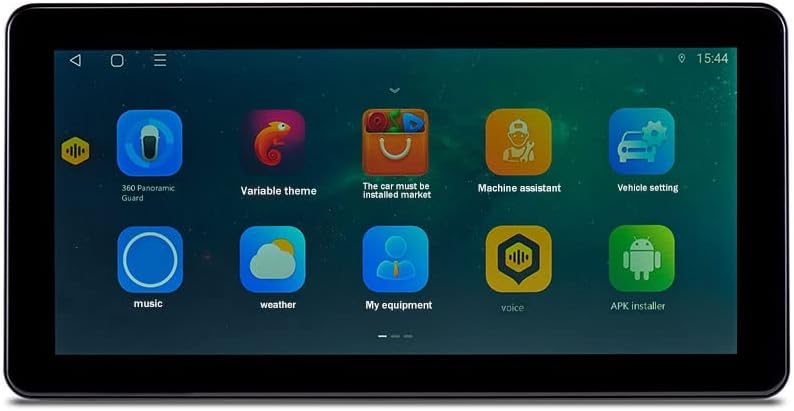
Image: A screen capture of the ISTOVO TS18 showing additional application icons, including utilities and customization options.
- Navigační aplikace: Tap on the navigation app icon (e.g., Amap) to start route planning.
- Přehrávání médií: Use the 'Music' or 'Video' apps to play audio or video files from connected storage or streaming services.
- Bluetooth: Pair your smartphone via Bluetooth for hands-free calling and audio streaming. Go to Settings > Connected devices > Bluetooth.
5.4 Pokročilá nastavení
Access the system settings to customize various aspects of the device's operation.

Image: The screen displaying icons for advanced system tools and utilities, such as GPS testing and digital sound processing.
- Nastavení zvuku: Adjust equalizer, balance, and other audio parameters in the sound settings.
- Nastavení obrazovky: Modify brightness, wallpaper, and screen timeout.
- Aktualizace systému: Check for and install system software updates to ensure optimal performance and access to new features.
6. Údržba
- Čištění: K čištění obrazovky a vnějšího povrchu používejte měkký, suchý hadřík. Nepoužívejte abrazivní čisticí prostředky ani rozpouštědla.
- Aktualizace softwaru: Regularly check for and install system updates to ensure the device runs smoothly and securely.
- Záloha dat: Periodically back up important data or settings if the device allows for it.
- Teplota: Avoid exposing the device to extreme temperatures, which can affect its performance and lifespan.
7. Řešení problémů
| Problém | Možná příčina | Řešení |
|---|---|---|
| Zařízení se nezapne | Žádné napájení; Nesprávné zapojení; Spálená pojistka | Check vehicle's power supply; Verify wiring connections; Inspect and replace fuse if necessary. |
| Žádný signál GPS | GPS antenna not connected; Antenna obstructed; Poor satellite reception | Ensure GPS antenna is securely connected; Relocate antenna to a clear view of the sky; Move to an open area. |
| Bluetooth se nepřipojuje | Bluetooth off; Device not in pairing mode; Interference | Ensure Bluetooth is enabled on both devices; Put the unit in pairing mode; Try pairing in a different location. |
| Obrazovka nereaguje | Software glitch; System freeze | Perform a soft reset (refer to device manual for specific steps); If issue persists, contact support. |
8. Záruka a podpora
For warranty information, please refer to the documentation provided with your purchase or contact the seller directly. ISTOVO provides customer support for technical assistance and inquiries.
- Výrobce: ISTOVO
- ASIN: B0CK7973FZ
- První dostupné datum: 18. října 2023
For further assistance, please visit the official ISTOVO support webnebo kontaktujte jejich zákaznický servis.
Související dokumenty - 00371819A2
 |
Tomstar TS18 Smart Bracelet User Manual Comprehensive user manual for the Tomstar TS18 Smart Bracelet, covering setup, features, specifications, and FCC compliance. |
 |
Produktová příručka TS18 – Navigační a zábavní systém Komplexní uživatelská příručka pro navigační a zábavní systém vozidla TS18, která zahrnuje funkce jako je plocha, navigace, Bluetooth, hudba, video, nastavení vozu a další. |
 |
KOIOT TS18 Tractor Management System User Manual Comprehensive user manual for the KOIOT TS18 Tractor Management System, detailing its features, operation, specifications, safety guidelines, and troubleshooting steps. |
 |
TS18 Android Car Radio User Manual Comprehensive user manual for the TS18 Android car radio, covering navigation, Bluetooth, multimedia playback, system settings, and advanced features. |
 |
TY9097 Product Manual - Features and Operation Comprehensive user manual for the TY9097 car infotainment system, detailing features like navigation, music, Bluetooth, settings, carplay, and more. |
 |
Uživatelská příručka multimediálního přehrávače do auta Junsun Komplexní uživatelská příručka pro multimediální přehrávač do auta Junsun, která zahrnuje základní ovládání, nastavení, aplikace jako navigace, rádio, hudba, video, Bluetooth a řešení problémů. |
Ask a question about this manual
Ask about setup, troubleshooting, compatibility, parts, safety, or missing instructions. Manuals+ will review the question and use this page’s manual context to help answer it.