
1. Úvod
The dollarfix OBD2 Scanner EF18 is a diagnostic tool designed to help users identify and understand issues within their vehicle's engine and related systems. This manual provides detailed instructions for the proper setup, operation, and maintenance of your diagnostic scanner, ensuring accurate readings and effective use.

Image 1.1: The dollarfix OBD2 Scanner EF18 device and its packaging, highlighting its compact design and user interface.
2. Nastavení
Setting up your dollarfix OBD2 Scanner EF18 is a straightforward process. The device is designed for ease of use, even for beginners.
- Vyhledejte port OBD2: Identify your vehicle's 16-pin OBD2 diagnostic port. This port is typically located under the dashboard on the driver's side, but its exact position may vary by vehicle model and manufacturer. Refer to your vehicle's owner's manual if you have difficulty locating it.
- Připojení skeneru: Firmly plug the dollarfix OBD2 Scanner EF18's cable connector into your vehicle's OBD2 port. Ensure a secure connection.
- Zapnutí: Turn your vehicle's ignition to the "ON" position (do not start the engine). The scanner will automatically power on, drawing power directly from the vehicle's OBD2 port. No external batteries are required for operation.
- Počáteční zobrazení: The scanner's LCD screen will illuminate, displaying the main menu or a welcome screen. You are now ready to begin diagnostics.

Image 2.1: The dollarfix OBD2 Scanner EF18 connected to a vehicle, illustrating the device's display and its ability to read and clear Diagnostic Trouble Codes (DTCs).
3. Návod k obsluze
The dollarfix OBD2 Scanner EF18 offers a range of diagnostic functions. Navigate through the menus using the arrow keys and confirm selections with the 'OK' button.
3.1. Main Diagnostic Functions
- Číst kódy: Retrieves Diagnostic Trouble Codes (DTCs) from the vehicle's computer. These codes indicate specific issues detected by the vehicle.
- Vymazat kódy: Vymaže kódy DTC z počítače vozidla a vypne kontrolku poruchy L.amp (MIL), also known as the 'Check Engine' light. Ensure the underlying issue is resolved before clearing codes.
- Připravenost I/M: Checks the status of the emission-related monitoring systems. This function helps determine if your vehicle is ready for an emissions test.
- Datový tok: Displays real-time data from the vehicle's sensors, such as engine RPM, vehicle speed, oxygen sensor readings, and more.
- Freeze Frame: Records a snapshot of operating conditions at the moment a DTC was set. This data can help diagnose intermittent problems.
- Test senzoru O2: Retrieves O2 sensor monitoring test results for the most recently completed tests from the vehicle's on-board computer.
- Test palubního monitoru: Získává výsledky pro komponenty a systémy hnacího ústrojí související s emisemi, které nejsou nepřetržitě monitorovány.
- Test systému EVAP: Zahájí zkoušku těsnosti systému regulace emisí způsobených odpařováním vozidla.
- Informace o vozidle: Displays the vehicle's Vehicle Identification Number (VIN), Calibration ID (CID), and Calibration Verification Number (CVN).
- Vyhledávání DTC: Umožňuje ručně zadat kód DTC do view jeho obecný popis.
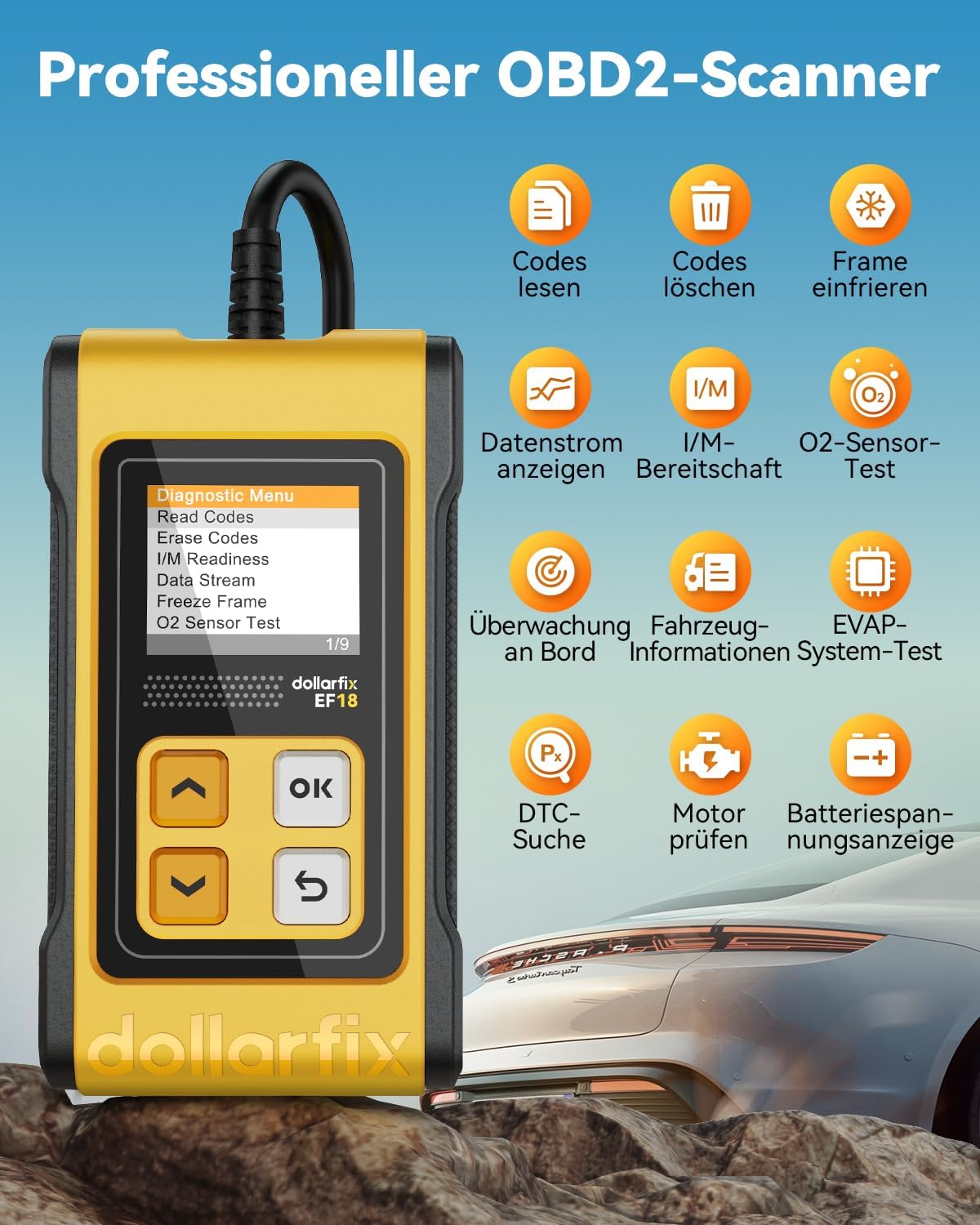
Obrázek 3.1: Konecview of the dollarfix OBD2 Scanner EF18's professional diagnostic capabilities, including reading and clearing codes, viewing data streams, and performing O2 sensor tests.

Image 3.2: The scanner displaying I/M Readiness results, indicating the status of emission monitors for a smog check.

Image 3.3: The device conducting an O2 sensor test and an EVAP system test, crucial for exhaust efficiency and emission control.

Image 3.4: The scanner displaying vehicle information, including the Vehicle Identification Number (VIN).
3.2. Nastavení jazyka
The dollarfix OBD2 Scanner EF18 supports 8 languages for user convenience. To change the language:
- From the main menu, navigate to 'Settings' or 'Einrichtung' (if in German).
- Select 'Language' or 'Sprache'.
- Choose your desired language from the list: English, German, Spanish, French, Italian, Portuguese, Russian, Polish.
4. Údržba
Proper maintenance ensures the longevity and reliable performance of your dollarfix OBD2 Scanner EF18.
- Čištění: K čištění obrazovky skeneru a jeho části použijte měkký, suchý hadřík.asing. Avoid abrasive cleaners or solvents that could damage the device.
- Skladování: Store the scanner in a cool, dry place, away from direct sunlight and extreme temperatures. Keep it protected from dust and moisture.
- Péče o kabely: Avoid bending or twisting the diagnostic cable excessively. Store the cable neatly to prevent damage to the wires or connectors.
- Aktualizace softwaru: The device supports free lifetime software updates. Regularly check for and install updates to ensure compatibility with newer vehicle models and access to the latest diagnostic features. Refer to the dollarfix support webstránky s pokyny k aktualizaci.
5. Řešení problémů
If you encounter issues while using your dollarfix OBD2 Scanner EF18, refer to the following common problems and solutions:
- Skener se nezapne:
- Ensure the scanner is securely plugged into the vehicle's OBD2 port.
- Verify that the vehicle's ignition is in the 'ON' position (engine off).
- Check the vehicle's fuse for the OBD2 port. Consult your vehicle's owner's manual for fuse box location and relevant fuse.
- Communication Error / Link Error:
- Confirm the scanner is correctly connected to the OBD2 port.
- Ensure the vehicle's ignition is 'ON'.
- Verify that your vehicle is OBD2 compliant (most vehicles manufactured after 1996 are). Some older or specific vehicle models, even if OBD2 compliant, might have unique communication protocols that the scanner may not fully support.
- Try the scanner on a different OBD2 compliant vehicle to rule out a scanner malfunction.
- Codes Cannot Be Cleared:
- DTCs can only be cleared if the underlying fault has been resolved. If the fault persists, the codes will reappear immediately or after a short driving cycle.
- Ensure the ignition is 'ON' and the engine is off when attempting to clear codes.
- Nepřesná čtení:
- Ensure the vehicle's engine is at normal operating temperature for certain tests (e.g., O2 sensor tests).
- Ověřte, zda je software skeneru aktuální.
6. Specifikace
| Funkce | Detail |
|---|---|
| Značka | dolarfix |
| Model | EF18 (YHDE-FBA3.03.01.0022-EF18-ZL-C1) |
| Kompatibilita | OBD2 Protocol Cars (most vehicles manufactured after 1996) |
| Zobrazit | LCD screen with backlight, 2.8 Inches |
| Zdroj napájení | Vehicle's OBD2 port (no external batteries required) |
| Podporované jazyky | English, German, Spanish, French, Italian, Portuguese, Russian, Polish |
| Hmotnost položky | 240 g |
| Rozměry balení | 17 x 7.2 x 7.2 cm |
| UPC | 768534533677 |
7. Záruka a podpora
dollarfix is committed to providing high-quality products and excellent customer service.
- Záruka: The dollarfix OBD2 Scanner EF18 comes with a 5-year warranty from the date of purchase, covering manufacturing defects.
- Záruka vrácení peněz: A 30-day money-back guarantee is offered, allowing you to return the product if you are not satisfied.
- Technická podpora: 24/7 technical support is available to assist you with any questions or concerns regarding the product's operation or functionality.
- Aktualizace softwaru: Enjoy free lifetime software updates to ensure your scanner remains compatible and up-to-date with the latest vehicle protocols and features.
- Kontaktujte nás: For support, warranty claims, or any inquiries, please contact dollarfix customer service through the official webweb nebo vaše nákupní platforma.

Image 7.1: Visual representation of the comprehensive support and warranty offered for the dollarfix OBD2 Scanner EF18.