
1. Úvod
Thank you for choosing the Bewinner Star Projector. This device is designed to project high-definition celestial scenes, creating an immersive starry sky experience. Please read this manual thoroughly before use to ensure proper operation and to maximize your enjoyment of the product.
2. Konec produktuview
2.1. Součásti
- Star Projector Unit
- 12 Film Discs (various celestial themes)
- Napájecí kabel USB
- Uživatelská příručka
2.2. Klíčové vlastnosti
- High Definition Projection: Advanced lens for clear and detailed celestial images.
- Focusing Design: Manual focus adjustment for optimal clarity at various distances.
- Multiple Scenes: Includes 12 film discs featuring different astronomical views.
- Tichý provoz: Navrženo pro minimální hluk během používání.
- Funkce časovače: Built-in timer for automatic shutdown.
- Napájení přes USB: Pohodlný zdroj energie.
2.3. Schéma produktu
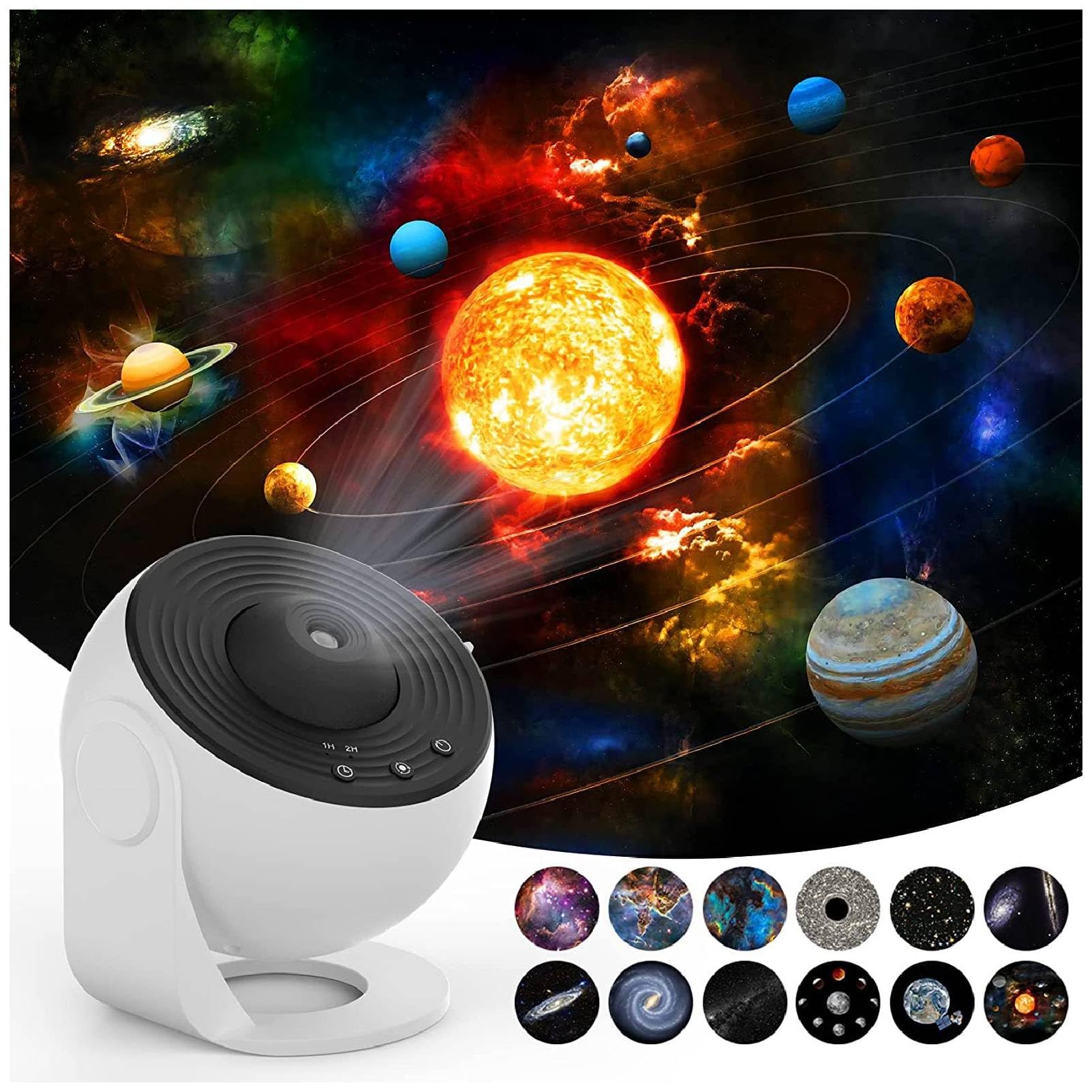


3. Pokyny k nastavení
- Rozbalit: Opatrně vyjměte všechny součásti z obalu.
- Připojení napájení: Connect the provided USB cable to the projector's DC 5V port and plug the other end into a compatible USB power adapter (not included) or a USB port.
- Insert Film Disc:
- Gently open the film disc slot cover on the side of the projector.
- Select your desired film disc.
- Insert the film disc into the slot, ensuring it is properly seated.
- Bezpečně zavřete kryt slotu.
- Umístění: Place the projector on a stable, flat surface. For optimal projection, ensure the room is dark.

4. Návod k obsluze
- Zapnutí/vypnutí: Press the power button (usually indicated by a universal power symbol) on the top of the projector to turn it on or off.
- Upravit zaostření: Rotate the focus ring around the projection lens to achieve a clear image on your desired surface.
- Change Film Disc: To change the projected scene, turn off the projector, open the film disc slot, replace the current disc with a new one, and close the slot.
- Ovládání rotace: The projector features a silent rotation mechanism. Use the designated button (if available, refer to specific model controls) to activate or deactivate the rotation of the projected image.
- Nastavení časovače: Use the timer button (often labeled "1H" or "2H") to set an automatic shutdown time for 1 or 2 hours.


5. Údržba
- Čištění: K čištění vnější strany projektoru používejte měkký, suchý hadřík. Nepoužívejte abrazivní čisticí prostředky ani rozpouštědla.
- Péče o čočky: For the projection lens, use a lens cleaning cloth to gently wipe away dust or smudges. Avoid touching the lens directly with your fingers.
- Film Discs: Handle film discs by their edges to avoid fingerprints. Store them in their protective cases when not in use.
- Skladování: When not in use for extended periods, store the projector in a cool, dry place away from direct sunlight.
6. Řešení problémů
| Problém | Možná příčina | Řešení |
|---|---|---|
| No projection/Power not turning on | Power cable not connected properly; No power from USB source. | Check USB cable connection. Ensure USB power source is active. |
| Obraz je rozmazaný | Focus not adjusted; Projector too far/close to projection surface. | Rotate the focus ring until the image is clear. Adjust distance to projection surface. |
| Obrázek se neotáčí | Rotation function is off. | Press the rotation control button to activate rotation. |
| Tlumená projekce | Room is not dark enough; Lens or film disc is dirty. | Ensure the room is sufficiently dark. Clean the lens and film disc. |
7. Specifikace
| Funkce | Detail |
|---|---|
| Značka | Bewinner |
| Číslo modelu | Bewinnertfk9sm0inu |
| Zdroj napájení | Elektrický kabel |
| svtage | 5 voltů |
| Typ světelného zdroje | LED |
| Materiál | Akrylonitril-butadien-styren |
| Barva | Bílý |
| Zahrnuté komponenty | Projection Light, 12 x Film |
| Vnitřní/venkovní použití | Krytý |
| Kontrolní metoda | Remote Control (or direct buttons) |
| Technologie připojení | USB |
| Protokol připojení | Bluetooth |
| Další funkce | Dálkové ovládání |
| Úroveň odolnosti proti vodě | Není odolný vůči vodě |
8. Záruka a podpora
For warranty information and customer support, please refer to the product packaging or contact Bewinner customer service directly. Keep your purchase receipt for any warranty claims.
For additional support or to explore other products, visit the official Bewinner Store: Bewinner Store on Amazon.