
Zavedení
This manual provides detailed instructions for the safe and efficient operation of your boAt Partypal 390 Bluetooth Speaker. Please read this manual thoroughly before using the product and retain it for future reference. The Partypal 390 is a powerful portable speaker designed for various audio needs, featuring 160W boAt Signature Sound, multiple connectivity options, and integrated LED lighting.
Bezpečnostní informace
- Nevystavujte reproduktor extrémním teplotám, přímému slunečnímu záření ani vysoké vlhkosti.
- Vyvarujte se pádu reproduktoru nebo jej nevystavujte silným nárazům.
- Nepokoušejte se reproduktor rozebírat, opravovat ani upravovat sami. Požádejte o pomoc kvalifikovaný servisní personál.
- Keep the speaker away from water and other liquids. Although it is waterproof, prolonged submersion or exposure to high-pressure water jets should be avoided.
- Používejte pouze dodaný nabíjecí kabel nebo jeho certifikovaný ekvivalent.
- Při provozu reproduktoru zajistěte řádné větrání.
- Reproduktor čistěte měkkým, suchým hadříkem. Nepoužívejte abrazivní čisticí prostředky ani rozpouštědla.
Obsah balení
Ověřte, zda jsou v balení přítomny všechny níže uvedené položky:
- boAt Partypal 390 Speaker
- Nabíjecí kabel
- Uživatelská příručka
- Záruční list
Konec produktuview
The boAt Partypal 390 is a versatile Bluetooth speaker featuring powerful audio output and dynamic LED lighting. Below are key visual references and descriptions of its components.
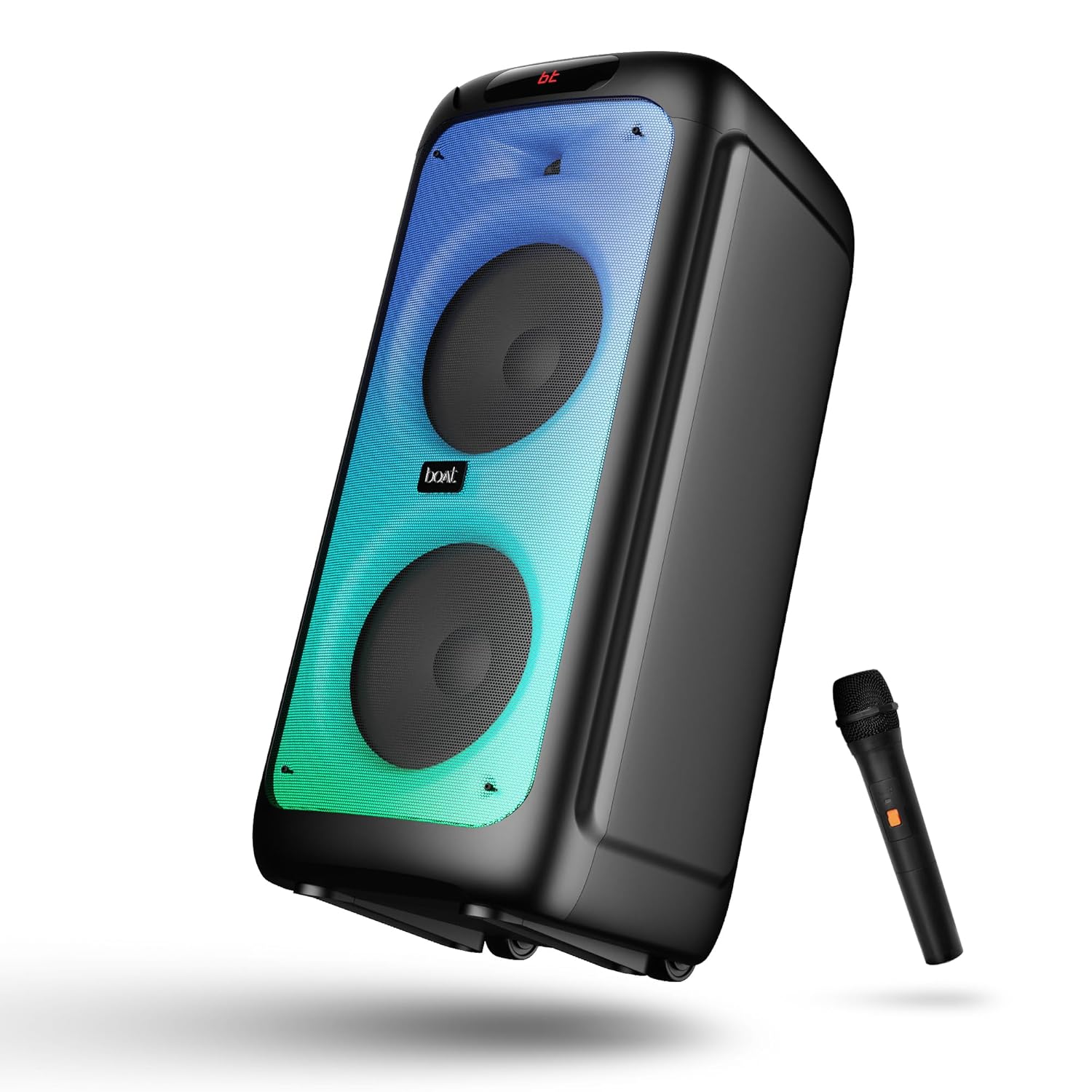
Obrázek 1: Přední view of the boAt Partypal 390 speaker, showcasing its dual speaker design, integrated flame LEDs, and the included wired microphone.

Obrázek 2: Top panel of the speaker displaying the control buttons and various input ports including USB, AUX, Guitar In, Mic 1, Mic 2, and the USB Type-C charging port. Also shown are dedicated controls for Bass/Treble, LED modes, and volume.
Klíčové vlastnosti:
- 160W boAt charakteristický zvuk: Poskytuje silný a čistý zvuk.
- Flame LEDs: Dynamic lighting effects to enhance the listening experience.
- Vícenásobné připojení: Bluetooth v5.3, AUX, USB, and TF card support.
- Funkce karaoke: Two microphone input ports for vocal performances.
- Vstup pro kytaru: Dedicated port for connecting a guitar.
- Režimy EQ: Pre-set sound modes (Normal, Party, Pop, Rock, Jazz) for different audio preferences.
- Režim TWS: Allows wireless connection of two Partypal speakers for stereo sound.
- Ovládání basů a výšek: Adjustable audio settings for personalized sound.
- Dlouhé přehrávání: Výdrž baterie až 6 XNUMX hodin.
Nastavení
1. Nabíjení reproduktoru
Before first use, fully charge the speaker. Connect the provided USB Type-C charging cable to the speaker's charging port and the other end to a compatible USB power adapter (not included). The charging indicator will show the charging status. A full charge provides up to 6 hours of playback.

Obrázek 3: The speaker in an outdoor setting, illustrating its portability and battery life.
2. Zapnutí/vypnutí
- To power on, press and hold the Power button located on the control panel until the display illuminates.
- Chcete-li zařízení vypnout, znovu stiskněte a podržte tlačítko napájení, dokud se displej nevypne.
3. Počáteční párování Bluetooth
- Ensure the speaker is powered on and in Bluetooth mode. The display will show "bt" and the Bluetooth indicator will flash, indicating it's ready for pairing.
- Na svém mobilním zařízení povolte Bluetooth a vyhledejte dostupná zařízení.
- Select "boAt Partypal 390" from the list of devices.
- Once paired, the speaker will emit a confirmation sound, and the Bluetooth indicator will stop flashing.
Návod k obsluze
1. Výběr režimu
Press the "Mode" button on the control panel to cycle through available input modes: Bluetooth, AUX, USB, and TF Card.
2. Režim Bluetooth
- Po úspěšném spárování se zvuk z připojeného zařízení bude přehrávat přes reproduktor.
- Use the volume knob on the speaker or your connected device to adjust the volume.
- Pro přeskakování skladeb použijte tlačítka Předchozí/Další.
- Stisknutím tlačítka Přehrát/Pozastavit ovládáte přehrávání.
3. Režim AUX
- Connect an audio device to the AUX input port using a 3.5mm audio cable.
- Switch the speaker to AUX mode using the "Mode" button.
- Ovládejte přehrávání a hlasitost z připojeného zařízení.
4. USB/TF Card Mode
- Vložte USB flash disk do USB portu nebo TF kartu do slotu pro TF kartu.
- Reproduktor se automaticky přepne do režimu USB nebo TF karty a začne přehrávat zvuk files. If not, switch manually using the "Mode" button.
- Use the Previous/Next buttons to navigate tracks and Play/Pause for playback control.
5. Karaoke Function (Microphone Input)
- Connect up to two wired microphones to the "MIC 1" and "MIC 2" input ports.
- Adjust microphone volume using the dedicated MIC VOL knob.
- Adjust microphone echo effect using the ECHO knob.
6. Vstup pro kytaru
- Connect a guitar to the "GUITAR IN" port.
- Adjust guitar volume using the dedicated GUITAR VOL knob.
7. Režimy ekvalizéru
The speaker offers several pre-set equalizer modes to optimize audio for different content types. Press the "EQ" button to cycle through:
- Normální
- Strana
- Pop
- Rock
- Jazz

Obrázek 4: Visual representation of the available EQ modes for sound customization.
8. Režim TWS (True Wireless Stereo)
To connect two Partypal 390 speakers for a stereo audio experience:
- Ujistěte se, že jsou oba reproduktory zapnuté a v režimu Bluetooth, ale ještě nejsou spárované s žádným zařízením.
- On one speaker (this will be the primary speaker), press and hold the TWS button. The speaker will emit a sound indicating it's searching for another speaker.
- Dva reproduktory se automaticky propojí. Úspěšné spárování TWS bude signalizováno potvrzovacím zvukem.
- Now, pair your mobile device to the primary speaker via Bluetooth as described in the "Initial Bluetooth Pairing" section. Audio will play in stereo through both speakers.

Obrázek 5: Two Partypal 390 speakers wirelessly connected, demonstrating the TWS feature.
9. LED ovládání
Press the "LED Mode" button to cycle through different flame LED lighting effects or to turn them off.
10. Bass and Treble Controls
Use the dedicated Bass and Treble knobs on the control panel to adjust the low and high frequencies of the audio output according to your preference.
Údržba
- Čištění: K čištění vnější strany reproduktoru používejte měkký, suchý hadřík, který nepouští vlákna. Nepoužívejte tekuté čisticí prostředky, aerosoly ani rozpouštědla.
- Skladování: Pokud reproduktor delší dobu nepoužíváte, skladujte jej na chladném a suchém místě, mimo dosah přímého slunečního záření a extrémních teplot.
- Péče o baterie: Chcete-li prodloužit životnost baterie, vyhněte se častému úplnému vybíjení reproduktoru. Pravidelně jej nabíjejte, i když jej nepoužíváte.
Odstraňování problémů
| Problém | Možná příčina | Řešení |
|---|---|---|
| Reproduktor se nezapne. | Slabá baterie; Tlačítko napájení nebylo správně stisknuto. | Plně nabijte reproduktor. Stiskněte a několik sekund podržte tlačítko napájení. |
| Žádný zvuk. | Příliš nízká hlasitost; Nesprávný režim vstupu; Zařízení není připojeno. | Increase speaker and device volume. Ensure correct mode is selected (Bluetooth, AUX, USB, TF). Re-pair Bluetooth device or check cable connections. |
| Párování Bluetooth selhalo. | Reproduktor není v režimu párování; Zařízení je příliš daleko; Rušení. | Ensure speaker is in Bluetooth pairing mode (flashing "bt"). Move device closer to speaker. Turn off other Bluetooth devices. Forget "boAt Partypal 390" on your device and try pairing again. |
| Mikrofon nefunguje. | Microphone not connected properly; MIC VOL too low. | Ensure microphone is securely plugged into MIC 1 or MIC 2 port. Increase the MIC VOL knob. |
| Připojení TWS selhalo. | Reproduktory již spárované se zařízením; Reproduktory jsou od sebe příliš daleko. | Ensure both speakers are not connected to any Bluetooth device. Place speakers within close proximity. Repeat TWS pairing steps. |
Specifikace
Below are the technical specifications for the boAt Partypal 390 speaker:
| Název modelu | Partypal 390 |
| Typ reproduktoru | Multimediální, Stojací |
| Zvukový výstupní výkon | 160 wattů |
| Technologie připojení | Bluetooth v5.3, AUX, USB, TF karta |
| Dosah Bluetooth | Až 10 metrů |
| Životnost baterie | Až 6 hodin |
| Kapacita baterie | 7500 mAh (Lead Acid) |
| Rozměry produktu (D x Š x V) | 70H x 32Š x 32V centimetrů |
| Hmotnost položky | 10.8 kg |
| Úroveň odolnosti proti vodě | Vodotěsný |
| Zahrnuté komponenty | Speaker, Charging Cable, User Manual, Warranty Card |

Obrázek 6: Diagram illustrating the physical dimensions of the Partypal 390 speaker.
Záruka a podpora
Your boAt Partypal 390 speaker comes with a limited warranty. Please refer to the included Warranty Card for specific terms and conditions, including the warranty period and coverage details. For technical support, service, or warranty claims, please contact boAt customer service through their official webstránky nebo kontaktní informace uvedené na vaší záruční kartě.
For more information, visit the official boAt store: Obchod boAt na Amazonu