
1. Úvod
This manual provides detailed instructions for the installation, operation, and maintenance of the DEWIN G2R 63A 2P Automatic Transfer Switch (ATS). This device is designed to automatically switch between two power sources, ensuring continuous power supply to your load.
The DEWIN G2R 63A 2P ATS features a compact structure, small size, and supports 35mm DIN rail installation, making it suitable for household distribution boxes. It offers extremely fast switching speed, resolving power outage issues efficiently.
2. Bezpečnostní informace
VAROVÁNÍ: Nebezpečí úrazu elektrickým proudem. Instalaci a údržbu by měl provádět pouze kvalifikovaný personál.
- Always disconnect power before installing or servicing the ATS.
- Ujistěte se, že všechna elektroinstalace jsou bezpečná a splňují místní elektrotechnické předpisy.
- Do not operate the device if it is damaged or appears to be malfunctioning.
- The operating environment temperature range is -5°C to +40°C.
- The installation altitude must be below 2000 meters.
- The enclosure protection class of the ATS is IP30.
3. Konec produktuview
3.1 Klíčové vlastnosti
- Vysoký výkon: Electromagnetically driven for extremely fast switching, less than 50ms conversion time.
- Vysoká kvalita: Flame-retardant shell for resistance to extreme environments, strong adaptability, and reliable operation.
- Automatický převod: Designed with common power supply, backup power supply, load power-on indicator, and clear switch status.
- Arc Extinction System: Internal arc extinction system for rapid cooling and arc suppression.
- Snadné použití: Modular structure, same-side wire entry for convenient wiring, compact size, supports 35mm DIN rail installation.
3.2 Product Components and Dimensions
The DEWIN G2R 63A 2P ATS is a compact unit designed for efficient power management.

Obrázek 1: Přední strana view of the DEWIN G2R 63A 2P Automatic Transfer Switch.

Figure 2: Dimensions of the DEWIN G2R 63A 2P Automatic Transfer Switch. The device measures approximately 45mm wide, 70mm high, and 105mm deep, with a 35mm DIN rail mounting width.
3.3 Panel Analysis
Understanding the control panel is crucial for proper operation.

Figure 3: Panel analysis showing common power supply indicator light (I), standby power indicator light (II), common power hand/automatic switch, commonly used power supply closing mechanical indication, operating handle, backup power closing mechanical indication, and load power indicator light.
3.4 Specifikace
| Specifikace | Hodnota |
|---|---|
| Provozní režim | ON-ON |
| Jmenovitý proud | 63 A |
| Provozní svtage | 220 voltů |
| Typ kontaktu | Normálně otevřeno |
| Typ konektoru | Krimpování |
| Typ přepínače | Přepínač automatického přenosu |
| Typ terminálu | Šroub |
| Materiál | Polycarbonate and Copper |
| Typ obvodu | 2-pole common circuit and auxiliary compatible |
| Typ montáže | Montáž na lištu DIN |
| Typ pohonu | Elektromagnet |
| Počet pozic | 2 |
| Horní jmenovitá teplota | 40 stupňů Celsia |
| Control Device Type | Mechanické tlačítko |
| Kontrolní metoda | Dotek |
| Protokol připojení | RÁMUS |
| Moc | 13.86 wattů |
| Kompatibilní zařízení | Household electrical appliances, electronic equipment, 220V AC powered devices |
| Hodnocení mezinárodní ochrany | IP30 |
| Compliant Specification | CCC, IEC 60669-2-1:2002 |
| Hmotnost položky | 380 gramů |
4. Nastavení a instalace
4.1 Montáž
The ATS is designed for 35mm DIN rail mounting. Ensure the DIN rail is securely fastened within your distribution box or electrical panel.

Figure 4: The image illustrates the 35mm DIN rail installation method and the robust terminals for wiring.
4.2 Schéma zapojení
Proper wiring is essential for safe and correct operation. Refer to the diagram below for connecting the common power (I), backup power (II), and load output.
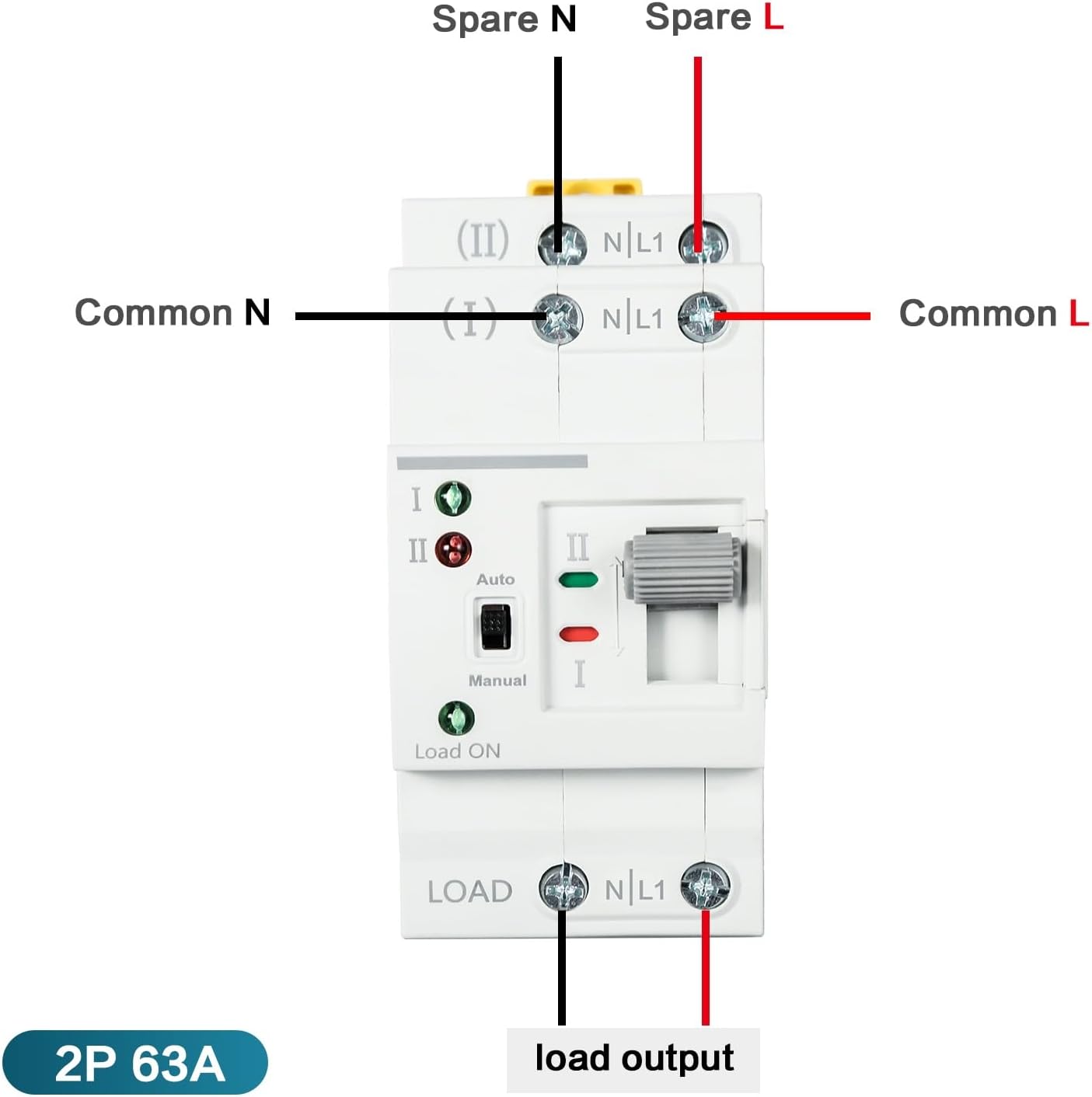
Figure 5: Wiring diagram showing connections for Common N, Common L, Spare N, Spare L, and Load Output. Ensure the input power supply is connected in the correct phase sequence.
5. Návod k obsluze
The DEWIN G2R 63A 2P ATS supports both automatic and manual operation modes.
5.1 Automatický režim
In automatic mode, the switch will detect the presence of the common power supply (I) and the backup power supply (II). If the common power fails, the switch will automatically transfer the load to the backup power supply. When common power is restored, it will switch back.
- Set the 'Auto/Manual' switch to 'Auto'.
- The indicator lights (I and II) will show which power source is active.
- The 'Load ON' indicator will illuminate when power is supplied to the load.
5.2 Ruční režim
To manually switch between power sources:
- Set the 'Auto/Manual' switch to 'Manual'.
- Use the operating handle to physically switch between position I (Common Power) and position II (Backup Power).
- Ensure the desired power source is selected and the corresponding indicator light is on.
6. Údržba
The DEWIN G2R 63A 2P ATS is designed for reliable operation with minimal maintenance. However, periodic checks are recommended:
- Vizuální kontrola: Regularly inspect the device for any signs of physical damage, loose connections, or overheating.
- Čištění: Udržujte zařízení bez prachu a nečistot. K čištění používejte suchý, měkký hadřík. Nepoužívejte tekutiny ani abrazivní čisticí prostředky.
- Kontrola terminálu: Periodically verify that all terminal screws are tight to prevent arcing and ensure good electrical contact.
Před prováděním jakékoli údržby vždy odpojte napájení.
7. Řešení problémů
If you encounter issues with your ATS, consider the following common problems and solutions:
- Žádné napájení k načtení:
- Check if both common and backup power sources are active.
- Verify the 'Load ON' indicator is illuminated.
- Ensure the ATS is in 'Auto' mode or manually switched to an active power source. - Failure to Transfer Automatically:
- Confirm the 'Auto/Manual' switch is set to 'Auto'.
- Check the status of both power sources using their respective indicator lights.
- If the issue persists, consult a qualified electrician. - Overheating or Unusual Noises:
- Immediately disconnect power.
- This could indicate a serious electrical fault. Do not attempt to repair it yourself. Contact a qualified electrician.
8. Záruka a podpora
Informace o záruce a technickou podporu naleznete na obalu produktu nebo se obraťte na prodejce. Uschovejte si účtenku jako doklad o koupi.