
Zavedení
This manual provides detailed instructions for the setup, operation, and maintenance of your infactory FWS-100 Radio-Controlled Weather Station. Please read this manual thoroughly before using the device to ensure proper function and longevity.
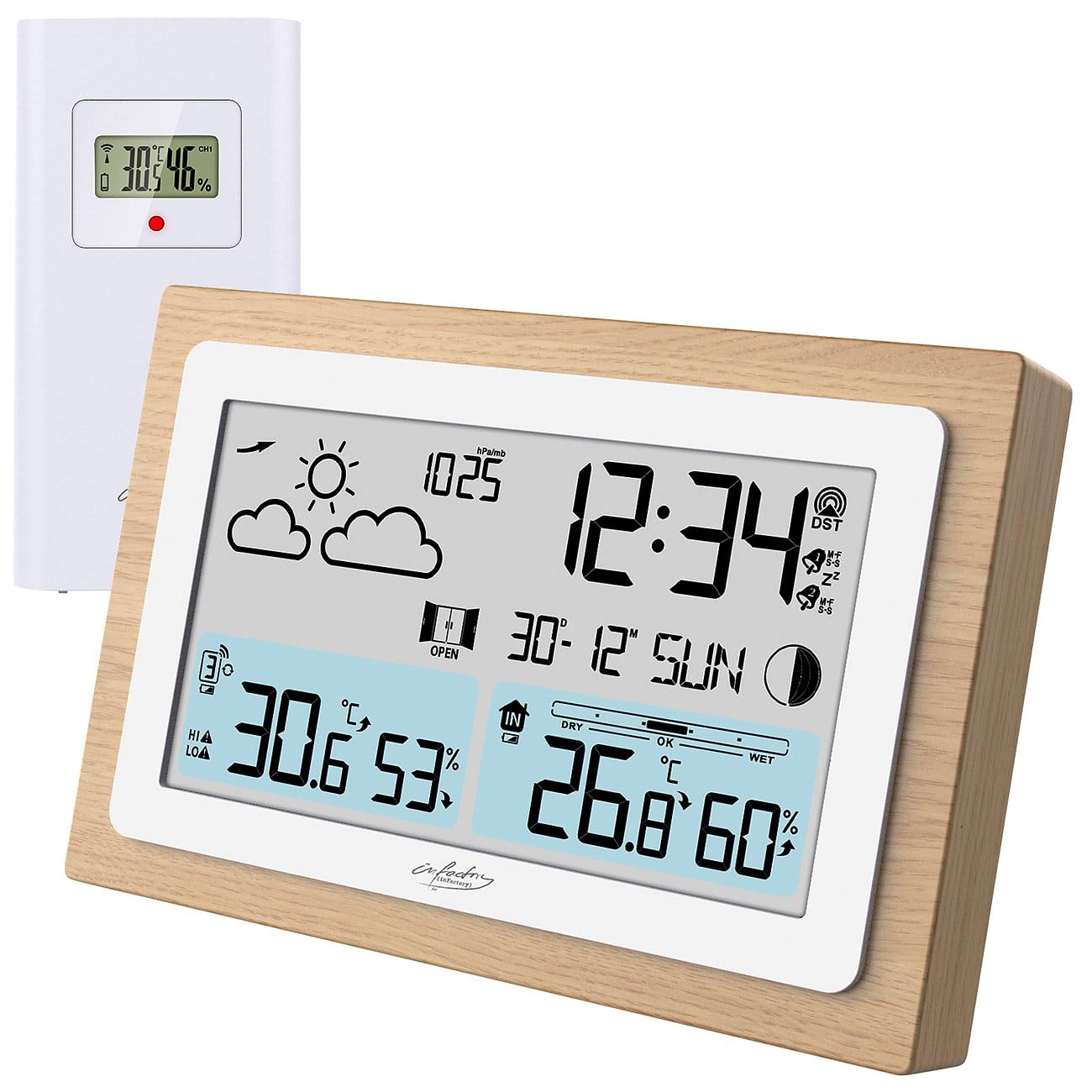
Image: The infactory FWS-100 weather station with its main unit featuring a wooden frame and a separate white outdoor sensor.
Obsah balení
- 1x infactory FWS-100 Radio-Controlled Weather Station (main unit)
- 1x Wireless Outdoor Sensor (IP44 splash-proof)
- 1x User Manual (refer to this translated version for English)
Poznámka: Batteries (2x AAA for main unit, 2x AAA for outdoor sensor) and a DC power adapter are not included and must be purchased separately.
Klíčové vlastnosti
- LCD display (11.2 x 6.2 cm) with backlight
- Simultaneous display of indoor and outdoor temperature and humidity
- Weather trend forecast
- Radio-controlled time (DCF signal) with manual setting option
- 12/24 hour format selection
- Date and moon phase display
- Alarm clock with up to two adjustable alarms and snooze function
- Real wood frame design
- Wireless outdoor sensor with up to 60m transmission range (open area)
- Expandable with up to 2 additional outdoor sensors (sold separately)
- Temperature range: Indoor -9.9°C to 50°C; Outdoor -40°C to 70°C
- Power supply: 2x AAA batteries or DC power adapter (not included) for main unit; 2x AAA batteries (not included) for outdoor sensor.
Nastavení
1. Instalace baterie
Hlavní jednotka:
- Otevřete kryt přihrádky na baterie na zadní straně hlavní jednotky.
- Vložte 2 baterie typu AAA a dbejte na správnou polaritu (+/-).
- Zavřete kryt prostoru pro baterie.
- Alternatively, connect a DC 5V power adapter (not included) to the DC jack for continuous power and backlight.
Venkovní senzor:
- Otevřete kryt přihrádky na baterie na zadní straně venkovního senzoru.
- Vložte 2 baterie typu AAA a dbejte na správnou polaritu (+/-).
- Zavřete kryt prostoru pro baterie.

Obrázek: Zadní view of the main weather station unit, showing the battery compartment and control buttons.
2. Umístění senzoru
Place the outdoor sensor in a shaded, dry location, protected from direct sunlight and rain. Ensure it is within the 60-meter transmission range of the main unit. Avoid placing it near large metal objects or electronic devices that may interfere with the wireless signal. The sensor is splash-proof (IP44) but not fully waterproof.
3. Počáteční synchronizace
After inserting batteries into both units, the main unit will automatically attempt to connect with the outdoor sensor and receive the DCF radio signal for time synchronization. This process may take several minutes. Ensure both units are close to each other during initial setup.
Video: This video demonstrates the general features and setup of a wireless weather station, including sensor placement and display functions.
Návod k obsluze
1. Zobrazit přesview
The LCD display shows various information simultaneously:
- Vlevo nahoře: Weather forecast icons (sunny, cloudy, rainy, etc.)
- Vpravo nahoře: Time, DCF signal indicator, alarm indicators (Zz for snooze, bell for alarm)
- Střední: Date and day of the week, moon phase
- Vlevo dole: Outdoor temperature and humidity, signal strength for outdoor sensor
- Vpravo dole: Indoor temperature and humidity, comfort level indicator (DRY, OK, WET)

Obrázek: Podrobný view of the weather station's LCD display, showing indoor/outdoor temperatures, humidity, time, date, and weather forecast icons.
2. Nastavení času a data
The station automatically sets the time via the DCF radio signal. If the signal is not received or you wish to set it manually:
- Stiskněte a podržte "SOUBOR" button (or similar, refer to button layout on back) to enter time setting mode.
- Použijte "+" a "-" tlačítka pro úpravu hodnot.
- Stiskněte "SOUBOR" again to confirm and move to the next setting (e.g., 12/24 hour format, hour, minute, year, month, day).
3. Funkce alarmu
The station supports up to two alarms.
- Stiskněte tlačítko "POPLACH" button (or similar) to view časy budíku.
- Stiskněte a podržte "POPLACH" vstoupíte do režimu nastavení budíku.
- Použití "+" a "-" pro úpravu času budíku.
- Stiskněte "POPLACH" to confirm and switch between Alarm 1 and Alarm 2 settings.
- Chcete-li aktivovat/deaktivovat budík, stiskněte tlačítko "POPLACH" opakovaně stiskněte tlačítko , dokud se nezobrazí/nezmizí ikona budíku.
- When an alarm sounds, press any button (except snooze) to stop it, or press the "PODŘIMOVAT" button for a temporary delay.
4. Výběr jednotky teploty
Chcete-li přepínat mezi stupni Celsia (°C) a Fahrenheita (°F), stiskněte tlačítko „C/F“ button (or similar, often combined with another button). This usually affects both indoor and outdoor temperature displays.
5. Adding Additional Sensors
The weather station can connect to up to two additional outdoor sensors (not included). To add a new sensor:
- Vložte baterie do nového senzoru.
- Na hlavní jednotce stiskněte tlačítko "CH" (Channel) button to cycle through channels.
- Stiskněte a podržte "CH" button to initiate a search for new sensors. The main unit will display the new sensor's data once connected.
Údržba
- Čištění: Hlavní jednotku a senzor otřete měkkým, suchým hadříkem. Nepoužívejte abrazivní čisticí prostředky ani rozpouštědla.
- Výměna baterie: Vyměňte baterie v obou zařízeních, když se na displeji zobrazí indikátor slabé baterie. Dbejte na správnou polaritu.
- Skladování: Pokud zařízení skladujete delší dobu, vyjměte všechny baterie, abyste zabránili jejich vytečení.
Odstraňování problémů
| Problém | Možná příčina | Řešení |
|---|---|---|
| Žádný displej na hlavní jednotce | Dead batteries or incorrect polarity. No power adapter connected. | Replace batteries or check polarity. Connect DC power adapter. |
| Venkovní teplota/vlhkost se nezobrazuje | Senzor mimo dosah, vybité baterie senzoru nebo rušení. | Move sensor closer to main unit. Replace sensor batteries. Re-synchronize sensor (see Setup). Avoid interference sources. |
| Nesprávné zobrazení času | Weak DCF signal or manual setting required. | Move unit to a location with better signal reception. Manually set the time (see Operating Instructions). |
| Nepřesná venkovní teplota | Snímač vystavený přímému slunečnímu záření nebo zdroji tepla. | Relocate the outdoor sensor to a shaded area, away from heat sources. |
Specifikace
- Značka: infactory
- Model: FWS-100 (ZX7450)
- Typ displeje: LCD
- Velikost LCD obrazovky: 11.2 x 6.2 cm
- Rozsah vnitřní teploty: -9.9 °C až 50 °C (14.2 °F až 122 °F)
- Rozsah venkovních teplot: -40 °C až 70 °C (-40 °F až 158 °F)
- Přesnost teploty: ±0.1 °C
- Dosah bezdrátového přenosu: Až 60 metrů (otevřená plocha)
- Ochrana venkovního senzoru: IP44 (odolné proti stříkající vodě)
- Power Supply (Main Unit): 2x AAA batteries (not included) or DC 5V power adapter (not included)
- Power Supply (Outdoor Sensor): 2x AAA baterie (nejsou součástí balení)
- Rozměry (hlavní jednotka): 14.8 x 9.8 x 2.6 cm
- Dimensions (Outdoor Sensor): 9.7 x 5 x 3.2 cm
- Hmotnost (hlavní jednotka): 256 g
- Konektivita: Bezdrátový
- Speciální vlastnosti: Radio-controlled clock, dual alarms, snooze, moon phase, weather forecast, comfort indicator.
Záruka a podpora
Warranty information is typically provided with your purchase. Please refer to the documentation included in your product packaging or contact your retailer for details regarding warranty coverage and customer support. For technical assistance, please contact infactory customer service.