
CRONY M5 Pro
CRONY M5 Pro Electric Scooter User Manual
Model: M5 Pro
1. Úvod
Welcome to the CRONY M5 Pro Electric Scooter user manual. This manual provides essential information for the safe operation, maintenance, and troubleshooting of your new electric scooter. Please read this manual thoroughly before using the scooter to ensure optimal performance and safety.
The CRONY M5 Pro is a high-performance electric scooter designed for adults and kids, featuring a powerful 1500W motor, a top speed of 65-80 KM/H, Bluetooth speaker, app connectivity, and IPX4 waterproofing. It is built with a durable aluminum alloy frame and can support a maximum load of 120KG.

Figure 1.1: CRONY M5 Pro Electric Scooter Overview
This image displays the CRONY M5 Pro Electric Scooter from a side angle, showcasing its robust design, dual headlights, seat, and rear luggage box. The scooter is black with orange accents on the wheels and suspension.
2. Bezpečnostní informace
Vaše bezpečnost je prvořadá. Vždy dodržujte následující bezpečnostní pokyny:
- Při jízdě vždy používejte helmu a vhodné bezpečnostní vybavení (chrániče kolen, lokty).
- Do not ride in heavy rain or through standing water deeper than 1 inch, despite IPX4 rating.
- Před každou jízdou se ujistěte, že jsou všechny šrouby a upevňovací prvky utažené.
- Seznamte se s místními dopravními předpisy a předpisy týkajícími se elektrických koloběžek.
- Dodržujte bezpečnou vzdálenost od ostatních vozidel a chodců.
- Avoid riding on slippery surfaces, steep inclines, or uneven terrain at high speeds.
- Neprovádějte kaskadérské kousky ani agresivní manévry.
- The maximum load capacity is 120KG. Do not exceed this limit.
- Keep hands and feet on the designated areas while riding.
- Do not allow children to operate the scooter without adult supervision.
3. Vlastnosti produktu
The CRONY M5 Pro Electric Scooter is equipped with advanced features for a superior riding experience:
- Výkonný motor: 1500W motor for instant acceleration and speeds up to 80 KM/H.
- Baterie s prodlouženým dojezdem: 48V/18AH lithium battery providing 30-45KM real-world range.
- Advanced Braking System: Dual hydraulic disc brakes (front/rear) for effective stopping power.
- Robustní rám: Reinforced aluminum alloy frame with 120KG max load capacity.
- Dvojité odpružení: Front/rear hydraulic suspension for a smooth ride on various terrains.
- Inteligentní připojení: App control for speed modes, route tracking, and scooter locking.
- Integrovaný Bluetooth reproduktor: For music playback and enhanced navigation.
- Voděodolnost IPX4: Protection against splashes and dust.
- Dual LED Headlamps: For improved visibility and safety during night rides.
- Pohodlné vlastnosti: Mobile phone holder, rearview mirrors, detachable seat, and rear luggage box.

Figure 3.1: CRONY M5 Pro Labeled Components
This diagram highlights key components of the CRONY M5 Pro, including the digital screen, smart phone holder, rearview mirror, Bluetooth speaker, brake, key, detachable single seat, luggage box, 1500W motor, easy folding mechanism, hydraulic shock arm, dual head lights, and tires.

Figure 3.2: Dual LED Headlight System
This image focuses on the dual LED headlamps of the CRONY M5 Pro, emphasizing their brightness and wide illumination angle (up to 75 degrees) for enhanced safety during night riding.
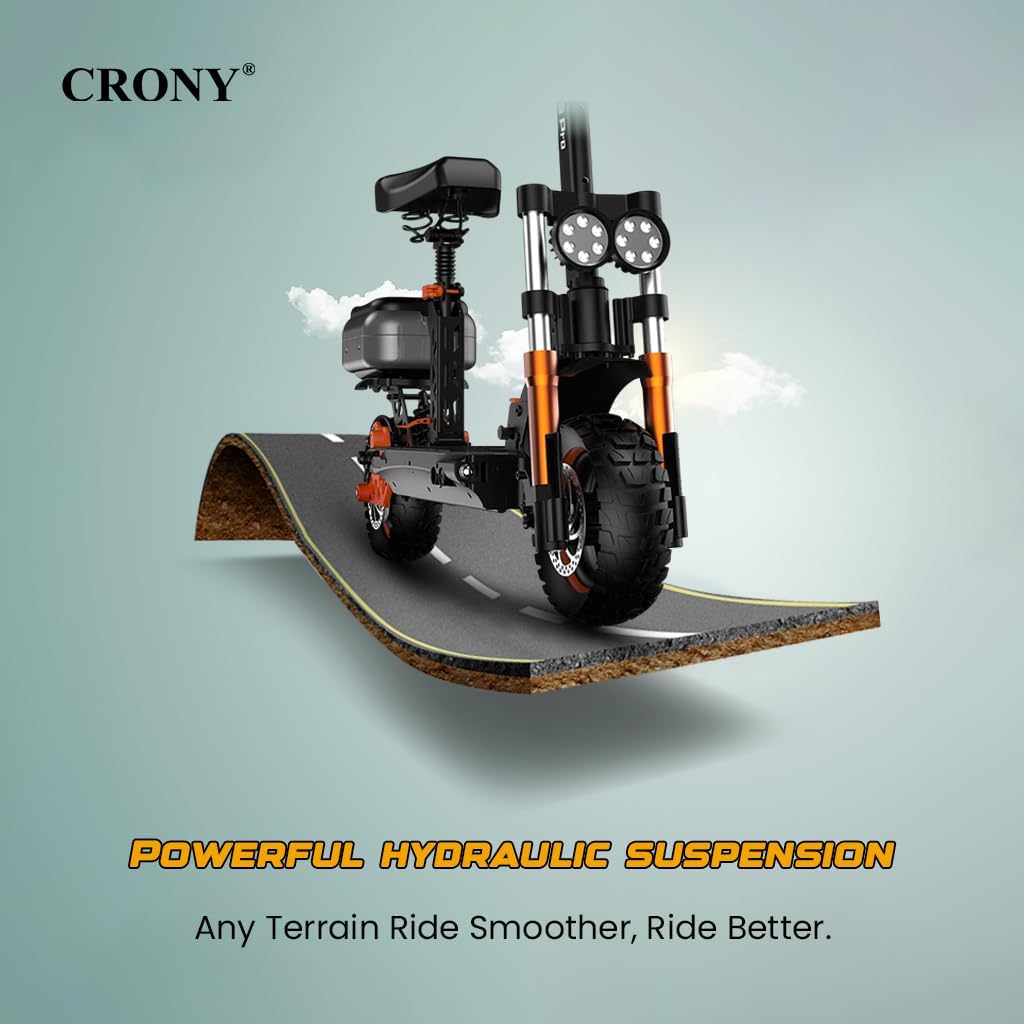
Figure 3.3: Powerful Hydraulic Suspension
This visual illustrates the powerful hydraulic suspension system of the CRONY M5 Pro, designed to absorb bumps and provide a smoother ride across various terrains.
4. Nastavení a montáž
The CRONY M5 Pro comes partially assembled. Follow these steps for initial setup:
- Rozbalení: Opatrně vyjměte koloběžku a veškeré příslušenství z obalu.
- Instalace řídítek: Attach the handlebar to the stem, ensuring it is securely fastened.
- Rozložení koloběžky:
- Krok 1: Lift the connecting buckle.
- Krok 2: Lift the buckle again and press down to fully extend the stem.
- Krok 3: Fold it together to secure the locking mechanism.
- Seat and Luggage Box (Optional): If included, attach the detachable seat and rear luggage box according to the provided instructions.
- Počáteční poplatek: Fully charge the scooter before its first use. Connect the charger to the charging port and a power outlet. The charging indicator will change when fully charged (approx. 6-8 hours).
- Tlak v pneumatikách: Check and adjust tire pressure to the recommended PSI for optimal performance and safety.

Figure 4.1: Scooter Folding and Unfolding Mechanism
This image illustrates the three-step process for folding the CRONY M5 Pro electric scooter: lifting the connecting buckle, lifting and pressing down the buckle, and finally folding the scooter together for compact storage.
5. Návod k obsluze
Learn how to operate your CRONY M5 Pro Electric Scooter:
5.1. Control Area Overview

Figure 5.1: CRONY M5 Pro Control Area
This diagram labels the key elements of the scooter's control area, including the rear view mirror, high quality LED display, Bluetooth speaker, power switch, horn, smart phone holder, brake, accelerator, key, and height adjustment mechanism.
5.2. Startování a jízda
- Zapnutí: Insert the key and turn the power switch to the ON position. The LED display will illuminate.
- Rychlostní režimy: The scooter features 3 adjustable speed modes. Use the control panel or the app to select your desired speed mode.
- Akcelerace: Gently press the accelerator lever to begin moving. Increase pressure for more speed.
- brzdění: Apply the brake levers (front/rear) to slow down or stop. Use both brakes simultaneously for emergency stops.
- Světla: Activate the dual LED headlamps for improved visibility, especially in low-light conditions.
- Roh: Use the horn to alert pedestrians or other riders.
5.3. Připojení aplikací
The CRONY M5 Pro can connect to a dedicated mobile application for enhanced control and features:
- Stáhnout aplikaci: Scan the QR code in the quick start guide or search for the "CRONY Scooter" app on your smartphone's app store.
- Párování: Enable Bluetooth on your phone and follow the in-app instructions to pair with your scooter.
- Vlastnosti aplikace:
- Control speed modes.
- Track riding routes and statistics.
- Zamknout/odemknout skútr.
- Sledujte stav baterie.
- Přístup k diagnostickým informacím.
5.4. Bluetooth reproduktor
The integrated Bluetooth speaker allows for music playback and navigation audio:
- Párování: Turn on the scooter. The speaker will enter pairing mode. Hledat "CRONY M5 Pro Speaker" on your phone's Bluetooth settings and connect.
- Přehrávání: Once connected, audio from your phone will play through the scooter's speaker.
6. Údržba
Pravidelná údržba zajistí dlouhou životnost a bezpečný provoz vašeho skútru:
- Čištění: Otřete skútr reklamouamp hadříkem. Nepoužívejte vysokotlaké vodní paprsky ani korozivní čisticí prostředky.
- pneumatiky: Pravidelně kontrolujte tlak v pneumatikách a zkontrolujte, zda nejsou opotřebované nebo poškozené. V případě potřeby pneumatiky vyměňte.
- brzdy: Test brakes before each ride. Adjust or replace brake pads if they feel loose or worn.
- Péče o baterie:
- Po každém použití baterii plně nabijte.
- Baterii nepřebíjejte ani zcela nevybíjejte.
- Pokud baterii skladujete delší dobu, nabijte ji každé 2–3 měsíce na 50–70 %.
- Spojovací materiál: Pravidelně kontrolujte všechny šrouby, vruty a rychloupínací mechanismy, abyste se ujistili, že jsou pevně utažené a bezpečné.
- Skladování: Skladujte koloběžku na chladném a suchém místě mimo dosah přímého slunečního záření a extrémních teplot.
7. Řešení problémů
V této části naleznete běžné problémy a jejich řešení:
| Problém | Možná příčina | Řešení |
|---|---|---|
| Koloběžka se nezapne. | Low battery; Power switch off; Faulty key. | Charge the battery; Ensure power switch is ON; Try a different key if available or contact support. |
| Motor not engaging/low power. | Low battery; Loose connections; Overload; Motor issue. | Charge battery; Check all visible connections; Reduce load; Contact support. |
| Brzdy nejsou účinné. | Worn brake pads; Loose brake cable; Air in hydraulic system. | Inspect and replace brake pads; Adjust brake cable tension; Seek professional service for hydraulic system. |
| Aplikace se nepřipojuje. | Bluetooth vypnutý; Aplikace zastaralá; Koloběžka není v režimu párování. | Ensure phone Bluetooth is on; Update app; Restart scooter and app; Refer to app's troubleshooting guide. |
| Neobvyklé zvuky během provozu. | Loose components; Bearing wear; Debris in wheels. | Inspect and tighten all parts; Clean wheels; If noise persists, contact support. |
If you encounter issues not listed here or if the suggested solutions do not resolve the problem, please contact CRONY customer support.
8. Specifikace
Detailed technical specifications for the CRONY M5 Pro Electric Scooter:
| Funkce | Specifikace |
|---|---|
| Model | M5 Pro |
| Výkon motoru | 1500W |
| Maximální rychlost | 65-80 KM/H (lab-tested, depends on conditions) |
| Baterie | Lithiová baterie 48V / 18AH |
| Dosah v reálném světě | 30-45 KM (varies by terrain/load) |
| Doba nabíjení | 6-8 hodin |
| Maximální nosnost | 120 kg |
| Materiál rámu | Reinforced Aluminum Alloy |
| Typ brzdy | Dual Hydraulic Disc Brakes (Front/Rear) |
| Suspenze | Front/Rear Hydraulic Suspension |
| Velikost pneumatiky | 10-inch wide tires |
| Hodnocení voděodolnosti | IPX4 |
| Rozměry produktu (rozložený) | 131.5 x 29 x 52 cm (přibližně 1300 mm x 1270 mm x 640 mm) |
| Hmotnost produktu | 41 kg |
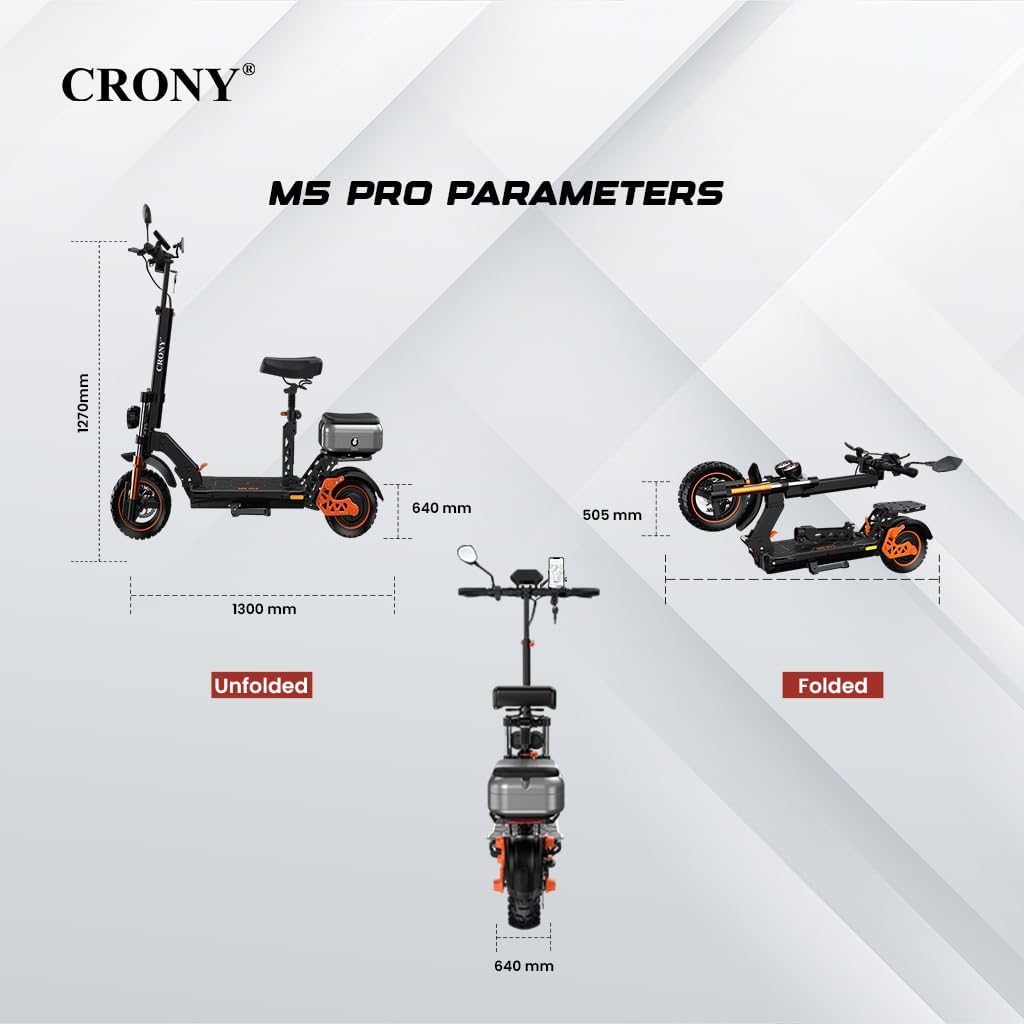
Figure 8.1: CRONY M5 Pro Dimensions (Unfolded and Folded)
This image provides detailed dimensions of the CRONY M5 Pro in both its unfolded and folded states, including height, length, and width measurements.

Figure 8.2: CRONY M5 Pro Feature Summary
This graphic summarizes key performance specifications and features of the CRONY M5 Pro, such as max speed, suspension type, speed modes, LED lights, range, charging time, max load, detachable seat, luggage box, and frame material.
9. Záruka a podpora
CRONY provides the following warranty for the M5 Pro Electric Scooter:
- Záruka na motor: 1-year warranty on the motor.
- Core Component Coverage: 3-month coverage for other core components.
For warranty claims, technical support, or any inquiries, please contact CRONY customer service through the official channels provided at the point of purchase or on the CRONY website. Please have your purchase receipt and scooter model number ready when contacting support.
Ask a question about this manual
Ask about setup, troubleshooting, compatibility, parts, safety, or missing instructions. Manuals+ will review the question and use this page’s manual context to help answer it.