
Zavedení
Thank you for choosing the Andoer Mini Photography Lamp. This portable LED light panel is designed to provide versatile and high-quality illumination for various applications, including vlogging, video conferencing, live broadcasting, and small product photography. This manual provides essential information for the safe and effective use of your device. Please read it thoroughly before operation and retain it for future reference.

Image: The Andoer Mini Photography Lamp in use, illustrating its professional lighting capabilities. It features 196 LED beads, 2500K-9000K color temperature, CRI ≥95, 20 lighting effects, and 1750LUX/0.5m illumination.

Image: The compact and portable design of the Andoer Mini Photography Lamp, shown alongside everyday items like a smartphone and wallet. The lamp measures approximately 15.1 x 10.1 x 2 cm and weighs 130g, making it easy to carry.
Bezpečnostní informace
- Nevystavujte zařízení vodě ani vysoké vlhkosti.
- Nerozebírejte ani se nepokoušejte o opravu zařízení sami. Veškerý servis svěřte kvalifikovanému personálu.
- Use only NP-F series batteries as specified. Ensure correct battery polarity when inserting.
- Zabraňte přímému vystavení očí LED světlu, zejména při vysokém jasu.
- Udržujte zařízení mimo dosah dětí.
- Operate the device within the specified temperature range.
Obsah balení
Zkontrolujte prosím balení, zda jsou všechny položky přítomny:
- 1 x Andoer Mini Photography LED Lamp
- 1 x Hot Shoe Holder
- 1 x Uživatelská příručka

Image: The Andoer Mini Photography Lamp, hot shoe holder, and the instruction manual as included in the product package.
Konec produktuview
Familiarize yourself with the components of your Andoer Mini Photography Lamp:
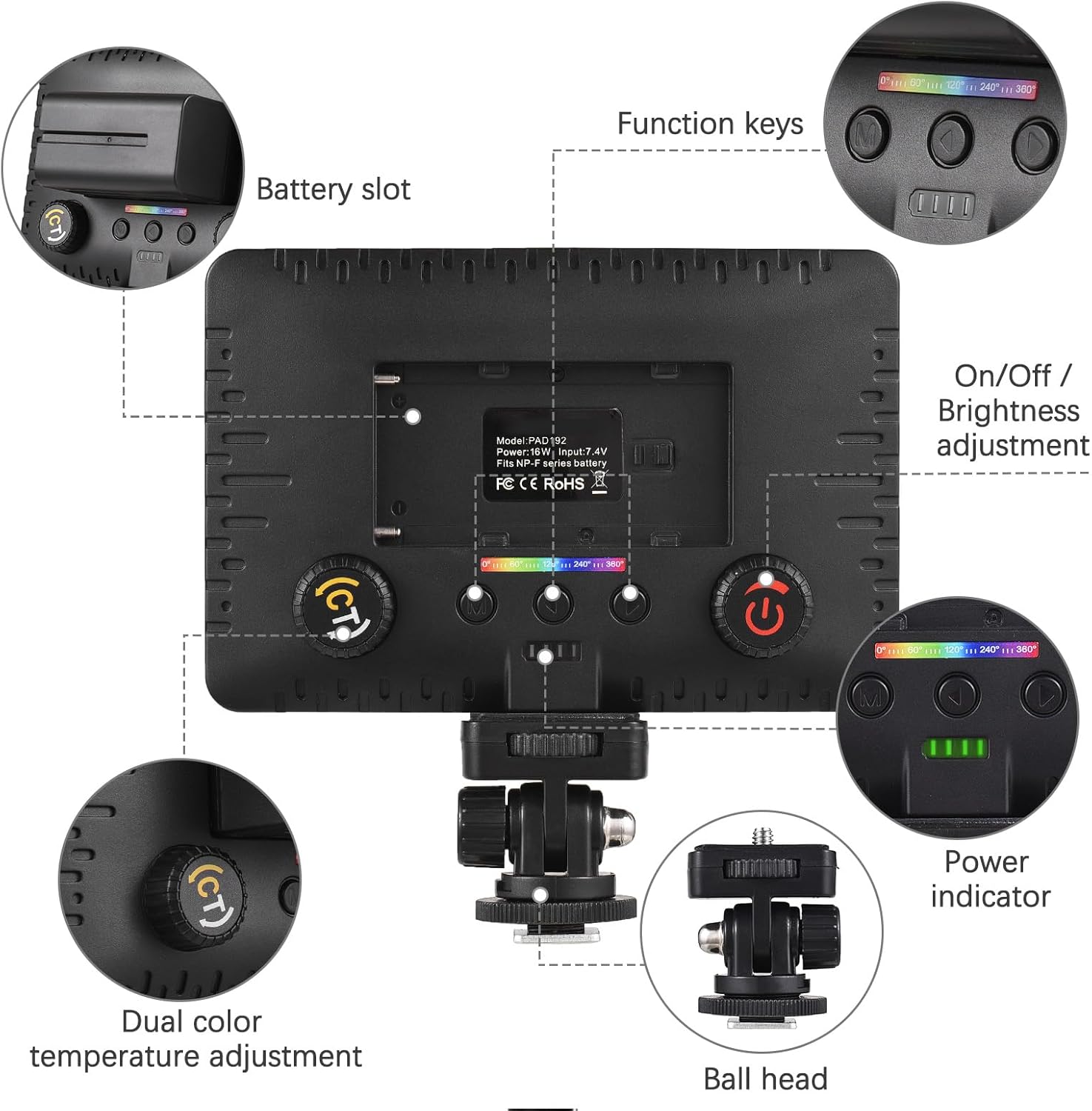
Obrázek: Podrobný view of the Andoer Mini Photography Lamp, highlighting key components such as the battery slot, function keys, On/Off and brightness adjustment dial, power indicator, dual color temperature adjustment dial, and the ball head mount.
- Slot baterie: For inserting NP-F series batteries.
- Funkční klávesy: Buttons for mode selection and special effects.
- On/Off / Brightness Adjustment: A dial to power the unit on/off and adjust light intensity.
- Indikátor napájení: LEDs indicating battery level.
- Dual Color Temperature Adjustment: A dial (CT button) to change the color temperature from warm to cool.
- Kulová hlava: For mounting the light and adjusting its angle.
Nastavení
- Attach Hot Shoe Holder: Secure the hot shoe holder to the 1/4-inch threaded hole at the bottom of the LED lamp.
- Vložte baterii: Open the battery slot cover and insert a compatible NP-F series battery, ensuring correct orientation.
- Upevněte světlo: Attach the hot shoe holder to your camera's hot shoe mount, a tripod, or other compatible devices. Tighten the locking ring to secure it.

Image: The Andoer Mini Photography Lamp securely mounted on top of a camera, demonstrating a typical setup for use.
Návod k obsluze
- Zapnutí/vypnutí: Rotate the On/Off / Brightness Adjustment dial to turn the light on or off.
- Upravit jas: While the light is on, continue rotating the On/Off / Brightness Adjustment dial to increase or decrease the light intensity from 0% to 100%.
- Úprava teploty barev (režim CCT): Press the CT button (Dual Color Temperature Adjustment dial) to enter CCT mode. Rotate the dial to adjust the color temperature between 2500K (warm) and 9000K (cool).
- Select Special Lighting Effects: Use the function keys to cycle through the 20 available special lighting effects. Refer to the on-screen display for effect names or numbers.

Image: Visual representation of the adjustable brightness and color temperature features. The lamp offers a wide range from 2500K (warm) to 9000K (cold) and brightness levels from 0% to 100%.
Kompatibilita
The Andoer Mini Photography Lamp is designed for wide compatibility:
- Uchycení sáněk blesku: Easily attaches to most cameras with a standard hot shoe.
- 1/4-inch Threaded Hole: Allows mounting on tripods, light stands, phone holders, and other accessories with a 1/4-inch screw.

Image: The Andoer Mini Photography Lamp demonstrating its wide compatibility, showing it can be used with cameras, smartphones (via a phone holder), and tripods, thanks to its hot shoe mount and 1/4-inch threaded hole.
Údržba
- Čištění: K čištění l používejte měkký, suchý hadříkamp body. For the LED panel, use a microfiber cloth to gently wipe away dust or smudges. Do not use harsh chemicals or abrasive materials.
- Péče o baterie: Remove the battery if the lamp will not be used for an extended period. Store batteries in a cool, dry place.
- Skladování: Uložte lamp in a dry, dust-free environment, away from direct sunlight and extreme temperatures.
Odstraňování problémů
| Problém | Možná příčina | Řešení |
|---|---|---|
| Světlo se nerozsvítí. | Baterie není správně vložena nebo je vybitá. | Ensure battery is inserted with correct polarity. Charge or replace the battery. |
| Jas ani teplotu barev nelze upravit. | Incorrect mode selected or controls are not functioning. | Ensure you are in the correct mode (CCT for color temperature). Check if the dials are obstructed. |
| Světlo bliká nebo je nestabilní. | Low battery power or faulty battery. | Charge or replace the battery. If the problem persists, contact support. |
Specifikace
| Funkce | Specifikace |
|---|---|
| LED korálky | 196 (54 White, 54 Yellow, 88 RGB) |
| Special Lighting Effects | 20 |
| Osvětlení | 1750 LUX / 0.5m |
| Úhel paprsku | 120° |
| Moc | 16W |
| svtage | 7.4 V |
| Napájení | NP-F Series Batteries |
| CRI (index podání barev) | 95 |
| Teplota barev | 2500K - 9000K |
| Velikost položky | 15 x 10 x 1.5 cm (přibližně 5.9 x 3.9 x 0.6 palce) |
| Hmotnost položky | 81 g (cca 2.86 oz) |
| Technologie připojení | USB (for potential charging/control, power via NP-F batteries) |
| Úroveň odolnosti proti vodě | Není odolný vůči vodě |
| Číslo modelu | HXH7438494991380KD |
Záruka a podpora
This product comes with a standard manufacturer's warranty. For specific warranty terms and conditions, please refer to the documentation provided with your purchase or contact the seller directly. For technical support or inquiries, please reach out to Andoer customer service through their official channels or the retailer where the product was purchased.