
Sharp SPC5028AMZ
Sharp Digital Alarm Clock User Manual
Model: SPC5028AMZ
Zavedení
Thank you for choosing the Sharp Digital Alarm Clock. This manual provides detailed instructions for setting up, operating, and maintaining your new alarm clock. Designed for clarity and convenience, this clock features an easy-to-read LCD display with an optional always-on backlight, dual alarm settings, and a USB charging port for your devices. Please read this manual thoroughly before use to ensure optimal performance and longevity of your product.

Přední view of the Sharp Digital Alarm Clock, displaying time, month, date, day, and temperature on its colorful LCD screen.
Bezpečnostní informace
Please observe the following safety precautions to prevent damage to the unit or personal injury:
- Nevystavujte jednotku extrémním teplotám, přímému slunečnímu záření nebo vysoké vlhkosti.
- Zabraňte pádu jednotky na zem nebo jejímu vystavení silným nárazům.
- Nekombinujte staré a nové baterie ani různé typy baterií.
- Pokud nebudete přístroj delší dobu používat, vyjměte baterie, abyste zabránili jejich vytečení.
- Udržujte jednotku mimo dosah vody a jiných kapalin.
- Nepokoušejte se jednotku rozebírat ani opravovat sami. Veškerý servis svěřte kvalifikovanému personálu.
Obsah balení
Ověřte, zda jsou v balení přítomny všechny položky:
- Sharp Digital Alarm Clock (Model SPC5028AMZ)
- Uživatelská příručka (tento dokument)
Note: 3 x AAA batteries are required and not included.
Konec produktuview
Přední displej

Diagram illustrating key features of the alarm clock, including atomic accuracy, 1.5-inch tall time display, on/off display nightlight, indoor temperature display, calendar display, bright color display, wall mountable or tabletop viewing, and battery operation (3x AAA batteries).
The front of the clock features a clear LCD display that shows the time, month, date, day of the week, and indoor temperature. The main time display is approximately 1.5 inches tall for easy readability.
Zadní panel a ovládací prvky

Detailní view of the clock's rear panel, showing the location of the battery compartment, various control buttons (Calendar, Time, Alarm, 12/24, Up, °C/°F, Down, Wave), the ON/OFF switch for the nightlight, and the backstand for tabletop viewing. Dimensions (6.45"W x 5"H) are also indicated.
- CALENDAR Set Button: Used to set the date and year.
- TIME Set Button: Used to set the time manually.
- ALARM Set & ON/OFF Button: Používá se k nastavení a aktivaci/deaktivaci alarmů.
- Tlačítko 12/24: Přepíná mezi 12hodinovým a 24hodinovým formátem času.
- Tlačítko NAHORU: Zvýší nastavení.
- Tlačítko °C/°F: Přepíná zobrazení teploty mezi stupni Celsia a Fahrenheita.
- Tlačítko DOLŮ: Sníží nastavení.
- WAVE (Atomic Search) Button: Initiates a manual search for the atomic time signal.
- ON/OFF Switch (Nightlight): Controls the always-on backlight feature.
- Přihrádka na baterie: Holds 3 x AAA batteries.
- Backstand: For tabletop viewIng.
- Otvor pro montáž na zeď: For hanging the clock on a wall.
Nastavení
Instalace baterie
- Open the battery compartment cover on the rear of the clock.
- Vložte 3 nové baterie typu AAA a dbejte na správnou polaritu (+ a -).
- Bezpečně zavřete kryt bateriového prostoru.
Počáteční zapnutí
Upon battery installation, the clock will power on and attempt to synchronize with the atomic time signal.
Atomická synchronizace času (WWVB)
The Sharp Digital Alarm Clock is designed to automatically synchronize with the WWVB atomic time signal broadcast from Fort Collins, Colorado, ensuring precise timekeeping.

Map of the United States showing the WWVB radio broadcast signal originating from Fort Collins, Colorado, which the atomic clock uses for synchronization.
- The clock will automatically attempt to receive the signal daily, typically overnight when electronic interference is minimal.
- For optimal reception, place the clock near a window and orient its front or rear panel towards Fort Collins, Colorado.
- A signal strength indicator (antenna icon) on the display will show the reception status.
- To manually initiate a signal search, press the VLNA tlačítko na zadním panelu.

Graphic depicting a full moon, with text 'LESS ELECTRONIC INTERFERENCE AT NIGHT SET BY MORNING', indicating optimal atomic clock synchronization occurs during nighttime hours.
Setting Time Zone
Even with atomic synchronization, you must manually select your local time zone for the correct hourly time display.
- Stiskněte a podržte ČAS button until the time zone indicator flashes.
- Použijte UP or DOLŮ buttons to select your desired time zone (e.g., PST, MST, CST, EST).
- Stiskněte tlačítko ČAS znovu pro potvrzení a ukončení.
Ruční nastavení času a data
Pokud atomická synchronizace není požadována nebo není k dispozici, můžete čas a datum nastavit ručně.
- Nastavení času: Stiskněte a podržte ČAS button until the hour flashes. Use UP/DOLŮ pro nastavení. Stiskněte ČAS to move to minutes, then adjust. Press ČAS znovu uložit.
- Nastavení data: Stiskněte a podržte KALENDÁŘ button until the year flashes. Use UP/DOLŮ pro nastavení. Stiskněte KALENDÁŘ to move to month, then day, adjusting each. Press KALENDÁŘ znovu uložit.
- 12/24hodinový formát: Stiskněte tlačítko 12/24 tlačítko pro přepínání mezi 12hodinovým (s indikátorem AM/PM) a 24hodinovým formátem času.
Návod k obsluze
Adjusting Display Brightness and Backlight
The clock features an optional always-on backlight with adjustable brightness for optimal viewza různých světelných podmínek.
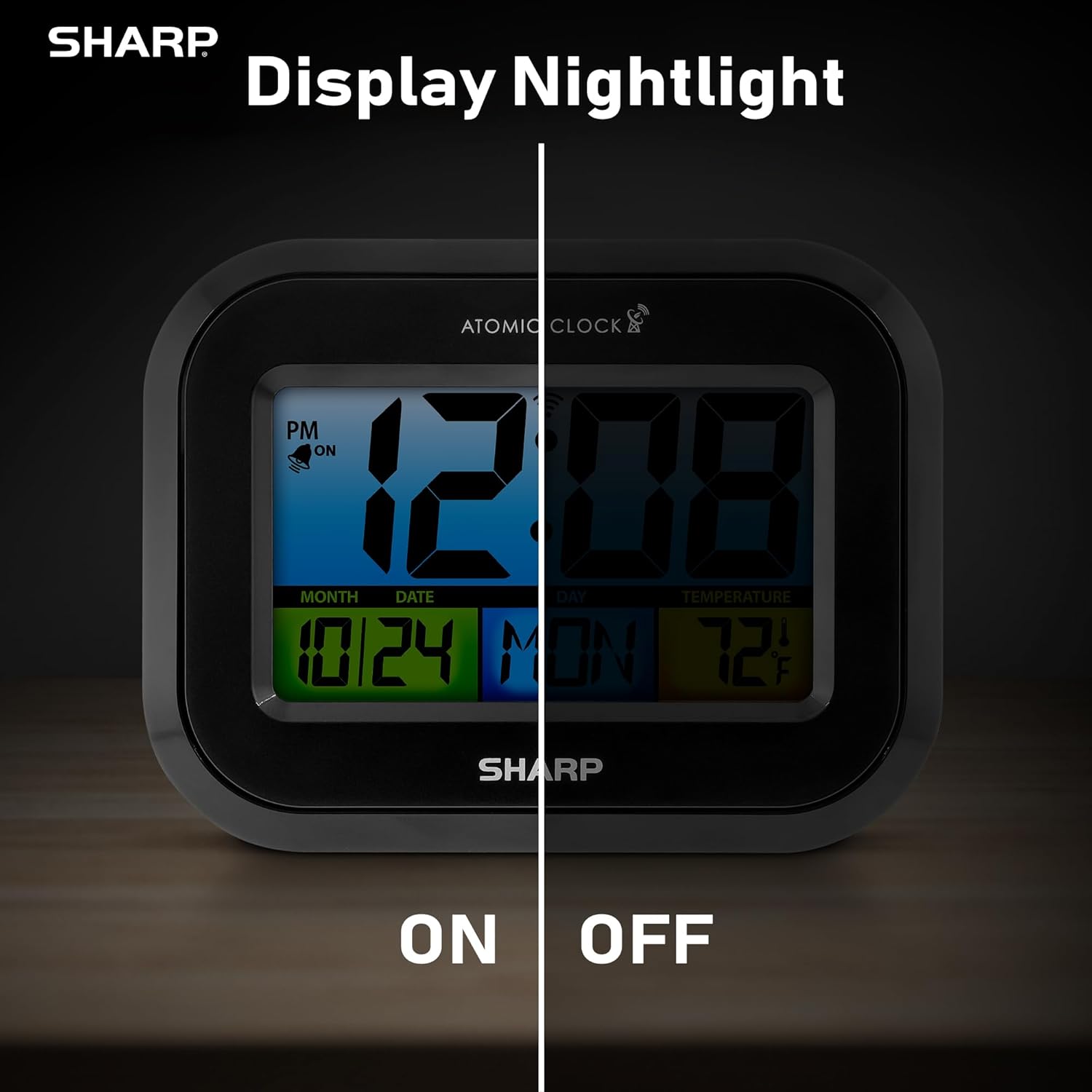
Comparison image showing the clock's display with the nightlight off (dim) and on (illuminated) in both day and night settings.
- Always-On Backlight: Použijte vypínač ON/OFF on the rear panel to activate or deactivate the continuous backlight. When ON, the display will have a soft glow.
- Podsvícení na vyžádání: Even if the always-on backlight is OFF, you can momentarily illuminate the display by pressing the PODSVĚTLO button (usually located on the top edge, though not explicitly labeled in the provided image, it's a common feature). This provides a brighter illumination for a few seconds.

Image highlighting the physical ON/OFF switch on the rear of the clock for controlling the display nightlight, indicating its function for soft glowing backlight in the dark.
Nastavení duálních alarmů
The clock supports two independent alarm settings.
- Stiskněte tlačítko POPLACH button once to select Alarm 1. Press again for Alarm 2.
- While the alarm time is displayed, press and hold the POPLACH tlačítko, dokud nezačne blikat hodina.
- Použijte UP or DOLŮ tlačítka pro nastavení hodiny. Stiskněte POPLACH to move to minutes, then adjust.
- Stiskněte POPLACH again to save the alarm time.
- Chcete-li aktivovat/deaktivovat budík, stiskněte tlačítko POPLACH button repeatedly until the alarm icon (bell) appears/disappears for the desired alarm.
Pomocí nabíjecího portu USB
The clock includes a USB charging port for convenient charging of small electronic devices. Locate the USB port on the side or rear of the unit (specific location not detailed in provided images, but implied by feature bullets). Connect your device's USB cable to this port to begin charging.
Temperature Display (°C/°F)
The clock displays the indoor temperature. To switch between Celsius and Fahrenheit, press the ° C / ° F tlačítko na zadním panelu.
Viewing Angle Optimization
Like most LCD screens, this display is best viewed from the front or slightly above. Visibility may appear reduced at sharp side or low angles. For the best viewing experience, use the built-in kickstand to position the clock to face you.

Illustration demonstrating the optimal viewing angle for the LCD display, showing that the clock is best viewed from above or straight on, with a built-in kickstand to position it.
Wall Mounting and Tabletop Use
The clock is designed for versatile placement. Use the integrated backstand for tabletop viewing or the wall mount hole on the rear for hanging it on a wall.

The Sharp Digital Alarm Clock displayed in a home office setting, showing its versatility for both wall mounting and tabletop placement.
Údržba
Čištění
Hodiny otřete měkkým, suchým hadříkem. Nepoužívejte abrazivní čisticí prostředky ani rozpouštědla, protože by mohly poškodit povrch.
Výměna baterie
When the display becomes dim or the clock stops functioning, it's time to replace the batteries. Follow the battery installation steps in the Setup section. It is recommended to replace all three AAA batteries at the same time with new ones.
Odstraňování problémů
| Problém | Možné řešení |
|---|---|
| Displej je tmavý nebo prázdný. | Check battery polarity and ensure batteries are fresh. Replace all 3 AAA batteries. Ensure the backlight ON/OFF switch is in the 'ON' position if continuous illumination is desired. |
| Atomový čas se nesynchronizuje. | Ensure the clock is placed near a window and oriented towards Fort Collins, Colorado. Avoid placing near electronic devices that may cause interference. Try initiating a manual search by pressing the WAVE button. Synchronization is often best overnight. |
| Time or date is incorrect after battery change. | Manually set the time zone. Allow time for atomic synchronization, or manually set the time and date using the TIME and CALENDAR buttons. |
| Display is hard to read from certain angles. | This is a characteristic of LCD technology. Adjust the clock's position using the kickstand to ensure it is viewed straight-on or from slightly above eye level. |
| Alarm se nespustí. | Ensure the alarm is set and activated (bell icon visible). Check battery level. |
Specifikace
| Vlastnictví | Hodnota |
|---|---|
| Značka | Ostrý |
| Číslo modelu | SPC5028AMZ |
| Typ zobrazení | LCD |
| Barva | Černý |
| Rozměry produktu | 6.45 cm Š x 5 cm V |
| Hmotnost položky | 10.8 unce (0.31 kilogramů) |
| Zdroj napájení | Napájení z baterií (3 x AAA, nejsou součástí balení) |
| Provozní režim | Atomový |
| Speciální funkce | Cordless, Dual Alarm, USB Charging Port, Indoor Temperature Display, Always-On Backlight |
| Typ montáže | Držák na stěnu, Stolní |
| Materiál rámu | Plast |
Záruka a podpora
Sharp products are manufactured to the highest quality standards. For warranty information or technical support, please refer to the documentation included with your purchase or visit the official Sharp webUschovejte si účtenku jako doklad o koupi pro případ reklamace.

Sharp Time Solutions
Ask a question about this manual
Ask about setup, troubleshooting, compatibility, parts, safety, or missing instructions. Manuals+ will review the question and use this page’s manual context to help answer it.