
1. Úvod
This manual provides essential instructions for the safe installation, operation, and maintenance of your EAPRO 1450VA Solar Inverter, Model EGPL1P170012SOLAR. This device is a powerful solar inverter with an integrated 50A PWM solar charge controller, designed to convert DC power from a 12V battery and solar panels into stable AC power for various loads. It supports up to 1000W of solar panel input and has a load capacity of 1200W.
2. Bezpečnostní pokyny
Před instalací a provozem si pečlivě přečtěte všechny bezpečnostní pokyny. Nedodržení těchto pokynů může vést k úrazu elektrickým proudem, požáru nebo vážnému zranění.
- Elektrická bezpečnost: Ensure all electrical connections are secure and correctly polarized. Only qualified personnel should perform electrical wiring.
- Bezpečnost baterie: Work with batteries in a well-ventilated area. Wear protective eyewear and clothing. Avoid short-circuiting battery terminals.
- Bezpečnost solárních panelů: Solar panels generate electricity when exposed to light. Cover panels during installation to prevent electric shock.
- Instalační prostředí: Install the inverter in a dry, well-ventilated area, away from flammable materials, direct sunlight, and moisture.
- Základy: Měnič musí být řádně uzemněn, aby se zabránilo úrazu elektrickým proudem.
- Údržba: Disconnect all power sources (AC, battery, solar) before performing any maintenance or cleaning.
3. Konec produktuview
3.1 Klíčové vlastnosti
- Integrated 50A Powerful PWM Solar Charge Controller
- Supports up to 1000W Solar Panel Input
- Maximum Solar VOC (Open Circuit Voltage) Range of 25V
- Designed for Single 12V Battery Operation
- 1200 W (5 Amps) Load Lifting Capacity
- Multiple operating modes including IPS and Power Saving
3.2 Součásti a ovládací prvky
The EAPRO 1450VA Solar Inverter features a user-friendly front panel for monitoring and control, and a rear panel for all electrical connections.
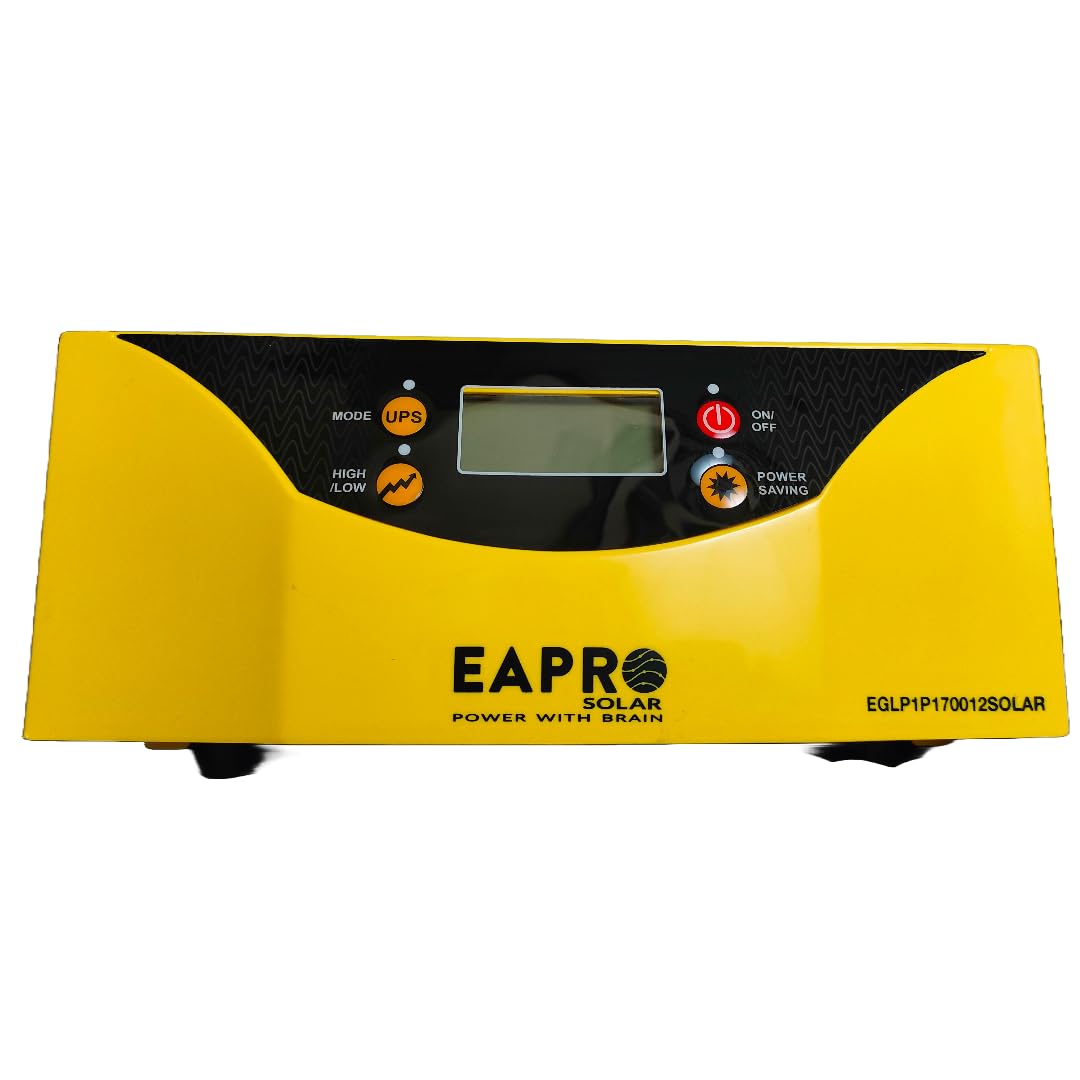
Obrázek 1: Přední view of the EAPRO 1450VA Solar Inverter, showing the LCD display, mode selection buttons (MODE, IPS, HIGH/LOW), and power controls (ON/OFF, POWER SAVING).

Obrázek 2: Rear panel of the EAPRO 1450VA Solar Inverter, illustrating the AC input, AC output, solar input terminals, battery terminals, and a reset button.

Obrázek 3: Detailní záběr view of the solar input terminals on the rear panel, clearly marked for Solar -VE and Solar +VE connections. This image also shows the product part code and a QR code for additional information.

Obrázek 4: Shora dolů view of the rear panel, highlighting a warning label regarding the maximum voltage of solar power. It states that the maximum VOC (Open Circuit Voltage) should not be more than 25 Volts, with 18 Volts (Vmpp) recommended.
4. Nastavení a instalace
4.1 Vybalení a kontrola
Carefully unpack the inverter and inspect it for any shipping damage. Report any damage to your supplier immediately.
4.2 Montáž
Mount the inverter vertically on a sturdy, non-flammable surface. Ensure adequate clearance around the unit for proper ventilation (at least 15 cm on all sides). Do not block the ventilation openings.
4.3 Připojení baterie
- Ensure the inverter is OFF before connecting the battery.
- Connect the positive (+) terminal of a 12V battery to the red BATT (+) terminal on the inverter.
- Connect the negative (-) terminal of the battery to the black BATT (-) terminal on the inverter.
- Ujistěte se, že jsou spoje pevné a bezpečné.
4.4 Připojení solárních panelů
The inverter supports up to 1000W of solar panels with a maximum VOC of 25V. Recommended Vmpp is 18V.
- Ensure solar panels are covered or disconnected to prevent power generation during connection.
- Connect the positive (+) output from your solar panel array to the SOLAR +VE terminal on the inverter.
- Connect the negative (-) output from your solar panel array to the SOLAR -VE terminal on the inverter.
- Verify polarity before making final connections.
4.5 Připojení vstupu/výstupu střídavého proudu
- Connect the mains AC power supply to the AC INPUT socket on the rear panel.
- Connect your AC loads (appliances) to the AC OUTPUT socket on the rear panel.
- Ensure that the total load connected does not exceed the inverter's 1200W capacity.
4.6 Uzemnění
Connect the inverter's grounding terminal to a reliable earth ground using appropriate gauge wire. This is crucial for safety.
5. Návod k obsluze
5.1 Zapnutí/vypnutí
- Zapnutí: Press the ON/OFF button on the front panel. The LCD display will illuminate, and the inverter will begin operation.
- Vypnutí: Press and hold the ON/OFF button until the display turns off.
5.2 Výběr režimu
Use the MODE button to cycle through different operating modes. The IPS (Inverter Power Supply) mode is typically for continuous power. The HIGH/LOW button allows adjustment of voltage sensitivity or charging parameters, depending on the specific model configuration.
5.3 Funkce úspory energie
Activate the POWER SAVING function by pressing the dedicated button. This mode reduces power consumption when no load or a very light load is detected, extending battery backup time.
5.4 Indikátory na LCD displeji
The LCD display provides real-time information on battery status, load level, input voltage, výstupní objemtage, and operational mode. Refer to the display for system status and any error codes.
6. Údržba
Pravidelná údržba zajišťuje optimální výkon a dlouhou životnost vašeho měniče.
- Čištění: Keep the inverter clean and free from dust. Use a dry cloth to wipe the exterior. Do not use liquid cleaners. Ensure ventilation openings are clear.
- Kontroly připojení: Periodically check all electrical connections (battery, solar, AC input/output) for tightness and corrosion. Tighten any loose connections.
- Stav baterie: Monitor baterie voltage and electrolyte levels (for flooded batteries) regularly. Ensure the battery terminals are clean.
- Kontrola prostředí: Zajistěte, aby instalační prostředí zůstalo suché, chladné a dobře větrané.
7. Řešení problémů
If you encounter issues with your inverter, refer to the table below for common problems and solutions. For persistent issues, contact customer support.
| Problém | Možná příčina | Řešení |
|---|---|---|
| Měnič se nezapne | Baterie není připojena nebo je nízkátage; Tlačítko ZAP/VYP není stisknuto. | Zkontrolujte připojení baterie a objtage. Press ON/OFF button firmly. |
| Žádný AC výstup | Overload; short circuit; inverter in fault mode. | Reduce load. Check for short circuits. Press the RESET button on the rear panel. |
| Solar charging not active | Solar panels not connected; insufficient sunlight; incorrect solar voltage. | Check solar panel connections and polarity. Ensure adequate sunlight. Verify solar panel VOC is within 25V. |
| Varování před přetížením | Připojená zátěž překračuje kapacitu střídače. | Disconnect some loads to reduce total power consumption below 1200W. |
Poznámka: A reset button is located on the rear panel (refer to Figure 2). Pressing this button can resolve certain operational issues by restarting the inverter's internal system.
8. Specifikace
Technical specifications for the EAPRO 1450VA Solar Inverter, Model EGPL1P170012SOLAR.
| Parametr | Hodnota |
|---|---|
| Značka | EAPRO |
| Model | EGPL1P170012SOLAR |
| Wattage | 1.5 KW (1500VA) |
| Kapacita zatížení | 1200W / 5 Amps |
| Zdroj napájení | Solární a bateriové napájení |
| Baterie Voltage | 12V (Single Battery Operated) |
| Kapacita baterie (doporučená) | 200 Amp hodiny |
| Solární regulátor nabíjení | 50 A PWM |
| Max Solar Panel Support | 1000W |
| Max Solar VOC Range | 25V |
| Materiál | Polykarbonát |
| Rozměry produktu (DxŠxV) | 33 x 32.5 x 18.5 cm |
| Hmotnost položky | 11.5 kg |
| Výrobce | EAPRO GLOBAL PVT LTD |
9. Záruka a podpora
For warranty information, technical support, or service inquiries, please contact EAPRO Global PVT LTD or your authorized dealer. You may also reach customer support at the number provided on the product label:
Customer Support: +91-9850115
For additional resources, you may refer to the following link: Informace o podpoře produktu