
1. Úvod
Thank you for choosing the Devoko Electric Standing Desk. This manual provides detailed instructions for the safe and efficient assembly, operation, and maintenance of your new adjustable height desk. Designed for enhanced ergonomics and productivity, this desk allows you to easily switch between sitting and standing positions throughout your workday.
2. Bezpečnostní informace
- Hmotnostní limit: Do not exceed the maximum recommended weight capacity of 70 kg (154 lbs). Overloading can cause instability and damage.
- Shromáždění: Follow all assembly instructions carefully. Incorrect assembly can lead to instability and potential injury.
- Protikolizní systém: The desk is equipped with an anti-collision technology. If an obstacle is detected during height adjustment, the desk will stop and reverse slightly to prevent damage or injury.
- Ochrana proti přehřátí: The motor includes overheating protection. If the motor becomes too hot from continuous use, it will temporarily shut down to prevent damage. Allow it to cool before resuming operation.
- Odbavení: Ensure there is adequate clearance around the desk during height adjustments to avoid collisions with walls, furniture, or other objects.
- Děti a domácí mazlíčci: Během provozu držte děti a domácí zvířata v dostatečné vzdálenosti od stolu, abyste předešli nehodám.
- Moc: Používejte pouze dodaný napájecí adaptér. Před čištěním nebo údržbou odpojte napájení.
3. Obsah balení
Před zahájením montáže se prosím ujistěte, že jsou všechny komponenty přítomny:
- Desktop (4 sections)
- Nohy stolu (2)
- nohy (2)
- Control Panel with USB-C Port
- Motor and Drive Rod
- Kabel pro správu kabelů
- Háčky na sluchátka (2)
- Napájecí adaptér a kabely
- Assembly Hardware (screws, Allen keys)
- Uživatelská příručka
4. Montážní návod
Assembly is designed to be straightforward with pre-drilled holes. It typically takes about 40 minutes.
- Attach Desk Legs to Feet: Secure the desk legs to the feet using the provided screws. Ensure they are firmly attached.
- Sestavení pracovní plochy: Join the four desktop sections together using the included connectors and screws. A power drill may simplify this step.
- Mount Legs to Desktop: Carefully place the assembled desktop upside down on a soft, clean surface. Attach the leg frames to the pre-drilled holes on the underside of the desktop using the provided screws.
- Install Drive Rod and Motor: Connect the drive rod between the two leg mechanisms. Install the motor unit and connect it to the drive rod and the control box.
- Attach Control Panel and Accessories: Mount the control panel to the underside of the desk in the designated area. Connect its cable to the control box. Install the cable management tray and headphone hooks as desired.
- Připojte napájení: Connect the power adapter to the control box and then plug it into a wall outlet.
Video: This video demonstrates the assembly process of the Devoko Electric Standing Desk, showing how to connect the frame components, attach the desktop, and install the control panel and motor. It also briefly shows the height adjustment function.

Obraz: Illustration showing the simple and quick assembly process, highlighting pre-drilled holes for easy setup.

Obraz: Detailní záběr view of desk accessories: two headphone hooks, a cable pass-through hole, a cable management tray, and adjustable feet.
5. Návod k obsluze
Nastavení výšky
Use the up and down arrow buttons on the control panel to adjust the desk height. The current height in centimeters will be displayed on the LED screen.
Předvolby paměti
The control panel allows you to save up to 3 preferred height positions:
- Nastavte stůl do požadované výšky pomocí šipek nahoru/dolů.
- Press the 'S' (Set) button. The display will flash.
- Press one of the numbered memory buttons (1, 2, or 3) within 3 seconds. The height is now saved to that preset.
- To recall a saved height, simply press the corresponding numbered memory button. The desk will automatically move to the saved position.
Nabíjecí port USB-C
The integrated USB-C port on the control panel allows you to conveniently charge your devices directly from your desk. Simply plug your compatible device into the port.
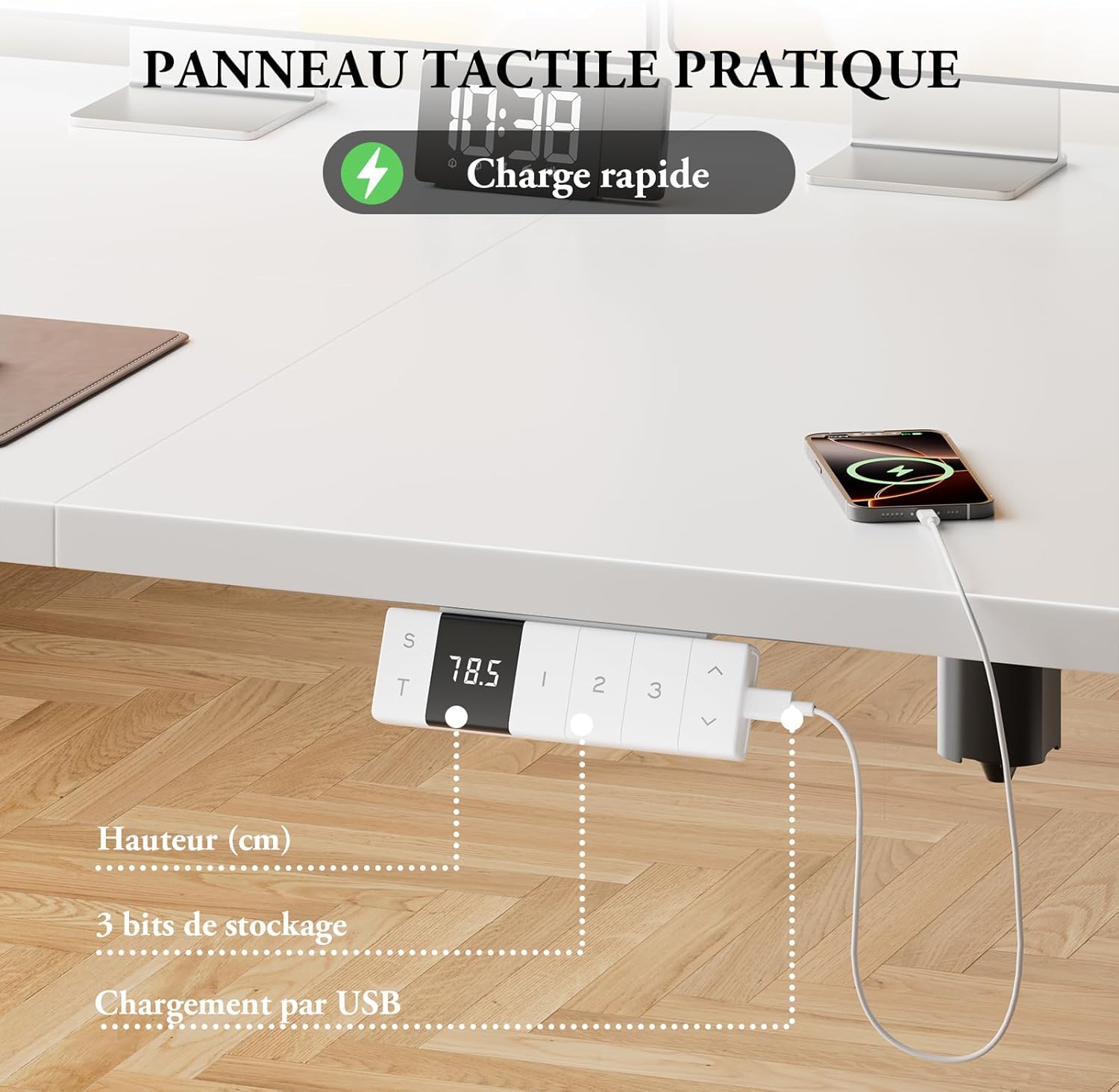
Obraz: Close-up of the control panel showing the digital height display, memory preset buttons, and the integrated USB-C charging port with a phone connected.

Obraz: Diagram illustrating the intelligent control panel with LED screen, 3 height memories, Type-C port, sitting position reminder function, and up/down movement.

Obraz: A device charging via the integrated Type-C connector on the desk's control panel, emphasizing convenient power access.

Obraz: The control panel displaying a reminder for smart sitting position memory, encouraging regular posture changes.
6. Klíčové vlastnosti
- Nastavitelná výška: Easily adjust the desk height from 72 cm to 118 cm to suit your ergonomic needs.
- Tichý provoz: The motor operates at less than 50dB, ensuring a quiet working environment.
- Robustní stabilita: T-shaped widened desk legs provide excellent stability, supporting up to 70 kg.
- Antikolizní technologie: Automatically stops and reverses if an obstacle is detected during movement.
- Ochrana proti přehřátí: Built-in safety feature to prevent motor damage during prolonged use.
- Integrated USB-C Charger: Conveniently charge your devices directly from the desk.
- Správa kabelů: Includes a cable management tray and hooks to keep your workspace tidy.

Obraz: A woman standing comfortably at the Devoko Electric Standing Desk in a modern office setting, demonstrating its ergonomic benefits.

Obraz: Two Devoko desks, one at its minimum height (72cm) and another at its maximum height (118cm), illustrating the adjustable range.

Obraz: Diagram illustrating the immediate stop mechanism in case of an obstacle, ensuring safety for users, pets, and furniture.

Obraz: A visual representation of the desk's quiet motor operation, indicating noise levels below 50dB for an undisturbed work environment.

Obraz: An illustration demonstrating the desk's robust stability, capable of supporting up to 70 kg for multiple monitors and office equipment.

Obraz: A modern white desk setup showcasing the hidden cable management system, ensuring a clean and organized workspace.
7. Údržba
- Čištění: Otřete povrch stolu a rám měkkým hadříkemamp hadříkem. Nepoužívejte abrazivní čisticí prostředky ani agresivní chemikálie.
- Inspekce: Pravidelně kontrolujte všechny šrouby a spoje, zda jsou pevně utažené. V případě potřeby je dotáhněte.
- Správa kabelů: Ujistěte se, že kabely jsou úhledně uspořádané a nejsou přiskřípnuté ani zamotané, zejména během nastavování výšky.
- Péče o motor: Avoid spilling liquids near the motor or control box. If the motor overheats, allow it to cool down completely before operating the desk again.
8. Řešení problémů
| Problém | Možná příčina | Řešení |
|---|---|---|
| Stůl se nehýbe | Power cable disconnected; Overload; Overheating protection activated | Check power connections; Reduce weight on desk; Allow motor to cool down for 20 minutes. |
| Nerovnoměrné nastavení výšky | Překážka; Nevyvážené zatížení | Odstraňte všechny překážky; Rovnoměrně rozložte váhu na pracovní plochu. |
| Předvolby paměti nefungují | Nesprávné naprogramování | Re-program the memory presets following the operating instructions. |
| Protikolizní systém se často spouští | Sensitive setting; Actual obstruction | Ensure no objects are in the desk's path. Consult support if issue persists. |
9. Specifikace
- Značka: Devoko
- Číslo modelu: 0077
- Rozměry (D x Š x V): 140 x 80 x 72–118 cm (55.1 x 31.5 x 28.3–46.5 palce)
- Minimální výška: 72 cm (28.3 palců)
- Maximální výška: 118 cm (46.5 palců)
- Barva: Bílý
- Materiál: Engineered Wood (top), Alloy Steel (legs)
- Nosnost: 70 kg (154 lb)
- Typ motoru: Elektrický
- Speciální vlastnosti: Ergonomic, Height Adjustable, Integrated USB-C Port, 3 Memory Positions, Anti-Collision, Overheating Protection, Cable Management
- Hladina hluku: ≤ 50 dB
10. Záruka a podpora
The Devoko Electric Standing Desk comes with a limited warranty. For specific warranty details, claims, or technical support, please refer to the warranty card included with your product or contact Devoko customer service through the retailer where you purchased the product.