
Zavedení
Thank you for choosing the Krysenix PG1 Gaming Headset. This manual provides detailed instructions for setting up, operating, maintaining, and troubleshooting your headset to ensure an optimal gaming experience. Please read this manual thoroughly before use.

Image: The Krysenix PG1 Gaming Headset, featuring a black design with RGB lighting on the earcups and an attached microphone.
Obsah balení
- Herní headset Krysenix PG1
- 2.2m prodlužovací kabel
- 3.5mm 1-to-2 Audio Splitter Cable
- Uživatelská příručka
Nastavení
Připojování k zařízením
The Krysenix PG1 headset offers multi-platform compatibility through its 3.5mm jack and a USB connection for RGB lighting.
- For PC/Laptop/Mac (with separate audio/mic ports): Connect the headset's 3.5mm jack to the included 3.5mm 1-to-2 audio splitter cable. Plug the green connector of the splitter into your device's audio output (headphone) port and the pink connector into the microphone input port. For RGB lighting, connect the USB cable to an available USB port.
- For PS4/PS5/Nintendo Switch/Mobile/Tablet (with combined 3.5mm audio/mic port): Plug the headset's 3.5mm jack directly into the device's 3.5mm audio port. For RGB lighting, connect the USB cable to an available USB port on your console or a power source.
- Pro Xbox One/Xbox Series X/S: An additional adapter (not included) may be required for older Xbox One controllers that do not have a 3.5mm jack. For controllers with a 3.5mm jack, plug the headset's 3.5mm jack directly into the controller. For RGB lighting, connect the USB cable to an available USB port on the console or a power source.
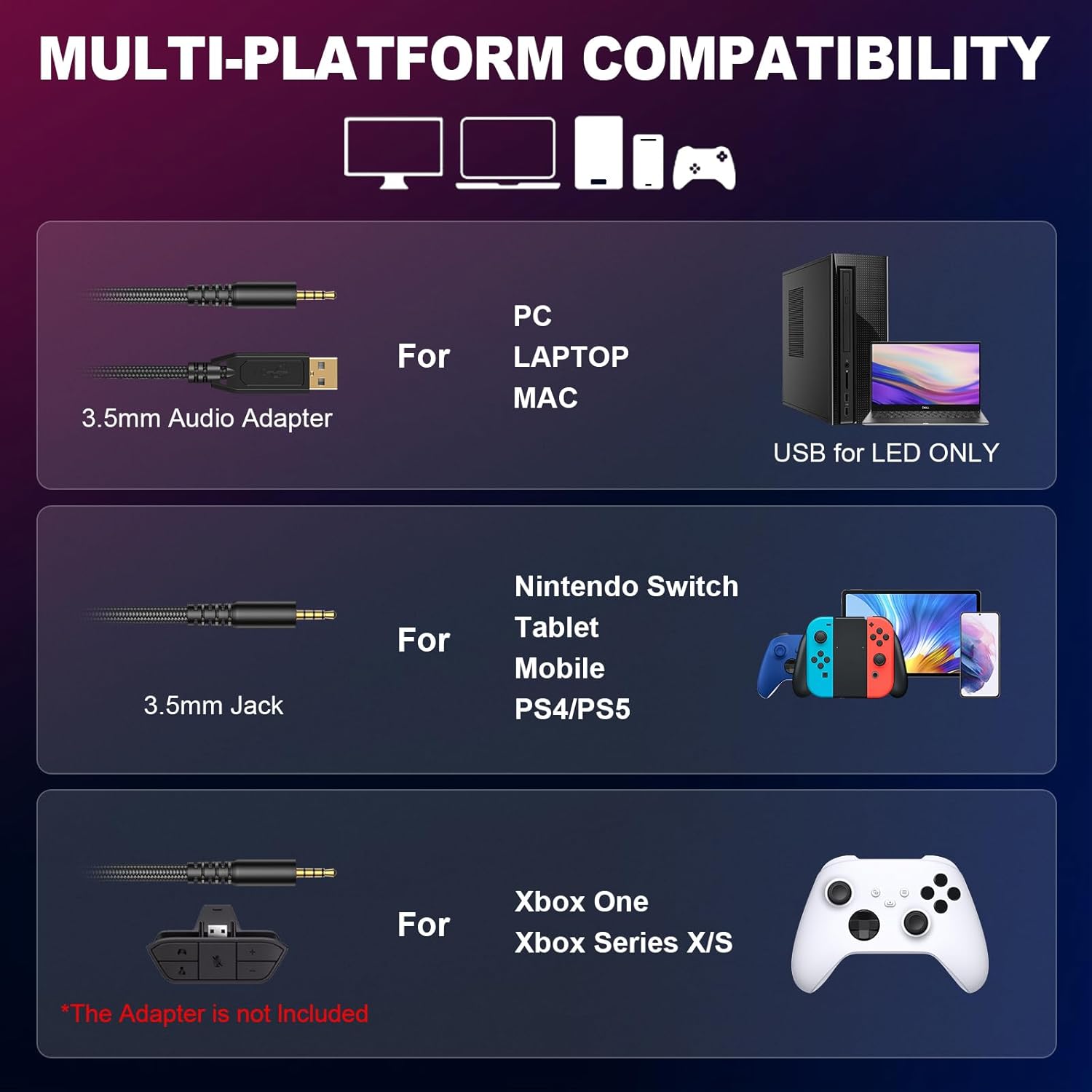
Image: Diagram illustrating various connection methods for PC, Laptop, Mac, Nintendo Switch, Tablet, Mobile, PS4/PS5, Xbox One, and Xbox Series X/S, highlighting the 3.5mm audio adapter and USB for LED.

Image: A visual representation of the Krysenix PG1 headset connected to various gaming platforms including Xbox, Nintendo Switch, PS4/PS5, Laptop, and PC.
Návod k obsluze
Audio and Microphone Control
The headset features an in-line control unit for easy access to volume and microphone functions.
- Kolečko hlasitosti: Rotate the scroll wheel on the in-line control to adjust the audio volume up or down.
- Přepínač ztlumení mikrofonu: Use the dedicated switch on the in-line control to quickly mute or unmute the microphone.
- Nastavení mikrofonu: The flexible, omnidirectional microphone can be adjusted up to 120 degrees to position it optimally for clear voice pickup.

Obrázek: Podrobný view of the headset's braided cable, showing the USB connector for LED lights, the gold-plated 3.5mm plug, the volume wheel, and the one-key mute switch on the in-line control.

Image: Close-up of the in-line control unit, highlighting the one-touch volume switch and microphone mute button.
RGB osvětlení
The headset features dynamic RGB lighting on the earcups. To activate the RGB lights, ensure the USB connector is plugged into a powered USB port on your device or a USB power adapter.
Pohodlí a fit
The Krysenix PG1 headset is designed for comfort during extended use. It features a lightweight headband and soft, breathable ear cushions. Adjust the headband to fit your head comfortably. The earcups provide passive noise isolation.

Image: A close-up of the headset's stretchable headband mechanism, showing approximately 2cm of adjustment range.

Obrázek: Podrobný view of the upgraded 3D earmuff structure, emphasizing the soft padding for comfort.

Image: A close-up of the unique hybrid ear cushions, highlighting their design for comfort and sound isolation.
Údržba
Proper care will extend the life of your Krysenix PG1 Gaming Headset.
- Čištění: K otření sluchátek použijte měkký, suchý hadřík. V případě náušníků použijte mírněamp Lze použít hadřík, ale před použitím se ujistěte, že je zcela suchý. Nepoužívejte agresivní chemikálie ani abrazivní čisticí prostředky.
- Skladování: Sluchátka skladujte na chladném a suchém místě mimo dosah přímého slunečního záření a extrémních teplot. Nepokládejte na ně těžké předměty.
- Péče o kabely: Vyhněte se ostrým ohybům nebo nadměrnému tahání za kabel, abyste předešli jeho poškození.
Odstraňování problémů
If you encounter issues with your Krysenix PG1 headset, refer to the following common solutions:
| Problém | Možná příčina | Řešení |
|---|---|---|
| Z sluchátek se nehlásí žádný zvuk |
|
|
| Mikrofon nefunguje |
|
|
| RGB světla nefungují |
|
|
| Sound imbalance (one ear louder) |
|
|
| Nepohodlná sluchátka |
|
|
Specifikace
| Funkce | Detail |
|---|---|
| Název modelu | PG1 |
| Technologie připojení | Kabelové |
| Jack pro sluchátka | Zásuvka 3.5 mm |
| Velikost ovladače | 50mm neodymové ovladače |
| Frekvenční odezva | 20 Hz - 20 kHz |
| Impedance | 32 ohmů |
| Citlivost | 111 dB |
| Typ mikrofonu | Omnidirectional, Noise-Cancelling |
| Délka kabelu | Approximately 2.2 meters (86 inches) |
| Hmotnost | 280 gramů |
| Materiál | Polyurethane (PU) Plastic |
| Speciální funkce | Adjustable Headband, Noise Isolation, Lightweight, RGB Lighting |
| Kompatibilní zařízení | Gaming Consoles (PS4, PS5, Xbox One, Switch), PC, Laptop, Mobile Phones |
Záruka a podpora
Krysenix products are designed for reliability and performance. For specific warranty information, please refer to the documentation included with your purchase or visit the official Krysenix website. If you require technical support or have questions not covered in this manual, please contact Krysenix customer service through their official channels.