
Popglory P96
Popglory Smart Watch Uživatelská příručka
Model: P96
Zavedení
The Popglory Smart Watch is a versatile fitness tracker designed for both men and women, featuring a 1.69-inch display. It offers comprehensive health monitoring capabilities, including heart rate, blood pressure, blood oxygen, and sleep tracking. With over 110 sports modes, it helps users track their daily exercise and maintain healthy habits. The watch is waterproof and compatible with Android and iPhone devices.

Figure 1: Popglory Smart Watch (Dark Black)
Co je v krabici
- Popglory Smart Watch (P96)
- Pásek hodinek
- Nabíjecí kabel (USB)
- Uživatelská příručka (tento dokument)
Průvodce nastavením
1. Připevnění řemínku k hodinkám
The watch band is designed for easy attachment. Locate the small pins on the ends of the watch band. Align these pins with the corresponding holes on the watch body. Pull back the small lever on the pin, insert one end into the hole, then release the lever to secure the other end. Ensure both ends of the band are firmly clicked into place.
Figure 2: Watch with attached band (exampobrázek)
2. Nabíjení chytrých hodinek
Before initial use, fully charge your Popglory Smart Watch. Connect the provided USB charging cable to a power source (e.g., computer USB port, USB wall adapter). The magnetic end of the charging cable will attach to the charging points on the back of the watch. Ensure the connection is secure. The watch display will indicate charging status. A full charge typically provides up to 5 days of usage time and 25 days of standby time.
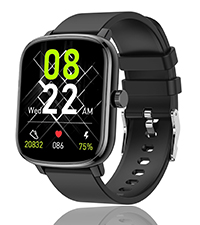
Figure 3: Charging indicator (example icon)
3. Instalace a párování aplikace
To unlock the full functionality of your Popglory Smart Watch, download the GloryFit app. The app is compatible with smartphones running Android 5.0 or above/iOS 9.0 or above and Bluetooth 5.0 or later. (Note: Tablets, iPads, and computers are not compatible.)
- Scan the QR code in the watch's settings or search for "GloryFit" in your smartphone's app store.
- Nainstalujte a otevřete aplikaci GloryFit.
- Postupujte podle pokynů v aplikaci a vytvořte si účet a nastavte si profesionála.file.
- Povolte na svém smartphonu Bluetooth.
- In the GloryFit app, navigate to the device pairing section and select your Popglory Smart Watch (P96) from the list of available devices.
- Potvrďte párování na hodinkách i smartphonu.

Figure 4: GloryFit App icon
Návod k obsluze
Základní navigace
- Dotyková obrazovka: Přejetím prstu doleva, doprava, nahoru nebo dolů můžete procházet nabídkami a funkcemi.
- Boční tlačítko/korunka: Press the side button to wake the screen or return to the main watch face. Rotate the functional crown to switch dials or scroll through screens.

Figure 5: Functional Crown for navigation
Monitorování zdraví
The watch features advanced sensors for continuous health tracking. Access these functions directly from the watch or view detailed data in the GloryFit app.
- Monitor srdečního tepu: Provides 24-hour heart rate monitoring.
- Monitor krevního tlaku: Measures blood pressure directly from the wrist.
- Monitor krevního kyslíku: Sleduje hladinu kyslíku v krvi.
- Monitor spánku: Automatically records sleep patterns and duration.
- Glukóza v krvi: Provides blood glucose data.
- Tělesná teplota: Sleduje tělesnou teplotu.

Figure 6: Health tracking features including Heart Rate, Blood Pressure, and Blood Oxygen.

Figure 7: Sleep tracking interface on the watch.
Sportovní režimy a sledování aktivity
The watch supports over 110 sports modes to track your workouts. It records calories burned, time, distance, and steps. The step count interface includes a target step count for motivation.

Figure 8: Daily activity tracker with various sports modes.
Oznámení a komunikace
Stay connected by receiving SMS, call reminders, and app messages directly on your watch. You can enable notifications for various social media and communication apps through the GloryFit app settings.

Figure 9: Real-time call and message notifications.
Doplňkové funkce
- Budík: Nastavujte si budíky přímo z hodinek.
- Režim Nerušit: Ztlumit oznámení v určitých časech.
- Sedavé připomenutí: Získejte upozornění na pohyb po obdobích nečinnosti.
- Najít telefon: Vyhledejte spárovaný smartphone.
- Ovládání hudby: Ovládejte přehrávání hudby na svém smartphonu.
- Zobrazení počasí: View aktuální povětrnostní podmínky.
- Časovač a stopky: Využijte vestavěné funkce časování.
- Svítilna: Use the watch screen as a temporary light source.
- Intenzita vibrací: Adjust the vibration strength for notifications and alarms.
- Sledování ženského zdraví: Monitor menstrual cycles.
- Dálkové ovládání kamery: Ovládejte fotoaparát telefonu na dálku.
- Kalkulačka: Proveďte základní výpočty.

Obrázek 10: Přesview of various functions available on the watch.
Přizpůsobení
- Ciferníky: Customize the watch face to personalize your device. Over 1000+ DIY dials are available through the app.
- Jas obrazovky: Adjust the screen brightness directly on the watch.
- Screen On Time: Adjust the duration the screen stays active.
- Styl menu: Choose between list, grid, planet, or board view for the menu.

Figure 11: Customizable watch faces and display options.
Údržba
- Voděodolnost: The watch has an IP67 water resistance rating, suitable for daily needs like hand washing or light rain. It is not recommended for swimming or showering.
- Čištění: Regularly wipe the watch screen and band with a soft, dry cloth to remove dust and sweat. Avoid using harsh chemicals.
- Skladování: Pokud hodinky delší dobu nepoužíváte, skladujte je na chladném a suchém místě.
Odstraňování problémů
- Hodinky se nepřipojují k aplikaci: Ensure Bluetooth is enabled on your phone and the watch is within range. Restart both the watch and the app. Check app permissions.
- Inaccurate readings (e.g., Blood Pressure): While the watch provides health data, it is not a medical device. Readings may vary. For accurate medical measurements, consult professional medical equipment. Ensure the watch is worn snugly on the wrist during measurements.
- Rychlé vybíjení baterie: Reduce screen brightness, shorten screen-on time, and disable unnecessary notifications.
- Hodinky se nezapínají: Ujistěte se, že jsou hodinky plně nabité. Pokud se stále nezapnou, kontaktujte zákaznickou podporu.
Specifikace
| Funkce | Detail |
|---|---|
| Rozměry produktu | 10.63 x 3.54 x 0.79 palce |
| Číslo modelu položky | P96 |
| Baterie | Vyžadovány 1 lithium -polymerové baterie (součástí balení) |
| Hmotnost položky | 0.14 miligram |
| Velikost stálé obrazovky | 1.69 palce |
| Operační systém | Android (Compatible with Android/iOS) |
| Technologie připojení | Bluetooth 5.0 |
| Voděodolnost | IP67 |
| Výrobce | Popglory |
| Barva | Tmavě černá |
Záruka a podpora
Popglory is committed to providing cost-effective products and meticulous after-sales experience.
- 30 Days No Reason to Return: If you are not satisfied with the product, you may return it within 30 days.
- 1 Year Replacement for Damage: The product is covered by a 1-year replacement warranty for damage.
- Doživotní technická podpora: Popglory provides lifetime technical support for its products.
Kontaktování zákaznického servisu:
If you have any questions or encounter problems during use, please feel free to contact us:
- Your Amazon account → Your Order → Find related order number → Click "Contact Seller".
- Product details page → Click "Seller Name" → Click the button "Ask a question" → Enter "Seller messaging assistant" to contact seller.

Figure 12: 24-hour Online Customer Service available.
Ask a question about this manual
Ask about setup, troubleshooting, compatibility, parts, safety, or missing instructions. Manuals+ will review the question and use this page’s manual context to help answer it.