
1. Úvod
Děkuji za nákupasing the PPLEE RGB Digital Alarm Clock, Model CR1008R. This clock is designed to provide accurate timekeeping, customizable alarm functions, and convenient charging options. Please read this manual thoroughly before use to ensure proper operation and to maximize your product experience.
2. Bezpečnostní informace
- Ensure the power adapter is compatible with your local power supply (100-240V).
- Nevystavujte zařízení vodě ani nadměrné vlhkosti.
- Avoid placing the clock near heat sources or in direct sunlight.
- Používejte pouze dodaný napájecí adaptér.
- Uchovávejte mimo dosah dětí.
- Insert AAA batteries correctly for backup function (not included).
3. Obsah balení
Ověřte, zda jsou v balení přítomny všechny položky:
- 1 x PPLEE RGB Digital Clock
- 1 x napájecí adaptér
- 1 x Napájecí kabel
- 1 x Uživatelská příručka (tento dokument)

Image: The package includes the RGB digital clock, power adapter, power cord, and user manual.
4. Konec produktuview
Familiarize yourself with the main components of your alarm clock.

Obrázek: Přední strana view of the PPLEE RGB Digital Alarm Clock displaying time with RGB digits and a smartphone charging via its USB port.
Přední panel: Large LED display for time, AM/PM indicator, DST indicator, Alarm indicator.
Horní panel: Snooze/Light bar, Hour button, Minute button.
Zadní panel:
- DC IN Port: For power adapter connection.
- USB Charging Port: For charging external devices.
- Type-C Charging Port: For charging external devices.
- Alarm ON/OFF Switch.
- Alarm Volume Control (Low/Med/High).
- Dimmer Control (for display brightness).
- Time Format Switch (12H/24H).
- DST (Daylight Saving Time) Switch.
- Set Time Button.
- Set Alarm Button.
- Multi-Color Button (for display and night light).
- Battery Compartment (for 2x AAA backup batteries).

Obrázek: Zadní view of the alarm clock highlighting the various control buttons and charging ports, including dimmer, alarm volume, time/alarm set, and time format switches.
5. Nastavení
5.1 Připojení napájení
- Connect the power cord to the DC IN port on the back of the clock.
- Plug the power adapter into a standard electrical outlet (AC 100-240V).
- The clock display will light up.
5.2 Instalace záložní baterie
For battery backup, which saves settings during power outages and can trigger the alarm, install 2 AAA batteries (not included) into the battery compartment on the back of the clock.
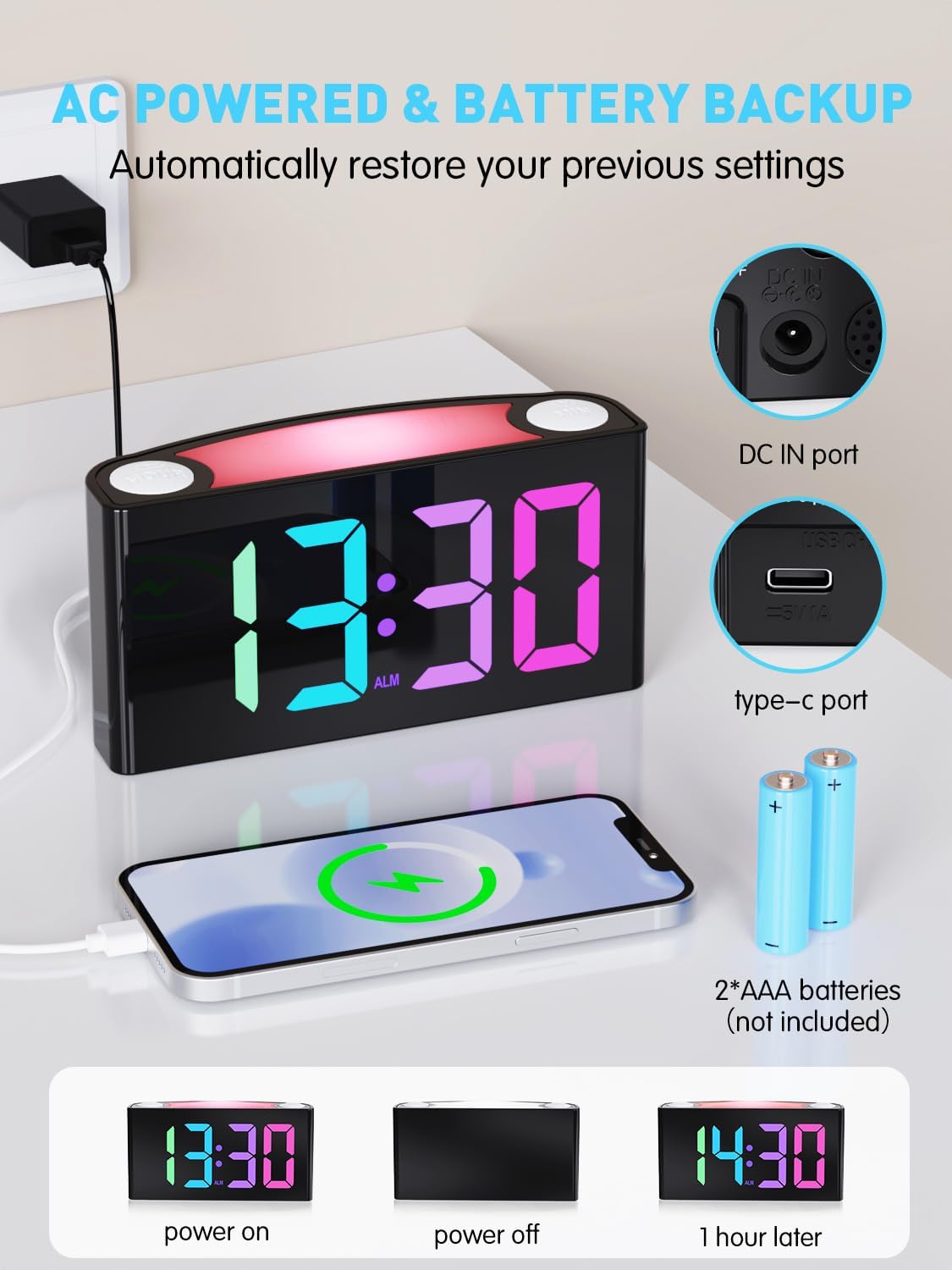
Image: The alarm clock is shown connected to AC power, with an open battery compartment indicating where to insert 2 AAA batteries for backup. The display shows "13:30" (power on), a blank screen (power off), and "14:30" (1 hour later, demonstrating time retention).
Poznámka: The clock's main functions (display, USB charging, alarm) require AC power. Batteries only provide backup for time memory and alarm trigger during power interruptions.
6. Návod k obsluze
6.1 Nastavení času
- Stiskněte tlačítko "SET TIME" button on the rear panel. The display will start flashing.
- Stiskněte tlačítko "HODINA" button (on top) to adjust the hour.
- Stiskněte tlačítko "MIN" button (on top) to adjust the minute.
- Stiskněte "SET TIME" again to save, or wait 5 seconds for automatic confirmation.
Video: Demonstrates how to set the time on the PPLEE RGB Digital Alarm Clock, including adjusting hours and minutes and confirming the setting.
6.2 Nastavení alarmu
- Posuňte "ALARM ON/OFF" switch to the "ON" position. The alarm indicator will light up.
- Stiskněte tlačítko "SET ALARM" button on the rear panel. The alarm time display will start flashing.
- Stiskněte tlačítko "HODINA" button (on top) to adjust the alarm hour.
- Stiskněte tlačítko "MIN" button (on top) to adjust the alarm minute.
- Stiskněte "SET ALARM" again to save, or wait 5 seconds for automatic confirmation.
To turn off the alarm, slide the "ALARM ON/OFF" switch to the "OFF" position. The alarm indicator will disappear.
6.3 Display Brightness (Dimmer)
The clock features a 7-level dimmer for the time display (0%-100% brightness).
- Použijte "STMÍVAČ" button on the rear panel to cycle through brightness levels.

Image: The alarm clock display shows various brightness levels from 0% to 100%, illustrating the 7-level dimmer function.
6.4 režimů nočního osvětlení
The clock includes an 8-mode/7-color night light with 3 adjustable brightness settings.
- Stiskněte tlačítko "ODLOŽENÍ/SVĚTLO" bar on top to turn the night light on/off and cycle through colors/modes.
- To adjust night light brightness, press and hold the "ODLOŽENÍ/SVĚTLO" bar.

Image: A person sleeping next to the alarm clock, which emits a soft yellow night light from its top bar. Below are icons indicating 3-level adjustable brightness for the night light.
6.5 Hlasitost alarmu
Adjust the alarm volume to your preference (Low, Medium, High).
- Použijte "ALARM VOLUME" switch on the rear panel to select the desired volume level.

Image: A person reaching for the snooze bar on the alarm clock, which displays "8:30". The image also illustrates the 3-level adjustable alarm volume (90db, 103db, 110db).
6.6 Funkce odložení
Když zazvoní budík, stiskněte velké "ODLOŽENÍ/SVĚTLO" bar on top to activate snooze for 9 extra minutes of sleep.
The alarm will sound again after 9 minutes. To completely turn off the alarm, use the "ALARM ON/OFF" přepínač.
6.7 12/24 Hour Format and DST
- Použijte "TIME FORMAT" switch on the rear panel to toggle between 12-hour and 24-hour display.
- Použijte "Letní čas" switch on the rear panel to enable or disable Daylight Saving Time (adjusts time by 1 hour).
6.8 Dual Charging Ports
The clock is equipped with a Type-C output port and a USB output port for charging your devices.

Image: The alarm clock with its display showing "12:00" and two smartphones connected to its USB and Type-C charging ports, indicating active charging.
Simply connect your device's charging cable to the appropriate port on the back of the clock.
7. Údržba
- Hodiny čistěte měkkým, suchým hadříkem. Nepoužívejte abrazivní čisticí prostředky ani rozpouštědla.
- Ensure the clock is unplugged before cleaning.
- Pokud se přístroj delší dobu nepoužívá, vyjměte záložní baterie.
8. Řešení problémů
| Problém | Řešení |
|---|---|
| Displej hodin je prázdný. | Check if the power adapter is securely plugged into both the clock and the wall outlet. Ensure the outlet has power. |
| Alarm se nespustí. | Verify the "ALARM ON/OFF" switch is in the "ON" position. Check the alarm volume setting. Ensure the alarm time is correctly set. |
| Čas je po výpadku proudu nesprávnýtage. | Ensure 2 AAA batteries are installed in the battery compartment for backup. If batteries were not present or depleted, reset the time manually. |
| Zařízení se nenabíjejí přes USB/Type-C. | Confirm the clock is connected to AC power. Check the charging cable and the device being charged. |
| Noční světlo nefunguje. | Press the "SNOOZE/LIGHT" bar to cycle through modes and turn on the light. Check if the clock is powered. |
9. Specifikace
| Číslo modelu | CR1008R |
| Značka | PPLEE |
| Typ zobrazení | Digital LED (RGB) |
| Rozměry produktu | 6.46 cm Š x 3.39 cm V |
| Zdroj napájení | Elektrické s kabelem (AC 100-240 V) |
| Zálohování baterie | 2 x AAA baterie (nejsou součástí balení) |
| Nabíjecí porty | 1 x USB, 1 x Type-C |
| Jas displeje | 7stupňový nastavitelný stmívač |
| Noční světlo | 8 modes / 7 colors, 3-level adjustable brightness |
| Hlasitost alarmu | 3-level adjustable (Low, Medium, High) |
| Doba odložení | 9 minut |
10. Záruka a podpora
For warranty information or technical support, please refer to the contact details provided with your purchase or visit the official PPLEE webmísto. Uschovejte si doklad o koupi pro případ záručních reklamací.
E-mail: support@pplec.net