
Zavedení
Thank you for choosing the WESEARY WG1 Wireless Gaming Headset. This manual provides detailed instructions on how to set up, operate, and maintain your headset to ensure optimal performance and longevity. Please read this manual thoroughly before using the product.
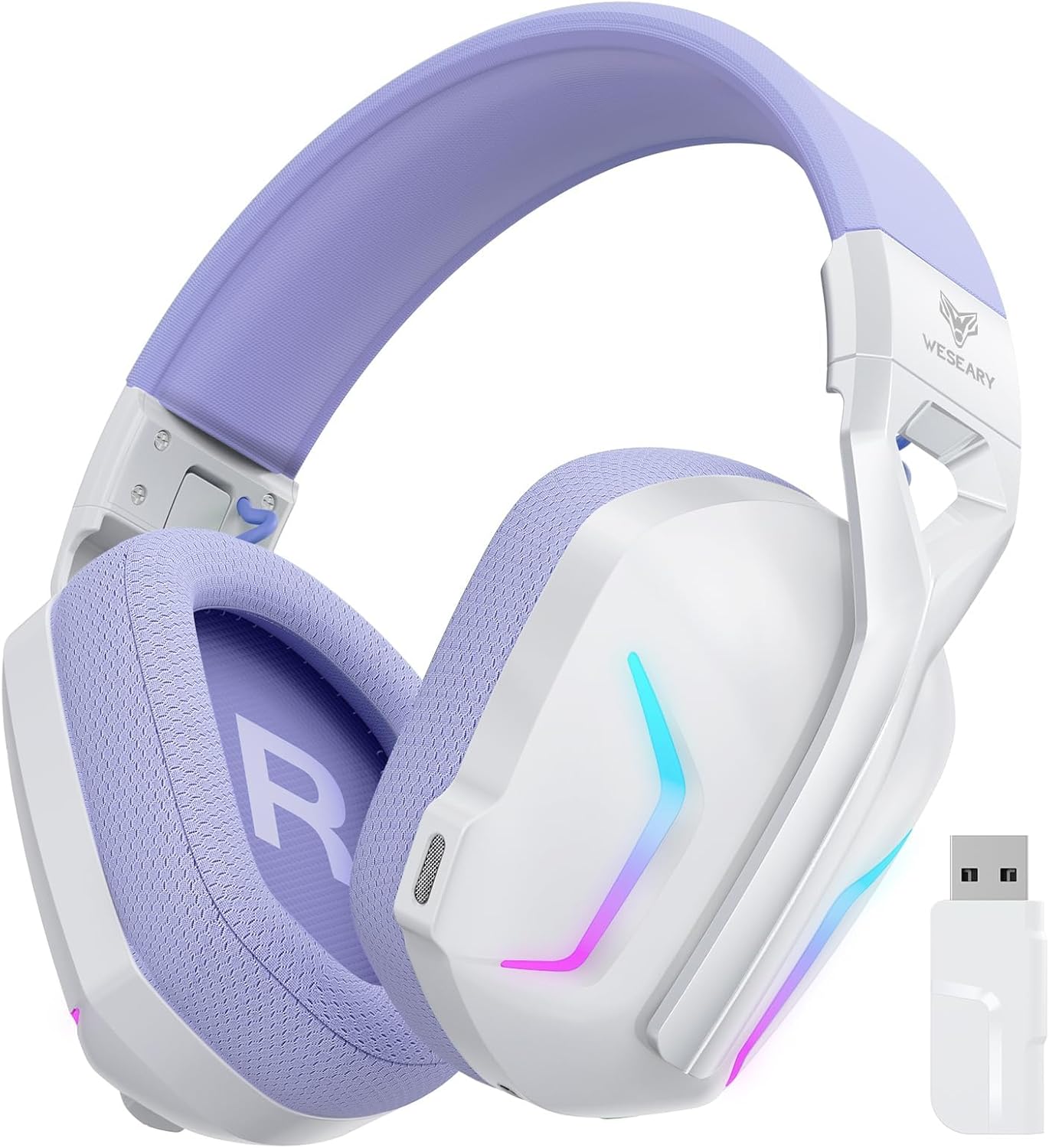
Image: The WESEARY WG1 Wireless Gaming Headset, showcasing its white and purple design along with the included USB dongle.
Obsah balení
Ujistěte se, že v balení jsou přítomny všechny položky:
- 1 x WESEARY WG1 Wireless Gaming Headset
- 1 x USB Dongle (2.4GHz)
- Nabíjecí kabel 1 x USB-C
- 1 x Uživatelská příručka
Specifikace
| Funkce | Detail |
|---|---|
| Číslo modelu | WG1 |
| Technologie připojení | Wireless (2.4GHz, Bluetooth), Wired (USB) |
| Kompatibilní zařízení | Desktops, Laptops, Tablets, PS5, PS4, PC, Switch, Mac, Smartphones |
| Ovladače zvuku | 50mm Titanium-plated Drivers |
| Zvukové vlastnosti | 7.1 Virtual Surround Sound, Deep Bass, Clear Highs |
| Mikrofon | Integrated Dual-beam Noise-cancelling (ENC) |
| Kapacita baterie | 1200mAh Lithium-iont |
| Prázdno | Up to 50 hours (40 hours with RGB) |
| Doba nabíjení | Přibližně 2.5 hodiny (USB-C) |
| Bezdrátové Dosah | Up to 49 feet (2.4GHz mode) |
| Hmotnost | 250 gramů |
| Speciální funkce | Noise Reduction, Foldable, Lightweight, RGB Lighting, Memory Foam Earpads, Adjustable Headband |
Průvodce nastavením
Nabíjení náhlavní soupravy
Before first use, fully charge the headset. Connect the included USB-C charging cable to the headset's charging port and the other end to a USB power source (e.g., computer USB port, wall adapter). The LED indicator will show charging status.

Image: Visual representation of the headset's 50-hour playtime, 1200mAh battery capacity, 2.5-hour Type-C full charge time, and 40-hour RGB mode playtime.
Režimy připojení
The WESEARY WG1 headset supports three connectivity modes:
- 2.4GHz Dongle Mode:
This mode provides a low-latency wireless connection ideal for gaming. Compatible with PS5, PS4, PC, Mac, and Switch (microphone not valid on Switch in this mode).
- Insert the 2.4GHz USB dongle into an available USB port on your device.
- Zapněte sluchátka. Měla by se automaticky připojit k adaptéru.
- Ujistěte se, že jsou v nastavení systému vybrána sluchátka jako vstupní/výstupní zvukové zařízení.
- Režim Bluetooth:
This mode is suitable for general use with Bluetooth-enabled devices. Compatible with PC, Mac, Switch (microphone not valid on Switch in this mode), and smartphones.
- Long press the microphone button on the headset to switch to Bluetooth mode.
- Enable Bluetooth on your device and search for "WESEARY WG1".
- Vyberte sluchátka, která chcete spárovat.
- USB Cable Mode (Wired):
For a stable wired connection, compatible with PS5, PS4, PC, and Mac.
- Connect the headset to your device using the USB-C charging cable.
- Sluchátka budou fungovat jako kabelové audio zařízení.
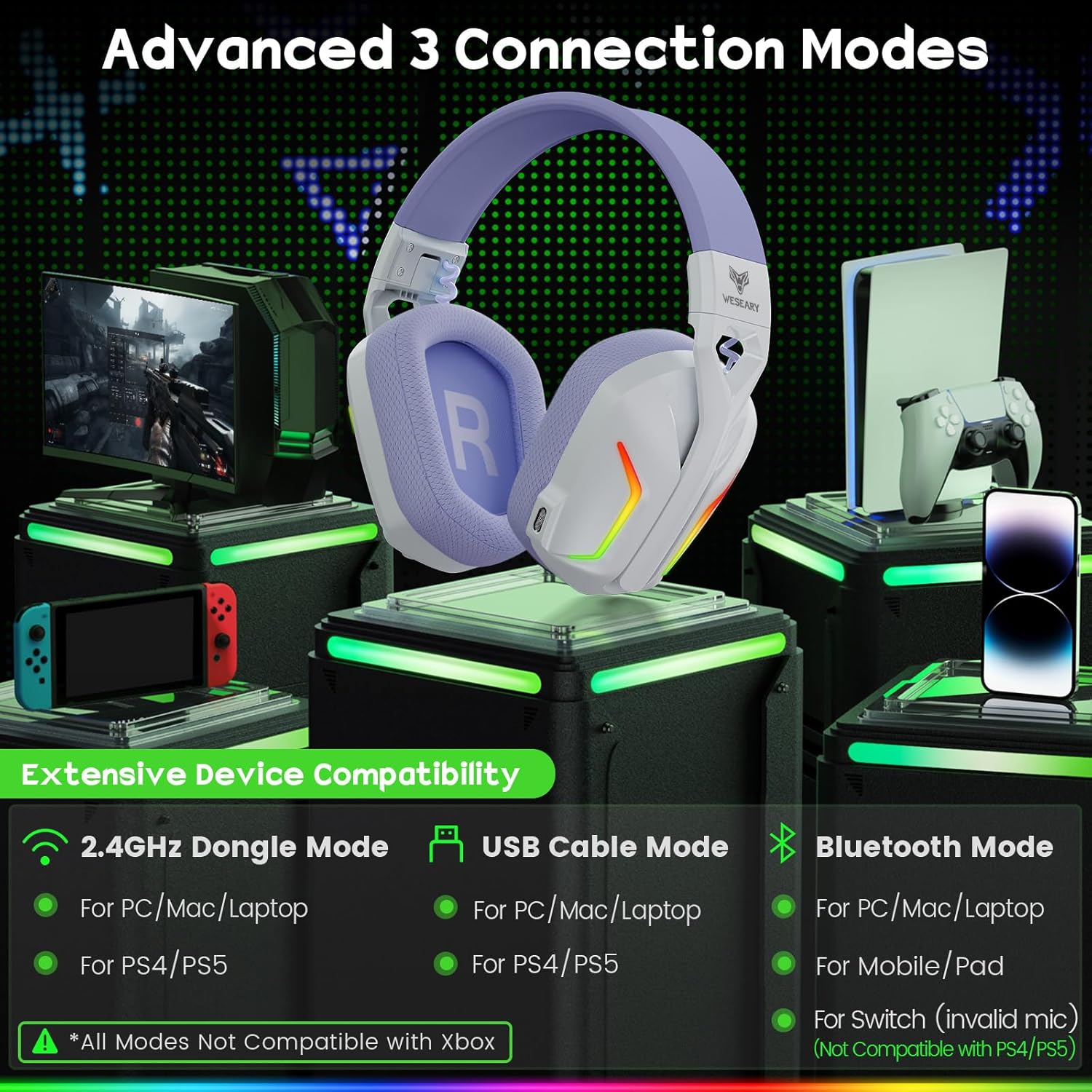
Image: An illustration detailing the three advanced connection modes (2.4GHz Dongle, USB Cable, Bluetooth) and their respective device compatibilities, including PS5, PS4, PC, Mac, Switch, and mobile/pad.
Důležité poznámky:
- None of the three modes are compatible with all Xbox devices.
- The microphone is not usable in Bluetooth mode on the Nintendo Switch.
- Bluetooth mode is not compatible with PS4/PS5 consoles.
- Long press the microphone button to switch between Bluetooth mode and dongle mode.
Návod k obsluze
Ovládání náhlavní soupravy

Image: A detailed diagram illustrating the various control buttons on the WESEARY WG1 headset, including power, volume, microphone, and RGB/surround sound controls, along with their corresponding functions.
- Vypínač (1):
- Turn on/off: Long press for 3 seconds.
- Play/Pause: Single click.
- Answer Call: Single click.
- Hang up Call: Single click.
- Reject Call: Long press for 2 seconds.
- Traceback: Double click.
- Volume Down / Previous Track Button (2):
- Volume Down: Single click.
- Previous Track: Long press for 2 seconds.
- Volume Up / Next Track Button (3):
- Volume Up: Single click.
- Next Track: Long press for 2 seconds.
- Clear All Devices (for pairing): Press volume up/down together for 6 seconds.
- Microphone Button (4):
- Mic on/off: Single click.
- Switch between BT mode and 2.4G mode: Long press for 2 seconds.
- RGB / 7.1 Surround Sound Button (5):
- Turn on/off RGB: Single click.
- 7.1 Surround on/off: Double click.
- Re-pairing (BT mode): Long press for 3 seconds.
Zvukové funkce
The WG1 headset features 50mm titanium-plated drivers for rich audio and 7.1 virtual surround sound for an immersive experience.

Image: An illustration demonstrating the 7.1 Pro Stereo Surround Sound feature, showing sound waves emanating from various directions around a gamer wearing the headset, indicating immersive audio.

Obrázek: Detailní výřez view of the 50mm titanium-plated driver, highlighting its components and the robust vibrations that deliver profound bass and crystalline highs for unparalleled sound clarity.
Použití mikrofonu
The integrated dual-beam microphones utilize ENC (Environmental Noise Cancellation) technology to ensure clear voice communication by suppressing up to 95% of background noise.

Image: A graphic illustrating the "Crystal Clear Voice Call" feature, showing how the headset precisely captures voice while suppressing 95% of rear and side background noise, accompanied by a noise reduction graph.
Údržba a péče
- Čištění: K čištění sluchátek s mikrofonem používejte měkký, suchý hadřík. Nepoužívejte abrazivní čisticí prostředky ani rozpouštědla.
- Skladování: Store the headset in a cool, dry place away from direct sunlight and extreme temperatures. The headset is foldable for easy storage and transport.
- Péče o baterie: Chcete-li prodloužit životnost baterie, vyvarujte se častého úplného vybíjení sluchátek. Pravidelně je nabíjejte, i když je delší dobu nepoužíváte.
- Zacházení: Zabraňte pádu sluchátek z náhlavní soupravy nebo jejich vystavení silným nárazům.

Image: A visual representation of the headset's ergonomic design, highlighting its lightweight and breathable nano breathable mesh with high-density sponge, memory foam earpads, and adjustable headbands for comfort and adaptability.
Odstraňování problémů
| Problém | Možná příčina | Řešení |
|---|---|---|
| Z sluchátek se nehlásí žádný zvuk | Headset not powered on; Incorrect audio output selected; Low battery; Not properly connected. | Ensure headset is powered on. Check system audio settings and select "WESEARY WG1". Charge the headset. Reconnect the dongle/cable or re-pair Bluetooth. |
| Mikrofon nefunguje | Microphone muted; Incorrect audio input selected; Compatibility issue (e.g., Switch Bluetooth mode). | Single click the microphone button to unmute. Check system audio input settings and select "WESEARY WG1". Refer to compatibility notes for specific devices. |
| Connection unstable or lagging | Interference; Too far from dongle/device; Low battery. | Move closer to the dongle/device. Ensure no strong interference sources nearby. Charge the headset. For Bluetooth, try re-pairing. |
| Sluchátka se nespárují přes Bluetooth | Headset not in pairing mode; Device Bluetooth off; Already paired with another device. | Long press the microphone button to enter Bluetooth mode. Ensure device Bluetooth is on. Try clearing all paired devices (press volume up/down together for 6s) and re-pair. |
If you encounter issues not listed here, please refer to the official WESEARY support channels.
Záruka a podpora
WESEARY products come with a standard manufacturer's warranty. For warranty claims, technical support, or further assistance, please contact WESEARY customer service through their official website or the platform where you purchased the product. Please retain your proof of purchase for warranty purposes.
Nejnovější informace a podporu naleznete na adrese: www.weseary.com (Poznámka: Toto je zástupný symbol URL, please refer to actual product documentation for official support links.)