
MEGATEK CP27BR
MEGATEK Portable CD Player User Manual
Model: CP27BR
Zavedení
Thank you for choosing the MEGATEK Portable CD Player. This device is designed to provide a versatile and high-quality audio experience, supporting various media formats and offering multiple connectivity options. Please read this manual carefully to ensure proper use and maintenance of your new CD player.

Image: The MEGATEK Portable CD Player, showcasing its compact design, integrated speakers, control buttons, and included accessories like headphones and USB-C charging cables.
Bezpečnostní informace
Pro zajištění bezpečného provozu a prevenci poškození dodržujte prosím následující bezpečnostní opatření:
- Nevystavujte zařízení extrémním teplotám, vlhkosti nebo přímému slunečnímu záření.
- Zabraňte pádu zařízení nebo jeho vystavení silným nárazům.
- Nerozebírejte ani se nepokoušejte o opravu zařízení sami. Veškerý servis svěřte kvalifikovanému personálu.
- Používejte pouze dodaný nabíjecí kabel a kompatibilní napájecí adaptér.
- Udržujte zařízení mimo dosah vody a jiných kapalin.
- Zařízení čistěte měkkým, suchým hadříkem. Nepoužívejte abrazivní čisticí prostředky ani rozpouštědla.
- Dlouhodobý poslech při vysoké hlasitosti může způsobit poškození sluchu. Upravte hlasitost na bezpečnou úroveň.
Obsah balení
Ověřte, zda jsou v balení přítomny všechny položky:
- MEGATEK Portable CD Player - Black
- Kabelová sluchátka
- Nabíjecí kabel USB-C
- Uživatelská příručka

Image: A visual representation of the package contents, including the CD player, headphones, USB-C cable, and user manual.
Konec produktuview
Familiarize yourself with the various parts and controls of your MEGATEK Portable CD Player.
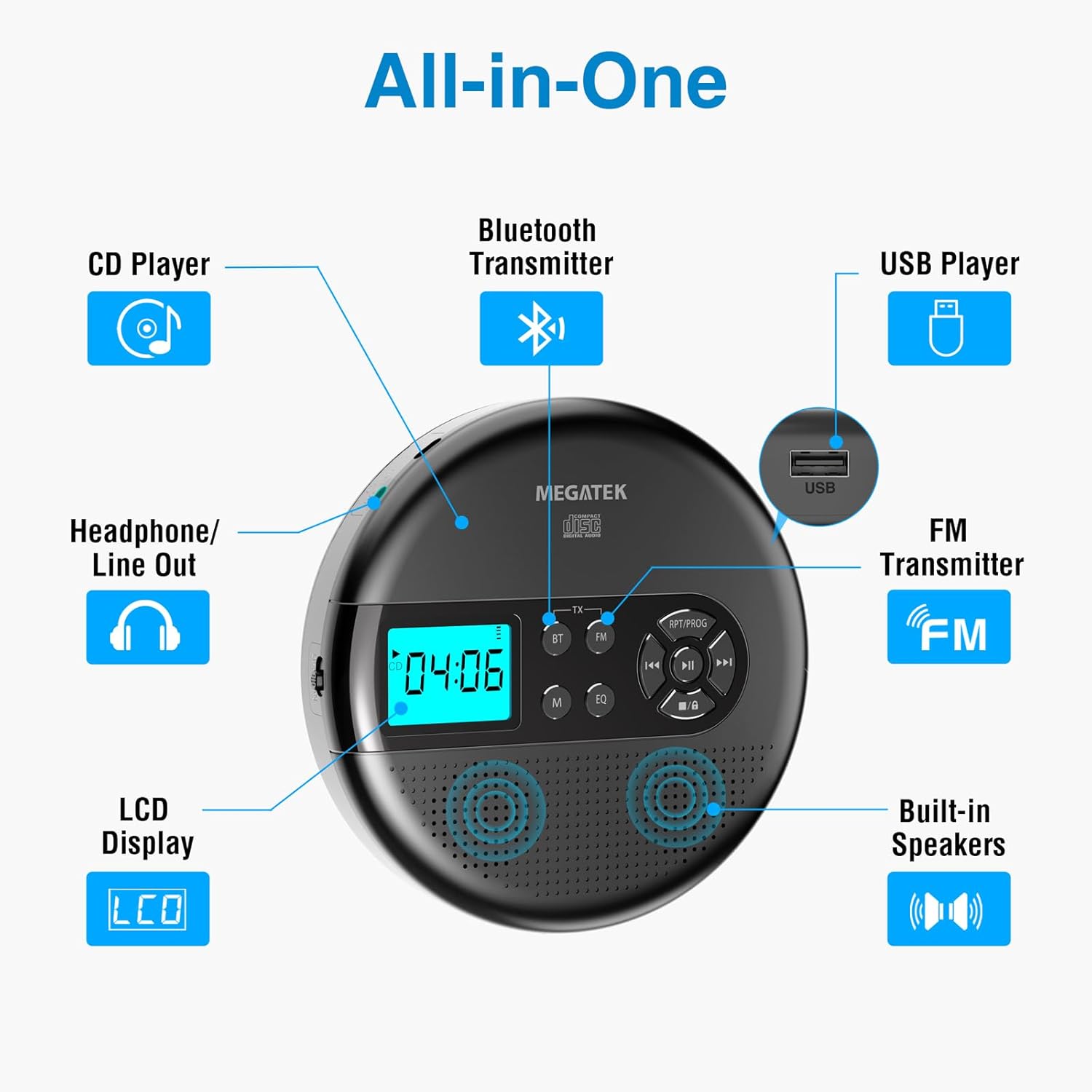
Image: An "All-in-One" diagram highlighting key features such as the CD Player, Bluetooth Transmitter, USB Player, FM Transmitter, Built-in Speakers, LCD Display, and Headphone/Line Out port.
Ovládací prvky a porty:
- LCD displej: Shows track number, time, mode, and battery status.
- Tlačítko Přehrát/Pozastavit: Spustí nebo pozastaví přehrávání.
- Tlačítka Předchozí/Další: Přeskočí skladby nebo se rychle posune vpřed/vzad.
- Tlačítko Stop: Zastaví přehrávání.
- RPT/PROG Button: Controls repeat modes and programming tracks.
- Tlačítko BT: Activates Bluetooth transmission mode.
- Tlačítko FM: Activates FM transmission mode.
- Tlačítko M (režim): Switches between CD, USB, Bluetooth, and FM modes.
- Tlačítko EQ: Cykluje mezi předvolbami ekvalizéru.
- Ovládání hlasitosti: Upravuje úroveň zvukového výstupu.
- USB port: Pro přehrávání zvuku filez USB disku.
- Nabíjecí port typu C: Pro nabíjení interní baterie.
- 3.5mm Audio Out Jack: Pro připojení sluchátek nebo externích reproduktorů.
- Vestavěné stereo reproduktory: Pro přímé přehrávání zvuku.
Nastavení
Nabíjení baterie:
The device is equipped with a built-in 2000mAh rechargeable Li-ion battery. Before first use, fully charge the player.
- Connect the provided USB-C charging cable to the Type-C charging port on the player.
- Druhý konec kabelu USB-C připojte k napájecímu adaptéru USB (není součástí balení) nebo k portu USB počítače.
- The battery indicator on the LCD display will show charging status. A full charge provides up to 15 hours of playtime at medium volume.

Image: The portable CD player connected to a power source via its USB-C cable, resting on a nightstand next to a bed.
Vložení CD:
- Locate the CD compartment latch/button on the side of the player and slide/press it to open the lid.
- Carefully place the CD onto the center spindle with the label side facing up.
- Jemně zatlačte CD dolů, dokud nezacvakne na místo.
- Pevně zavřete víko přihrádky na CD, dokud nezaklapne.

Image: The portable CD player with its lid open, showing a blue CD disc inserted into the compartment, ready for playback.
Návod k obsluze
Přehrávání CD:
- Vložte CD podle pokynů v části Nastavení.
- Stiskněte tlačítko Přehrát/Pozastavit tlačítko pro zahájení přehrávání.
- Použijte Předchozí/Další buttons to navigate between tracks. Hold to fast-forward or rewind.
- Stiskněte tlačítko RPT/PROG button to cycle through repeat modes (repeat one, repeat all, random) or to program a custom playback order.
- Stiskněte tlačítko Zastávka tlačítko pro ukončení přehrávání.
- Adjust volume using the dedicated volume control.
USB přehrávání:
The player supports MP3, WMA, and WAV audio filez USB disku.
- Vložte USB flash disk do USB portu.
- Stiskněte tlačítko M (režim) tlačítko pro přepnutí do režimu USB.
- Použijte Přehrát/Pozastavit, Předchozí/Dalšía RPT/PROG tlačítka stejně jako při přehrávání CD.
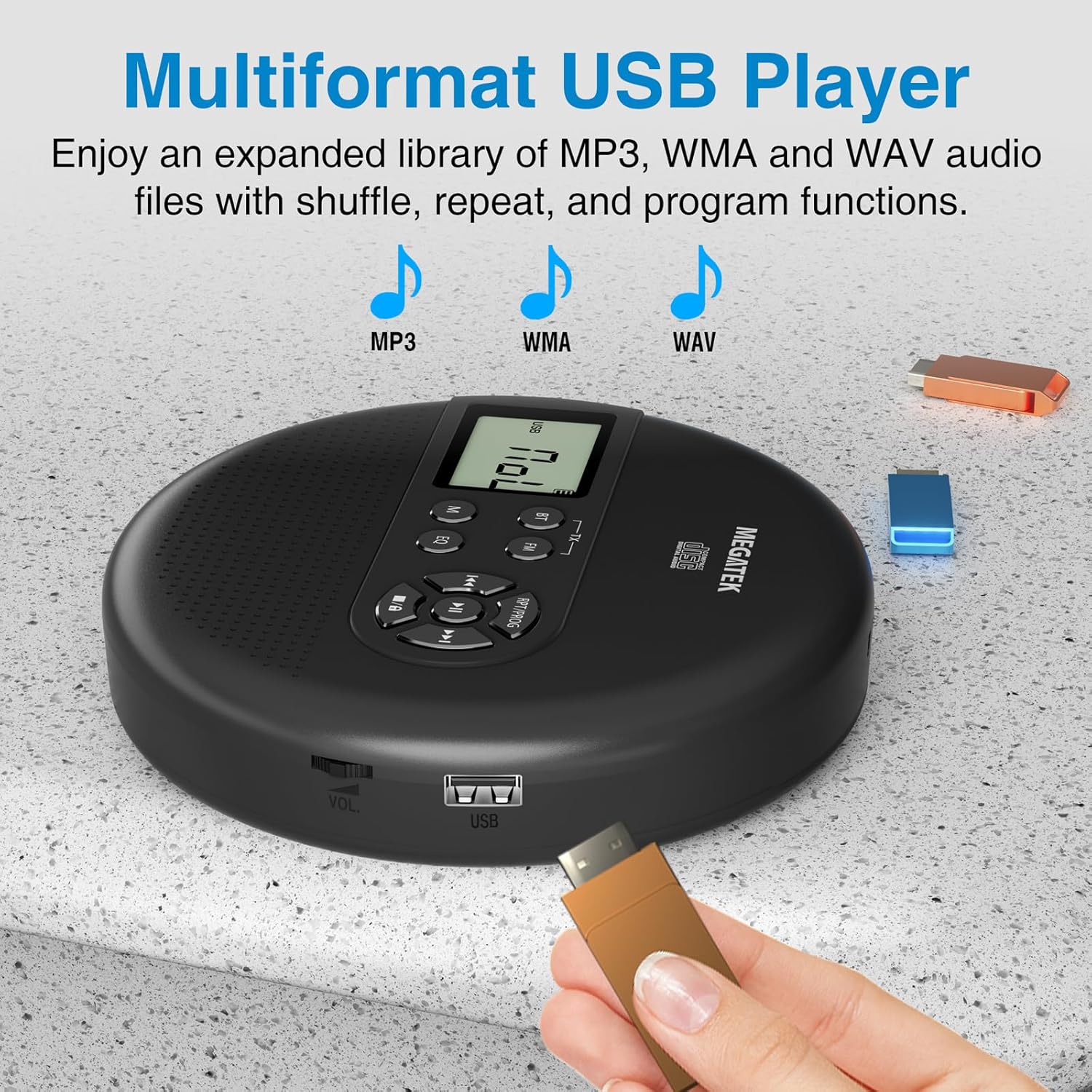
Image: The portable CD player with a USB flash drive inserted into its side port, illustrating its multi-format USB playback capability.
Přenos Bluetooth:
Stream audio wirelessly to Bluetooth-enabled headphones or speakers. Note: This feature does not support connections to car stereo systems.
- Ujistěte se, že vaše Bluetooth sluchátka nebo reproduktor jsou v režimu párování.
- On the CD player, press the BT button. The Bluetooth indicator on the display will flash.
- The player will automatically search for and connect to nearby Bluetooth devices. Once connected, the indicator will stop flashing.

Image: The portable CD player wirelessly transmitting audio to two external Bluetooth speakers, demonstrating its Bluetooth transmission capability.
FM přenos:
Transmit audio signals to nearby FM radios, including car FM stereos and home stereo systems.
- Stiskněte tlačítko FM button on the CD player. The display will show an FM frequency.
- Tune your FM radio (car stereo, home stereo) to the same frequency displayed on the CD player.
- Adjust the frequency on the CD player using the Předchozí/Další buttons if interference occurs or to find a clearer channel.

Image: The portable CD player placed on a car dashboard, transmitting audio to the car's FM stereo system, indicated by an FM frequency on the car's display.
Using Headphones/External Speakers:
For private listening or connecting to wired audio systems:
- Plug the included wired headphones into the 3.5mm audio out jack.
- Alternatively, connect an audio cable (not included) from the 3.5mm audio out jack to the AUX input of external speakers or an audio system.
- The built-in speakers will automatically mute when headphones or external speakers are connected.

Image: A close-up of the portable CD player, visually representing sound waves emitting from its dual stereo speakers, emphasizing the built-in audio capability.
Údržba
- Čištění: Use a soft, dry, lint-free cloth to clean the exterior of the player. For the CD lens, use a specialized CD lens cleaner. Do not use liquids or aerosol cleaners directly on the device.
- Skladování: Pokud přehrávač delší dobu nepoužíváte, skladujte jej na chladném a suchém místě, mimo dosah přímého slunečního záření a extrémních teplot.
- Péče o baterie: Chcete-li prodloužit životnost baterie, vyvarujte se častého úplného vybíjení baterie. Zařízení pravidelně nabíjejte, i když jej aktivně nepoužíváte.
Odstraňování problémů
| Problém | Možná příčina | Řešení |
|---|---|---|
| Přehrávač se nezapne. | Baterie je vybitá. | Charge the player using the USB-C cable. |
| Z reproduktorů/sluchátek není slyšet žádný zvuk. | Volume is too low; headphones not fully plugged in; incorrect mode selected. | Increase volume; ensure headphones are securely connected; press the M (režim) tlačítko pro výběr správného zdroje. |
| CD přeskakuje nebo se nepřehrává. | CD is dirty, scratched, or inserted incorrectly; anti-skip function overwhelmed. | Clean the CD; ensure CD is properly seated; avoid strong vibrations. |
| Problémy s připojením Bluetooth. | Device not in pairing mode; too far from player; interference. | Ensure receiving device is in pairing mode; move closer to the player; restart both devices. |
| Špatná kvalita/statické rušení FM vysílání. | Interference; incorrect frequency. | Adjust the FM frequency on the player and receiver to find a clear channel. |
Specifikace
| Funkce | Detail |
|---|---|
| Číslo modelu | CP27BR |
| Rozměry produktu | 5.91 x 5.91 x 1.32 palce |
| Hmotnost položky | 10.9 unce |
| Baterie | 2000mAh lithium-iontová (dobíjecí) |
| Prázdno | Až 15 hodin (při střední hlasitosti) |
| Podporované formáty CD | CD, CD-R/RW, MP3 CD, Audio Book CD |
| Podporované formáty USB | MP3, WMA, WAV |
| Ochrana proti přeskakování | 60 sekund |
| Konektivita | USB, Bluetooth Transmitter, FM Transmitter, 3.5mm Audio Out |
| Speciální funkce | Built-in Stereo Speakers, Resume Play, Shuffle, Repeat, Program Functions, 5 EQ Options |
Záruka a podpora
MEGATEK offers comprehensive support for its products:
- 12měsíční výměna: In case of product defects or issues within 12 months of purchase.
- Doživotní technická podpora: Assistance with product usage, troubleshooting, and general inquiries.
- Zákaznický servis 24/7: Available through Amazon buyer-seller messaging.
For any questions or problems, please contact MEGATEK customer service via the Amazon platform or refer to the contact information provided in the product packaging.
Image: A graphic detailing MEGATEK's customer support, including 12-month replacement, lifetime technical support, and 24/7 Amazon buyer-seller messaging, alongside an image of customer service representatives.
Ask a question about this manual
Ask about setup, troubleshooting, compatibility, parts, safety, or missing instructions. Manuals+ will review the question and use this page’s manual context to help answer it.