
Zavedení
Thank you for choosing the Vivitar Singimals Kids Karaoke Speaker. This manual provides essential information for the safe and effective use of your new karaoke speaker. Please read it thoroughly before operation and retain it for future reference.
Co je v krabici:
- Singimals Kids Karaoke Speaker (Asher The Fox)
- Kabelový mikrofon
- Nabíjecí kabel
- Uživatelská příručka
Konec produktuview
The Vivitar Singimals Kids Karaoke Speaker is designed for interactive fun, featuring a 5W speaker, Bluetooth v5.1 connectivity, and multicolor LED lighting. It offers up to 12 hours of playtime on a single charge.
Klíčové vlastnosti:
- 5W Speaker: Delivers clear and crisp audio for an engaging karaoke experience.
- Bluetooth v5.1: Ensures stable and efficient wireless connection to compatible devices.
- 12 hodin hraní: Enjoy extended entertainment with the built-in rechargeable battery.
- Vícebarevné LED osvětlení: Dynamic lights that pulse and dance to the music, enhancing the performance atmosphere.
- Přenosný design: Kompaktní a lehký pro snadnou přepravu a použití kdekoli.
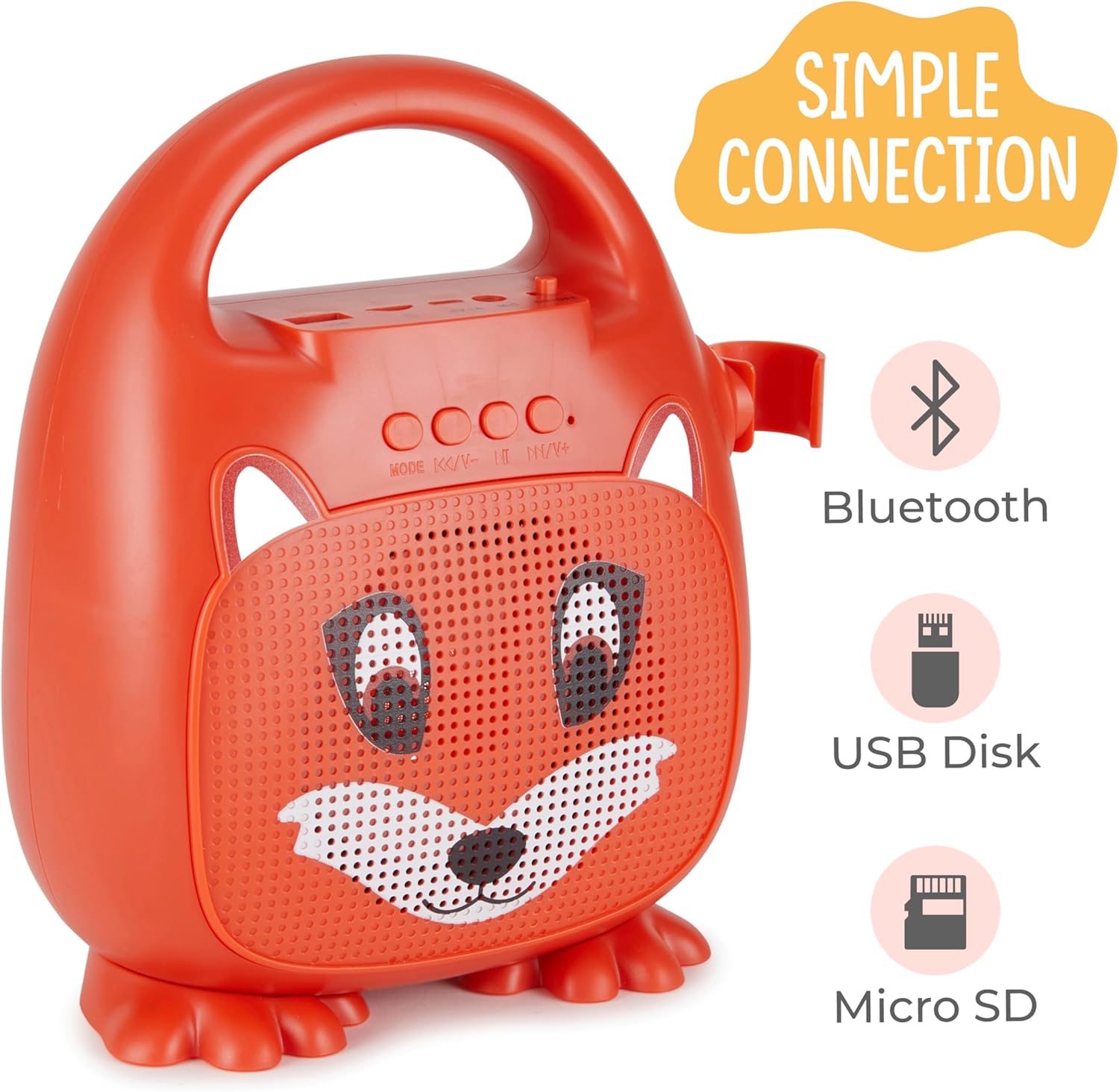
Obrázek 1: Přední strana view of the Singimals Kids Karaoke Speaker (Asher The Fox).
Nastavení
1. Nabíjení reproduktoru:
Before first use, fully charge the speaker. Connect the provided charging cable to the speaker's charging port (usually labeled "5V 1A" or similar) and the other end to a USB power adapter (not included) or a computer's USB port. The charging indicator light will show the charging status.
2. Připojení mikrofonu:
Insert the microphone's plug into the MIC input port on the speaker. Ensure the microphone's ON/OFF switch is in the 'ON' position when in use.

Figure 2: Wired Microphone with ON/OFF switch.
3. Zapnutí/vypnutí:
Locate the ON/OFF switch on the speaker. Slide it to the 'ON' position to power on the device. Slide it to 'OFF' to power down.
4. Bluetooth párování:
- Power on the karaoke speaker. It will automatically enter Bluetooth pairing mode, indicated by a flashing LED light.
- Na smartphonu nebo jiném zařízení s podporou Bluetooth přejděte do nastavení Bluetooth.
- Hledat available devices and select "Singimals" (or similar name) from the list.
- Once connected, the LED indicator on the speaker will stop flashing and remain solid, and you may hear an audible confirmation.
5. USB Disk and Micro SD Card Playback:
Vložte USB flash disk nebo kartu Micro SD (s přednastavenými zvukovými soubory) files) into the respective ports on the speaker. The speaker will automatically detect the media and begin playback. Use the 'MODE' button to switch between input sources (Bluetooth, USB, Micro SD).

Figure 3: Control panel and input ports.
Návod k obsluze
Ovládací tlačítka:
| Tlačítko | Funkce |
|---|---|
| MODE | Switches between input modes (Bluetooth, USB, Micro SD). |
| Předchozí skladba / snížení hlasitosti | Krátké stisknutí pro předchozí skladbu. Dlouhé stisknutí pro snížení hlasitosti. |
| Přehrát / Pozastavit | Přehraje nebo pozastaví aktuální zvukovou stopu. |
| Další stopa / zvýšení hlasitosti | Krátkým stisknutím přejdete na další skladbu. Dlouhým stisknutím zvýšíte hlasitost. |
LED osvětlení:
The speaker features multicolor LED lights that illuminate the speaker grille. These lights automatically pulse and change colors with the music. There is no separate control for the LED lighting; it operates automatically when the speaker is on.
Údržba
- Čištění: Wipe the speaker and microphone with a soft, dry cloth. Do not use abrasive cleaners or solvents.
- Skladování: Přístroj skladujte na chladném a suchém místě mimo dosah přímého slunečního záření a extrémních teplot.
- Péče o baterie: Pro prodloužení životnosti baterie reproduktor pravidelně nabíjejte, i když jej nepoužíváte často. Nevystavujte baterii úplnému vybíjení po delší dobu.
- Vystavení vodě: Toto zařízení není vodotěsné. Chraňte jej před vodou a vlhkostí.
Odstraňování problémů
| Problém | Řešení |
|---|---|
| Reproduktor se nezapne. | Ensure the ON/OFF switch is in the 'ON' position. Charge the speaker if the battery is depleted. |
| Žádný zvuk z mikrofonu. | Check if the microphone is securely plugged into the MIC port. Ensure the microphone's ON/OFF switch is in the 'ON' position. |
| Nelze spárovat přes Bluetooth. | Ensure the speaker is in Bluetooth mode (flashing LED). Turn off and on Bluetooth on your device. Move your device closer to the speaker. |
| Špatná kvalita zvuku. | Ensure the audio source is of good quality. Adjust the volume on both the speaker and the connected device. Check for obstructions around the speaker grille. |
Specifikace
| Funkce | Detail |
|---|---|
| Značka | Vivitar |
| Číslo modelu | SNG200-FOX |
| Technologie připojení | Bluetooth |
| Verze Bluetooth | v5.1 |
| Výstupní Wattage | 5 wattů |
| Zdroj napájení | Napájení z baterie |
| Rozměry položky (D x Š x V) | 4.72 x 8.7 x 9.25 palce |
| Hmotnost položky | 0.94 kg |
| Materiál | Plast |
| Zvukový vstup | Microphone, USB, Micro SD |
Bezpečnostní informace
- Nevystavujte zařízení extrémním teplotám, přímému slunečnímu záření nebo vysoké vlhkosti.
- Udržujte zařízení mimo dosah vody a jiných kapalin.
- Nepokoušejte se zařízení rozebírat ani upravovat. Zrušíte tím záruku a může dojít k poškození.
- Používejte pouze dodaný nabíjecí kabel.
- Během používání dohlížejte na malé děti, aby byl zajištěn bezpečný provoz.
- Vyhněte se delšímu poslechu při vysoké hlasitosti, abyste předešli poškození sluchu.
Záruka a podpora
Informace o záruce a zákaznické podpoře naleznete v záruční kartě, která je součástí produktu, nebo navštivte oficiální webové stránky společnosti Vivitar. webwebu. Uschovejte si účtenku jako doklad o koupi.
Výrobce: Sakar International, Inc.