
Lightkiwi B0CG2PSV8B
Lightkiwi 600 Watt Multi-Tap Low Volttage Landscape Lighting WiFi Transformer
Model: B0CG2PSV8B
Zavedení
This manual provides detailed instructions for the safe and efficient installation, operation, and maintenance of your Lightkiwi 600 Watt Multi-Tap Low Voltage Landscape Lighting WiFi Transformer. This transformer is designed for low voltage outdoor lighting applications, including landscape, lawn, and garden lighting. Please read this manual thoroughly before installation and retain it for future reference.
Bezpečnostní informace
VAROVÁNÍ: To reduce the risk of fire or injury to persons, read these instructions carefully before use.
- Pouze pro instalaci do nebo na nehořlavé materiály.
- Vhodné pro vnitřní i venkovní použití.
- Read installation instructions before connecting to the power supply.
- Pouze pro použití s nízkým objememtage landscape luminaries and fittings.
- Není určeno pro použití s ponornými zařízeními.
- Always disconnect power before servicing or installing.
- Ujistěte se, že všechny spoje jsou bezpečné a řádně izolované.
- Do not overload the transformer. Refer to the maximum load specifications.

Obrázek: Interní view of the Lightkiwi transformer, showing safety warnings and wiring terminals. This image highlights the internal components and the caution labels for safe operation.
Obsah balení
Zkontrolujte prosím obsah balení, abyste se ujistili, že jsou všechny položky přítomny a nepoškozené:
- Lightkiwi 600 Watt Multi-Tap Low Volttage Landscape Lighting WiFi Transformer
- WiFi Smart Plug
- Návod k použití (tento dokument)
Konec produktuview
The Lightkiwi 600 Watt Multi-Tap Transformer is a robust and efficient solution for your outdoor lighting needs. It features a heavy-duty stainless steel enclosure, a high-performance toroidal core for quiet and reliable operation, and multi-tap output voltages (12V-13V-14V-15V AC) to compensate for voltage drop over extended wire runs. It also includes dual protection with an auto-reset thermal circuit breaker and two 25A magnetic circuit breakers for enhanced safety.

Image: The Lightkiwi 600 Watt Multi-Tap Low Voltage Landscape Lighting WiFi Transformer shown alongside its smart plug accessory. This image provides a complete view of the product and its smart control component.

Image: A close-up of the Lightkiwi transformer, emphasizing its heavy-duty stainless steel construction and the attached power cord. This image highlights the robust build quality suitable for outdoor use.
Nastavení a instalace
Follow these steps for proper installation of your transformer:
- Vyberte umístění: Select a suitable location for mounting the transformer. It should be close to a 120V AC power outlet and centrally located to your landscape lighting fixtures to minimize wire runs. The unit is weatherproof and suitable for outdoor installation.
- Namontujte transformátor: Securely mount the transformer to a wall or sturdy surface using appropriate hardware (not included) through the mounting holes on the top flange. Ensure it is mounted vertically with the wiring compartment facing downwards.
- Připojte Low Voltage dráty: Open the transformer door. Connect your low voltage landscape lighting wires to the appropriate output terminals (Com1, Com2, 12V, 13V, 14V, 15V). Use the multi-tap voltages (13V, 14V, 15V) to compensate for voltage drop on longer wire runs. For example, use 12V for short runs, and higher voltages for longer runs to maintain consistent brightness.
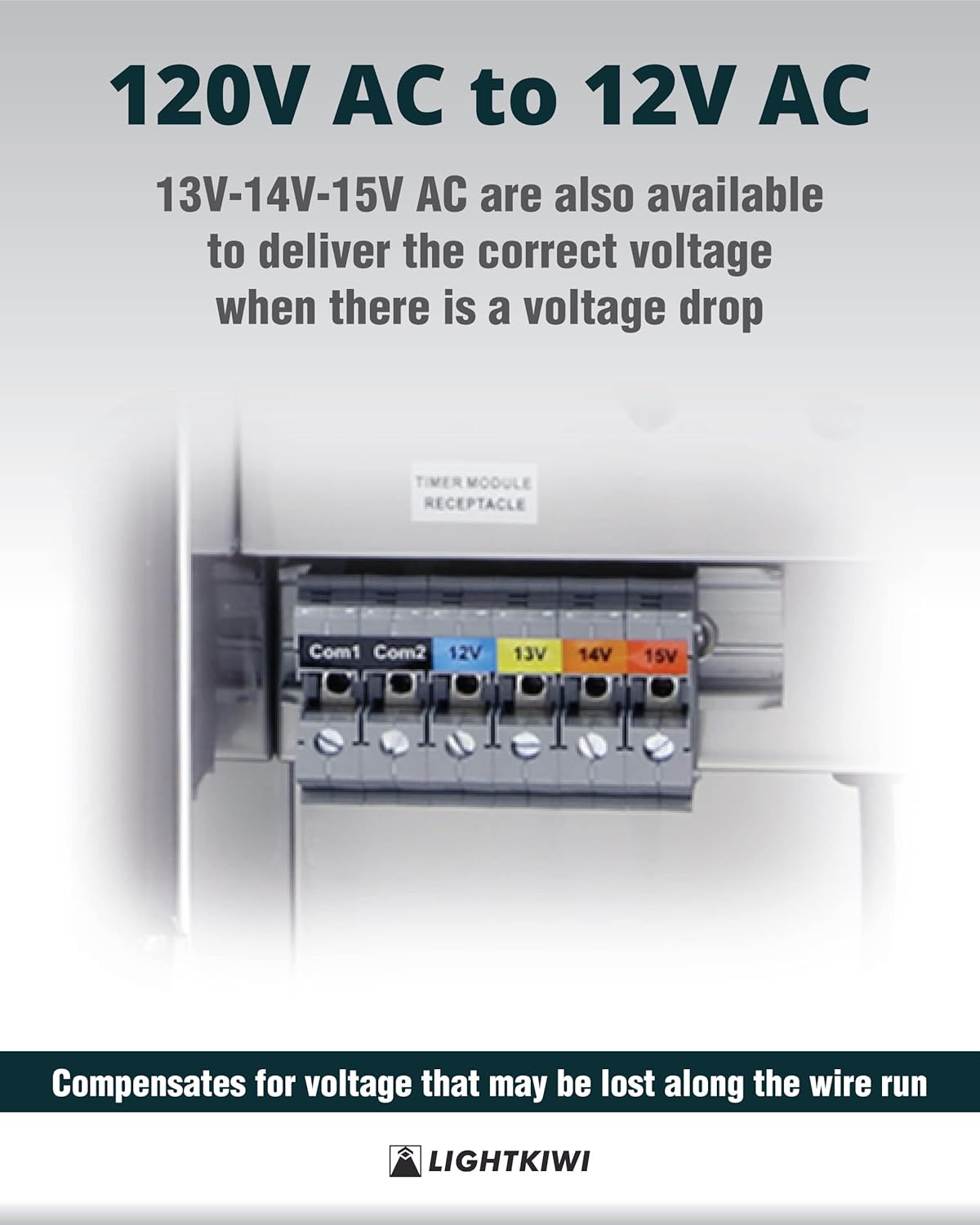
Obrázek: Podrobný view of the multi-tap voltage terminals (Com1, Com2, 12V, 13V, 14V, 15V) on the Lightkiwi transformer. This image illustrates where to connect the low voltage wiring for different voltage výstupy.
- Connect the Smart Plug (Optional): If using the WiFi Smart Plug, plug it into the 'TIMER MODULE RECEPTACLE' inside the transformer. Then, plug the photocell plug (if applicable) into the smart plug.

Image: The Lightkiwi transformer with the smart plug and photocell connected to the internal receptacle. This image demonstrates the correct way to integrate the smart plug for remote control.

Image: A detailed composite image showing various configurations of the smart plug and photocell connections within the transformer. This provides clear visual guidance for connecting these components.
- Zapnutí: Plug the transformer's power cord into a grounded 120V AC outlet. The transformer is now ready for operation.
Návod k obsluze
The Lightkiwi transformer is designed for simple operation. Once installed and powered, your low voltage lighting system will be active.
Using the WiFi Smart Plug
The included WiFi Smart Plug allows for remote control and scheduling of your landscape lighting via the Smart Life app.
- Stáhněte si aplikaci: Stáhněte si aplikaci „Smart Life“ z App Storu (iOS) nebo Obchodu Google Play (Android).
- Registrace/Přihlášení: Vytvořte si účet nebo se přihlaste ke svému stávajícímu účtu Smart Life.
- Přidat zařízení: Follow the in-app instructions to add the WiFi Smart Plug. Typically, this involves putting the smart plug into pairing mode (often by holding a button until an indicator light blinks rapidly) and then selecting 'Electrical Outlet' or 'Smart Plug' in the app.
- Control and Schedule: Once connected, you can turn your lighting system on/off remotely, set schedules, timers, and integrate with voice assistants (if supported by the app).
Údržba
The Lightkiwi transformer requires minimal maintenance to ensure long-lasting performance.
- Pravidelný úklid: Pravidelně otírejte vnější povrch transformátoru čisticím prostředkem.amp hadříkem odstraňte nečistoty a usazeniny. Nepoužívejte abrazivní čisticí prostředky ani rozpouštědla.
- Zkontrolujte kabeláž: Annually inspect all wiring connections for tightness and signs of wear or corrosion. Ensure the power cord is not damaged.
- Průhledné větrací otvory: Ensure that any ventilation openings are clear of obstructions to prevent overheating.
- Kontrola jističe: The transformer features magnetic circuit breakers. If the lighting system goes out, check if a breaker has tripped. Reset by flipping the switch back to the 'ON' position. If it trips repeatedly, investigate for a short circuit or overload in your lighting system.
Odstraňování problémů
If you encounter issues with your Lightkiwi transformer, refer to the following common problems and solutions:
| Problém | Možná příčina | Řešení |
|---|---|---|
| Světla se nezapínají. | No power to transformer; Tripped circuit breaker; Loose wiring connection; Faulty bulb/fixture. | Check power outlet and transformer plug. Reset circuit breakers inside the transformer. Inspect and tighten all wire connections. Test individual bulbs/fixtures. |
| Světla jsou slabá nebo blikají. | svtage drop due to long wire run; Overloaded transformer; Loose connection. | Použijte vyšší objtage tap (13V, 14V, or 15V) on the transformer. Reduce the total wattage of connected lights. Check and tighten all wire connections. |
| Transformátor vydává neobvyklý zvuk. | Overload; Internal issue. | Reduce the load on the transformer. If noise persists, disconnect power and contact customer support. |
| Smart Plug not connecting to WiFi. | Incorrect WiFi password; Out of range; Router issues. | Ensure correct WiFi password. Move transformer closer to router or use a WiFi extender. Restart router. Follow Smart Life app troubleshooting. |
Specifikace
Detailed technical specifications for the Lightkiwi 600 Watt Multi-Tap Transformer:
- Model: B0CG2PSV8B
- Vstupní objemtage: 120V AC
- Výstupní objemtage: 12V-13V-14V-15V AC Multi-Tap
- Maximální Wattage: 600 wattů
- Maximální zatížení: 70% of rated wattage
- Aktuální hodnocení: 25 Amps (per secondary breaker)
- Napájecí kabel: 70" black 18AWG SJTW cord and plug set
- Materiál pouzdra: Těžká nerezová ocel
- Typ jádra: High-Performance Toroidal Core
- Ochrana: Primary: Auto Reset Thermal Circuit Breaker; Secondary: (2) 25A Magnetic Circuit Breakers
- certifikace: Seznam ETL
- Rozměry (přibližné): 14.60 cm (výška) x 6.80 cm (šířka) x 6.50 cm (hloubka)

Image: A technical drawing illustrating the dimensions of the Lightkiwi transformer, including height, width, depth, and power cord length. This provides precise measurements for installation planning.

Image: The ETL Listed certification mark and associated product information for the Lightkiwi transformer. This confirms the product's compliance with safety guidelines and standards.
Záruka a podpora
Lightkiwi stands behind the quality of its products. For warranty information, technical support, or any inquiries regarding your transformer, please contact Lightkiwi customer service. Refer to the product packaging or the official Lightkiwi webstránky s nejaktuálnějšími kontaktními údaji.
Zavazujeme se poskytovat vynikající služby a podporu pro váš produkt.
Ask a question about this manual
Ask about setup, troubleshooting, compatibility, parts, safety, or missing instructions. Manuals+ will review the question and use this page’s manual context to help answer it.