
VIP4205, VIP5305BT, VIP5305W
RF Remote Control for Arris VIP4205 VIP5305BT VIP5305W User Manual
Model: VIP4205, VIP5305BT, VIP5305W
Zavedení
This manual provides essential information for the proper use and maintenance of your RF Remote Control for Arris IPTV/OTT Set-Top TV Boxes. Please read this manual thoroughly before operating the device to ensure optimal performance and longevity.
Bezpečnostní informace
Abyste předešli poškození nebo zranění, dodržujte následující bezpečnostní opatření:
- Nevystavujte dálkový ovladač přímému slunečnímu záření, vysokým teplotám nebo vlhkosti.
- Zabraňte pádu dálkového ovladače na zem nebo jeho vystavení silným nárazům.
- Nepokoušejte se dálkový ovladač rozebírat ani upravovat. Ztratíte tak záruku.
- Udržujte baterie mimo dosah dětí. Při požití okamžitě vyhledejte lékařskou pomoc.
- Použité baterie zlikvidujte v souladu s místními předpisy.
Obsah balení
Ověřte, zda jsou v balení přítomny všechny položky:
- 1 x RF Remote Control (for Arris VIP4205, VIP5305BT, VIP5305W)
- (Baterie nejsou součástí balení a je nutné je zakoupit samostatně)
Nastavení
1. Instalace baterie
Dálkové ovládání vyžaduje dvě baterie AAA (nejsou součástí balení).
- Najděte přihrádku na baterie na zadní straně dálkového ovladače.
- Zatlačte na západku a vysuňte kryt baterie.
- Vložte dvě baterie typu AAA a ujistěte se, že kladný (+) a záporný (-) pól správně shodují s označením uvnitř přihrádky.
- Zasuňte kryt baterie zpět na místo, dokud bezpečně nezapadne.

Tento obrázek zobrazuje zadní část view of the remote control, highlighting the battery compartment cover. The cover is a solid piece, indicating where it needs to be removed to access the battery slots.
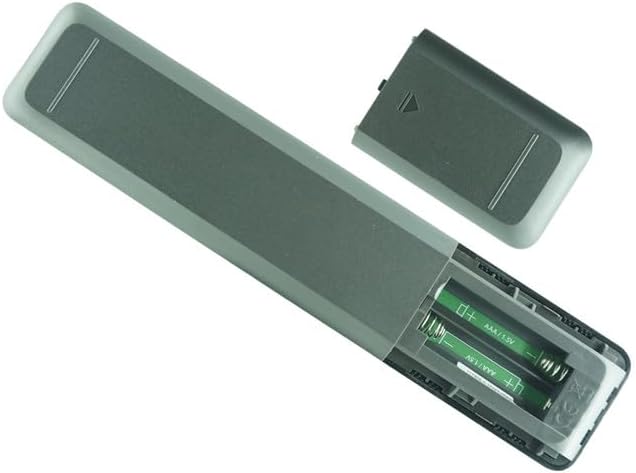
This image shows the remote control with its battery cover detached, exposing the two empty AAA battery slots. The internal markings for positive and negative terminals are visible, guiding correct battery insertion.

This image illustrates the remote control with two AAA batteries already inserted into their respective compartments. The batteries are oriented correctly according to the polarity markings.
2. Pairing with Arris Set-Top Box (RF Pairing)
This remote control uses Radio Frequency (RF) technology and typically requires pairing with your Arris VIP4205, VIP5305BT, or VIP5305W set-top box. The exact pairing procedure may vary slightly depending on your specific set-top box model and firmware version. Refer to your Arris set-top box's original user manual for detailed pairing instructions.
General Pairing Steps (Consult your set-top box manual for specifics):
- Ensure your Arris set-top box is powered on.
- On your Arris set-top box, navigate to the Nastavení menu.
- Hledejte možnosti, jako například Dálkové ovládání, Párovánínebo Zařízení Bluetooth (even though this is RF, some menus might group it here).
- Follow the on-screen prompts to initiate the pairing process. This often involves pressing and holding specific buttons on the new remote control (e.g., a dedicated pairing button, or a combination like "OK" and "Menu") until an indicator light on the remote or set-top box flashes.
- Once paired, the remote control should be fully functional.
Poznámka: This remote is designed as a replacement. If your original remote was an IR (Infrared) remote, this RF remote may not be a direct plug-and-play replacement without specific set-top box configuration or if your set-top box does not support RF remotes. Verify compatibility with your Arris set-top box model before use.
Obsluha dálkového ovládání
This section outlines the general functions of the buttons on your RF remote control. Button layouts may vary slightly, but core functionalities remain consistent.
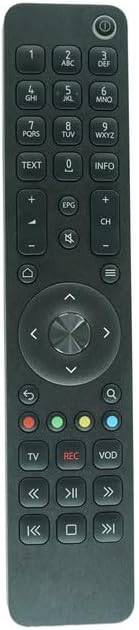
Tento obrázek poskytuje jasný a přímočarý view of the front face of the RF remote control, showcasing all its buttons and their labels. This is the primary visual reference for button identification.

This image shows the RF remote control from an angled perspective, providing a sense of its three-dimensional design and button layout from a different viewbod.
Funkce tlačítek:
| Tlačítko | Funkce |
|---|---|
| Výkon (⏻) | Zapíná nebo vypíná set-top box. |
| Číselná klávesnice (0-9) | Direct channel entry, text input. |
| TEXT | Accesses text-based services or teletext. |
| INFO | Zobrazuje informace o programu. |
| Zvýšení/snížení hlasitosti (+/-) | Nastavuje úroveň hlasitosti. |
| Ztlumit (🔇) | Ztlumí nebo zapne zvuk. |
| Kanál nahoru/dolů (CH +/-) | Změní kanál. |
| Domů (🏠) | Návrat do hlavní nabídky nebo na domovskou obrazovku. |
| Zpět (↩) | Návrat na předchozí obrazovku nebo do nabídky. |
| Menu (☰) | Otevře hlavní nabídku. |
| Navigační tlačítko (nahoru, dolů, vlevo, vpravo, OK) | Prochází menu a vybírá možnosti. |
| Search (🔍) | Spustí funkci vyhledávání. |
| Barevná tlačítka (červená, zelená, žlutá, modrá) | Context-sensitive functions, often indicated on-screen. |
| TV | Switches input to TV or returns to live TV. |
| REC | Starts recording current program (if PVR/DVR functionality is available). |
| VOD | Accesses Video On Demand services. |
| Playback Controls (Rewind, Play/Pause, Fast Forward, Skip Back, Stop, Skip Forward) | Controls media playback (e.g., recorded content, VOD). |
Note: Some functions may require specific features or subscriptions from your service provider.
Údržba
Čištění
K čištění dálkového ovladače použijte měkký, suchý hadřík. V případě odolných nečistot lehceampen the cloth with water or a mild, non-abrasive cleaner. Do not use harsh chemicals or abrasive materials, as they may damage the surface.
Výměna baterie
Replace batteries when the remote control's responsiveness decreases or if the indicator light (if present) signals low battery. Always replace both batteries at the same time with new AAA batteries. Do not mix old and new batteries, or different types of batteries.
Odstraňování problémů
| Problém | Možná příčina | Řešení |
|---|---|---|
| Dálkové ovládání nereaguje. | Vybité nebo nesprávně vložené baterie. | Vyměňte baterie a dbejte na správnou polaritu. |
| Dálkové ovládání nereaguje. | Remote not paired with set-top box. | Refer to the "Pairing with Arris Set-Top Box" section and your set-top box manual for pairing instructions. |
| Limited functionality or some buttons not working. | Compatibility issues or specific functions not supported by your set-top box. | Ensure your Arris set-top box model (VIP4205, VIP5305BT, VIP5305W) is compatible with this RF remote. Some advanced functions may require specific firmware or service provider features. |
| Dálkové ovládání funguje přerušovaně. | Nízká kapacita baterie. | Vyměňte baterie. |
| Dálkové ovládání funguje přerušovaně. | Rušení od jiných RF zařízení. | Ensure there are no strong RF interference sources nearby. Try moving the set-top box or remote slightly. |
If the problem persists after trying these solutions, contact your service provider or the remote control vendor for further assistance.
Specifikace
- Model: RF Remote Control for Arris VIP4205, VIP5305BT, VIP5305W
- Konektivita: Rádiová frekvence (RF)
- Kompatibilní zařízení: Arris VIP4205, VIP5305BT, VIP5305W IPTV/OTT HD Set-Top TV Boxes
- Zdroj napájení: 2 x AAA baterie (nejsou součástí balení)
- Speciální vlastnosti: Replacement remote, Ergonomic design
- Výrobce: Easytry
- Země původu: Čína
Záruka a podpora
Informace o záruce
This product is sold as a replacement remote control. Specific warranty terms, if any, are typically provided by the seller at the time of purchase. Please refer to your purchase documentation or contact the seller directly for warranty details.
Zákaznická podpora
For any questions, issues, or further assistance regarding this remote control, please contact the seller or manufacturer through the platform where you purchased the product. Provide your order number and a detailed description of the issue for prompt support.
Note: As this is a replacement remote, comprehensive technical support for specific set-top box functionalities should primarily be directed to your Arris service provider.
Ask a question about this manual
Ask about setup, troubleshooting, compatibility, parts, safety, or missing instructions. Manuals+ will review the question and use this page’s manual context to help answer it.