
Formovie X5
Uživatelská příručka k laserovému televiznímu projektoru Formovie X5 4K
Model: X5 | Brand: Formovie
Zavedení
The Formovie X5 4K Laser TV Projector is a portable mini smart projector designed to deliver a cinematic experience in your home. Featuring ALDP Laser Display Technology, 2450 lumens brightness, and built-in Denon speakers, it offers stunning 4K resolution and immersive audio. This manual provides essential information for setting up, operating, and maintaining your projector.
Konec produktuview
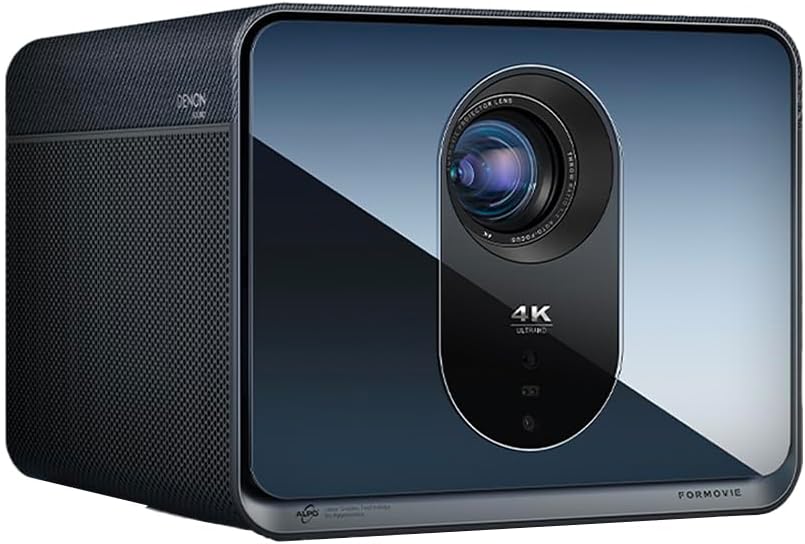
Přední view of the Formovie X5 projector, showcasing its sleek design and prominent lens.
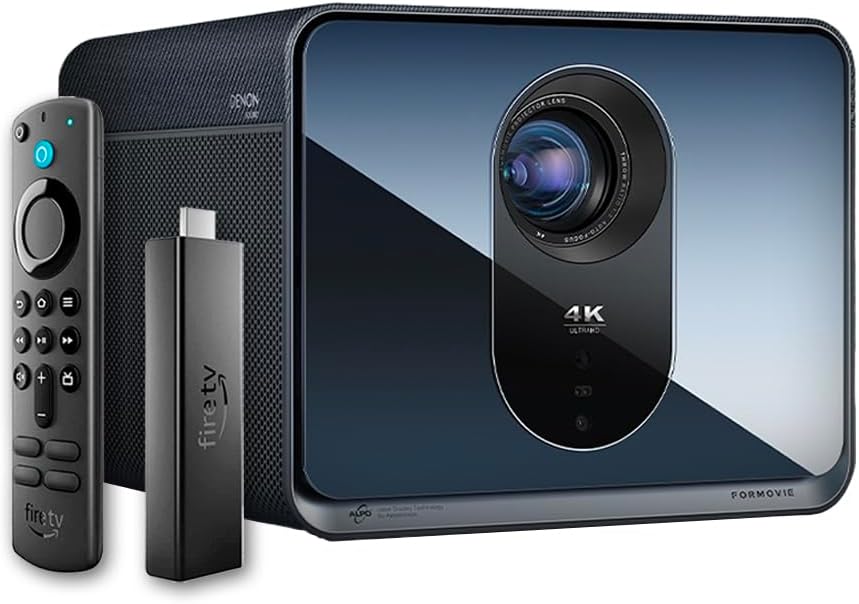
The Formovie X5 projector shown alongside its included Amazon Fire TV Stick 4K Max and remote control.

Zadní view of the Formovie X5 projector, displaying various connectivity ports including LAN, USB, HDMI, and S/PDIF.
Průvodce nastavením
1. Rozbalení a umístění
- Opatrně vyjměte projektor a veškeré příslušenství z obalu.
- Umístěte projektor na stabilní, rovný povrch. Zajistěte dostatečné větrání kolem jednotky.
- Position the projector directly in front of your desired projection surface (wall or screen) for optimal image geometry. While the projector has auto-correction, a direct alignment is recommended for the best experience.
2. Připojení napájení
- Připojte napájecí adaptér ke vstupnímu portu projektoru.
- Zapojte napájecí adaptér do vhodné elektrické zásuvky.
3. Initial Power On and Auto-Focus
- Stisknutím tlačítka napájení na projektoru nebo na dálkovém ovladači zapněte zařízení.
- The projector will automatically initiate its auto-focus and omnidirectional auto-correction features. Allow a few moments for the image to stabilize and sharpen.
4. Connecting the Fire TV Stick 4K Max
- Insert the Amazon Fire TV Stick 4K Max into an available HDMI port on the projector.
- Connect the Fire TV Stick to its power source.
- Select the corresponding HDMI input on the projector's menu.
Návod k obsluze
Funkce dálkového ovládání
The included remote control allows full navigation and control of the projector and the connected Fire TV Stick.
- Vypínač: Zapne/vypne projektor.
- Navigační podložka: Používá se k navigaci v nabídkách a výběru možností.
- Tlačítko Zpět: Vrátí se na předchozí obrazovku.
- Tlačítko Domů: Návrat do hlavní nabídky.
- Tlačítka hlasitosti: Nastavuje hlasitost zvuku.
- Tlačítko hlasového ovládání: Activates voice commands for the Fire TV Stick.
Úprava nastavení obrazu
The Formovie X5 features advanced automatic adjustment tools. For manual adjustments:
- Manuální ostření: If auto-focus is not satisfactory, access the projector settings to manually adjust focus.
- Korekce lichoběžníkového zkreslení: While omnidirectional auto-correction is standard, manual keystone adjustment is available in the settings for fine-tuning image shape.
- Adaptivní okolní světlo: The projector automatically adjusts brightness based on ambient light conditions. This can be toggled or fine-tuned in the display settings.
Klíčové vlastnosti
- 4K ALDP Laser Display Technology: Experience breathtaking visuals with true 4K resolution and a wide color gamut, ensuring crystal-clear and vibrant images.
- Cinema-Like Projection Size: Project images from 60 inches up to a massive 1,000 inches, providing an immersive viewing experience for movies, sports, and gaming.
- Powerful Adjustment Tools: Equipped with omnidirectional auto-correction, ambient light adaptive technology, laser autofocus, and automatic curtain alignment for hassle-free setup and optimal picture quality.
- Built-In Three-Way Denon Speakers: The X5 is the first projector to feature integrated three-way speakers powered by Denon, delivering rich, immersive audio without the need for external sound systems.
- Integrated Amazon Fire TV: Stream directly from your favorite apps like Netflix, Prime Video, Disney+, and more, with the convenience of the included Fire TV Stick 4K Max.
Údržba
- Čištění objektivu: Jemně otřete čočku projektoru měkkým hadříkem bez žmolků, který je speciálně určen pro optické povrchy. Nepoužívejte abrazivní čisticí prostředky ani nadměrnou sílu.
- Větrání: Ensure the projector's ventilation ports are clear of dust and obstructions to prevent overheating. Regularly clean the vents with a soft brush or compressed air.
- Skladování: Pokud projektor delší dobu nepoužíváte, skladujte jej na chladném a suchém místě, mimo dosah přímého slunečního záření a extrémních teplot.
Odstraňování problémů
| Problém | Možná příčina | Řešení |
|---|---|---|
| Žádný promítaný obraz | Power cable disconnected, incorrect input source, projector in standby mode. | Check power connection, select correct HDMI input, press power button to wake. |
| Obraz je rozmazaný | Out of focus, lens dirty. | Allow auto-focus to complete or manually adjust focus. Clean the lens. |
| Obraz je zkreslený (lichoběžníkový tvar) | Projector not perpendicular to screen, auto-correction issue. | Reposition projector directly in front of the screen. Use manual keystone correction if needed. |
| Žádný zvuk | Volume too low, mute activated, external audio device not connected properly. | Increase volume, check mute status, ensure external audio (if used) is correctly connected. |
| Upozornění na přehřátí | Zablokované větrání, dlouhodobé používání v horkém prostředí. | Ensure vents are clear. Turn off projector and allow it to cool down. Operate in a well-ventilated area. |
Specifikace
| Funkce | Detail |
|---|---|
| Značka | formové |
| Číslo modelu | X5 |
| Rozlišení displeje | 3840 x 2160 (4K) |
| Technologie světelných zdrojů | ALDP Laser |
| Jas (ANSI Lumeny) | 2450 XNUMX lumenů |
| Technologie připojení | HDMI, USB, LAN |
| Speciální funkce | Portable, Omnidirectional Auto-Correction, Ambient Light Adaptive, Laser Autofocus, Automatic Curtain Alignment, Built-In Denon Three-Way Speakers, Integrated Amazon Fire TV |
| Hmotnost položky | 15.14 libry |
| Rozměry produktu | 8.27 x 8.54 x 6.57 palce |
Záruka a podpora
For warranty information, please refer to the documentation included with your product or visit the official Formovie website. For technical support, troubleshooting assistance, or to access additional resources, please contact Formovie customer service.
- Uživatelská příručka (PDF): Stáhnout
- Uživatelská příručka (PDF): Stáhnout
- Visit the Formovie Store: Formovie Store
Ask a question about this manual
Ask about setup, troubleshooting, compatibility, parts, safety, or missing instructions. Manuals+ will review the question and use this page’s manual context to help answer it.