
Mibro sol-me3
Uživatelská příručka k bezdrátovým Bluetooth sluchátkům Mibro 3 True Wireless
Model: sol-me3 | Brand: Mibro
Zavedení
This manual provides comprehensive instructions for the Mibro 3 True Wireless Bluetooth Earbuds. It covers essential information regarding setup, operation, maintenance, troubleshooting, and product specifications to ensure optimal performance and longevity of your device. The Mibro 3 earbuds offer a perfect blend of style and functionality, featuring an attractive design, long battery life, an LED display, and impressive sound quality.
Konec produktuview
Familiarize yourself with the components of your Mibro 3 True Wireless Bluetooth Earbuds.
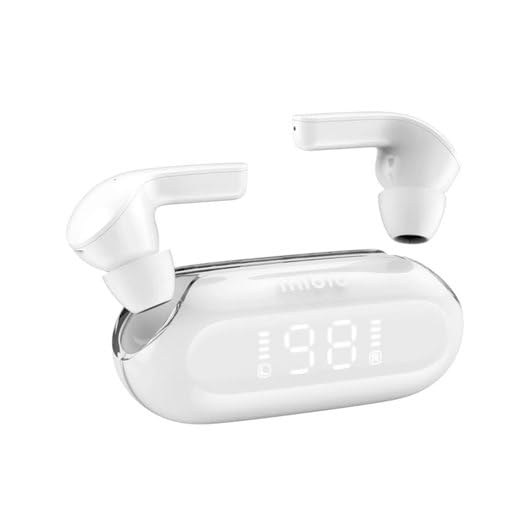
Obrázek 1: Mibro 3 True Wireless Bluetooth Earbuds and Charging Case. This image displays the white earbuds, one removed from the charging case and one partially visible, alongside the sleek white charging case which features a clear lid and an LED display showing '98', indicating battery percentage.
Komponenty:
- Sluchátka: Left and Right True Wireless Earbuds.
- Nabíjecí pouzdro: Portable case for charging and storing earbuds, with an integrated LED display.
- Nabíjecí kabel: (Typically USB-C, though not specified) For charging the case.
- Špunty do uší: (Various sizes, though not specified) For comfortable fit.
Nastavení
1. Počáteční nabíjení
- Vložte obě sluchátka do nabíjecího pouzdra.
- Connect the charging cable (not included in product details, but standard) to the charging port on the case and a power source.
- LED displej na nabíjecím pouzdře bude indikovat stav nabíjení. Před prvním použitím se ujistěte, že jsou pouzdro i sluchátka plně nabité.
2. Spárování se zařízením
- Open the charging case. The earbuds will automatically enter pairing mode (indicated by a flashing light on the earbuds, if applicable).
- Na svém zařízení (chytrý telefon, tablet, počítač) povolte Bluetooth.
- Hledat "Mibro 3" or a similar name in the list of available Bluetooth devices.
- Select "Mibro 3" to connect. Once connected, a voice prompt or indicator light will confirm successful pairing.
- Pokud se párování nezdaří, vložte sluchátka zpět do pouzdra, zavřete víko, počkejte několik sekund a poté kroky opakujte.
Návod k obsluze
Zapnutí/vypnutí
- Zapnutí: Open the charging case, and the earbuds will automatically power on and connect to the last paired device. Alternatively, press and hold the touch control area on both earbuds for 2-3 seconds.
- Vypnout: Place the earbuds back into the charging case and close the lid. They will automatically disconnect and power off. Alternatively, press and hold the touch control area on both earbuds for 5 seconds.
Touch Controls (Typical Functions)
The Mibro 3 earbuds feature intuitive touch controls. Specific functions may vary slightly, but common operations include:
- Přehrát/pozastavit: Jediným klepnutím na jedno sluchátko.
- Další skladba: Dvakrát klepněte na pravé sluchátko.
- Předchozí skladba: Dvakrát klepněte na levé sluchátko.
- Přijmout/ukončit hovor: Během příchozího hovoru klepněte jedním klepnutím na kterékoli sluchátko.
- Odmítnout hovor: Během příchozího hovoru stiskněte a podržte libovolné sluchátko po dobu 2 sekund.
- Aktivovat Voice Assistant: Trojitě klepněte na kterékoli sluchátko.
- Ovládání hlasitosti: (If supported) Tap and hold on the right earbud to increase volume, tap and hold on the left earbud to decrease volume.
Nošení sluchátek
Gently insert the earbuds into your ear canal. Rotate them slightly until they fit snugly and comfortably. Ensure the microphone is pointing towards your mouth for optimal call quality.
Údržba
Čištění
- K otření sluchátek a nabíjecího pouzdra použijte měkký, suchý hadřík, který nepouští vlákna.
- Pro odolnou špínu lehceampnavlhčete hadřík vodou nebo jemným neabrazivním čisticím prostředkem.
- Nepoužívejte agresivní chemikálie, alkohol ani abrazivní materiály.
- Regularly clean the eartips and the mesh covers to prevent wax buildup, which can affect sound quality.
Skladování
- Vždy uchovávejte sluchátka v nabíjecím pouzdře, když je nepoužíváte, aby byla chráněna a zůstávala nabitá.
- Store the device in a cool, dry place, away from direct sunlight, extreme temperatures, and humidity.
Péče o baterie
- Vyhněte se častému úplnému vybíjení baterie.
- Zařízení pravidelně nabíjejte, i když jej nepoužíváte často, abyste zachovali jeho stav.
- Do not expose the device to extreme heat or cold, as this can degrade battery performance.
Odstraňování problémů
If you encounter issues with your Mibro 3 earbuds, try the following solutions:
| Problém | Možné řešení |
|---|---|
| Sluchátka se nespárují se zařízením. |
|
| Funguje pouze jedno sluchátko. |
|
| Žádný zvuk nebo nízká hlasitost. |
|
| Nabíjecí pouzdro se nenabíjí. |
|
Specifikace
Key technical specifications for the Mibro 3 True Wireless Bluetooth Earbuds:
| Funkce | Detail |
|---|---|
| Číslo modelu | sol-me3 |
| Značka | Mikro |
| Technologie připojení | Bezdrátové (Bluetooth) |
| Form Factor | In-Ear |
| Barva | Bílý |
| Materiál | Plast |
| Hmotnost položky | 100 gramů |
| Speciální funkce | Lehký |
| Nabíjecí baterie | Ano |
| Typ ovládání | Volume Control (and touch controls for playback/calls) |
Záruka a podpora
Informace o záruce
The Mibro 3 True Wireless Bluetooth Earbuds are covered by a standard manufacturer's warranty. Please refer to the warranty card included with your purchase or visit the official Mibro webPodrobné podmínky týkající se záručního krytí a doby trvání naleznete na webových stránkách.
Zákaznická podpora
For technical assistance, product inquiries, or warranty claims, please contact Mibro customer support. Contact information can typically be found on the official Mibro website or within the product packaging. When contacting support, please have your product model number (sol-me3) and purchase details ready.
Ask a question about this manual
Ask about setup, troubleshooting, compatibility, parts, safety, or missing instructions. Manuals+ will review the question and use this page’s manual context to help answer it.