
Xprinter XP-Q801K
Uživatelská příručka k termální tiskárně účtenek Xprinter XP-Q801K
Model: XP-Q801K
1. Úvod
This manual provides comprehensive instructions for the setup, operation, and maintenance of your Xprinter XP-Q801K Thermal Receipt Printer. This printer is designed for efficient and reliable receipt printing in various business environments, featuring high-speed direct thermal printing and a USB interface for easy connectivity.

Obrázek 1: Přední strana view of the Xprinter XP-Q801K Thermal Receipt Printer, showing the paper output slot and control buttons.
2. Nastavení
2.1 Vybalení
Opatrně vyjměte tiskárnu a veškeré příslušenství z obalu. Zkontrolujte, zda jsou všechny součásti přítomny:
- Xprinter XP-Q801K Thermal Receipt Printer
- Napájecí adaptér
- USB kabel
- Paper Roll (starter)
- Uživatelská příručka (tento dokument)
2.2 Připojení tiskárny
Before connecting, ensure the printer is powered off. Locate the ports on the rear of the printer.
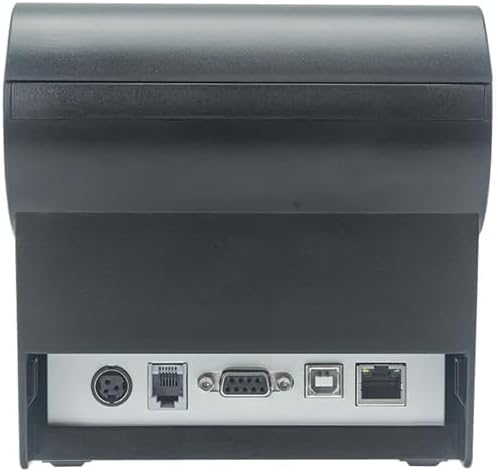
Obrázek 2: Zadní view of the printer, highlighting the power, USB, and other interface ports.
- Připojte napájení: Insert the power adapter cable into the printer's power input port (DC 24V/2.5A) and plug the adapter into a suitable electrical outlet (AC 100-240V, 50-60Hz).
- Připojte USB: Connect one end of the provided USB cable to the USB port on the printer and the other end to an available USB port on your computer.
- Cash Drawer (Optional): If using a cash drawer, connect its cable to the cash drawer port (DC 24V/1A) on the printer.
2.3 Vkládání papírové role
Tiskárna používá role termopapíru o šířce 80 mm.
- Open the paper cover by pushing the cover open button (usually located on the side or front).
- Insert the thermal paper roll with the printing surface facing the print head. Ensure the roll is seated correctly in the paper compartment.
- Vytáhněte malé množství papíru ven z řezačky.
- Pevně zavřete kryt papíru, dokud nezacvakne na místo.
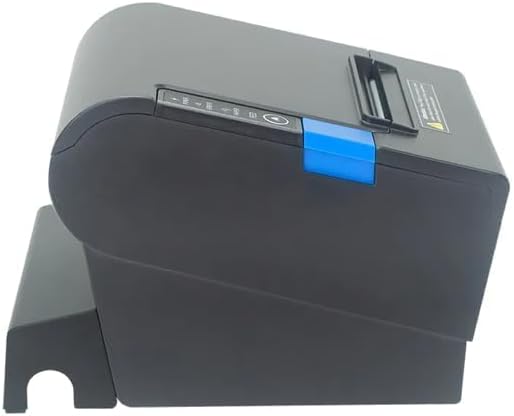
Obrázek 3: Strana view of the printer, illustrating the paper cover mechanism.
2.4 Instalace ovladače
The printer requires a driver to communicate with your computer. Drivers are typically available for Windows, Linux, Android, and Mac operating systems.
- For Windows users, the printer often supports plug-and-play installation or requires a specific Windows driver.
- For Linux, Android, and Mac, SDKs (Software Development Kits) are usually provided for integration.
Viz pokyny výrobce website or the included driver CD/USB drive for the latest drivers and installation instructions specific to your operating system.
3. Obsluha tiskárny
3.1 Zapnutí/vypnutí
Locate the power switch on the side or rear of the printer. Flip the switch to the 'ON' position to power on the printer. The 'POWER' indicator light will illuminate. Flip to 'OFF' to power down.
3.2 Indicator Lights and Buttons
The front panel typically features several indicator lights and buttons:
- MOC: Indikuje, že je tiskárna zapnutá.
- CHYBA: Illuminates or flashes to indicate an error condition (e.g., paper out, print head overheating, cutter error).
- PAPÍR: Indicates that the paper roll is low or out.
- Tlačítko FEED: Press to manually feed paper. Hold to perform a self-test print (if supported by model).
3.3 Základní tisk
Once the printer is connected and drivers are installed, you can print receipts from your POS software or application. Ensure the printer is selected as the default or active printer in your system settings.
The printer supports various print speeds up to 300 mm/s and automatic paper cutting after each print job.
4. Údržba
Pravidelná údržba zajišťuje optimální výkon a prodlužuje životnost vaší tiskárny.
4.1 Čištění tiskové hlavy
The print head should be cleaned regularly, especially if print quality degrades.
- Vypněte tiskárnu a odpojte napájecí kabel.
- Otevřete papírový kryt.
- Použijte vatový tampon lehceampened with isopropyl alcohol (ethanol) to gently wipe the thermal elements of the print head.
- Před zavřením krytu a opětovným připojením napájení nechte tiskovou hlavu zcela vyschnout.
4.2 Cleaning the Cutter
Paper dust can accumulate around the cutter blade, affecting its performance.
- Vypněte tiskárnu a odpojte napájecí kabel.
- Carefully remove any visible paper dust or debris from around the cutter blade using a soft brush or compressed air.
- Do not use liquids on the cutter.
4.3 Obecné čištění
Otřete vnější povrch tiskárny měkkým,amp tkanina. Vyhněte se používání agresivních chemikálií nebo abrazivních čisticích prostředků.
5. Řešení problémů
Tato část se zabývá běžnými problémy, se kterými se můžete s tiskárnou setkat.
| Problém | Možná příčina | Řešení |
|---|---|---|
| Tiskárna se nezapne. | Napájecí kabel není připojen; Vadná zásuvka; Vypínač je vypnutý. | Ensure power cable is securely connected. Test power outlet. Turn power switch to 'ON'. |
| Žádný tisk. | Paper out; Paper loaded incorrectly; Driver not installed or incorrect; USB cable loose; Printer not selected. | Load new paper roll. Re-load paper correctly. Install/reinstall correct driver. Check USB connection. Select printer in software. |
| ERROR light is on/flashing. | Paper out; Paper jam; Print head overheating; Cutter error. | Load paper. Clear paper jam. Allow printer to cool down. Check cutter for obstructions. |
| Špatná kvalita tisku. | Dirty print head; Low quality paper; Old paper roll. | Clean the print head (see Section 4.1). Use high-quality thermal paper. Replace old paper rolls. |
Pokud problém přetrvává i po vyzkoušení těchto řešení, kontaktujte zákaznickou podporu.
6. Specifikace
| Funkce | Detail |
|---|---|
| Způsob tisku | Přímé tepelné |
| Šířka papíru | 80 mm |
| Rychlost tisku | 230 mm/s, 260 mm/s, 300 mm/s |
| Rozhraní | USB |
| Řádkování | 3.75 mm (adjustable by commands) |
| Character Size (ANK) | Font A: 1.5 × 3.0 mm (12 × 24 dots) Font B: 1.1 × 2.1 mm (9 × 17 dots) |
| Character Size (Chinese/Traditional Chinese) | 3.0 × 3.0 mm (24 × 24 dots) |
| Typy čárových kódů | UPC-A / UPC-E / JAN13 (EAN13) / JAN8 (EAN8) / CODE39 / ITF / CODABAR / CODE93 / CODE128 |
| 2D čárový kód | QR Code / PDF417 |
| NV Flash Memory | 256 kB |
| Vstupní výkon | AC 100-240V, 50-60Hz |
| Výstupní výkon | DC 24V/2.5A |
| Výstup pokladní zásuvky | DC 24V/1A |
| Hmotnost | 1.0 kg |
| Rozměry (D × Š × V) | 194.5 × 145 × 146.4 mm |
| Provozní teplota | 0~45 °C |
| Provozní vlhkost | 10~80% RH |
| Život frézy | 1.5 miliony škrtů |
| Životnost tiskové hlavy | 150 km |
| Kompatibilita OS | Windows, Linux, Android, Mac |
Ask a question about this manual
Ask about setup, troubleshooting, compatibility, parts, safety, or missing instructions. Manuals+ will review the question and use this page’s manual context to help answer it.