
Brady M511
Brady M511 Portable Wireless Industrial Label Printer
Uživatelská příručka
Zavedení
This manual provides comprehensive instructions for the setup, operation, and maintenance of your Brady M511 Portable Wireless Industrial Label Printer. The M511 is designed for industrial applications, offering robust performance and wireless connectivity for efficient label creation.
Před použitím zařízení si prosím pečlivě přečtěte tento návod, abyste zajistili jeho správnou funkčnost a předešli poškození.
Co je zahrnuto
Upon unboxing, verify that all components listed below are present in your Brady M511 Printer Kit:
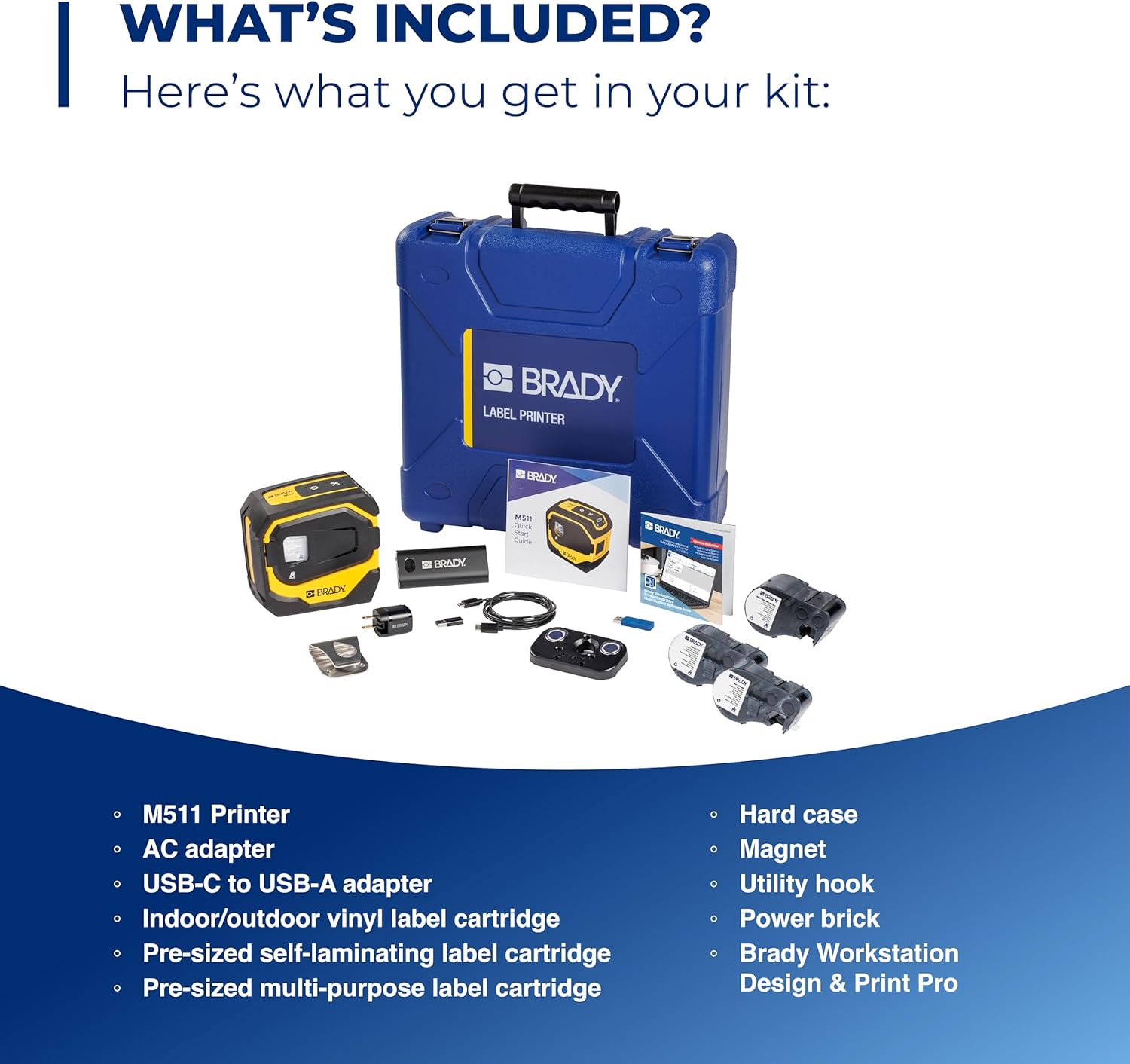
Image: Contents of the Brady M511 Printer Kit. This image displays the M511 printer, a blue hard case, an AC adapter, a USB-C to USB-A adapter, three label cartridges (indoor/outdoor vinyl, self-laminating, multi-purpose), a power brick, a magnet, and a utility hook.
- Brady M511 Printer
- Pevné pouzdro
- AC adaptér
- Adaptér USB-C na USB-A
- Power Brick
- Indoor/Outdoor Vinyl Label Cartridge
- Pre-sized Self-Laminating Label Cartridge
- Pre-sized Multi-Purpose Label Cartridge
- Magnet
- Užitkový hák
- Brady Workstation Design & Print Pro Software (download access)
Klíčové vlastnosti
The Brady M511 printer is engineered with features to enhance efficiency and durability in industrial environments:

Image: A detailed diagram of the M511 printer, pointing out its key features including the convenient USB-C charger, internal Li-ION battery for longer life, ability to connect 5 users simultaneously, Bluetooth printing via mobile app or PC, automatic cutter, high-resolution print quality, less label waste, ability to print labels up to 1.5 inches wide, and military-grade shock resistance (withstands 6-foot drops).
- Kapacita tisku: Ideal for larger applications, capable of printing labels up to 1.5 inches wide.
- Efektivní tisk: Designed for less waste, allowing edge-to-edge printing of text, graphics, and barcodes.
- Životnost baterie: Equipped with an internal Li-ION battery providing over 8 hours of work or 1,000 labels on a single charge.
- Trvanlivost: Resists 6-foot drops, 250-pound crushes, and blowing sand and dust (MIL-STD-810G compliant), ensuring military-grade shock resistance.
- Konektivita: Features Bluetooth 5.0 with a 65-foot range, allowing connection for up to 5 users simultaneously.
- Kompatibilita softwaru: Utilizes the Express Labels app via Bluetooth on a phone/tablet and Brady Workstation on a PC for label creation.
- Efektivita designu: Includes an auto label cutter and can print upright or on its side, saving time and space.

Image: This image showcases over 250 cartridge options available for the M511 printer, capable of printing labels up to 1.5 inches wide. Examples include self-laminating labels for wire identification, flag labels for cables, cryogenic labels for laboratory use, and multi-purpose labels for general industrial applications.

Image: The Brady M511 printer being used in different jobsite scenarios: for wire and asset identification, in a laboratory setting, for electrical labeling, and for safety and facility marking.
Průvodce nastavením
1. Počáteční nabíjení
- Connect the provided AC adapter to the printer's USB-C port.
- Zapojte adaptér do elektrické zásuvky.
- Allow the printer to charge fully before first use. The battery indicator on the printer will show charging status.
2. Instalace softwaru
- Pro mobilní zařízení (chytré telefony/tablety): Download the "Express Labels" app from your device's app store (iOS App Store or Google Play Store).
- Pro PC: Install "Brady Workstation" software. Access to this software is included with your printer kit. Follow the instructions provided with your kit for download and installation.
3. Párování Bluetooth
- Ensure the M511 printer is powered on.
- On your mobile device or PC, enable Bluetooth.
- Open the Express Labels app or Brady Workstation.
- Follow the on-screen prompts to search for and connect to your M511 printer. The printer will typically appear as "Brady M511" or similar in the list of available devices.
- Pokud budete vyzváni, potvrďte párování na obou zařízeních.
Návod k obsluze
1. Loading Label Cartridges
The M511 printer features easy changeovers for label cartridges:

Image: A hand demonstrating the process of inserting a label cartridge into the open compartment of the Brady M511 printer. The image highlights the simplicity of the "Open. Insert. Close. Print." process.
- OTEVŘENO: Gently open the front cover of the printer.
- Vložit: Align the label cartridge with the slot and push it firmly until it clicks into place. Ensure the label material feeds correctly into the printer mechanism.
- Blízko: Pevně zavřete přední kryt.
- Vytisknout: The printer is now ready for printing.
2. Vytváření a tisk štítků
- Using Express Labels App (Mobile):
- Open the Express Labels app and ensure it's connected to your M511 printer via Bluetooth.
- Select the desired label template or create a new label design.
- Enter your text, add symbols, barcodes, or graphics as needed.
- Předview štítek, aby byla zajištěna přesnost.
- Klepnutím na ikonu tisku odešlete úlohu do tiskárny.
- Using Brady Workstation (PC):
- Launch Brady Workstation and confirm connection to your M511 printer.
- Choose the appropriate application (e.g., Custom Designer, Wire & Cable ID) for your label needs.
- Design your label using the available tools and features.
- Utilize the print preview funkce.
- Click the print button to initiate printing.
3. Automatic Cutter
The M511 printer is equipped with an automatic cutter. After each print job, the printer will automatically cut the label, providing a clean and precise finish. No manual cutting is required.
Údržba
1. Čištění tiskárny
- Pravidelně otírejte vnější povrch tiskárny měkkým hadříkemamp tkanina. Nepoužívejte agresivní chemikálie nebo abrazivní čisticí prostředky.
- For the print head and platen roller, refer to the detailed cleaning instructions within the Brady Workstation software or the Express Labels app, or consult the Brady support webmísto.
- Před čištěním se ujistěte, že je tiskárna vypnutá a odpojená od sítě.
2. Péče o baterie
- Chcete-li maximalizovat životnost baterie, vyhněte se častému úplnému vybíjení.
- Pokud tiskárnu delší dobu nepoužíváte, skladujte ji na chladném a suchém místě.
- Recharge the battery regularly, even if the printer is not in active use, to maintain battery health.
3. Skladování
When storing the M511 printer, especially for long durations, it is recommended to:
- Remove any label cartridges.
- Store the printer in its hard case to protect it from dust, moisture, and physical impact.
- Chraňte jej před extrémními teplotami.
Odstraňování problémů
This section addresses common issues you might encounter with your Brady M511 printer. For more complex problems, please refer to the Brady support webnebo kontaktujte zákaznický servis.
| Problém | Možná příčina | Řešení |
|---|---|---|
| Tiskárna se nepřipojuje přes Bluetooth | Bluetooth is off on device; printer is off; out of range; interference. | Ensure Bluetooth is enabled. Turn printer off and on. Move closer to printer. Restart app/software. |
| Poor print quality (faded, lines, incomplete) | Low battery; dirty print head; incorrect label type; damaged cartridge. | Charge battery. Clean print head (refer to manual/app). Ensure correct label cartridge is used. Replace cartridge if damaged. |
| Štítky se nepodávají nebo se zasekávají | Cartridge not inserted correctly; label path obstructed; incorrect label size. | Re-insert cartridge firmly. Check for debris in label path. Ensure label size is compatible with printer. |
| Tiskárna se nezapíná | Battery fully discharged; power button issue. | Connect to power adapter and charge for at least 30 minutes. If still unresponsive, contact support. |
Specifikace
Technical specifications for the Brady M511 Portable Wireless Industrial Label Printer:
| Atribut | Detail |
|---|---|
| Značka | Brady |
| Název modelu | M511 |
| Technologie připojení | Bluetooth 5.0 |
| Technologie tisku | Thermal Transfer |
| Speciální funkce | Portable, Industrial-grade durability |
| Barva | Žlutá/černá |
| Tiskový výstup | Monochromatický |
| Maximální rychlost tisku (černobíle) | 1.33 palců za sekundu |
| Maximální šířka štítku | 1.5 palců |
| Hmotnost položky | 4 libry |
| Typ baterie | Internal Li-ION |
| Normy trvanlivosti | MIL-STD-810G (6' drop, 250lb crush, blowing sand/dust) |
Záruka a podpora
For information regarding product warranty, technical support, or service, please visit the official Brady website or contact Brady customer service directly. Keep your purchase receipt and product serial number handy for any warranty claims or support inquiries.
Note: Specific warranty terms and conditions may vary by region and purchase date.
Ask a question about this manual
Ask about setup, troubleshooting, compatibility, parts, safety, or missing instructions. Manuals+ will review the question and use this page’s manual context to help answer it.