
DUMBORC G02
DUMBORC G02 RC Mini Gyroscope User Manual
Model: G02
Zavedení
The DUMBORC G02 Mini Gyroscope is a compact and lightweight device designed to enhance the stability and control of various RC cars, including racing cars, speed cars, pull cars, and large mosquito cars. Its small form factor allows for easy integration into your vehicle, providing improved handling and a more precise driving experience.

Image: The DUMBORC G02 RC Mini Gyroscope, a compact red and silver unit with connection ports and adjustment knobs.
Nastavení
1. Kalibrace gyroskopu
Before initial use, the gyroscope requires calibration. Ensure your car is stationary. For G03 models, the gyroscope will flash alternately red and green immediately after being switched on. Once calibrated, the light will remain steady red.
2. Setting for End Point (EPA)
This setting limits the maximum movement of the servo to prevent mechanical damage.
- Zapněte vysílač a přijímač.
- Long press the SET button for 2 seconds. The red and green lights will flash quickly to enter the EPA setting mode.
- When the directional handwheel (CH1) is screwed to the right to the maximum, the red light will be on for 2 seconds. When the handwheel (CH1) is screwed to the left to the maximum, the red light will be on for 2 seconds. At this time, the EPA setting of the handwheel (CH1) is completed.
- If you do not adjust the gyroscope sensitivity through the remote control channel, press the SET button to complete the EPA setting. Otherwise, continue with the following operations:
- If you want to adjust the gyroscope sensitivity through the remote control, continue to set the EPA value for setting the gyroscope channel on the remote control after completing the EPA setting of the direction handwheel (CH1) in the previous step. Take CH6 as an example. If you screw CH6 to the minimum value, the red light will be on for 2 seconds. If you screw CH6 to the maximum value, the red light will be on for 2 seconds.
At this time, the red and green lights continue to flash alternately. Press the SET button to save the settings, and the red light will keep on.
*If the lights do not appear as described, check the wire connections.

Image: Detailed diagram illustrating the initial setting process, including gyro calibration, end point setting, and reverse setup.
3. Set Up Reverse
This function is used for changing the direction of the Gyro effect. If the Gyro effect direction is not correct, please change the setting as informed below. If the Gyro effect is correct, you do not need to follow these steps.
- After turning on the transmitter and receiver, check the movement of steering.
- Press the gyroscope SET button briefly. The LED light will flash, and the direction switch is successful.
*End point setting and reverse setting need only to be performed once. These settings are saved to memory of the unit. If you change the transmitter, receiver, or servo, please do these settings again.
Image: Visual guide for setting up the reverse function, showing correct and incorrect steering responses.
Provozní
Funkce a provoz produktu
The 4P cable is connected to the 4P seat of the gyroscope, and the other end of the 3P cable is connected to the CH1 of the receiver (ST: Steering). A single wire CH3 is connected to the CH3 of the receiver or other corresponding channels.
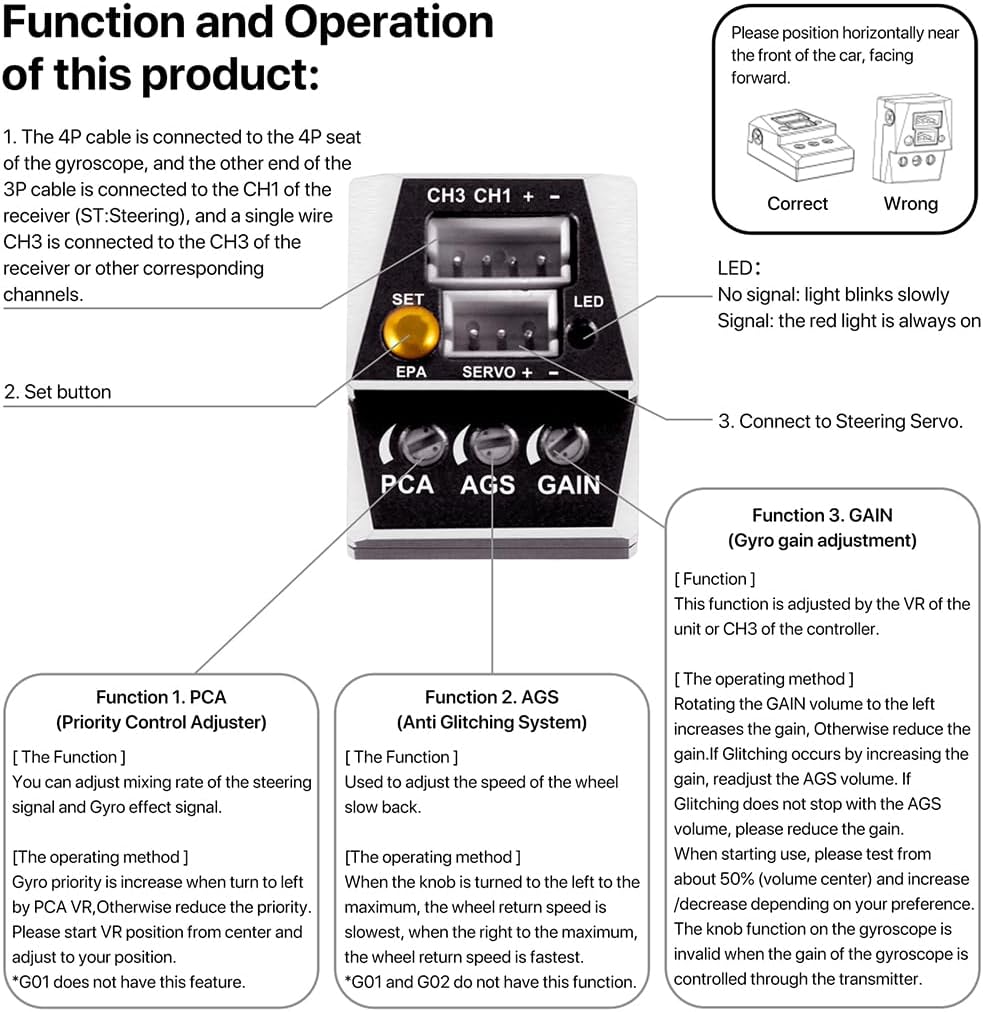
Image: Diagram detailing the connection points and functions of the DUMBORC G02 gyroscope, including LED indicator, SET button, Servo+ port, PCA, AGS, and GAIN adjustments.
- LED indikátor:
- No signal: light blinks slowly
- Signal: the red light is always on
- Tlačítko SET: Used for initial setup and saving settings.
- Function 1. PCA (Priority Control Adjuster):
You can adjust the mixing rate of the steering signal and Gyro effect signal. Used to adjust the priority of control. Rotate the PCA VR to increase turn priority. Start PCA VR from center and adjust to your position. *G01 does not have this feature.
- Function 2. AGS (Anti Glitching System):
Used to adjust the speed of the wheel slow back. When the knob is turned to the left to the maximum, the wheel return speed is slowest; when the right to the maximum, the wheel return speed is fastest. *G01 and G02 do not have this function.
- Function 3. GAIN (Gyro gain adjustment):
This function is adjusted by the VR of the unit or CH3 of the controller. Rotating the GAIN volume to the left increases the gain, otherwise reduces the gain. If glitching occurs by increasing the gain, readjust the AGS volume. If glitching does not stop with the AGS volume, please reduce the gain. When starting use, please test from about 50% (volume center) and increase/decrease depending on your preference. The knob function on the gyroscope is invalid when the gain of the gyroscope is controlled through the transmitter.
Údržba
To ensure the longevity and optimal performance of your DUMBORC G02 Gyroscope, follow these general maintenance guidelines:
- Udržujte v čistotě: Regularly clean the exterior of the gyroscope with a soft, dry cloth. Avoid using liquids or solvents that could damage the electronic components.
- Chránit před živly: Keep the gyroscope away from excessive moisture, dust, and extreme temperatures. While designed for RC car use, direct exposure to water or harsh conditions should be avoided.
- Zabezpečená připojení: Periodically check all cable connections to ensure they are secure and free from damage. Loose connections can lead to intermittent performance.
- Zacházejte opatrně: The gyroscope is a precision instrument. Avoid dropping it or subjecting it to strong impacts.
Odstraňování problémů
If you encounter issues with your DUMBORC G02 Gyroscope, consider the following common troubleshooting steps:
- No LED Light / No Power:
- Check all power connections from the receiver to the gyroscope.
- Ujistěte se, že je přijímač zapnutý a správně funguje.
- Verify the polarity of the connections.
- Gyro Not Responding / Incorrect Steering:
- Re-check the servo connection to the gyroscope's "SERVO+" port.
- Ensure the gyroscope is correctly connected to the CH1 (Steering) channel of your receiver.
- Perform the "Set Up Reverse" procedure if the steering correction is in the wrong direction.
- Re-do the "Gyro Calibration" and "Setting for End Point" procedures.
- Excessive Glitching or Unstable Performance:
- Reduce the GAIN setting. Start with a lower gain and gradually increase it until stable performance is achieved.
- Ensure the gyroscope is mounted securely and free from vibrations.
- Check for any interference from other electronic components in the RC car.
- Nastavení se neukládá:
- Ensure you press the SET button briefly to save settings after making adjustments.
- If you change the transmitter, receiver, or servo, you will need to re-perform the initial setup procedures.
If problems persist after following these steps, please refer to the manufacturer's support channels.
Specifikace

Image: Visual representation of the DUMBORC G02 gyroscope's ultra-small size and lightweight design, shown in hand and with dimensions.

Image: Detailed technical specifications of the DUMBORC G02 gyroscope, including dimensions, weight, operating voltage, and control system.
| Funkce | Detail |
|---|---|
| Značka | DUMBORC |
| Model | G02 |
| Rozměry produktu | 20.0 x 15.5 x 8.8 mm (0.78 x 0.61 x 0.31 palce) |
| Hmotnost položky | 4.2 g (0.15 uncí) |
| Materiál pláště | AL6061 |
| Provozní svtage | 5~10V |
| Proud | 20mA/6V |
| Pracovní teplota | -10°C až +50°C |
| Vstupní signál | PWM |
| Input and Output Plug | ZH1.5MM |
| Řídicí systém | PID control system |
| Balíček příslušenství | ZH1.5 4P cable, ZH1.5 4P to DuPont cable, ZH1.5 3P to DuPont cable, screwdriver |
| Výrobcem doporučený věk | 14 - 14 let |
| Země původu | Čína |
Model Comparison (G01, G02, G03)

Image: Table comparing features of DUMBORC G01, G02, and G03 gyroscope models, highlighting differences in PCA and AGS functionality.
The DUMBORC G02 model features EPA (Trip Setting), PCA (Priority Control Adjuster), and GAIN (Gyro Gain Adjustment). It does not include the AGS (Anti Glitching System) found in the G03 model.
Záruka a podpora
For warranty information and technical support, please refer to the official DUMBORC webwebu nebo kontaktujte prodejce přímo prostřednictvím vaší nákupní platformy. Uschovejte si doklad o koupi pro případné reklamace.
Pro další pomoc můžete navštívit DUMBORC Store on Amazon.
Ask a question about this manual
Ask about setup, troubleshooting, compatibility, parts, safety, or missing instructions. Manuals+ will review the question and use this page’s manual context to help answer it.