
Zavedení
The DUMBORC G03 RC Mini Gyroscope is a compact and lightweight device designed to enhance the stability and control of your RC cars, especially racing cars and small vehicles. This manual provides detailed instructions for its installation, setup, operation, and maintenance to ensure optimal performance.
With its mini size of 20mm x 15.5mm x 8.8mm and a weight of only 4.2g, the G03 gyroscope can be easily mounted on various types of RC vehicles. It features Gyro Gain Adjustment, Priority Control Adjuster (PCA), and Anti Glitching System (AGS) to provide precise control and stability.
Bezpečnostní informace
No specific safety information is provided for this product. Always handle electronic components with care and ensure proper insulation to prevent short circuits. Keep the device away from water and extreme temperatures. Adult supervision is recommended for users under 14 years of age.
Konec produktuview
The DUMBORC G03 RC Mini Gyroscope is engineered for precision and ease of use. It integrates advanced features to improve the handling characteristics of your RC vehicle.
Klíčové vlastnosti:
- Mini velikost: Dimensions of 20mm x 15.5mm x 8.8mm, making it suitable for various RC car models.
- lehký: Weighs only 4.2g, minimizing impact on vehicle performance.
- Gyro Gain Adjustment: Allows fine-tuning of the gyroscope's sensitivity.
- Priority Control Adjuster (PCA): Adjusts the mixing rate of steering signal and gyro effect signal.
- Anti Glitching System (AGS): Used to adjust the speed of wheel return.
- Snadná instalace: Designed for straightforward setup and compatibility with X6PM transmitters.
Co je v krabici:
- G03 RC Mini Gyroscope
- Připojovací kabely
- Montážní páska
- Malý šroubovák

Image: The DUMBORC G03 RC Mini Gyroscope package contents, showing the red gyroscope unit, various connection cables, double-sided mounting tape, and a small blue screwdriver for adjustments.

Image: A visual representation of the G03 gyroscope's compact size, held in a hand, alongside a diagram illustrating its dimensions: 20mm length, 15.5mm width, and 8.8mm height.
Nastavení
Follow these steps for the initial setup and calibration of your DUMBORC G03 Gyroscope.

Image: A detailed diagram outlining the initial setup process for the G03 gyroscope, covering gyro calibration, setting end points for the servo, and configuring reverse direction.
1. Kalibrace gyroskopu
Before turning on the G03, ensure your RC car is in a stationary position. The gyroscope light will flash alternately red and green. Once calibrated, the light will become steady red.
2. Setting for End Point
This limits the maximum movement of the servo to protect it from mechanical damage.
- Zapněte vysílač a přijímač.
- Long press the setting button for 2 seconds. The red and green lights will flash quickly to enter the EPA setting.
- When the directional handwheel (CH1) is screwed to the right to the maximum, the red light will be on for 2 seconds. When the handwheel (CH1) is screwed to the left to the maximum, the red light will be on for 2 seconds. At this time, the EPA setting of the handwheel (CH1) is completed. If you do not adjust the gyroscope sensitivity through the remote control channel, press the setting button to complete the EPA setting. Otherwise, continue with the following operations.
- If you want to adjust the gyroscope sensitivity through the remote control, continue to set the EPA value for setting the gyroscope channel on the remote control after completing the EPA setting of the direction handwheel (CH1) in the previous step. Take CH6 as an example. If you screw CH6 to the minimum value, the red light will be on for 2 seconds. If you screw CH6 to the maximum value, the red light will be on for 2 seconds.
At this time, the red and green lights continue to flash alternately. Press the setting button to save the settings, and the red light will keep on.
Poznámka: If the lights do not appear as described, check the wire connections.
3. Set Up Reverse
This is used for changing the direction of the Gyro effect. If the Gyro effect direction is not correct, please change the setting as informed below. If the Gyro effect is correct, you do not need to follow these steps.
- After turning on the transmitter and receiver, check the movement of steering.

Image: A visual guide demonstrating the correct and incorrect steering responses for an RC car, crucial for setting up the gyroscope's reverse function.
- Press the gyroscope setting button briefly. The LED light will flash, and the direction switch is successful.
Poznámka: End point setting and reverse setting need only to be performed once. These settings are saved to the memory of the unit. If you change the transmitter, receiver, or servo, please do these settings again.
Provozní
Understand the functions and connections of your DUMBORC G03 Gyroscope for effective operation.
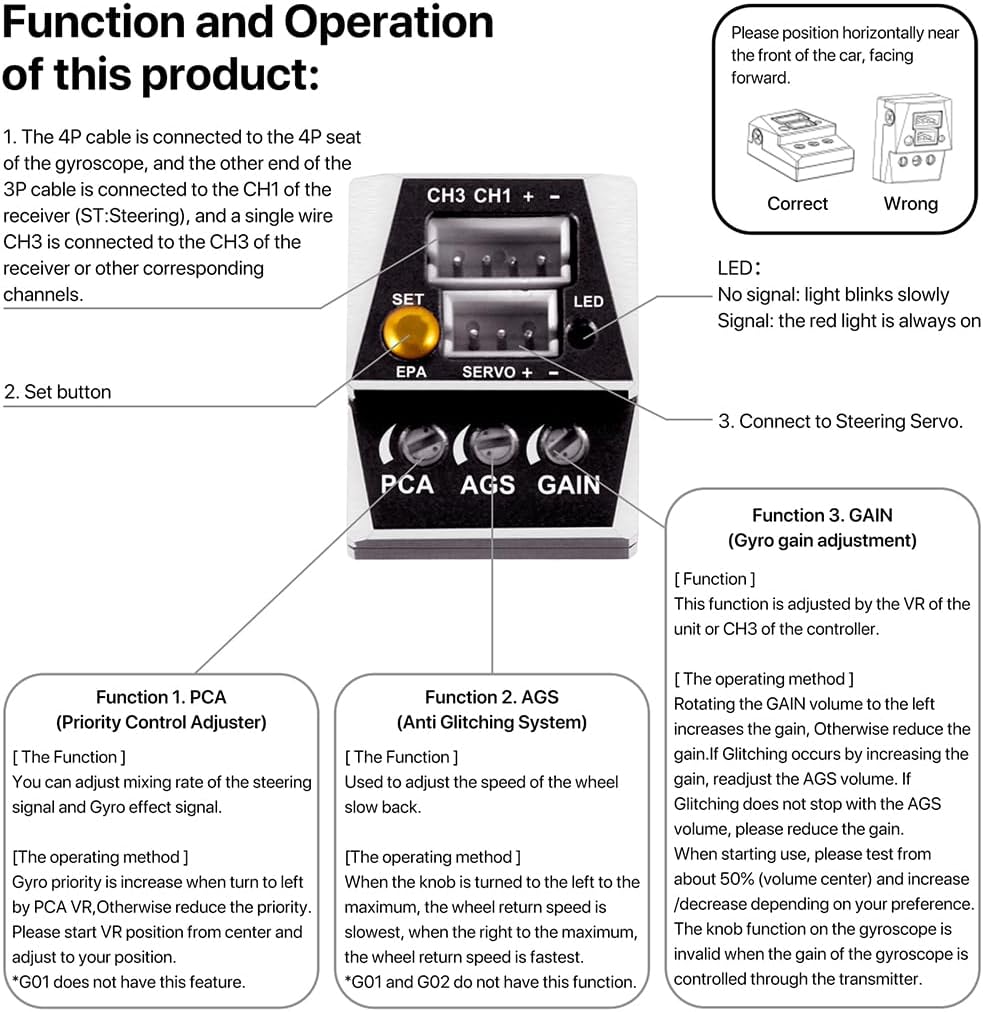
Image: An illustration showing the DUMBORC G03 gyroscope with labels for its CH3 CH1+ port, SET button, LED indicator, EPA, SERVO+, PCA, AGS, and GAIN controls, along with explanations of each function.
Connection and LED Indicator
- The 4P cable is connected to the 4P seat of the gyroscope.
- The other end of the 3P cable is connected to the CH1 of the receiver (ST: Steering).
- A single wire CH3 is connected to the CH3 of the receiver or other corresponding channels.
- LED indikátor:
- No signal: light blinks slowly
- Signal: the red light is always on
Ovládací prvky funkce
- Function 1. PCA (Priority Control Adjuster):
- Adjusts the mixing rate of the steering signal and Gyro effect signal.
- Provozní metoda: When the knob is turned to the left, the priority is increased. When turned to the right, the priority is reduced. Start PCA position from center and adjust to your preference.
- Function 2. AGS (Anti Glitching System):
- Used to adjust the speed of the wheel slow back.
- Provozní metoda: When the knob is turned to the left to the maximum, the wheel return speed is slowest. When turned to the right to the maximum, the wheel return speed is fastest.
- Function 3. GAIN (Gyro Gain Adjustment):
- This function is adjusted by the VR of the unit or CH3 of the controller.
- Provozní metoda: Rotating the GAIN volume to the left increases the gain, otherwise reduces the gain. If glitching occurs by increasing the gain, readjust the AGS volume. If glitching does not stop with the AGS volume, please reduce the gain. When starting use, please test from about 50% (volume center) and increase/decrease depending on your preference. The knob function on the gyroscope is invalid when the gain of the gyroscope is controlled through the transmitter.
Video: An official DUMBORC video demonstrating the functionality and adjustment of the G03 RC Gyroscope, including handwheel intervention ratio adjustment.
Údržba
To ensure the longevity and optimal performance of your DUMBORC G03 Gyroscope, follow these general maintenance guidelines:
- Udržujte v čistotě: Regularly clean the exterior of the gyroscope with a soft, dry cloth. Avoid using harsh chemicals or solvents.
- Chránit před živly: Keep the unit away from dust, dirt, moisture, and extreme temperatures.
- Zabezpečená připojení: Periodically check all cable connections to ensure they are secure and free from damage. Loose connections can lead to intermittent performance.
- Vyhněte se fyzickému dopadu: While designed for RC environments, excessive physical shock can damage internal components.
Odstraňování problémů
If you encounter issues with your DUMBORC G03 Gyroscope, consider the following troubleshooting steps:
- Bez LED indikace: Check power connections to the gyroscope and receiver. Ensure the receiver is powered on.
- Incorrect Gyro Effect Direction: Refer to the "Set Up Reverse" section in the Setup guide to correct the direction.
- Glitching or Unstable Performance:
- Adjust the GAIN setting. If increasing gain causes glitching, try reducing the AGS volume.
- If glitching persists, reduce the GAIN setting further.
- Ensure all connections are firm and free from interference.
- No Response from Steering: Verify that the 3P cable is correctly connected to CH1 of the receiver and the servo is properly connected to the gyroscope. Check the transmitter and receiver for proper binding and battery levels.
- Nastavení se neukládá: Ensure you press the setting button to save changes after making adjustments to EPA or reverse settings. If changing transmitters, receivers, or servos, settings may need to be re-applied.
Specifikace
Detailed technical specifications for the DUMBORC G03 RC Mini Gyroscope:

Image: A graphic displaying the technical specifications of the DUMBORC G03 gyroscope, such as its shell material (AL6061), weight (4.2g), operating voltage (5~10V), working temperature (-10°C to +50°C), and PID control system.
| Specifikace | Hodnota |
|---|---|
| Název značky | DUMBORC |
| Název modelu | dumborc G03 gyroscope |
| Číslo modelu | G03 |
| Číslo dílu výrobce | 09930 |
| Název typu položky | mini gyroscope |
| Materiál pláště | Aluminum (AL6061) |
| Hmotnost | 4.2 g |
| Provozní svtage | 5~10V |
| Proud | 20mA/6V |
| Pracovní teplota | -10°C až +50°C |
| Řídicí systém | PID control system |
| Vstupní signál | PWM |
| Input and Output Plug | ZH1.5MM |
| Rozměry (D x Š x V) | 20.0 mm x 15.5 mm x 8.8 mm (0.78 x 0.61 x 0.31 palce) |
| Popis věkového rozmezí | 14+ |
| Jsou vyžadovány baterie | Žádný |
| Montáž Vyžadována | Žádný |
Záruka
Specific warranty details are not provided with this product. Please retain your proof of purchase for any potential claims. For information regarding returns or defects, refer to the retailer's policy where the product was purchased.
Podpora
For any questions, technical assistance, or setting issues, please contact DUMBORC customer support. The manufacturer is committed to helping customers resolve any problems they may encounter with their products.
You may also visit the official DUMBORC store for additional resources and product information: DUMBORC Store on Amazon