
1. Úvod
The DROK Digital Control Step-Down Module is a high-quality power module designed for reliable power supply across a wide range of electronic devices and projects. This manual provides essential information for safe and effective use of the product.
2. Klíčové vlastnosti
- Digital Control and Easy Operation: Umožňuje přesné nastavení hlasitostitage and current settings. Converts a wide input voltage range of 10V to 100V to an adjustable output of 0V to 60V. Supports a maximum output capacity of 720W and current control from 0 to 12A, ensuring stable power supply for various applications.
- High-Quality Construction and Advanced Control Technology: Utilizes high-quality power devices and precision operational amplifiers, combined with CV and CC loops, to achieve superior module performance. Advanced microprocessor control allows for simple and quick parameter adjustment using buttons and an encoder.
- Excellent Heat Dissipation Design: Features a built-in cooling fan and external protective MOSFETs to enhance cooling performance, ensuring stable operation even under high load conditions. The LCD1602 display clearly shows output status.
- Precise Output Adjustment: Výstupní objemtage and current can be precisely adjusted via button operation, catering to diverse needs. Its compact design offers high output and efficiency, providing stable and reliable power for projects.
- Více ochranných funkcí: Equipped with multiple protection features including Input Low Voltage Protection (LVP), Output Over Voltage Protection (OVP), and Output Over Current Protection (OCP), providing comprehensive safety for connected devices.
3. Specifikace produktu
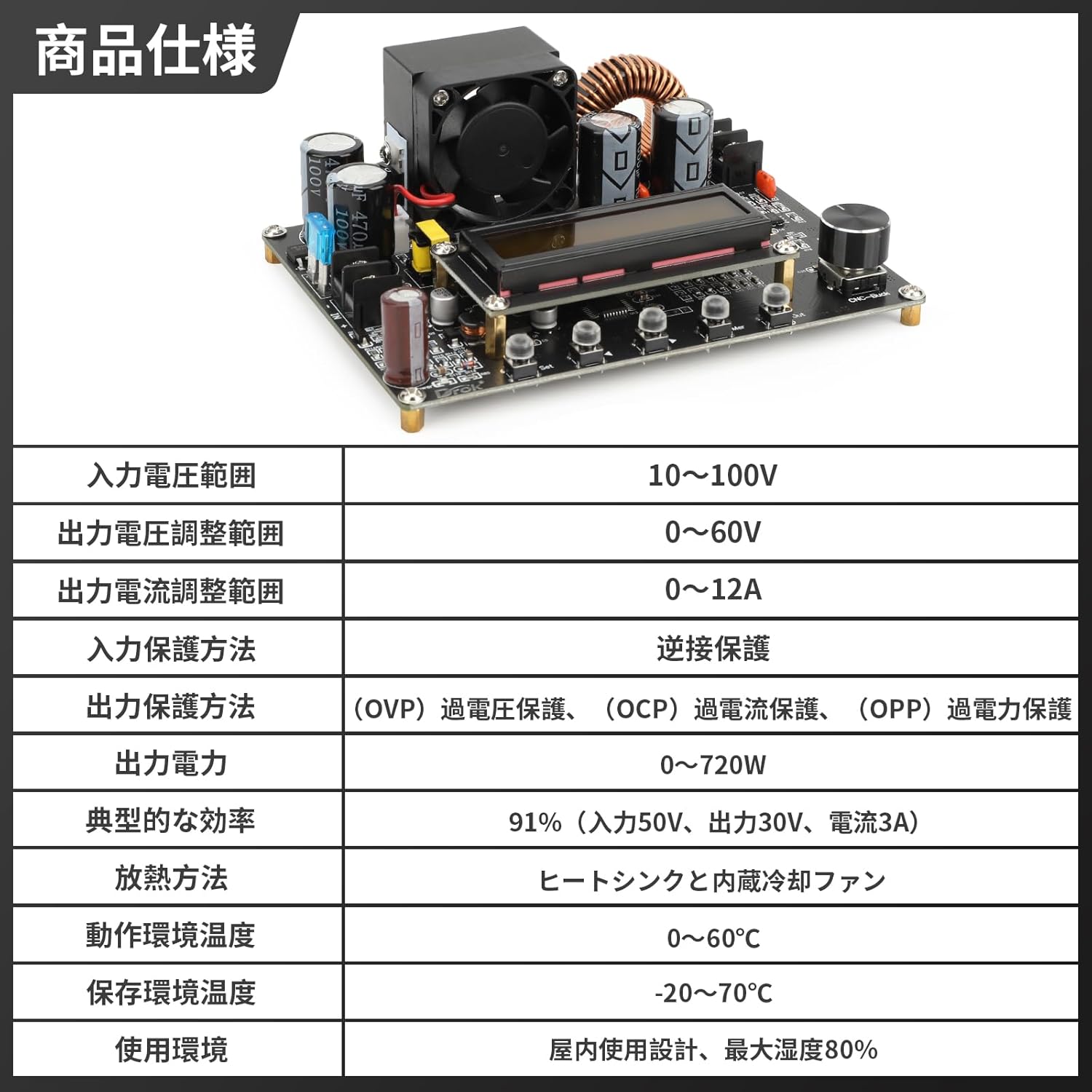
Obrázek 3.1: Podrobné specifikace produktu
| Specifikace | Hodnota |
|---|---|
| Vstupní objemtage Dosah | 10V ~ 100V |
| Výstupní objemtage Rozsah nastavení | 0V ~ 60V |
| Output Current Adjustment Range | 0 A ~ 12 A. |
| Input Protection Method | Ochrana proti zpětnému připojení |
| Output Protection Methods | Přes Voltage Protection (OVP), Over Current Protection (OCP), Over Power Protection (OPP) |
| Výstupní výkon | 0W ~ 720W |
| Typická účinnost | 91% (Input 50V, Output 30V, Current 3A) |
| Metoda rozptylu tepla | Heat Sink and Built-in Cooling Fan |
| Teplota provozního prostředí | 0 °C ~ 60 °C |
| Teplota prostředí skladování | -20 °C ~ 70 °C |
| Prostředí použití | Indoor use, maximum humidity 80% |
4. Konec produktuview

Obrázek 4.1: Hlavní view of the DROK DC-DC Step-Down Converter.

Figure 4.2: Front and side dimensions of the converter module.

Obrázek 4.3: Detailní view of the module display, input/output ports, encoder knob, and operation buttons.

Figure 4.4: Visual representation of the multiple protection functions including reverse connection, output over-voltage, výstup pod-objtage, and output over-current protection.

Figure 4.5: The LCD1602 display provides clear real-time output status and facilitates precise digital control.

Obrázek 4.6: Přamples of various application scenarios for the converter, including laboratory and research environments, electronic device repair, industrial automation and testing, and education and training.
5. Nastavení
Before connecting the module, ensure all power sources are disconnected. Observe proper polarity when making connections to prevent damage to the module or connected devices.
- Vstupní připojení: Connect your DC power source (10V-100V) to the 'IN+' and 'IN-' terminals on the module. Ensure the input voltage je ve specifikovaném rozsahu.
- Výstupní připojení: Connect your load to the 'OUT+' and 'OUT-' terminals.
- Počáteční zapnutí: After verifying all connections, apply power to the input. The LCD display will illuminate, showing the current settings.
6. Návod k obsluze
The module features an LCD display, an encoder knob, and several buttons for operation.
6.1. Režimy zobrazení
Press the 'SW' button to cycle through different display modes:
- Vstupní objemtage / výstupní objemtage
- Output Current / Output Power
- Výstupní objemtage / Output Current
- Temperature / Accumulated Capacity (Ah)
6.2. Nastavení výstupního objemutage a proud
- svtage Úprava: Rotate the encoder knob clockwise to increase the output voltage, and counter-clockwise to decrease it. The display will show the adjusted voltage.
- Aktuální úprava: To adjust the output current, press the 'U/I' button. The display will switch to current adjustment mode. Rotate the encoder knob to set the desired current limit.
- Output ON/OFF: Press the 'ON/OFF' button to enable or disable the output.
7. Údržba
To ensure optimal performance and longevity of your DROK DC-DC Step-Down Converter, follow these maintenance guidelines:
- Udržujte v čistotě: Regularly clean the module, especially the heat sink and fan, to prevent dust accumulation which can hinder heat dissipation. Use a soft, dry cloth.
- Větrání: Ensure adequate ventilation around the module during operation. Do not obstruct the cooling fan.
- Vyhněte se vlhkosti: Keep the module away from moisture and corrosive environments.
- Kontrola připojení: Periodically check all input and output connections for tightness and signs of wear.
8. Řešení problémů
Pokud narazíte na problémy s převodníkem, podívejte se na následující běžné problémy a jejich řešení:
| Problém | Možná příčina | Řešení |
|---|---|---|
| No display/No output | No input power, incorrect wiring, or input voltage outside range. | Check input power supply, verify wiring polarity, ensure input voltage je 10-100V. |
| Výstupní objemtage nestabilní | Loose connections, excessive load, or faulty input power. | Secure all connections, reduce load, or test with a stable input power source. |
| Nadproud/Nadobjemtagaktivována ochrana e | Load drawing too much current, or output voltage set too high for the load. | Reduce load, adjust output current limit, or verify output voltage nastavení. |
| Přehřívání modulu | Insufficient ventilation, excessive load, or fan malfunction. | Ensure proper airflow, reduce load, clean fan/heat sink, or replace fan if faulty. |
9. Záruka a podpora
DROK products are designed for reliability and performance. For any technical support or warranty inquiries, please contact your retailer or the manufacturer directly. Keep your purchase receipt as proof of purchase.