
Zavedení
Thank you for choosing the Fenge Dual Monitor Stand with 2 Drawers. This manual provides essential information for the safe and efficient assembly, operation, and maintenance of your new computer riser. Please read these instructions thoroughly before use and retain them for future reference.
Bezpečnostní informace
- Před montáží se ujistěte, že jsou všechny součásti přítomny a nepoškozené. Nepoužívejte, pokud některé součásti chybí nebo jsou vadné.
- Jednotku sestavte na měkkém a čistém povrchu, abyste zabránili poškrábání.
- Nepřekračujte maximální nosnost 99 kg.
- Place the monitor stand on a stable, level surface to prevent tipping.
- Udržujte malé části mimo dosah dětí.
Obsah balení
Ověřte, zda balení obsahuje všechny následující komponenty:
- Main MDF Board (Top Shelf)
- Lower MDF Board (Middle Shelf)
- Adjustable Height Legs (4 pieces)
- Fabric Drawers (2 pieces)
- Montážní materiál (šrouby, hmoždinky atd.)
- Assembly Tool (screwdriver/Allen wrench)
Montážní návod
Follow these steps to assemble your Fenge Dual Monitor Stand:
- Prepare the Boards: Lay the main MDF board (top shelf) and the lower MDF board (middle shelf) on a soft, flat surface.
- Attach Support Pieces: Secure the internal support pieces to the underside of the main MDF board and the top of the lower MDF board using the provided screws and dowels. Ensure they are aligned with the pre-drilled holes.
- Connect the Shelves: Carefully align the main MDF board with the lower MDF board, ensuring the support pieces fit correctly. Secure them together with the appropriate hardware.
- Instalace nohou: Attach the four adjustable height legs to the underside of the lower MDF board. Tighten the screws securely.
- Vložte zásuvky: Slide the two fabric drawers into their designated compartments on the lower shelf.
For a visual guide on assembly, please refer to the official assembly video:
Video: Fenge Monitor Stand Assembly Guide (Excludes Drawer Section). This video demonstrates the step-by-step process of assembling the monitor stand components.
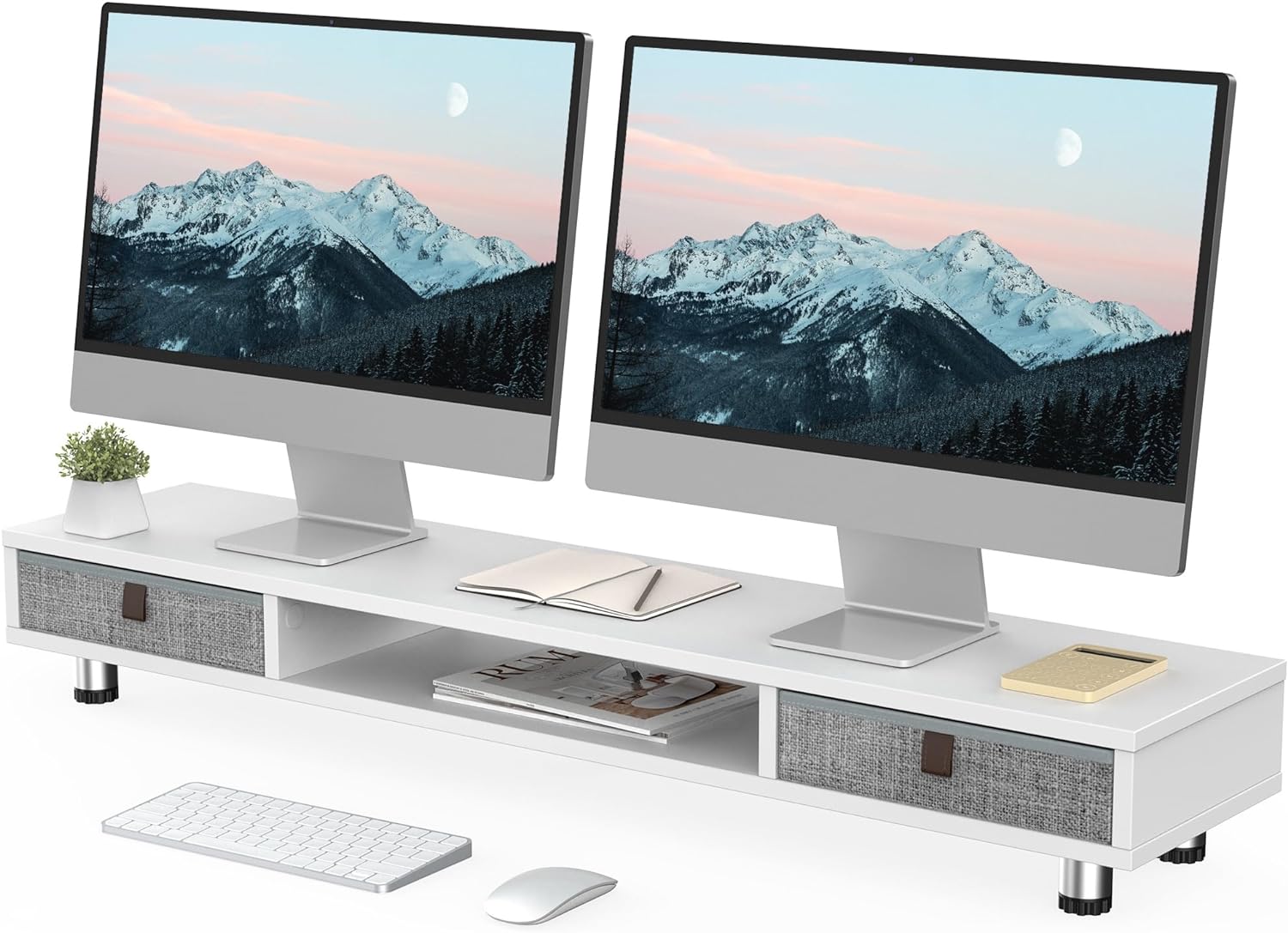
Image: The fully assembled Fenge Dual Monitor Stand in white, showcasing its design with two monitors and integrated storage drawers.
Návod k obsluze
The Fenge Dual Monitor Stand is designed to enhance your workspace ergonomics and organization.
- Umístění monitoru: Place up to two 32-inch monitors on the top surface of the stand. Ensure the weight is evenly distributed and does not exceed the 99 lbs (45 kg) capacity.
- Nastavitelná výška: The stand's height can be adjusted from 6.0 inches to 6.6 inches. Rotate the adjustable feet at the bottom of the legs to achieve your desired ergonomic viewing height. This helps alleviate neck strain during long work sessions.
- Integrované úložiště: Utilize the two large 10.9-inch slide-out fabric drawers for storing desktop items such as pens, notebooks, and small accessories, keeping your workspace tidy. The middle compartment also offers additional space for laptops, keyboards, or other devices.
- Všestranné použití: This stand can also function as a printer stand, laptop riser, or TV stand, adapting to various needs in your home or office.

Image: A close-up illustrating the practical storage provided by the pull-out drawers, ideal for organizing small office supplies.

Obrázek: Vizuální examples demonstrating the monitor stand's adaptability for use with printers, multiple monitors, or as a television stand.
Video: Fenge Dual Monitor Stand with 2 Drawers Product Overview. This video provides a brief demonstration of the monitor stand's features and functionality.
Údržba
Pro zajištění dlouhé životnosti a vzhledu stojanu na monitor:
- Otřete povrchy měkkým, damp hadříkem. Nepoužívejte agresivní chemikálie ani abrazivní čisticí prostředky.
- Pravidelně kontrolujte všechny šrouby a spoje, abyste se ujistili, že jsou pevně utažené.
- Keep the stand away from direct sunlight and extreme temperatures to prevent material damage.
Odstraňování problémů
If you encounter any issues with your monitor stand, refer to the following common solutions:
- Nestabilita/Kolísání: Ensure all screws are tightened. Check that the adjustable feet are evenly extended and making full contact with the desk surface.
- Zásuvky se neposouvají hladce: Verify that the drawers are inserted correctly and that there are no obstructions in the compartments.
- Difficulty with height adjustment: Ensure the adjustable feet are not overtightened and can rotate freely.
Specifikace
Detailed product specifications for the Fenge Dual Monitor Stand:
| Funkce | Detail |
|---|---|
| Model | B0CFF9BCKB |
| Rozměry (D x Š x V) | 42.5 x 9.3 x 6.0~6.6 palců |
| Hmotnost položky | 18.56 libry (8.44 kg) |
| Kapacita zatížení | 99 liber (44.91 kg) |
| Materiál | MDF (dřevovláknitá deska se střední hustotou) |
| Barva | Bílý |
| Zásuvky | 2 fabric slide-out drawers (10.9 inches each) |
| Nastavitelný rozsah výšky | 6.0 palců až 6.6 palců |

Image: A detailed diagram illustrating the physical dimensions and weight capacity of the monitor stand.

Obrázek: Detail view emphasizing the construction materials and adjustable features of the stand's legs.
Záruka a podpora
For warranty information or technical support, please refer to the product packaging or contact Fenge customer service directly. Keep your purchase receipt for any warranty claims.