
LED1903, LED-1903, LED2206, LED-2206
Návod k obsluze náhradního dálkového ovladače
Compatible with Manta LED1903, LED-1903, LED2206, LED-2206 TV Models
Konec produktuview
This document provides comprehensive instructions for the use and maintenance of your replacement remote control. Designed for compatibility with various Manta LED TV models, including LED1903, LED-1903, LED2206, and LED-2206, this remote offers essential functions for controlling your television.

Obrázek 1: Přední view of the replacement remote control. The remote is black with grey buttons, featuring standard TV controls like power, number pad, volume, channel, menu, and playback buttons.
Nastavení a instalace baterií
To begin using your new remote control, you will need to install batteries. This remote typically requires two AAA batteries (not included).
- Najděte přihrádku na baterie: Turn the remote control over. The battery compartment cover is located on the back.
- Otevřete kryt: Gently slide the battery compartment cover downwards or press the latch and lift, as indicated by the arrow or latch mechanism.
- Vložte baterie: Vložte dvě baterie AAA a ujistěte se, že kladný (+) a záporný (-) pól správně odpovídají označením uvnitř přihrádky. Nesprávné vložení může znemožnit funkci dálkového ovladače.
- Zavřete kryt: Zasuňte kryt přihrádky na baterie zpět na místo, dokud bezpečně nezacvakne.
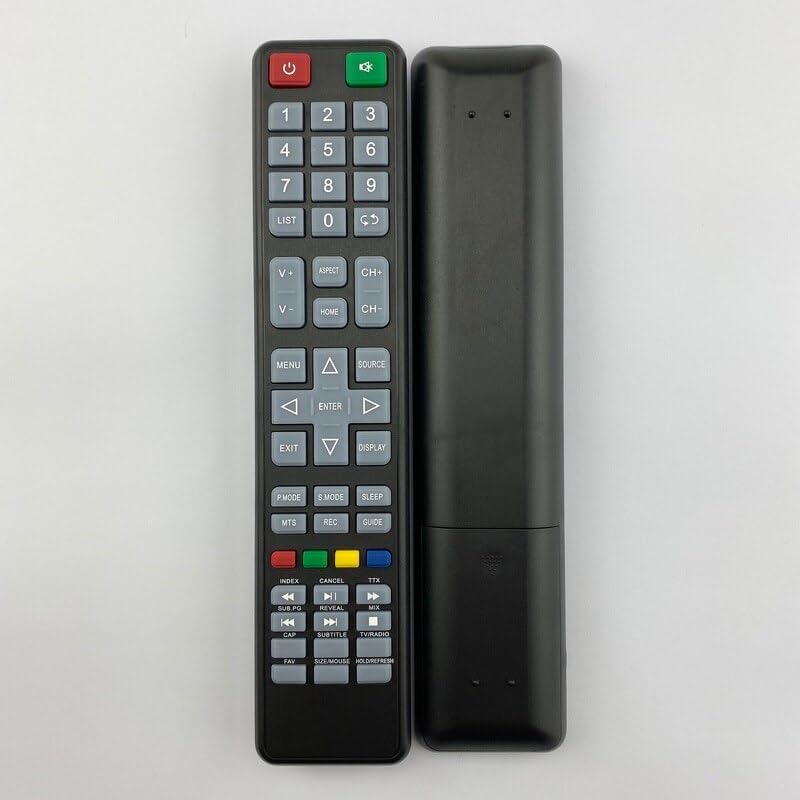
Obrázek 2: Zadní view of the replacement remote control. This image shows the smooth back casing, where the battery compartment is located.
Once batteries are installed, the remote control is ready for use. Point the remote directly at your Manta TV's infrared receiver.
Návod k obsluze
This section details the functions of the various buttons on your replacement remote control.
| Tlačítko/Sekce | Funkce |
|---|---|
| Napájení (červená) | Zapíná nebo vypíná televizor (pohotovostní režim). |
| Zdroj (zelený) | Switches between input sources (e.g., HDMI, AV, TV). |
| Číselná klávesnice (0-9) | Přímý výběr televizních kanálů nebo zadávání číselných hodnot. |
| SEZNAM | Přístup k seznamu kanálů. |
| V+/V- (Volume Up/Down) | Nastavuje úroveň hlasitosti. |
| CH+/CH- (Channel Up/Down) | Postupně mění televizní kanál. |
| ASPEKT | Změní poměr stran obrazovky. |
| DOMOV | Přístup k hlavní nabídce televizoru nebo k chytrým funkcím. |
| MENU | Otevře nabídku nastavení televizoru. |
| Navigační šipky (nahoru, dolů, vlevo, vpravo) | Prochází nabídkami a možnostmi. |
| ENTER | Potvrzuje výběry v nabídkách. |
| EXIT | Opustí aktuální nabídku nebo funkci. |
| ZOBRAZIT | Shows current channel information or on-screen display. |
| P.MODE (Picture Mode) | Cykluje mezi přednastavenými režimy obrazu. |
| S.MODE (Sound Mode) | Cycles through preset sound modes. |
| SPÁT | Nastaví časovač vypnutí pro televizor. |
| MTS | Selects Multi-channel Television Sound (e.g., Stereo, SAP). |
| REC | Initiates recording if the TV supports PVR functionality. |
| PRŮVODCE | Accesses the Electronic Program Guide (EPG). |
| Barevná tlačítka (červená, zelená, žlutá, modrá) | Context-sensitive functions within menus or smart TV applications. |
| Ovládání přehrávání (přetočení zpět, přehrávání/pozastavení, rychlé přetočení vpřed, předchozí, zastavení, další) | Controls media playback for connected devices or internal media player. |
| SUBTITLE | Zapíná/vypíná titulky. |
| TV / ROZHLAS | Switches between TV and Radio modes (if supported). |
| FAV | Přístup k seznamu oblíbených kanálů. |
| SIZE/MOUSE/HOLD/FREEZE | Multi-function button, may control screen size, mouse pointer (if smart TV), or freeze frame. |
Note: Some functions may not be available or may operate differently depending on your specific Manta TV model. This remote is a replacement and may not replicate all functions of your original remote.
Údržba a péče
- Čištění: K čištění dálkového ovladače používejte měkký, suchý hadřík. Nepoužívejte tekuté čisticí prostředky ani abrazivní materiály, protože by mohly poškodit povrch nebo vnitřní součásti.
- Výměna baterie: Replace batteries when the remote's response becomes sluggish or it stops working. Always replace both batteries at the same time with new ones of the same type.
- Skladování: Pokud dálkový ovladač nebudete delší dobu používat, vyjměte baterie, abyste zabránili jejich vytečení a možnému poškození. Skladujte na chladném a suchém místě.
- Vyhněte se poškození: Nenechávejte dálkový ovladač upustit, nevystavujte ho extrémním teplotám ani jej neponořujte do vody.
Odstraňování problémů
Pokud máte problémy s dálkovým ovladačem, zkuste následující kroky pro řešení potíží:
- Dálkové ovládání nereaguje:
- Zkontrolujte, zda jsou baterie vloženy správně se správnou polaritou (+/-).
- Vyměňte staré baterie za nové.
- Ujistěte se, že mezi dálkovým ovladačem a infračerveným senzorem televizoru nejsou žádné překážky.
- Ujistěte se, že se nacházíte v dosahu infračerveného senzoru televizoru.
- Konkrétní tlačítka nefungují:
- This replacement remote may not support all functions of your original TV remote. Refer to the "Operating Instructions" section for supported functions.
- Clean the button if it feels sticky or unresponsive.
- TV Not Responding to Power Button:
- Ensure the TV is plugged into a working power outlet and is not in a deep sleep mode.
- Try pressing the power button directly on the TV.
Specifikace
| Funkce | Detail |
|---|---|
| Typ produktu | Náhradní dálkový ovladač |
| Značka | Obecný |
| Kompatibilní modely televizorů | Manta LED1903, LED-1903, LED2206, LED-2206 |
| Zdroj napájení | 2 x AAA baterie (nejsou součástí balení) |
| Materiál | ABS plast |
| Barva | Černá nebo bílá (náhodně odeslaná) |
| Speciální funkce | Ergonomický design |
| Maximální počet podporovaných zařízení | 5 (as per product specifications, though this remote is for one TV) |
| Kompatibilní zařízení (obecně) | Television, Set Top Box, DVD/Blu-ray Player, Home Theater, Stereo System (as per product specifications, though this remote is primarily for TV) |
Záruka a podpora
Information regarding specific warranty terms for this replacement remote control is not provided in the product details. For any issues or support inquiries, please refer to the seller or the platform where the purchase was made.
As this is a generic replacement product, direct manufacturer support may not be available. It is recommended to contact the seller for assistance with product defects or operational questions not covered in this manual.
Ask a question about this manual
Ask about setup, troubleshooting, compatibility, parts, safety, or missing instructions. Manuals+ will review the question and use this page’s manual context to help answer it.