
Vonets VAP11S-5G
Uživatelská příručka k průmyslovému mini WiFi routeru VONETS VAP11S-5G 5GHz, mostovému opakovači
Model: VAP11S-5G
1. Úvod
The VONETS VAP11S-5G is an industrial-grade 5GHz wireless device designed to function as a WiFi bridge, wireless repeater, or WiFi router. It facilitates both wireless-to-wired and wired-to-wireless network conversions, making it suitable for various industrial and commercial applications. This device features a smart cooling fan for stable operation and supports multiple power supply options.
2. Obsah balení
Ověřte, zda jsou v balení přítomny všechny položky:
- 1 x VAP11S-5G Device
- 2 x 5G External Antennas
- 1 x montážní sada
- 1 x Industrial DC Connector
- 1 x DC/USB Power Cable
- 1 x ethernetový kabel RJ45
- 1 x Uživatelská příručka
3. Konec produktuview
The VAP11S-5G features a compact design with external antennas for enhanced signal reception. It includes essential ports for power and network connectivity, along with LED indicators for status monitoring.

Image: The VONETS VAP11S-5G device, showing its main unit with two external antennas, a USB power cable, an Ethernet cable, and an industrial DC connector for flexible power and network connections.

Image: A detailed diagram illustrating the VAP11S-5G's external interfaces, including the LAN/WAN port, USB power input, DC power input, reset button, and LED indicators for WiFi, Ethernet, and system status.
3.1. Externí rozhraní
- USB/DC Power Supply Cable: For device power.
- 10/100 Mbps Adaptive Ethernet Port: Pro kabelové síťové připojení.
- Resetovací tlačítko: Používá se k obnovení továrního nastavení.
3.2. Indikátory stavu LED
- Zelené světlo: Indicates 5G WiFi connection status.
- Žluté světlo: Indicates Ethernet cable connection status.
- Modré světlo: Označuje stav systému.
4. Specifikace
| Funkce | Popis |
|---|---|
| Název produktu | VAP11S-5G (With fan version) |
| Barva | Bílý |
| WiFi funkce | Repeater/Bridge/Router |
| Protokol WiFi | 802.11a/ac/n |
| Přenosová rychlost | 900 Mb / s (5 GHz) |
| WiFi pásmo | 5 GHz |
| Práce svtage | DC5V-24V (Typical 5V/2A or 12V/1A) |
| Rozměry produktu | 3.66 x 1.77 x 0.94 palce (94 x 45 x 15 mm) |
| Hmotnost položky | 3.53 unce (94 g) |
| Provozní teplota | -20 °C až 50 °C |
| Antény | 2 x 5G External Antennas |
| Přenosový výkon | 19dBm/23dBm (Adjustable) |
| Speciální funkce | Access Point Mode, Bridge/Repeater Mode, Router Mode, WiFi to Ethernet, Wireless to Wired, Smart Cooling Fan, WiFi Hotspot Memory (up to 100), SSA Signal Strength Detection. |
5. Provozní režimy
The VAP11S-5G supports multiple operating modes to suit various networking needs:

Image: Visual representation of the three primary operating modes: Repeater/Bridge mode for extending networks, AP mode for creating wireless access from a wired connection, and Router mode for internet access and network management.
5.1. Repeater/Bridge Mode
In this mode, the device expands existing WiFi networks. It converts a wireless signal into a wired signal, connecting to a network port device via an RJ45 cable. This effectively replaces a network cable, simplifying wiring and extending network access to devices like cash registers, printers, surveillance video recorders, and attendance machines.
5.2. Režim AP (přístupový bod)
AP mode enables wireless access functionality for a wired network. It is suitable for scenarios where a network cable is connected to a computer, allowing wireless devices to access the internet without requiring a dial-up connection.
5.3. Režim routeru
Router mode provides wireless access with dial-up internet access. This mode is ideal for scenarios requiring dial-up internet access and higher-level network management for cross-segment applications.
5.4. MAC Layer Transparency
The device supports transparent transmission of the MAC layer (link layer) and all data above it, including IP layer data. This feature is beneficial for special applications requiring MAC layer encryption, such as GoPro cameras, Cisco APs, and Hikvision surveillance systems.

Image: An illustration demonstrating MAC Layer Transparency, where the VAP11S-5G facilitates seamless data transmission for devices like GoPro cameras, industrial PLCs, and point-of-sale systems.
6. Průvodce nastavením
Tato část poskytuje obecný závěrview of the setup process. For detailed configuration steps, please refer to the comprehensive user manual included in the package or contact support.
- Připojení napájení: Connect the device to a power source using the provided USB/DC power cable. Ensure the power supply meets the DC5V-24V requirement (typical 5V/2A or 12V/1A).
- Počáteční připojení: Connect your computer to the VAP11S-5G via an Ethernet cable or wirelessly to its default WiFi hotspot.
- Stránka s nastavením přístupu: Otevřete a web browser and navigate to the device's default IP address (usually printed on the device or in the manual) to access the configuration interface.
- Vyberte provozní režim: Choose the desired operating mode (Bridge, Repeater, AP, or Router) based on your network requirements.
- Konfigurace nastavení sítě: Follow the on-screen instructions to configure the necessary network parameters, such as connecting to an existing WiFi network (for Repeater/Bridge mode) or setting up a new WiFi hotspot (for AP/Router mode).
- Uložit a restartovat: Save your settings and reboot the device for changes to take effect.
6.1. Možnosti napájení
The VAP11S-5G supports a wide voltage range of DC5V-24V and offers flexible power input methods:
- USB napájení: Recommended 5V/2A.
- Industrial Wiring Head: For direct industrial power connections.
- DC napájení: Podporuje široký objtage DC5V-24V.
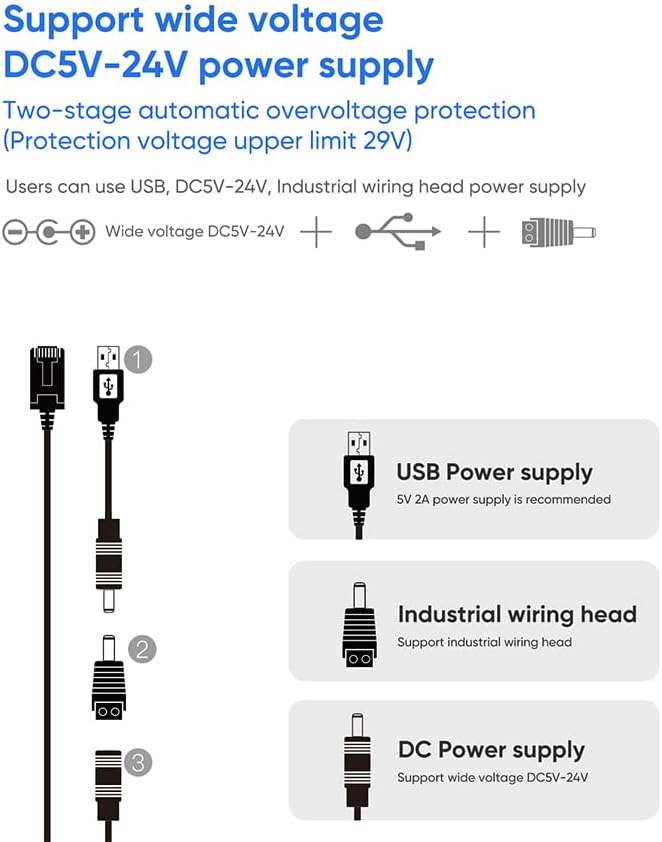
Image: An illustration detailing the flexible power input options for the VAP11S-5G, including standard USB (5V-2A recommended), an industrial wiring head, and a direct DC power input (5V-24V).
7. Aplikace
The VAP11S-5G is designed for a variety of industrial and commercial applications due to its robust features and flexible operating modes.

Image: A collage of nine images depicting diverse applications for the VAP11S-5G, including robots, electronic scales, printers, doll machines, PLCs, set-top boxes, robotic arms, medical equipment, and attendance machines.
7.1. Industrial Automation
- PLC Connectivity: Enables wireless communication for Programmable Logic Controllers (PLCs).
- Robotika: Facilitates data transfer for industrial robotic arms and AGVs.
7.2. Surveillance and Monitoring
- IP Cameras & DVR/NVR: Connects wired surveillance equipment to a wireless network.
- Přenos videa: Supports stable video transmission over distances, useful for remote monitoring.
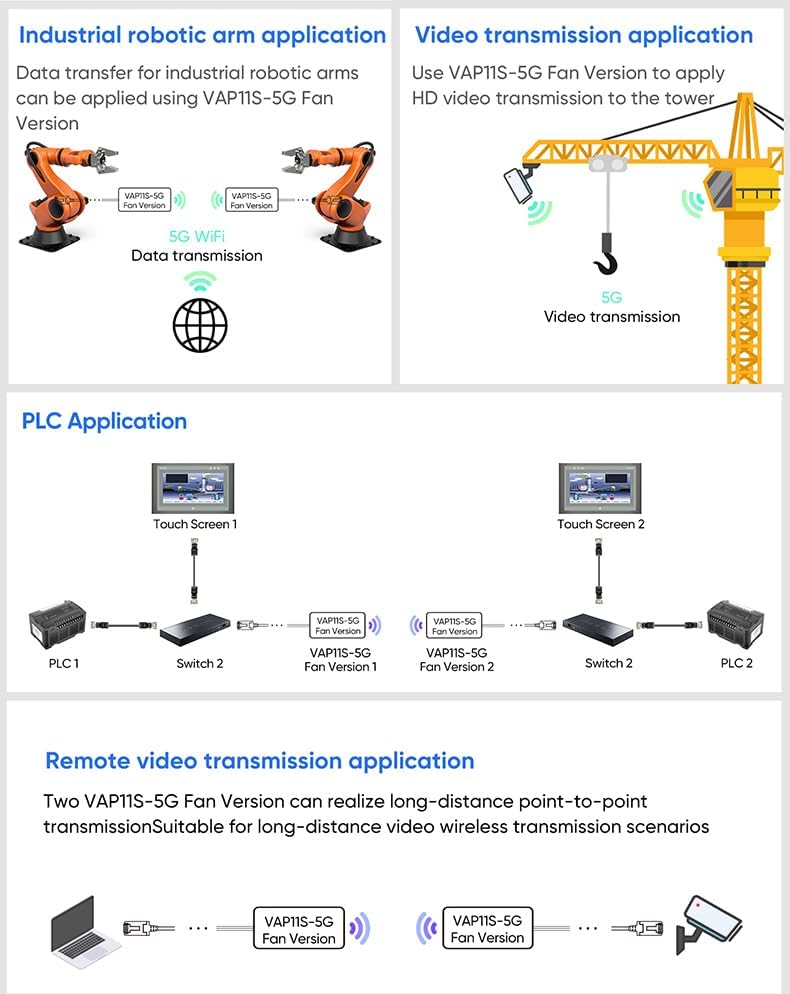
Image: Application diagrams illustrating the VAP11S-5G's use in industrial robotic arm data transfer, HD video transmission to a tower, PLC network integration, and long-distance point-to-point video transmission.
7.3. Other Applications
- Lékařské přístroje: Provides wireless connectivity for medical equipment.
- Zařízení internetu věcí: Integrates various Internet of Things devices into a network.
- Network Printers: Enables wireless printing for wired printers.
- Point-of-Sale Systems: Connects electronic scales and cash registers wirelessly.
8. Údržba
To ensure optimal performance and longevity of your VONETS VAP11S-5G, follow these maintenance guidelines:
- Udržujte v čistotě: Zařízení pravidelně čistěte měkkým, suchým hadříkem. Nepoužívejte tekuté čisticí prostředky ani rozpouštědla.
- Větrání: Ensure the smart cooling fan and ventilation openings are not obstructed to prevent overheating. The fan will automatically activate when needed.
- Napájení: Use only the recommended power supply (DC5V-24V, typical 5V/2A or 12V/1A) to prevent damage. The device has two-stage automatický overvoltage ochrana.
- Podmínky prostředí: Operate the device within the specified temperature range of -20°C to 50°C. Avoid extreme humidity or direct exposure to water.
- Aktualizace firmwaru: Periodically check the official VONETS webweb s aktualizacemi firmwaru pro zvýšení výkonu a zabezpečení.
9. Řešení problémů
If you encounter issues with your VAP11S-5G, consider the following troubleshooting steps:
- Bez napájení:
- Zkontrolujte, zda je napájecí kabel bezpečně připojen.
- Verify the power adapter is functioning and providing the correct voltage (DC5V-24V).
- No WiFi Signal:
- Ensure the external antennas are properly attached.
- Check the Green LED indicator for WiFi status.
- Confirm the device is configured correctly in Repeater or AP mode.
- Žádný přístup k internetu:
- In Repeater/Bridge mode, ensure the upstream WiFi network has internet access.
- In Router mode, verify WAN settings and internet service provider connection.
- Check the Yellow LED indicator for Ethernet connection status.
- Pomalá rychlost připojení:
- Ensure the device is operating in 5GHz mode for higher speeds.
- Reduce interference by repositioning the device or connected devices.
- Check signal strength (SSA function) and adjust antenna direction.
- Zařízení nereaguje:
- Perform a soft reboot by unplugging and replugging the power.
- If issues persist, use the reset button to restore factory defaults (this will erase all configurations).
Pro další pomoc se prosím obraťte na technickou podporu.
10. Podpora
If you have any questions regarding the setup, operation, or troubleshooting of your VONETS VAP11S-5G, please contact our technical support team:
E-mail: skyfoxcn@vip.163.com
Please provide your product model (VAP11S-5G) and a detailed description of the issue when contacting support.
11. Informace o záruce
VONETS products are covered by a limited warranty. Please refer to the warranty card included with your product or visit the official VONETS website for detailed warranty terms and conditions. The warranty typically covers manufacturing defects under normal use conditions.
Ask a question about this manual
Ask about setup, troubleshooting, compatibility, parts, safety, or missing instructions. Manuals+ will review the question and use this page’s manual context to help answer it.