
Zavedení
The IHSENO Mini WiFi Relay Smart Switch is an intelligent device designed to integrate your lighting and other electrical appliances into a smart home system. It operates on 2.4GHz WiFi and is controlled via the Tuya Smart Life App, allowing for remote management, scene customization, and voice control through platforms like Alexa and Google Home. Its compact design enables installation in various electrical boxes, facilitating the automation of your home environment.
Bezpečnostní informace
Before installation or operation, please read and understand all safety instructions. Improper installation can lead to electric shock or fire. This device is designed for indoor use only. Ensure the power supply is disconnected before any wiring work. Installation should be performed by a qualified electrician or in accordance with local electrical codes. The device is certified for safety (FCC, CE, RoHS) and features fireproof material.

Image: Safety and Certification details for the IHSENO Mini WiFi Smart Switch, highlighting compliance with FCC, CE, and RoHS standards, and indicating fireproof material construction.
Vlastnosti produktu
- Mini WiFi Smart Switch: Compact design for easy installation in standard electrical boxes.
- Tuya Smart Life App Control: Manage devices remotely, create intelligent scene linkages with other Tuya devices.
- Customizable Scene Modes: Set specific lighting or appliance configurations for various activities (e.g., Reading, Movie).
- Hlasové ovládání: Kompatibilní s Alexou a Google Assistant pro ovládání bez použití rukou.
- Inteligentní načasování: Schedule automatic on/off times for energy saving and convenience.
- 2-Way Control Support: Designed to work with existing 2-way switch setups.
- Funkce sdílení s rodinou: Share control permissions with family members through the app.
Specifikace

Image: Detailed product specifications for the IHSENO Mini WiFi Smart Switch, including electrical ratings, dimensions, and supported application.
| Výrobce | IHSENO |
| Velikost | 1.6*1.6*0.8 inches (approx. 41x20x41mm) |
| Barva | Bílý |
| Materiál | Copper (internal components), PC V0 (housing) |
| Položka Množství v balení | 2 |
| Typ přepínače | 1-cestný |
| Typ montáže | Držák na zeď |
| Styl přepínání | Stiskněte tlačítko |
| Bezdrátový typ | WiFi 2.4G |
| Vstup | AC 100-240V 50 / 60Hz 16A Max |
| Výstup | AC 100-240V 50 / 60Hz 16A Max |
| Kompatibilita aplikací | Smart Life (Support iOS & Android) |
Nastavení a instalace
Co je v krabici
Your package includes two (2) IHSENO Mini WiFi Relay Smart Switches and this instruction manual.
Schémata zapojení
Důležité: Ensure the power supply is completely disconnected at the circuit breaker before attempting any wiring. Input and output connections cannot be reversed. Consult a qualified electrician if you are unsure about any wiring procedures.

Image: Wiring Method 1 - Direct connection. This diagram illustrates connecting the smart switch directly between the mains power supply and a lamp. L-out and N-out connect to the lamp, while L-in and N-in connect to the mains. Input and output cannot be reversed.

Image: Wiring Method 2 - With a 1-way switch. This diagram shows how to integrate the smart switch with a traditional 1-way wall switch. The lamp connects to L-out/N-out, mains to L-in/N-in, and the 1-way switch connects to the S1 and S2 terminals on the smart switch. Input and output cannot be reversed.

Image: Wiring Method 3 - With a 2-way switch. This diagram details connecting the smart switch in a 2-way control setup. The lamp connects to L-out/N-out, mains to L-in/N-in, and the 2-way switch connects to the S1, S2, and L-in terminals of the smart switch. Input and output cannot be reversed.
Instalace aplikace a párování zařízení
- Stáhněte si aplikaci: Hledat "Tuya Smart" or "Smart Life" in your smartphone's app store (iOS or Android) and install the application.
- Registrace/Přihlášení: Otevřete aplikaci a zaregistrujte si nový účet nebo se přihlaste pomocí stávajícího účtu.
- Přidat zařízení:
- Ensure your smart switch is powered on and in pairing mode (usually indicated by a rapidly blinking light). If not, refer to the device's reset instructions (typically pressing a button for 5 seconds).
- V aplikaci klepněte na ikonu „+“ (obvykle v pravém horním rohu) pro přidání nového zařízení.
- Select "Electrical" or "Switch (Wi-Fi)" from the device list.
- Follow the on-screen prompts to connect the device to your 2.4GHz WiFi network.
- Once connected, you can rename the device for easier identification.
Návod k obsluze
Dálkové ovládání přes aplikaci Tuya Smart Life
Once paired, you can control your smart switch from anywhere with an internet connection using the Tuya Smart Life App. This includes turning devices on/off, checking status, and managing settings.
Image: Illustration of WiFi remote control, demonstrating how a smartphone connected to the internet can control the smart switch and connected devices from any location.

Image: App Remote Control in action, showing a user controlling a floor lamp via the Smart Life application on their smartphone.
Hlasové ovládání s Alexou a Google Home
Integrate your smart switch with Amazon Alexa or Google Assistant for convenient voice control. Follow the instructions in your Alexa or Google Home app to link your Tuya Smart Life account.
- Pro Alexu: Open the Alexa app, go to "Skills & Games," search for "Smart Life," enable the skill, and link your account. Discover devices.
- Pro Google Home: Open the Google Home app, tap "+", select "Set up device" > "Works with Google," search for "Smart Life," link your account.
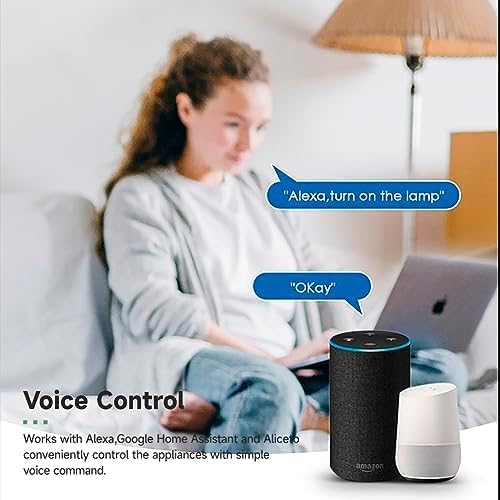
Image: Voice Control demonstration, showing a user interacting with an Amazon Echo and Google Home Mini to turn on a lamp using voice commands.
Customizing Scene Modes
The Tuya Smart Life App allows you to create custom scenes that activate multiple devices with a single command or condition. For example, a "Movie Night" scene could dim lights and turn on entertainment systems.
- In the Tuya Smart Life App, navigate to the "Smart" or "Scenes" section.
- Tap to create a new scene.
- Define the conditions (e.g., manual tap, time, device status) and the actions (e.g., turn on/off switch, set brightness).
- Save your scene.
Intelligent Timing and Scheduling
Set schedules for your devices to operate automatically, enhancing convenience and energy efficiency.
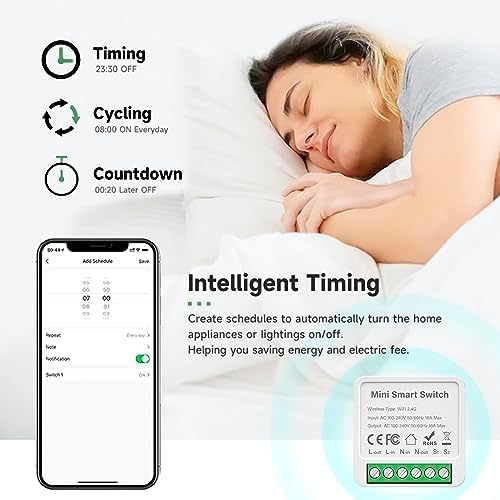
Image: Intelligent Timing features, illustrating the app's capabilities for setting schedules, cycling, and countdown timers to automate home appliances and lighting.
- From the device control interface in the app, look for "Schedule," "Timer," or "Countdown" options.
- Set desired on/off times, repeat cycles, or countdown durations.
- Potvrďte a uložte svá nastavení.
2-Way Control Functionality
The smart switch supports 2-way control, allowing you to maintain functionality with existing multi-location switch setups. Refer to the wiring diagrams in the Setup section for proper installation.

Image: Support for 2-way control, showing a wiring schematic for connecting the smart switch with two parallel switches to control a single light fixture.
Funkce sdílení
Share control of your smart devices with family members. This allows multiple users to manage the smart switch from their own Tuya Smart Life accounts.

Image: Sharing function overview, demonstrating how control permissions for smart devices can be shared among family members via the app.
- In the app, select the device you wish to share.
- Go to the device settings (usually an icon in the top right corner).
- Look for "Share Device" or "Device Sharing" and follow the prompts to add family members.
Údržba
The IHSENO Mini WiFi Relay Smart Switch requires minimal maintenance. Keep the device clean and free from dust. Do not attempt to open or repair the device yourself, as this will void the warranty and could pose a safety risk. Ensure the device is kept in a dry environment and away from extreme temperatures.
Odstraňování problémů
- Zařízení se nepřipojuje k Wi-Fi:
- Ujistěte se, že vaše WiFi síť je 2.4 GHz. Zařízení nepodporuje 5 GHz WiFi.
- Check that your WiFi password is correct.
- Přesuňte zařízení blíže k routeru WiFi.
- Reset the smart switch (refer to app instructions for specific reset procedure, usually holding a button for 5 seconds) and try pairing again.
- Device unresponsive in app:
- Ověřte, zda má váš smartphone aktivní připojení k internetu.
- Check if the smart switch has power and its indicator light is on.
- Restartujte aplikaci Tuya Smart Life.
- If the issue persists, try restarting your WiFi router.
- Hlasové ovládání nefunguje:
- Ensure your Tuya Smart Life account is correctly linked to Alexa or Google Home.
- Check the device name in the Alexa/Google Home app; it should match what you are saying.
- Verify your voice assistant device is online and functioning correctly.
- Physical switch not working after installation:
- Double-check all wiring connections against the provided diagrams. Ensure L-in, N-in, L-out, N-out, S1, and S2 are correctly connected.
- Ujistěte se, že je zapnuté napájení.
Záruka a podpora
IHSENO is committed to providing quality products and customer satisfaction. If you encounter any issues or have questions regarding your Mini WiFi Relay Smart Switch, please contact our customer service team. We aim to respond to all inquiries within 24 hours.
For support, please refer to the contact information provided with your purchase or visit the official IHSENO webmísto.