
1. Úvod
The CALEX Smart Home Indoor Ambiance Aroma Diffuser 590100500 is designed to enhance your indoor environment by improving air quality, diffusing pleasant aromas, and providing ambient lighting. This smart device integrates seamlessly into your smart home ecosystem, offering control through the Calex app, voice commands, and programmable features.
Mezi klíčové vlastnosti patří:
- Aroma diffusion with essential oils.
- Realistic flame effect for ambiance.
- Adjustable ambient lighting with 16 million color options.
- Smart control via Calex app (timers, programmable scenarios).
- Voice control compatibility with Google Assistant, Siri, and Amazon Alexa.
- 300ml water tank capacity with automatic shut-off.
2. Bezpečnostní informace
Please read all safety instructions before using the device to prevent injury or damage.
- Always place the diffuser on a stable, flat surface away from direct sunlight, heat sources, and electronic devices.
- Do not exceed the maximum water fill line (300ml) to prevent overflow.
- Používejte pouze čistou vodu z kohoutku nebo destilovanou vodu. Nepoužívejte horkou vodu.
- Only use 100% pure, water-soluble essential oils. Other oils or corrosive liquids may damage the device.
- Udržujte zařízení mimo dosah dětí a domácích zvířat.
- Do not cover the mist outlet during operation.
- Před čištěním nebo doplňováním baterie odpojte zařízení ze zásuvky.
- The device features an automatic shut-off function when the water tank is empty, and sends a notification to your phone.
- A built-in safety configuration will cause the diffuser to flash if the remaining water in the tank needs to cool down after a maximum of 72 hours of continuous operation.
- Nepokoušejte se zařízení opravovat ani upravovat sami. Požádejte o pomoc zákaznickou podporu.
3. Obsah balení
Ověřte, zda jsou v balení přítomny všechny položky:
- CALEX Smart Home Indoor Ambiance Aroma Diffuser (Model 5901000500)
- Napájecí adaptér
- Uživatelská příručka
4. Konec produktuview
Familiarize yourself with the components of your aroma diffuser.
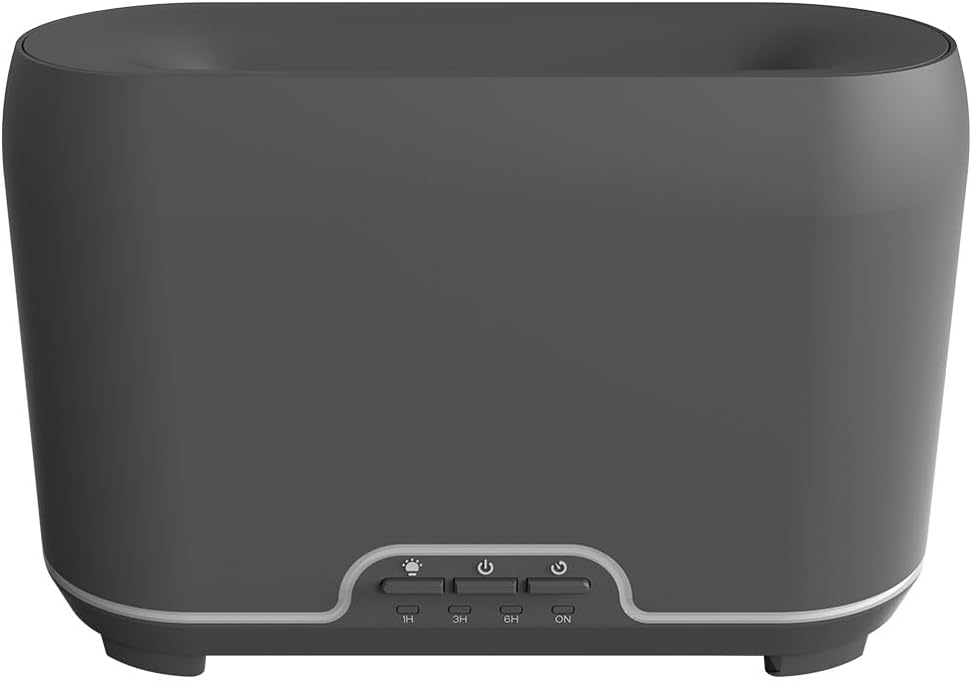
Obrázek: Přední strana view of the CALEX Smart Home Aroma Diffuser, showing the control panel with buttons for light, power, and timer settings (1H, 3H, 6H, ON).

Image: The CALEX Smart Home Aroma Diffuser operating on a wooden table, displaying its ambient flame effect and mist output.
The diffuser typically consists of a water tank, an ultrasonic plate, a mist outlet, and a control panel with buttons for power, light, and timer functions. The power input port is usually located at the back or bottom of the device.
5. Nastavení
Pro počáteční nastavení postupujte takto:
- Umístění: Umístěte difuzér na rovný a stabilní povrch.
- Otevřené víko: Opatrně sejměte horní kryt difuzéru.
- Naplňte nádrž na vodu: Fill the water tank with clean water up to the 300ml maximum fill line. Do not overfill.
- Přidejte esenciální olej: Přidejte několik kapek vašeho oblíbeného esenciálního oleje přímo do nádržky na vodu.
- Zavřít víko: Bezpečně nasaďte horní kryt.
- Připojte napájení: Plug the power adapter into the diffuser's power input port, then plug the adapter into a wall outlet.
- Download Calex App: Download the free Calex Smart app from your smartphone's app store (available for iOS and Android).
- Připojení k WiFi: Follow the in-app instructions to connect your diffuser to your home WiFi network. Ensure your WiFi is 2.4GHz.
6. Návod k obsluze
The CALEX Smart Home Aroma Diffuser can be operated via the Calex app or its integrated control buttons.
6.1 Using the Calex Smart App
The Calex app provides full control over your diffuser's functions:
- Zapnutí/vypnutí: Turn the diffuser on or off remotely.
- Ovládání mlhy: Adjust the mist output level.
- Ovládání světla: Change the ambient light color from over 16 million options, adjust brightness, and select lighting modes.
- Efekt plamene: Activate or deactivate the flame effect.
- Časovače: Set schedules for the diffuser to turn on or off automatically.
- Programovatelné scénáře: Create custom scenarios based on time, weather, or other smart home triggers.
- Oznámení: Receive alerts when the water tank is empty.
6.2 Hlasové ovládání
Integrate your diffuser with voice assistants for hands-free control:
- Asistent Google: Link your Calex account in the Google Home app. Use commands like "Hey Google, turn on the diffuser."
- Siri: Create custom shortcuts in the Apple Home app or through the Calex app for Siri commands.
- Amazon Alexa: Enable the Calex skill in the Alexa app. Use commands like "Alexa, set diffuser light to blue."
6.3 Tlačítka ručního ovládání
The control panel on the diffuser allows for basic operation:
- Vypínač: Press once to turn on/off the mist and flame effect.
- Světelné tlačítko: Press to cycle through light colors or turn the light on/off.
- Timer Buttons (1H, 3H, 6H, ON): Select a desired operating duration. The diffuser will automatically shut off after the selected time. 'ON' typically means continuous operation until water runs out or manually turned off.
7. Údržba
Pravidelné čištění zajišťuje optimální výkon a prodlužuje životnost difuzéru.
- Denní úklid: After each use, empty any remaining water from the tank. Wipe the inside of the tank with a clean, soft cloth.
- Týdenní úklid: For a more thorough clean, unplug the device. Add a small amount of white vinegar (about 10ml) to the water tank and let it sit for 10-15 minutes to dissolve mineral buildup. Gently wipe the ultrasonic plate with a cotton swab or soft brush. Rinse the tank thoroughly with clean water, avoiding the air outlet.
- Vnější čištění: Otřete vnější část difuzéru měkkým hadříkem.amp tkanina. Nepoužívejte abrazivní čisticí prostředky nebo rozpouštědla.
- Ensure the device is completely dry before refilling or storing.
8. Řešení problémů
Pokud narazíte na problémy, podívejte se na následující běžné problémy a jejich řešení:
| Problém | Možná příčina | Řešení |
|---|---|---|
| Žádná mlha nebo slabá mlha | Nízká hladina vody Ultrazvuková deska je špinavá Výstup mlhy je zablokovaný | Doplňte vodu na odpovídající úroveň. Vyčistěte ultrazvukovou desku dle pokynů k údržbě. Ujistěte se, že je výstup mlhy volný. |
| Zařízení se nezapne | Žádná síla Prázdná nádrž na vodu Porucha zařízení | Zkontrolujte připojení k elektrické síti a zásuvku ve zdi. Doplňte nádržku na vodu. Pokud problém přetrvává, kontaktujte zákaznickou podporu. |
| Problémy s připojením aplikace | Nesprávné heslo WiFi Router je příliš daleko 2.4GHz vs 5GHz WiFi | Ověřte heslo k Wi-Fi. Move diffuser closer to the router. Ensure your router is broadcasting a 2.4GHz network and connect to it. |
| Efekt plamene nefunguje | Feature deactivated in app Porucha zařízení | Check app settings to ensure flame effect is enabled. Kontaktujte zákaznickou podporu. |
9. Specifikace
| Funkce | Specifikace |
|---|---|
| Číslo modelu | 5901000500 |
| Značka | CALEX |
| Kapacita | 300 mililitrů |
| Materiál | Plast |
| Automatické vypnutí | Ano |
| Konektivita | WiFi (2.4 GHz) |
| Kontrolní metody | Calex Smart App, Voice Control (Google Assistant, Siri, Amazon Alexa), Manual Buttons |
| Možnosti světla | 16 milionů barev |
| Doporučená oblast použití | Medium space |
| Mezinárodní kód zboží (EAN/UPC) | 08712879157090 |
10. Záruka a podpora
Informace o záruce nebo technickou podporu naleznete v dokumentaci dodané s vaším nákupem nebo se obraťte přímo na prodejce/výrobce. Uschovejte si doklad o koupi pro případné reklamace.