
Amazon Echo Show 21
Amazon Echo Show 21 uživatelská příručka
Model: Echo Show 21
1. Úvod
Welcome to your new Amazon Echo Show 21. This smart display is designed to be the central hub for your home, offering a large Full HD screen for entertainment, organization, and communication. With built-in Fire TV and Alexa, you can stream content, manage your smart home, make video calls, and keep your family organized with customizable widgets.

Figure 1.1: Amazon Echo Show 21 Overview
The Echo Show 21 integrates seamlessly into your daily life, providing a visual and interactive experience for all your Alexa commands.
2. Začínáme: Nastavení
2.1 Co je v krabici
- Zařízení Echo Show 21
- Alexa Voice Remote with batteries (2 AAA included)
- Power adapter (30W) and 5 ft. cord (white)
- Wall mount, anchors, screws, mounting template
- Průvodce rychlým startem
2.2 Počáteční nastavení
The Echo Show 21 is designed for simple setup. You will need a Wi-Fi connection.
- Zapnutí: Connect the power adapter to your Echo Show 21 and plug it into a wall outlet. The device will automatically power on.
- Wi-Fi připojení: Follow the on-screen instructions to connect your device to your Wi-Fi network. Amazon Wi-Fi simple setup can automatically connect your device if you are a Prime member and have previously saved your Wi-Fi credentials.
- Amazon Account Login: Přihlaste se pomocí svých přihlašovacích údajů k účtu Amazon.
- Personalizace: Customize your home screen, set up profiles, and configure your preferred settings.
- Vzdálené párování: The included Alexa Voice Remote should pair automatically. If not, follow the on-screen instructions or refer to the quick start guide for manual pairing.
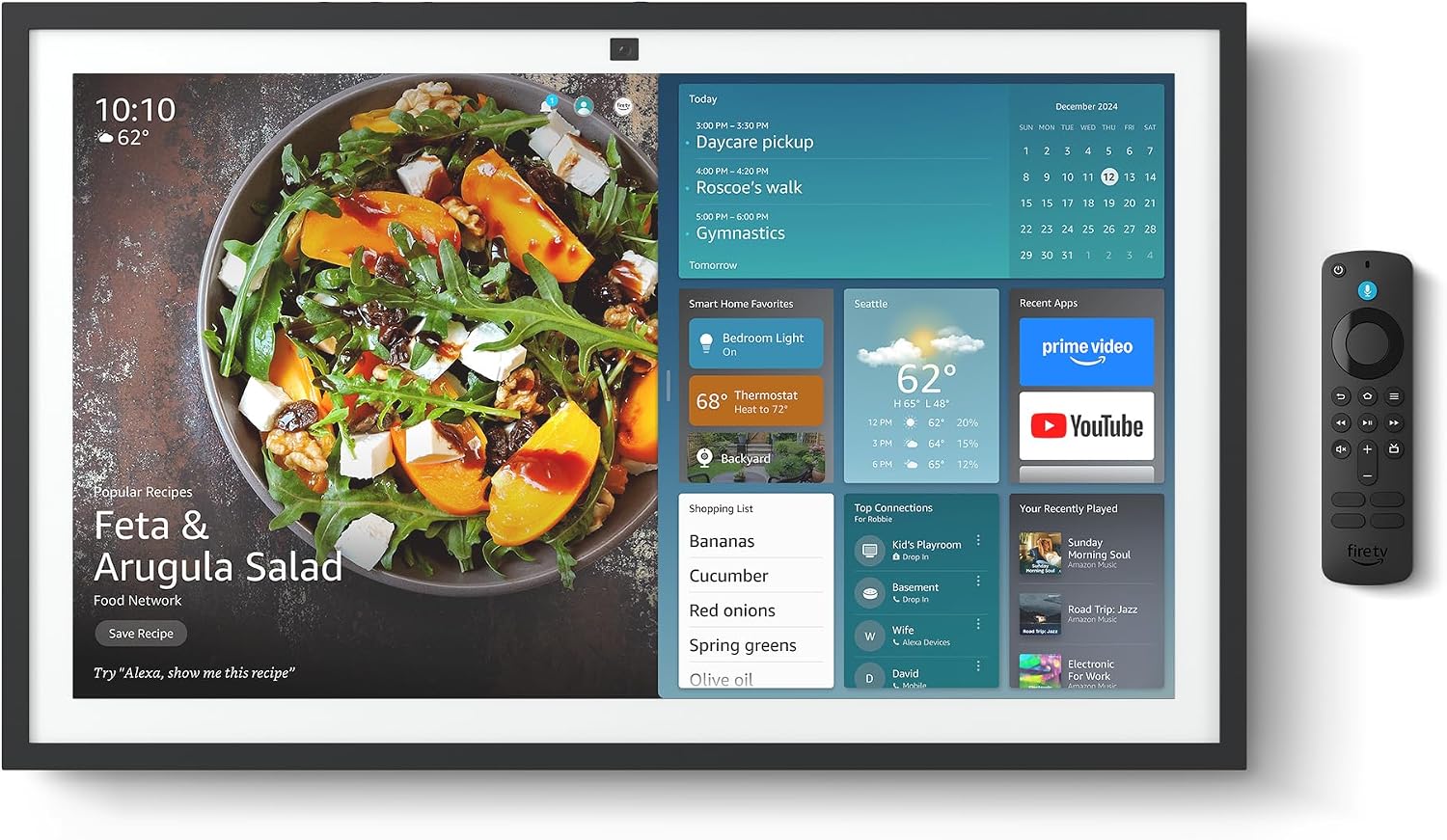
Figure 2.1: Echo Show 21 with Alexa Voice Remote
2.3 Možnosti montáže
The Echo Show 21 can be wall-mounted using the included hardware or placed on a stand (sold separately). Wall mounting requires an electric drill.
3. Operating Your Echo Show 21
3.1 Hlasové ovládání pomocí Alexy
Your Echo Show 21 is primarily controlled by voice using Alexa. Simply say the wake word "Alexa" followed by your command or question.
- Obecné příkazy: "Alexa, what's the weather?", "Alexa, set a timer for 10 minutes."
- Hudba a zvuk: "Alexa, play pop music," "Alexa, play my morning playlist."
- Video & Entertainment: "Alexa, open Prime Video," "Alexa, play The Boys on Netflix."
3.2 Fire TV Integration
Enjoy endless entertainment with built-in Fire TV. Use the included Alexa Voice Remote or voice commands to navigate.

Figure 3.1: Fire TV Interface
- Access thousands of apps like Prime Video, Netflix, YouTube, Apple TV.
- Stream movies, TV shows, and live content.
- The Fire TV remote allows for traditional navigation and playback control.
3.3 Home Screen & Widgets
The 21-inch display is ideal for organizing your day with customizable widgets.

Figure 3.2: Customizable Home Screen Widgets
- Keep important information like calendars, shopping lists, and weather in view.
- Personalize your home screen with family photos.
3.4 Ovládání chytré domácnosti
Control compatible smart devices using your voice or the smart home dashboard.

Figure 3.3: Smart Home Dashboard
- Turn lights on/off, adjust thermostats, or view živé přenosy z kamer.
- Supports Zigbee, Matter, and Thread Border Router for broad compatibility.
3.5 Video Calling
Connect with family and friends using the 13 MP camera with auto-framing, wide field of vision, 3.3x zoom, and noise reduction.

Figure 3.4: Echo Show 21 as a Digital Photo Frame
The camera can also be used to display your favorite memories as a digital photo frame.
4. Údržba
To ensure the longevity and optimal performance of your Echo Show 21, follow these maintenance guidelines:
- Čištění obrazovky: K jemnému otření obrazovky použijte měkký hadřík, který nepouští vlákna. V případě odolných šmouh lehceampen the cloth with water. Avoid abrasive cleaners or sprays directly on the screen.
- Čištění těla zařízení: Wipe the exterior surfaces with a dry, soft cloth. Do not use harsh chemicals or solvents.
- Větrání: Ujistěte se, že ventilační otvory zařízení nejsou zablokované, aby nedošlo k jeho přehřátí.
- Aktualizace softwaru: Your Echo Show 21 receives automatic software security updates. Ensure your device is connected to Wi-Fi to receive these updates.
5. Řešení problémů
If you encounter issues with your Echo Show 21, try the following common solutions:
- Zařízení nereaguje: Try saying "Alexa" again clearly. If unresponsive, unplug the power adapter for a few seconds and then plug it back in to restart the device.
- Žádné připojení k Wi-Fi: Check your router and modem to ensure they are working correctly. Restart your router. On the Echo Show 21, go to Settings > Network to re-select your Wi-Fi network and re-enter the password.
- Problémy se zvukem: Ensure the volume is not muted or too low. Say "Alexa, turn up the volume." Check audio settings in the device menu.
- Fotoaparát nefunguje: Ensure the physical camera shutter is open and the mic/camera-off button is not activated (red light indicates off).
- Dálkové ovládání nereaguje: Check the batteries in the Alexa Voice Remote. If necessary, replace them. Re-pair the remote if it becomes disconnected.
6. Technické specifikace
| Funkce | Specifikace |
|---|---|
| Velikost | 21.4 cm Š x 13.2 cm V x 1.5 cm H |
| Hmotnost | 10.7 lb |
| Zobrazit | 21” with 1920 x 1080 resolution (landscape or portrait) |
| Fotoaparát | 13 MP + Shutter |
| Zvuk | Two 2” woofers + two 0.6” tweeters |
| Wi-Fi připojení | Wi-Fi 6E (802.1ax), Tri-band, dual-antenna (MIMO). Supports 802.11a/b/g/n/ac. |
| Smart Home Hub | Zigbee + Matter + Thread Border Router |
| Procesor | Octa-core SoC with Amazon AZ2 neural network engine |
| Senzory | ALS RGB + Accelerometer |
| Jazyk | angličtina a španělština |

Figure 6.1: Echo Show 15 vs. Echo Show 21 Dimensions
7. Funkce ochrany osobních údajů
Echo Show 21 je navržen s několika vrstvami ochrany soukromí:
- Mic/Camera-Off Button: Fyzické tlačítko pro elektronické odpojení mikrofonů a kamery.
- Závěrka fotoaparátu: A built-in physical shutter to cover the camera lens.
- Technologie probuzení slov: Alexa devices only begin recording and sending audio to the cloud after detecting the wake word.
- Indikátory streamování: Vizuální indikátory ukazují, kdy je do cloudu streamován zvuk nebo video.
- Voice Recording Control: Schopnost view a smazat hlasové nahrávky.

Figure 7.1: Mic/Camera-Off Button and Camera Shutter
For more details, visit the Alexa Privacy Hub.
8. Funkce usnadnění
The Echo Show 21 includes various accessibility features to personalize Alexa to your abilities:
- Klepnutím na Alexu: Access Alexa via touch through on-screen tiles or a keyboard.
- Adaptivní poslech: Poskytuje více času na domluvení, než Alexa odpoví.
- Preferované tempo mluvení: Ovládejte, jak rychle nebo pomalu Alexa mluví.
- Titulky: Titulky Alexa, titulky hovorů a skryté titulky poskytují text pro podporovaný obsah.
- Ukaž a řekni: Helps users who are blind or visually impaired identify products.
- HlasView Čtečka obrazovky: Enables access for customers who are blind or visually impaired.
- Zvětšovací program obrazovky: Přiblížení/oddálení a posouvání po obrazovce.
- Kindle Čtení nahlas: Nechte Alexu, aby vám nahlas četla knihy z Kindle.
- Text v reálném čase: Pište živý text ve videohovoru.
These features can be enabled via Settings > Accessibility on your device.
9. Záruka a podpora
9.1 Záruka na produkt
Your Echo Show 21 comes with a 1letá omezená záruka a servis. Optional 1-year, 2-year, and 3-year extended warranties are available for U.S. customers, sold separately.
Use of Echo Show 21 and Fire TV on Echo Show 21 is subject to their respective terms of service.
9.2 Zákaznická podpora
For further assistance, troubleshooting, or to learn more about your device, please visit the Amazon support webwebu nebo kontaktujte zákaznický servis Amazonu.
Ask a question about this manual
Ask about setup, troubleshooting, compatibility, parts, safety, or missing instructions. Manuals+ will review the question and use this page’s manual context to help answer it.