
Zavedení
Thank you for choosing the ASHATA 6-Channel USB 3.7V Lithium Battery Charger Board. This device is designed to efficiently charge up to six 3.7V LiPo 1S or LiHv batteries simultaneously and independently. Its compact design and versatile power input make it an ideal solution for hobbyists and professionals requiring reliable battery charging.
Obsah balení
- 1 x ASHATA 6-Channel USB Lithium Battery Charger Board
Bezpečnostní informace
Před použitím tohoto výrobku si prosím přečtěte a pochopte všechny bezpečnostní pokyny. Nedodržení těchto pokynů může vést k úrazu elektrickým proudem, požáru nebo vážnému zranění.
- Use only with compatible 3.7V LiPo 1S or LiHv batteries. Do not attempt to charge other battery types.
- Ensure the charger is connected to a stable 5V USB power source (e.g., computer USB port, power bank, phone charger).
- Nenechávejte nabíjecí baterie bez dozoru.
- Chraňte nabíječku před vodou, vlhkostí a vysokými teplotami.
- Do not short-circuit the charging ports.
- Pokud nabíječka nebo baterie vykazuje známky poškození, okamžitě ji přestaňte používat.
- Uchovávejte mimo dosah dětí.
Konec produktuview
The ASHATA 6-Channel USB Lithium Battery Charger Board features a compact design with multiple independent charging channels and user-friendly indicators.
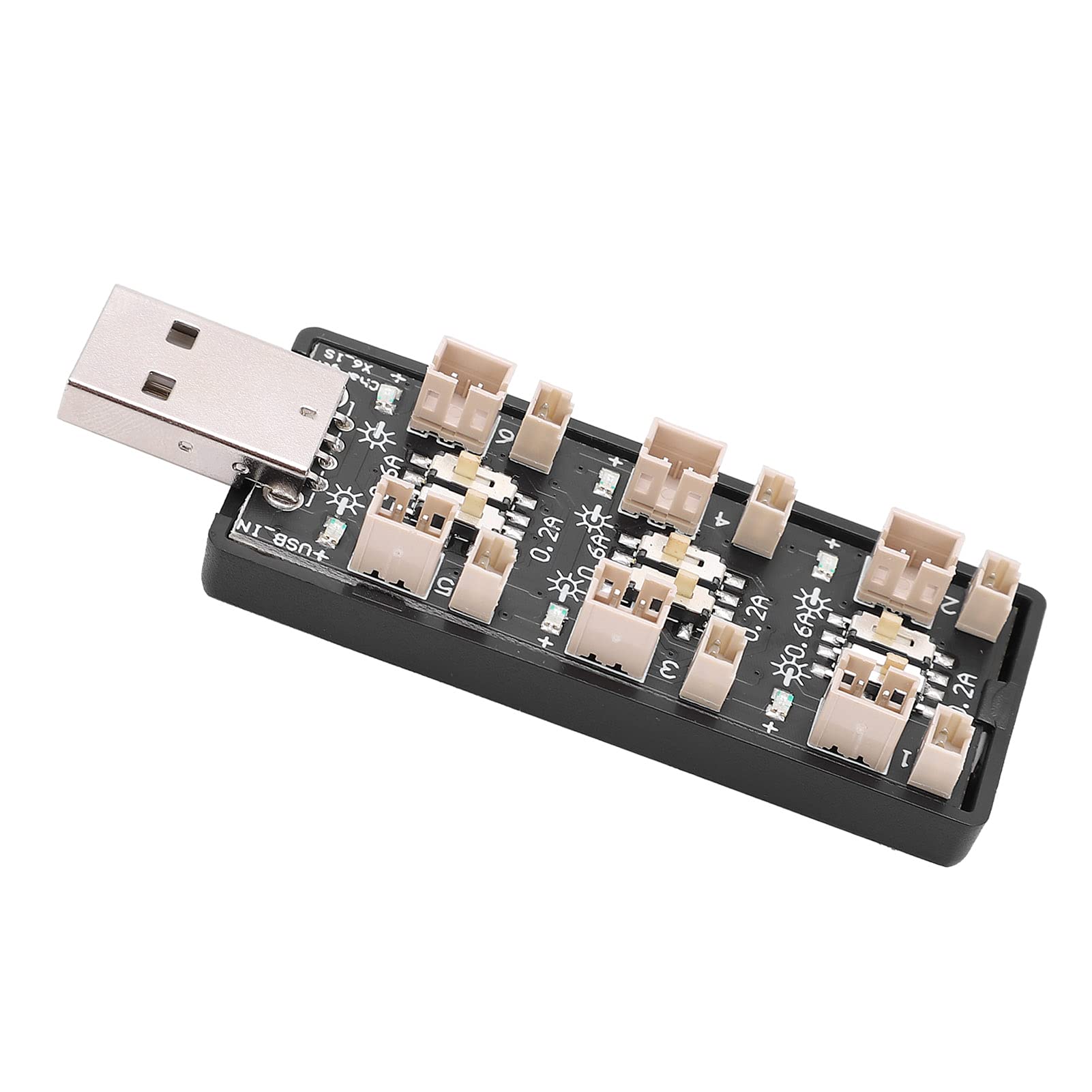
Obrázek 1: Celkově view of the ASHATA 6-Channel USB Lithium Battery Charger Board, showing the integrated USB plug for power input and the six charging ports.
Klíčové komponenty:
- USB Input Plug: Standard USB-A connector for power input.
- Charging Ports (x6): Independent ports for connecting 3.7V LiPo 1S or LiHv batteries.
- Current Selection Switches (x6): Individual toggle switches for each channel to select charging current (0.2A or 0.6A).
- LED indikátory (6x): Each channel has an LED to indicate charging status.

Obrázek 2: Detailní záběr view highlighting the individual charging ports and their corresponding current selection toggle switches (0.2A and 0.6A settings) and LED indicators.
Nastavení
- Připojte zdroj napájení: Insert the integrated USB plug of the charger board into a compatible 5V USB power source. This can be a computer USB port, a power bank, or a standard USB wall adapter (e.g., phone charger).
- Připravte si baterie: Ensure your 3.7V LiPo 1S or LiHv batteries are in good condition and compatible with the charger's ports.

Obrázek 3: Shora dolů view of the charger board, illustrating the layout of the six independent charging channels and the USB input.
Návod k obsluze
- Vyberte nabíjecí proud: For each battery you intend to charge, adjust the corresponding toggle switch to either 0.2A or 0.6A.
- 0.2A: Suitable for smaller capacity batteries or for a slower, more gentle charge.
- 0.6A: Suitable for larger capacity batteries or when a faster charge is desired. Ensure your battery can handle this current.
- Připojte baterie: Carefully plug your 3.7V LiPo 1S or LiHv batteries into the charging ports. Ensure correct polarity.
- Sledovat stav nabíjení: The LED indicator for each channel will behave as follows:
- Blikající LED: Indikuje, že se baterie aktuálně nabíjí.
- Svítící LED: Indicates that the battery is fully charged and the charging process has automatically stopped.
- Odpojit baterie: Once the LED turns solid, the battery is fully charged. Disconnect the battery from the charging port.
- Odpojit napájení: When all charging is complete, disconnect the USB charger board from its power source.

Obrázek 4: Nahoře a dole views of the charger board, showing the compact form factor and the USB input.
Údržba
- Čištění: Use a dry, soft cloth to clean the charger board. Do not use liquid cleaners or solvents.
- Skladování: Pokud nabíječku nepoužíváte, skladujte ji na chladném a suchém místě mimo dosah přímého slunečního záření a extrémních teplot.
- Inspekce: Periodically inspect the charger for any signs of damage to the casing, ports, or USB plug.
Odstraňování problémů
| Problém | Možná příčina | Řešení |
|---|---|---|
| LED does not light up when battery is connected. |
|
|
| Battery charges slowly. |
|
|
| Charger or battery gets excessively hot. |
|
|
Specifikace
| Číslo modelu | Rich0CsIrfVFiU |
| Vstupní objemtage Dosah | USB 5V ± 5% (0.5A ~ 2A) |
| Výstupní objemtage Dosah | 2.5V ~ 4.20V |
| Rozsah výstupního proudu | 600mA x 6CH (0.6A) / 200mA x 6CH (0.2A) |
| Počet kanálů | 6 nezávislé kanály |
| Použitelný typ baterie | LiPo 1S; LiHv high voltage lithium battery (3.7V nominal) |
| Rozměry (D x Š x V) | 8 x 3 x 2 cm |
| Výrobce | ASHATA |
| Země původu | Čína |
Záruka a podpora
For warranty information or technical support, please refer to the retailer's policy or contact ASHATA customer service through their official channels. Please have your model number (Rich0CsIrfVFiU) and purchase details ready when contacting support.