
1. Úvod
The OSIM uGlow PoreCare is a facial device designed for deep pore cleansing and impurity extraction. It features Softskin Vacuum Technology, a warm nose compress function, and LED aftercare pore solutions to address various skin concerns. This manual provides essential information for the safe and effective use of your device.
2. Komponenty produktu
The OSIM uGlow PoreCare device comes with several components to facilitate a comprehensive pore treatment:
- uGlow PoreCare Device: The main handheld unit with controls for suction levels, temperature, and LED light.
- 4 Interchangeable Suction Probes: Designed for different pore concerns and skin areas.
- LED Covers: For targeted light therapy.
- USB nabíjecí kabel: Pro dobíjení zařízení.
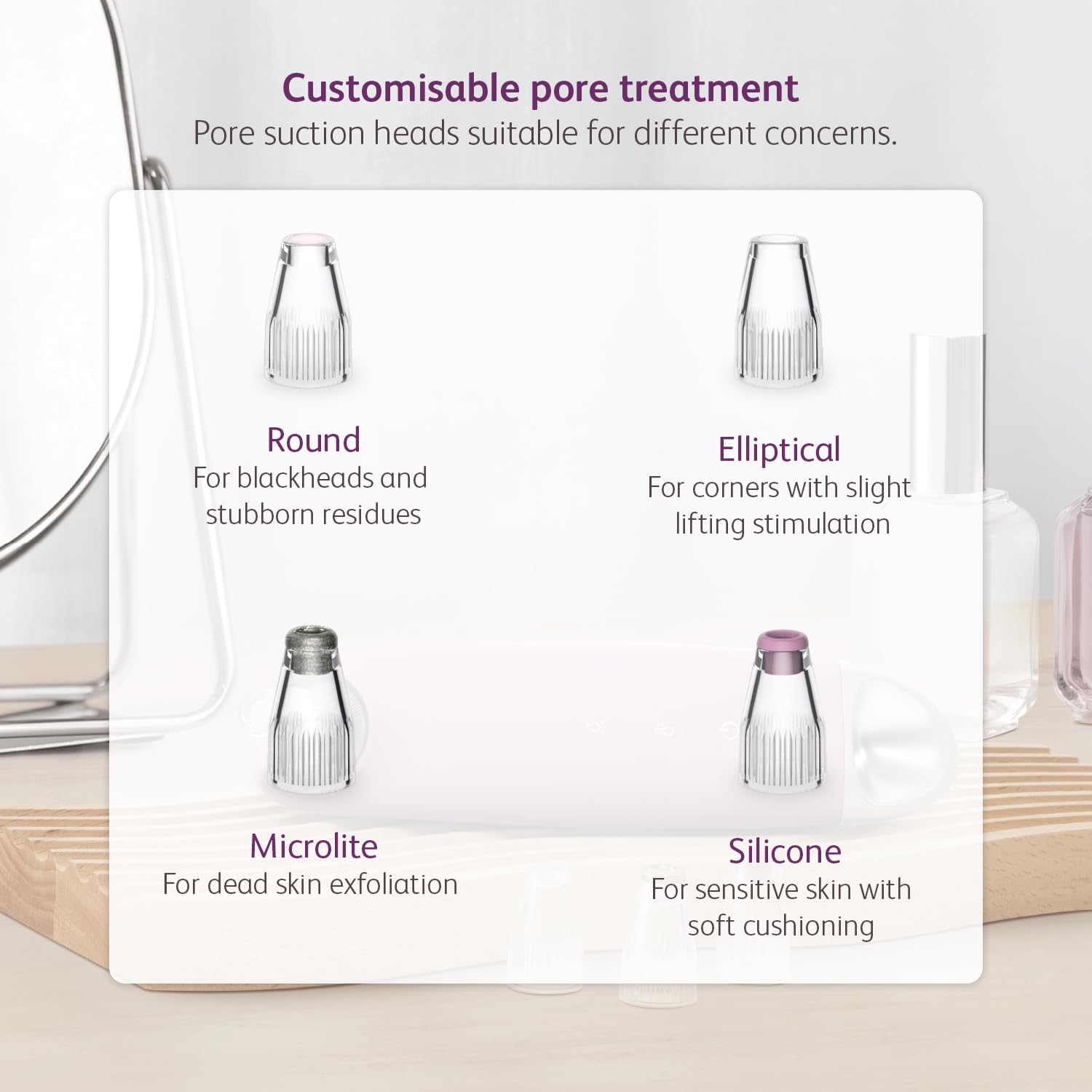
Image: The uGlow PoreCare device shown with its four distinct interchangeable suction heads, each designed for specific pore treatments.

Image: The uGlow PoreCare device highlighting its LED light therapy feature, with red, blue, and yellow LED covers.
3. Nastavení
3.1 Nabíjení zařízení
Before first use, fully charge the uGlow PoreCare device using the provided USB charging cable. Connect the cable to the charging socket on the device and a suitable USB power adapter (5V-1A recommended). The device's indicator lights will show charging status.
3.2 Attaching Suction Probes or LED Covers
Select the desired suction probe or LED cover based on your treatment needs. Gently twist and attach it to the head of the device until it is securely in place. Ensure a snug fit to maintain optimal suction or light contact.
4. Návod k obsluze
4.1 Preparation: Warm Nose Compress
To prepare your skin for deep cleansing, use the adjustable warm nose compress function. This helps to open up pores and loosen accumulated debris, making extraction easier.
- Ensure the device is clean and charged.
- Activate the warm compress function (refer to device controls).
- Gently place the warm compress area of the device against your nose or other areas where pores need opening.
- Hold for a few minutes to allow pores to soften.

Image: Step 1 of pore cleansing, demonstrating the use of the adjustable warm nose compress to open pores.
4.2 Pore Extraction: Softskin Vacuum Technology
The device utilizes Softskin Vacuum Technology to gently extract impurities from your pores. It offers 5 adjustable suction levels to suit different skin types and needs.
- After using the warm compress, select an appropriate suction probe.
- Turn on the device and select the lowest suction strength (Level 1) initially.
- Place the probe flat against your skin and move it in one continuous direction.
- Důležité: Do not keep the device in the same spot for more than 3 seconds to avoid skin irritation or bruising.
- Adjust the suction level as needed, increasing gradually if your skin tolerates it.
- Focus on areas with blackheads, whiteheads, and other impurities.

Image: Visual representation of the vacuum technology at work, extracting pore impurities.
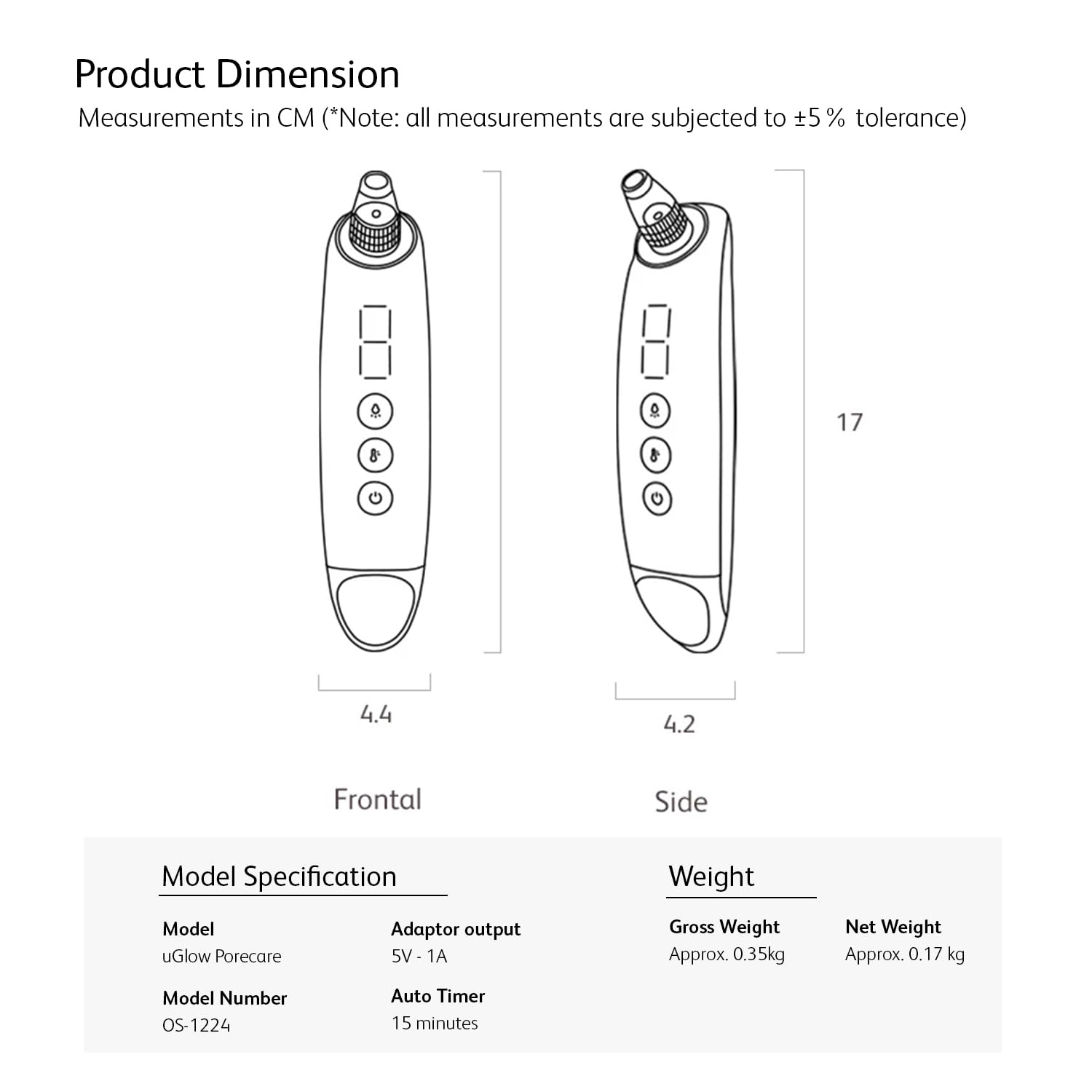
Image: Diagram explaining Softskin Vacuum Technology, showing deep cleansing to minimize pore congestion with 5 adjustable suction levels.
4.3 LED Aftercare Pore Solution
After extraction, use the LED aftercare pore solution to treat and improve various pore concerns with 3 spectrums of light. Attach the appropriate LED cover to the device.
- Červená LED: Helps regenerate cell production for pore recovery.
- Modrá LED: Soothes the skin and helps clear up inflammation around pores.
- Žlutá LED: Reduces skin pigments and brightens dark spots.

Image: The device in use, demonstrating the LED aftercare pore solution with descriptions for Red, Blue, and Yellow light benefits.
4.4 Interchangeable Suction Heads
The uGlow PoreCare includes four distinct suction heads, each designed for specific pore treatments:
- Kolo: Ideal for blackheads and stubborn residues.
- Eliptický: Suitable for corners and provides slight lifting stimulation.
- Microlite: Used for dead skin exfoliation.
- Silikon: Designed for sensitive skin with soft cushioning.

Image: A display of the four customisable pore treatment suction heads and their recommended uses.
5. Údržba
5.1 Čištění zařízení a sond
Pravidelné čištění zajišťuje hygienu a optimální výkon.
- After each use, detach the suction probe or LED cover.
- Rinse the probe/cover under running water and clean with a mild soap.
- Wipe the main device body with a soft, damp tkanina. Neponořujte hlavní jednotku do vody.
- Ensure all parts are completely dry before reattaching or storing.
5.2 Skladování
Store the device and its accessories in a cool, dry place, away from direct sunlight and extreme temperatures. Keep out of reach of children.
6. Řešení problémů
If you encounter issues with your OSIM uGlow PoreCare, refer to the following common problems and solutions:
| Problém | Možná příčina | Řešení |
|---|---|---|
| Zařízení se nezapne | Slabá baterie; Porucha zařízení | Zařízení plně nabijte; pokud problém přetrvává, kontaktujte zákaznickou podporu. |
| Slabé nebo žádné sání | Probe not attached correctly; Blockage in the suction head; Low battery | Ensure probe is securely attached; Clean the suction head; Charge the device. |
| LED světlo nefunguje | LED cover not attached correctly; Device malfunction | Ensure LED cover is securely attached; Contact customer support if issue persists. |
| Skin redness or bruising | Suction level too high; Device held in one spot for too long | Reduce suction level; Keep the device moving continuously; Do not exceed 3 seconds in one spot. |
7. Specifikace
Detailed specifications for the OSIM uGlow PoreCare device:
| Funkce | Detail |
|---|---|
| Model | uGlow PoreCare |
| Číslo modelu | OS-1224 |
| Výstup adaptéru | 5V - 1A |
| Automatický časovač | 15 minut |
| Hrubá hmotnost | Přibl. 0.35 kg |
| Čistá hmotnost | Přibl. 0.17 kg |
| Rozměry produktu (DxŠxV) | 17 x 4.4 x 17 cm |
Note: All measurements are subject to ±5% tolerance.

Image: Product dimensions and model specifications for the uGlow PoreCare device.
8. Záruka a podpora
The OSIM uGlow PoreCare device comes with a Záruka 6 měsíců od data nákupu. Tato záruka se vztahuje na výrobní vady vzniklé za běžných podmínek používání.
For warranty claims, technical support, or any other inquiries, please refer to the contact information provided with your purchase or visit the official OSIM webwebu. Uschovejte si prosím doklad o koupi pro ověření záruky.
9. Oficiální video produktu
Watch the official product video for a visual guide on how to use the OSIM uGlow PoreCare device effectively.
Video: An official demonstration of the OSIM uGlow PoreCare, showcasing its features and usage steps for effective pore cleansing and aftercare.