
ATTACK SHARK M71
Uživatelská příručka k bezdrátové mechanické klávesnici ATTACK SHARK M71
Model: M71
Zavedení
This manual provides detailed instructions for the setup, operation, and maintenance of your ATTACK SHARK M71 75% TKL Wireless Mechanical Keyboard. Please read this guide thoroughly to ensure proper use and to maximize your keyboard's performance and lifespan.

Image: The ATTACK SHARK M71 keyboard showcasing its 68% layout and key features like aluminum alloy body, three-mode connection, and RGB backlight.
Obsah balení
Ověřte, zda jsou v balení přítomny všechny položky:
- ATTACK SHARK M71 Wireless Mechanical Keyboard
- Kabel typu C
- 2.4G bezdrátový přijímač
- Keycap Puller / Switch Puller (Two-in-one tool)
- Complimentary 61 additional PBT OEM keycaps (different color layout)
- Uživatelská příručka

Image: A visual representation of the items included in the ATTACK SHARK M71 keyboard package, including the keyboard, cables, and extra keycaps.
Video: Unboxing the Blueberry version of the M71 keyboard, showing the package contents and a demonstration of its typing sound.
Konec produktuview
The ATTACK SHARK M71 is a 75% TKL wireless mechanical keyboard featuring a full aluminum CNC chassis, multi-mode connectivity, hot-swappable switches, and RGB lighting. Its compact design and robust construction are engineered for both gaming and productivity.
Klíčové vlastnosti:
- Full Aluminum CNC Body: Constructed from international standard 6063 aluminum alloy for durability and a premium feel.
- Třírežimové připojení: Supports Bluetooth 5.0/3.0, 2.4G wireless, and wired USB-C connections.
- Přepínače vyměnitelné za provozu: Compatible with 3/5-pin switches, allowing for easy customization without soldering.
- Struktura těsnění: Incorporates anti-static IPEX switch pads, PORON sound-absorbing cotton, and PET acoustic switch pads to enhance typing feel and reduce noise.
- RGB LED osvětlení: Features customizable RGB backlighting and a side LED light strip.
- Baterie 4600 mAh: Nabízí rozšířené bezdrátové využití.
- PBT OEM Keycaps: Durable keycaps with GMK-like characters.
Komponenty:
Seznamte se s hlavními součástmi klávesnice:
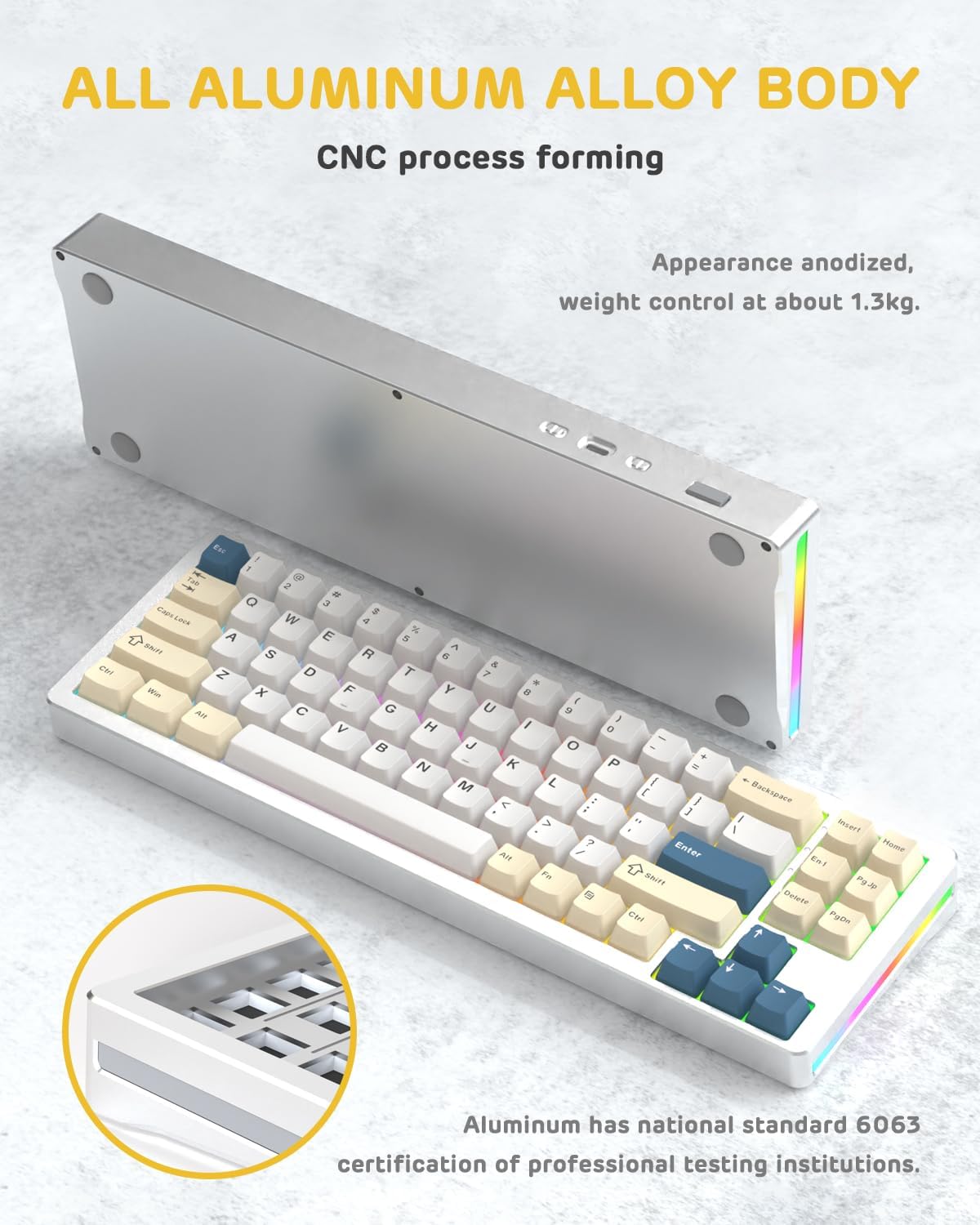
Obrázek: Strana view of the M71 keyboard highlighting its full aluminum alloy body and CNC process forming.

Obrázek: Explodoval view illustrating the multi-layered gasket mount structure, including the PBT keycaps, aluminum alloy upper cover, customized switch body, PC positioning board, PORON filled cotton, anti-static IPEX switch underpad, PET singing pad, PCB board, PORON shaft seat cushion, PET sound backing pad, wing light strip, and aluminum alloy base.
Nastavení
1. Connectivity Modes:
The M71 keyboard supports three connection modes: Bluetooth, 2.4G wireless, and wired USB-C.
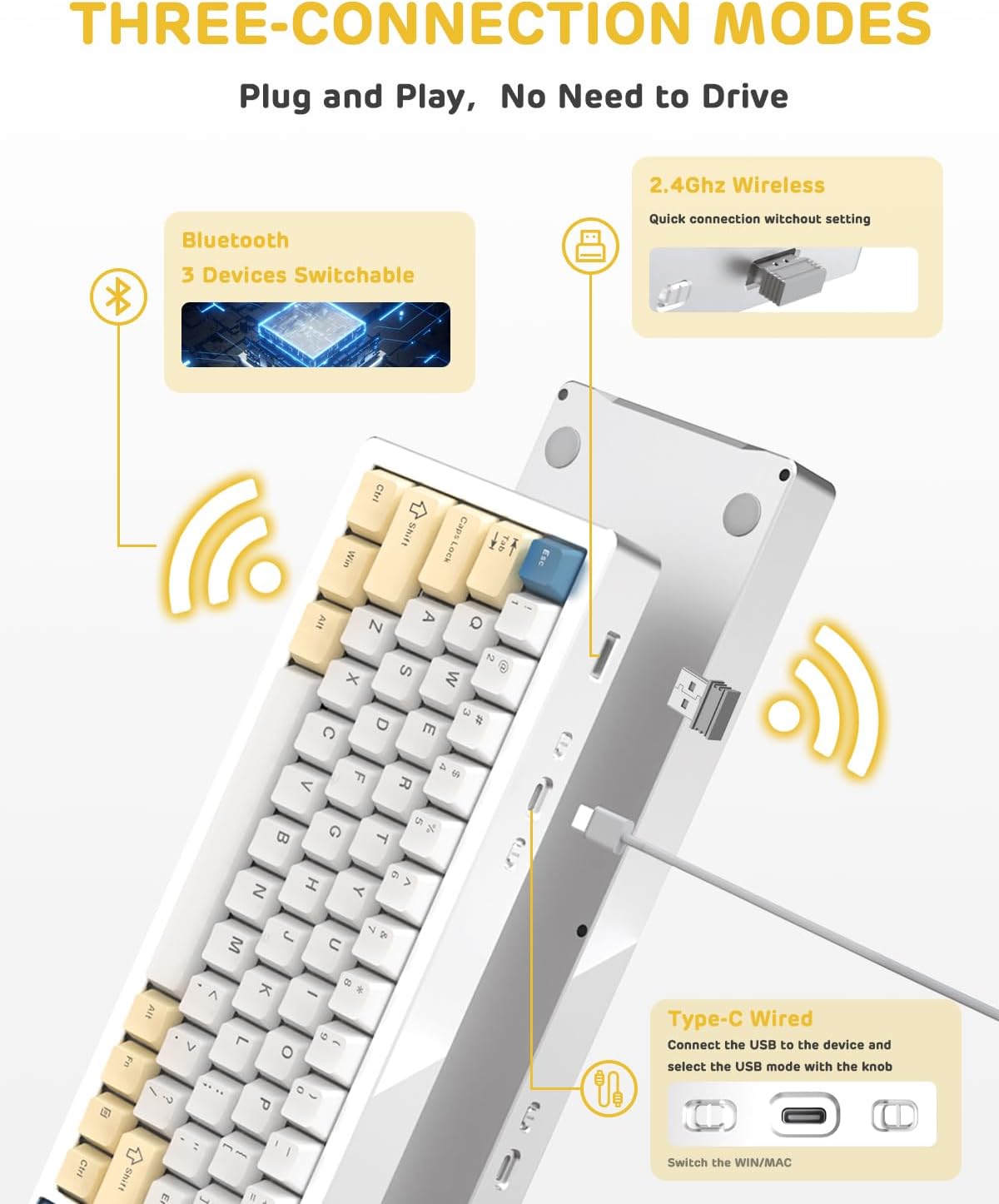
Image: A visual guide to the three connectivity options: Bluetooth for up to 3 devices, 2.4GHz wireless with a receiver, and wired Type-C connection.
Kabelové připojení:
- Connect the provided Type-C cable to the keyboard's USB-C port and to your computer's USB port.
- Ensure the mode switch on the keyboard is set to the wired (USB-C) position.
- Klávesnice bude automaticky rozpoznána vaším systémem.
Bezdrátové připojení 2.4G:
- V balení vyhledejte bezdrátový 2.4G přijímač (dongle).
- Zapojte 2.4G přijímač do volného USB portu na vašem počítači.
- Nastavte přepínač režimů na klávesnici do polohy bezdrátového připojení 2.4G.
- Klávesnice by se měla připojit automaticky.
Připojení Bluetooth:
- Nastavte přepínač režimů na klávesnici do polohy Bluetooth.
- V počítači nebo zařízení otevřete nastavení Bluetooth a vyhledejte nová zařízení.
- The keyboard should appear as "ATTACK SHARK M71" or similar. Select it to pair.
- Klávesnice se může připojit až ke 3 zařízením Bluetooth. Použití Fn + 1/2/3 pro přepínání mezi spárovanými zařízeními.
2. Battery Charging and Status:
The M71 keyboard is equipped with a 4600mAh battery. To charge, connect the keyboard via the USB-C cable to a power source (e.g., computer USB port, USB wall adapter).

Image: A diagram showing how to check the battery level using Fn+ALT(R) and the visual indicators on the keyboard's side LED strip.
- Chcete-li zkontrolovat stav baterie v bezdrátovém režimu, stiskněte Fn + ALT (Right). The side LED strip will indicate the charge level.
- Battery life is approximately 1-2 weeks with lighting enabled and up to 4 weeks with lighting disabled.
Návod k obsluze
1. Multimedia Keys:
The keyboard features 12 multimedia keys accessible via the Fn kombinace kláves:
- Fn + F1–F12: Access various multimedia functions (e.g., volume control, play/pause, calculator, email).
- Fn + 1/2: Ovládání jasu obrazovky.
2. Ovládání RGB osvětlení:
Customize the keyboard's RGB backlight and side LED strip:

Image: The M71 keyboard displaying its RGB backlight and side LED strip, along with a close-up of the PBT keycaps.
- Fn + Ctrl (Right): Switch between different side LED light strip modes.
- Fn + Tab: Toggle white light mode.
- Refer to the full user manual for additional lighting effect controls and customization options via the programmable software.
3. Programmable Software:
The keyboard supports a dedicated driver program for advanced customization. You can download the software from the official ATTACK SHARK website to personalize lighting effects, key assignments, and macros. The keyboard is compatible with Windows 2000/XP/Vista/7/8/10/11, Android, and iOS.
Údržba
1. Čištění:
- K otření povrchu klávesnice použijte měkký, suchý hadřík.
- Pro důkladnější čištění odstraňte krytky kláves pomocí dodaného stahováku a pomocí stlačeného vzduchu odstraňte nečistoty z prostoru mezi spínači.
- Vyhněte se používání agresivních chemikálií nebo abrazivních materiálů.
2. Hot-Swapping Switches:
The M71 keyboard features hot-swappable sockets, allowing you to change switches without soldering.

Obrázek: Detailní záběr view of the hot-swappable White Jade linear switches on the M71 keyboard, demonstrating how they can be easily removed and replaced.
- Vypněte klávesnici nebo ji odpojte od zařízení.
- Use the switch puller tool to carefully grip the switch and pull it straight up.
- Align the pins of the new switch with the holes on the PCB and press down gently until it clicks into place. Ensure pins are not bent.
- The PCB supports both 3-pin and 5-pin switches.
Video: A demonstration of the disassembly process for the M71 keyboard, showing how to remove keycaps and switches, revealing the gasket mount structure.
Odstraňování problémů
| Problém | Možné řešení |
|---|---|
| Klávesnice nereaguje v bezdrátovém režimu. |
|
| Klávesy se neregistrují nebo se píší dvakrát. |
|
| RGB osvětlení nefunguje nebo je nesprávné. |
|
| Problémy s párováním Bluetooth. |
|
Specifikace
| Funkce | Detail |
|---|---|
| Model | M71 |
| Rozložení | 75% TKL (71 keys) |
| Konektivita | Bluetooth 5.0/3.0, 2.4G Wireless, USB-C Wired |
| Spínače | Hot-swappable (3/5-pin compatible), Pre-lubed Linear White Jade Switch |
| Klíčenky | PBT OEM krytky kláves |
| Styl montáže | Držák těsnění |
| Materiál podvozku | Full Aluminum CNC (6063 alloy) |
| Kapacita baterie | 4600 XNUMX mAh |
| Osvětlení | RGB Backlight, RGB LED Side Light Strip |
| Kompatibilita | Windows 2000/XP/Vista/7/8/10/11, Android, iOS, Mac |
| Rozměry produktu | 13.78 cm D x 4.53 cm Š x 1.22 cm V |
| Hmotnost položky | 2.86 libry |
Záruka a podpora
Informace o záruce a technickou podporu získáte na oficiálních stránkách ATTACK SHARK. webnebo se obraťte přímo na jejich zákaznický servis. Uschovejte si účtenku jako doklad o koupi pro případné reklamace.
Výrobce: ÚTOČNÉHO ŽRALOKA
prodejce: Ajazz US
Datum první dostupnosti: 4. srpna 2023
Ask a question about this manual
Ask about setup, troubleshooting, compatibility, parts, safety, or missing instructions. Manuals+ will review the question and use this page’s manual context to help answer it.