
1. Úvod
The TRIGKEY S5 Mini PC is a compact and powerful desktop computer designed for various applications, from office work and content creation to home entertainment. It features an AMD Ryzen 7 5800H processor, integrated AMD Radeon Graphics, and supports multiple displays for enhanced productivity.

Obrázek 1.1: Přední strana view of the TRIGKEY S5 Mini PC, showcasinjeho kompaktní design a uspořádání portů.
2. Obsah balení
Prosím, ověřte, zda jsou v balení přítomny všechny položky:
- TRIGKEY S5 Mini PC
- Napájecí adaptér
- HDMI kabel
- Uživatelská příručka
- SATA Cable for 2.5" SSD (for optional storage expansion)
- Montážní držák a šrouby
3. Fyzický overview a porty
The TRIGKEY S5 Mini PC is designed with a durable ABS material body and a full metal mesh for efficient ventilation. Familiarize yourself with the various ports and components:

Obrázek 3.1: Detailní view of the TRIGKEY S5 Mini PC's front and rear ports, including USB, HDMI, DisplayPort, and LAN connections.
Přední porty:
- USB 3.2 Gen2 (typ A)Vysokorychlostní přenos dat.
- USB-C: Supports video output and data transfer.
- Audio Jack (HP&MIC): For headphones and microphone.
- Tlačítko napájení: To power on/off the device.
Zadní porty:
- HDMI (4K@60Hz): Connects to a display.
- DisplayPort (4K při 60 Hz): Connects to a display.
- USB 3.2 Gen2 (typ A)Vysokorychlostní přenos dat.
- USB 2.0 (typ A): Standard USB connection.
- RJ45 LAN (1000M Mbps): Pro kabelové síťové připojení.
- DC vstup: For power adapter connection.
4. Počáteční nastavení
- Připojte periferní zařízení: Connect your keyboard, mouse, and any other USB devices to the available USB ports.
- Connect Display(s): Connect your monitor(s) to the HDMI, DisplayPort, or USB-C video output ports. The Mini PC supports up to three 4K displays simultaneously.
- Připojte se k síti: For wired internet, connect an Ethernet cable to the RJ45 LAN port. For wireless internet, the device supports Wi-Fi 6.
- Připojte napájení: Plug the power adapter into the DC input port on the Mini PC, then plug the adapter into a power outlet.
- Zapnout: Press the power button on the front of the Mini PC. The system will boot up.
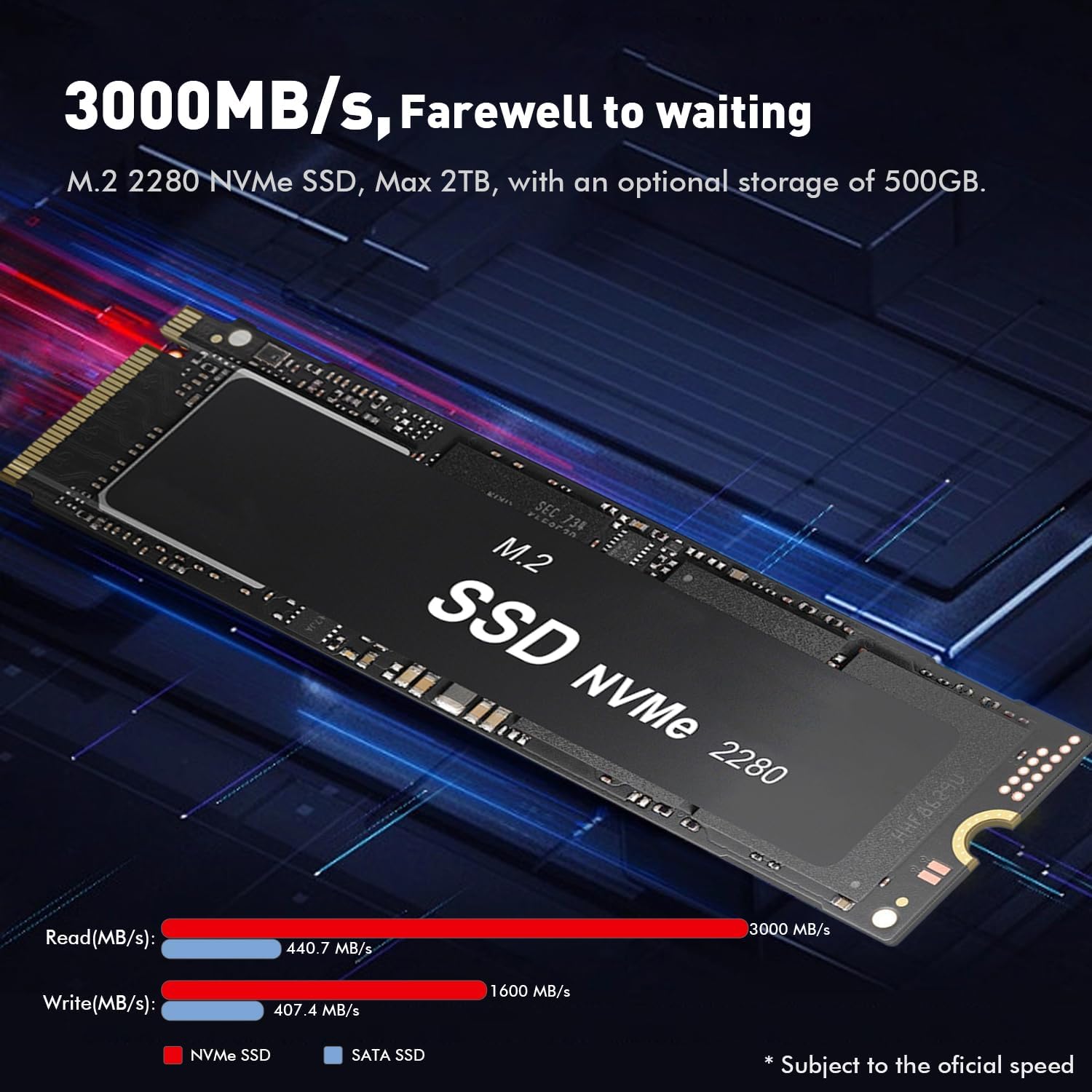
Image 4.1: The TRIGKEY S5 Mini PC connected to three external monitors, demonstrating its triple-screen display capability for multitasking.
5. Instalace operačního systému a ovladačů
The TRIGKEY S5 Mini PC typically comes with Windows 11 pre-installed. If you need to reinstall the operating system or install drivers, follow the instructions below.
5.1. Installing Windows 11
This video provides a step-by-step guide on how to install Windows 11 on a Beelink Mini PC, which uses a similar process for the TRIGKEY S5.
Video 5.1: Instructions for installing Windows 11 on a Mini PC. This video demonstrates the process of creating a bootable USB drive and performing a clean installation of Windows 11.
- Prepare a USB Drive: Obtain a blank USB drive with a minimum capacity of 8GB. Back up any important data from the USB drive as it will be formatted.
- Download Media Creation Tool: On another computer, visit the official Microsoft website to download the Windows 11 Media Creation Tool.
- Create Bootable USB: Run the Media Creation Tool, select 'USB flash drive' as the media type, and follow the on-screen prompts to create a bootable Windows 11 installation drive.
- Connect USB Drive: Insert the bootable USB flash drive into a USB port on your TRIGKEY S5 Mini PC.
- Vstupte do Boot Menu: Power on the Mini PC and repeatedly press the designated key (commonly F7 or Delete, refer to your specific model's boot instructions if F7 does not work) to enter the boot menu.
- Select USB Drive: From the boot menu, select your USB flash drive as the boot device and press Enter.
- Follow Windows Setup: The PC will enter the Windows 11 setup. Follow the on-screen instructions to select language, edition (e.g., Windows 11 Pro), accept license terms, and choose 'Custom: Install Windows only (advanced)'.
- Partition Management: If reinstalling on an old disk, it is recommended to delete existing partitions (after backing up data) to ensure a clean installation. Select the unallocated space and click 'Next' to install.
- Dokončete instalaci: The system will install Windows 11 and restart multiple times. After the final restart, you will be guided through the basic Windows settings.
5.2. Instalace ovladačů
After Windows 11 is installed, you may need to install specific drivers for optimal performance and functionality.
- Stáhněte si ovladače: Visit the official TRIGKEY support website (or the provided support email/phone for guidance) to download the latest drivers for your S5 Mini PC model. Unzip the downloaded driver package to a known location (e.g., Desktop).
- Otevřete Správce zařízení: Hledat 'Device Manager' in the Windows search bar and open it.
- Identify Missing Drivers: Look for devices listed under 'Other devices' or with a yellow exclamation mark, indicating missing or outdated drivers.
- Aktualizujte ovladač: Right-click on the device with the missing driver, select 'Update driver', then 'Browse my computer for drivers'.
- Select Driver Folder: Navigate to the folder where you unzipped the downloaded drivers and click 'OK', then 'Next' to install. Repeat this process for all necessary drivers.
6. Aktualizace hardwaru
The TRIGKEY S5 Mini PC offers options for memory and storage expansion.
6.1. Rozšíření paměti (RAM)
The Mini PC comes with 32GB of DDR4-3200MHz RAM (16GB x 2) and supports an upgrade to a maximum of 64GB (2 x 32GB) SO-DIMM DDR4-3200MHz RAM.

Image 6.1: Illustration of SO-DIMM DDR4 RAM modules, indicating support for up to 64GB memory upgrade.
6.2. Upgrade úložiště
The Mini PC includes a 500GB M.2 PCIe 2280 NVMe SSD. This can be expanded up to 2TB. Additionally, it supports adding a 500GB to 2TB 2.5-inch SATA HDD or SSD (not included).
Image 6.2: An M.2 2280 NVMe SSD, highlighting its high read/write speeds and capacity for storage expansion.
7. Chladicí systém
The TRIGKEY S5 Mini PC incorporates an efficient cooling system to maintain optimal performance. It features a large copper plate and double heat pipes, combined with a cooling fan, to dissipate heat effectively and smoothly.

Image 7.1: Diagram illustrating the heat dissipation system of the Mini PC, showing the large fan and heat sink design.
8. Specifikace
| Funkce | Specifikace |
|---|---|
| Procesor | AMD Ryzen 7 5800H (8 Cores/16 Threads, up to 4.4GHz) |
| Grafika | Integrated AMD Radeon Graphics (8 Cores, 2000MHz) |
| BERAN | 32GB DDR4-3200MHz (2x16GB), expandable to 64GB |
| Skladování | 500GB M.2 PCIe 2280 NVMe SSD, expandable to 2TB M.2 NVMe SSD + 2.5-inch SATA HDD/SSD (up to 2TB) |
| Video výstup | HDMI (4K@60Hz), DisplayPort (4K@60Hz), USB-C (Video&Data) - Triple Display Support |
| Bezdrátové připojení | Wi-Fi 6 (802.11ax), Bluetooth 5.2 |
| Kabelové připojení | 1x RJ45 LAN (1000M Mbps) |
| USB porty | 3x USB 3.2 Gen2, 1x USB 2.0, 1x USB-C |
| Zvuk | 1x audio jack (HP a MIC) |
| Operační systém | OS (Typically Windows 11) |
| Rozměry | 22.71 x 13.59 x 5.89 cm |
| Hmotnost | 989 g |
9. Řešení problémů
- Žádná síla: Ensure the power adapter is securely connected to both the Mini PC and a working power outlet. Check the power button for any damage.
- Žádný displej: Verify that display cables (HDMI, DisplayPort, USB-C) are firmly connected to both the Mini PC and the monitor. Ensure the monitor is powered on and set to the correct input source. Try connecting to a single display to isolate the issue.
- Žádné připojení k internetu: For wired connections, check the Ethernet cable and router. For Wi-Fi, ensure the Wi-Fi adapter drivers are installed and the correct network is selected with the right password.
- Pomalý výkon: Check for background applications consuming resources. Ensure sufficient free storage space. Consider upgrading RAM or SSD if performance issues persist.
- Periferní zařízení nebylo detekováno: Try connecting the peripheral to a different USB port. Ensure necessary drivers for the peripheral are installed.
10. Záruka a podpora
TRIGKEY provides online customer service and lifetime technical support for your Mini PC. If you encounter any issues not covered in this manual or require further assistance, please contact our support team.
- E-mailová podpora: support@trigkey.com
- Telefonická podpora: +86 18138216795