
TRIGKEY Key mini N150
TRIGKEY Key Mini N150 Mini PC User Manual
Model: Key mini N150
Zavedení
This manual provides detailed instructions for the setup, operation, and maintenance of your TRIGKEY Key Mini N150 Mini PC. Designed for efficiency and compact performance, this mini PC is ideal for various applications, from office work to multimedia entertainment. Please read this manual thoroughly before using the device to ensure optimal performance and longevity.

Obrázek: Přední strana view of the TRIGKEY Key Mini N150 Mini PC, highlighting its compact design and accessible front ports.
Bezpečnostní informace
- Ensure the mini PC is placed on a stable, flat surface to prevent accidental falls.
- Nevystavujte zařízení extrémním teplotám, vlhkosti nebo přímému slunečnímu záření.
- Používejte pouze dodaný napájecí adaptér. Použití neschválených adaptérů může poškodit zařízení a vést ke ztrátě záruky.
- Keep ventilation openings clear to prevent overheating. Do not block the air vents.
- Avoid spilling liquids on the device. In case of liquid contact, immediately power off and disconnect the device.
- Nepokoušejte se zařízení sami otevírat ani opravovat. S případnými opravami se obraťte na kvalifikovaný servisní personál.
Co je v krabici
Zkontrolujte prosím obsah balení a ujistěte se, že jsou v něm přítomny všechny položky:
- 1x TRIGKEY Key mini N150 Mini PC (16GB DDR5 500GB SSD)
- 1x Uživatelská příručka (tento dokument)
- 1x Power Adapter (US/EU/UK/AU, depending on region)
- 1x HDMI kabel (100 cm)
- 1x Wall Mount bracket
Konec produktuview a funkce
The TRIGKEY Key Mini N150 is a high-performance mini PC packed with advanced features for a seamless computing experience.
Hlavní přednosti
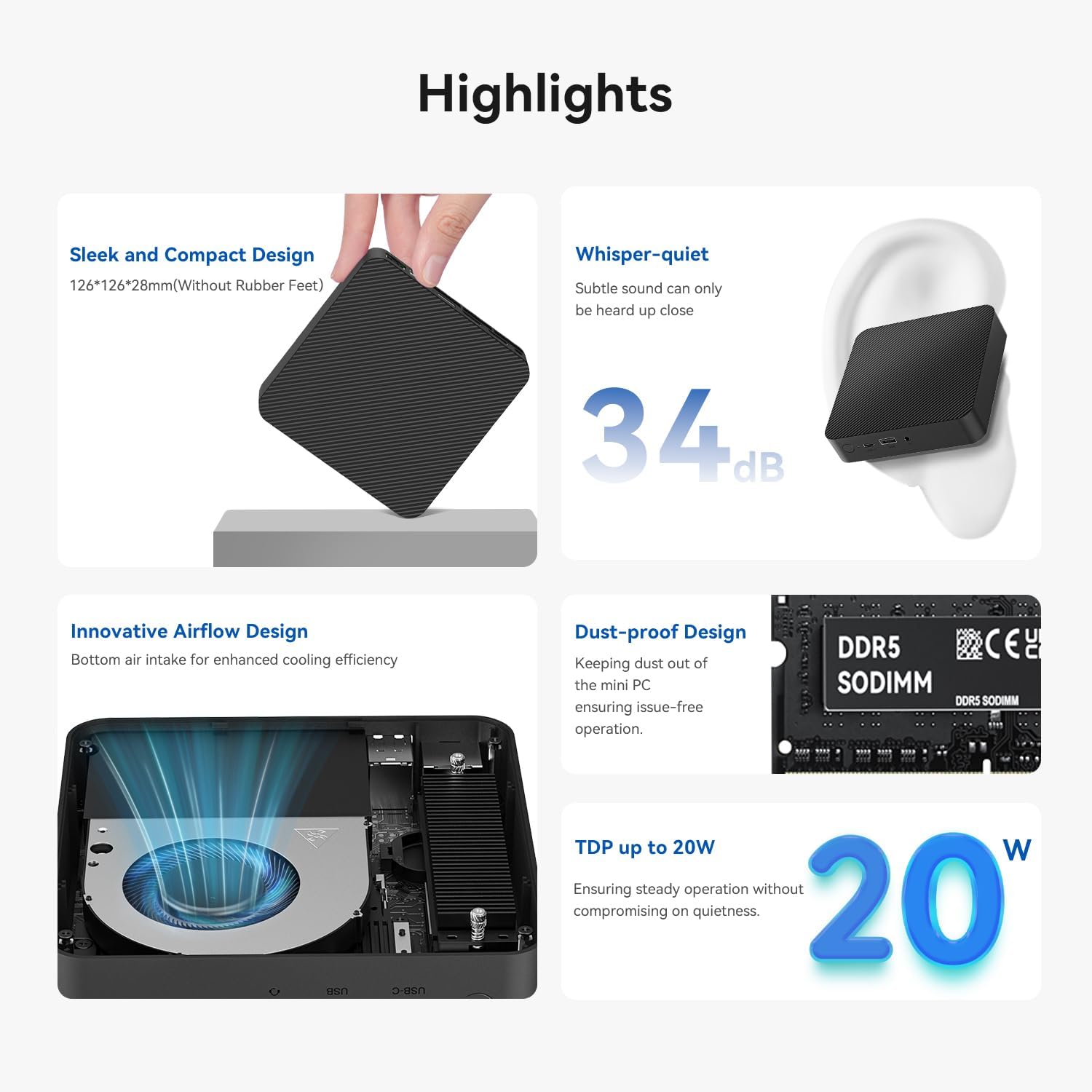
Image: Visual representation of the mini PC's key highlights including its compact size, low noise level, and efficient cooling.
- Elegantní a kompaktní design: Measuring just 126x126x28mm (without rubber feet), it fits easily into any setup.
- Tichý provoz: Operates at less than 34 decibels, ensuring a silent working environment.
- Innovative Airflow Design: Features bottom air intake for enhanced cooling efficiency, maintaining stable performance.
- Prachotěsné provedení: Helps keep internal components clean for prolonged, issue-free operation.
- Efektivní spotřeba energie: With a Thermal Design Power (TDP) of up to 20W, it balances performance with energy efficiency.
Procesor a grafika

Image: Diagram illustrating the Intel Twin Lake Processor N150 and its core specifications.
Powered by the Intel Twin Lake N150 processor (up to 3.6GHz, 4 Cores/4 Threads, Intel 7, 6MB L3 Intel Smart Cache, 20W TDP), the Key Mini N150 offers robust performance. It integrates Intel Graphics with 24 EUs at 1000 MHz, supporting dual 4K 60Hz video output via HDMI 2.0 and AV1 decoding.
Paměť a úložiště

Image: Internal layout showing the DDR5 RAM module and the dual M.2 SSD slots for storage expansion.
The mini PC comes equipped with 16GB DDR5 4800MHz RAM and a 500GB M.2 2280 PCIe3.0 x4 SSD. It features a SO-DIMM slot supporting up to 16GB DDR5 RAM and dual PCIe SSD slots that can host up to 4TB of internal storage. The PCIe 3.0x4 slot is also compatible with SATA3 solid-state drives of the M.2 2280 format.
Konektivita

Obrázek: Podrobný view of the mini PC's front and rear ports, indicating their functions.
The Key Mini N150 offers a comprehensive set of interfaces for versatile connectivity:
- 4x USB3.2 Gen2 (10Gbps) ports
- 1x LAN 2.5Gbps port
- 1x 3.5mm audio jack
- 2x HDMI (Max 4K 60Hz) ports
- 1x USB-C (Data 10Gbps) port
- 1x DC Jack for power input
- Wireless connectivity: Stable WiFi 6 (Intel AX101) and Fast Bluetooth 5.2.
Průvodce nastavením
Follow these steps to set up your TRIGKEY Key Mini N150 Mini PC:
- Rozbalte zařízení: Carefully remove the mini PC and all accessories from the packaging.
- Připojení k displeji: Pro připojení mini PC k monitoru nebo televizoru použijte dodaný kabel HDMI. Zařízení podporuje dva displeje s rozlišením 4K a obnovovací frekvencí 60 Hz.
- Připojení periferií: Plug in your USB keyboard, mouse, and any other desired peripherals into the available USB ports.
- Internetové připojení: For a wired connection, connect an Ethernet cable to the 2.5Gbps LAN port. For wireless, ensure your WiFi network is available.
- Zapnutí: Connect the power adapter to the DC Jack on the mini PC, then plug the adapter into a power outlet. Press the power button on the front of the device.
- Počáteční nastavení: The mini PC comes pre-installed with OS 11 Pro. Follow the on-screen prompts to complete the initial operating system setup, including language, region, and network configuration.
- Nástěnná montáž (volitelné): If desired, use the included wall mount bracket to attach the mini PC to the back of a VESA-compatible monitor or to a wall. Ensure proper ventilation when mounting.
Návod k obsluze
Your TRIGKEY Key Mini N150 is designed for ease of use. Here are some general operating guidelines:
- Zapnutí/vypnutí: Press the power button once to turn on the device. To shut down, use the operating system's shutdown function. A short press on the power button can also put the device to sleep.
- Připojení k Wi-Fi: After initial setup, you can connect to Wi-Fi networks through the operating system's network settings. The device supports WiFi 6 for fast and stable connections.
- Zařízení Bluetooth: Pair Bluetooth 5.2 compatible devices like keyboards, mice, or headphones via the operating system's Bluetooth settings.
- Nastavení duálního displeje: Connect two monitors to the HDMI ports for an extended desktop experience. Configure display settings within the operating system.
- Intel Unison App: Utilize the Intel Unison application to seamlessly connect your PC with mobile devices. This allows for viewvytváření fotogalerií, převod files, managing notifications, extending your PC screen with a tablet, and making/receiving calls/texts from your PC.

Image: Illustration of the Intel Unison App's capabilities for seamless device integration.
Údržba
Proper maintenance ensures the longevity and optimal performance of your mini PC:
- Udržujte to čisté: Regularly wipe the exterior with a soft, dry cloth. Avoid using liquid cleaners or aerosols.
- Prevence prachu: The device has a dust-proof design, but regular cleaning of the surrounding area can further reduce dust accumulation. Ensure the bottom air intake is not obstructed.
- Aktualizace softwaru: Pro zajištění bezpečnosti a výkonu udržujte operační systém a ovladače aktualizované.
- Řízení teploty: While designed for efficient cooling, avoid placing the mini PC in enclosed spaces or near heat sources that could impede airflow.

Image: Exploded diagram illustrating the internal structure and cooling components of the mini PC.
Odstraňování problémů
If you encounter issues with your mini PC, refer to the following common solutions:
| Problém | Možná příčina | Řešení |
|---|---|---|
| Žádné napájení/Zařízení se nezapne | Napájecí adaptér není správně připojen; Problém se zásuvkou; Vadný napájecí adaptér. | Ensure power adapter is securely connected to both the PC and the outlet. Try a different power outlet. If issue persists, contact support. |
| Žádné zobrazení na monitoru | HDMI cable loose or faulty; Incorrect input selected on monitor; Monitor power off. | Check HDMI cable connections. Ensure monitor is on and set to the correct input source (e.g., HDMI 1, HDMI 2). Try a different HDMI cable or monitor. |
| Žádné připojení k internetu (Wi-Fi) | Wi-Fi disabled; Incorrect password; Router issue; Signal interference. | Ensure Wi-Fi is enabled in OS settings. Re-enter Wi-Fi password. Restart your router. Move closer to the router or reduce interference. |
| Device running slow/overheating | Excessive background processes; Obstructed ventilation; Dust accumulation. | Close unnecessary applications. Ensure air vents are clear and not blocked. Clean dust from the device's exterior. |
| Zařízení USB nebyla rozpoznána | Loose connection; Driver issue; Faulty USB device/port. | Try a different USB port. Reinstall or update drivers for the USB device. Test the USB device on another computer. |
For issues not listed here, or if the problem persists, please contact TRIGKEY customer support.
Specifikace
Detailed technical specifications for the TRIGKEY Key Mini N150 Mini PC:
| Funkce | Specifikace |
|---|---|
| Model | Trigkey Key mini N150 Mini PC |
| Procesor | Intel Twin Lake N150 (up to 3.6GHz, 4 Cores/4 Threads, 6MB L3 Cache, 20W TDP) |
| Grafika | Intel Graphics 24EUs 1000MHz |
| BERAN | 16GB DDR5 4800MHz (SO-DIMM slot, max 16GB) |
| Skladování | 500GB M.2 2280 PCIe3.0 x4 SSD (Dual PCIe SSD slots, max 4TB total) |
| Operační systém | OS 11 Pro (Pre-installed) |
| Video výstup | 2x HDMI (Max 4K 60Hz), Dual-screen support |
| USB porty | 4x USB3.2 Gen2 (10Gbps), 1x USB-C (Data 10Gbps) |
| Síť | 1x LAN 2.5Gbps, WiFi 6 (Intel AX101), Bluetooth 5.2 |
| Zvuk | 1x 3.5mm audio jack |
| Rozměry | 126 x 126 x 28 mm (without rubber feet) |
| Hmotnost | Přibl. 2.14 libry |
| Barva | Černý |

Image: Official product specification sheet for the TRIGKEY Key Mini N150 Mini PC.
Záruka a podpora
TRIGKEY is committed to providing high-quality products and excellent customer service.
Informace o záruce
Your TRIGKEY Key Mini N150 Mini PC comes with a standard manufacturer's warranty. Please refer to the warranty card included in your package or visit the official TRIGKEY webPodrobné podmínky týkající se záručního krytí a doby trvání naleznete na webových stránkách.
Zákaznická podpora
If you have any questions, require technical assistance, or experience issues with your device, please contact TRIGKEY customer support through the following channels:
- Amazon Messaging: For purchases made on Amazon, you can contact the seller "TRiGKEY" directly through the Amazon platform.
- Oficiální Webmísto: Visit the TRIGKEY official webweb s zdrojovými zdroji podpory, častými dotazy a kontaktními informacemi.
- E-mailová podpora: Check the TRIGKEY website or your product packaging for a dedicated support email address.
When contacting support, please have your product model number (Key mini N150) and purchase details readily available.
Ask a question about this manual
Ask about setup, troubleshooting, compatibility, parts, safety, or missing instructions. Manuals+ will review the question and use this page’s manual context to help answer it.