
Zavedení
Thank you for choosing the MOTPK 47-Inch Gaming Desk. This desk is designed to enhance your gaming and work experience with its robust construction, integrated LED lighting, and convenient power outlets. This manual provides essential information for safe assembly, operation, and maintenance of your new desk. Please read it thoroughly before beginning assembly or use.

Figure 1: Fully assembled MOTPK 47-inch Gaming Desk setup.
Bezpečnostní informace
Pro zajištění bezpečného používání a prevenci poškození dodržujte prosím následující bezpečnostní pokyny:
- Shromáždění: This desk requires assembly by two people. Do not attempt to assemble alone.
- Nosnost: Do not exceed a maximum weight of 150 pounds (68 kg) on the desk surface.
- Stabilita: Před použitím se ujistěte, že jsou všechny šrouby a spojovací prvky bezpečně utažené. Pravidelně kontrolujte, zda nejsou uvolněné spoje.
- Elektrická bezpečnost: Only use the integrated power outlets and USB ports as intended. Do not overload the outlets. Keep liquids away from electrical components.
- Umístění: Place the desk on a level surface to prevent wobbling. Avoid placing in direct sunlight or near heat sources.
- Děti: Keep small parts away from children during assembly. This product is suitable for adults, teens, and kids, but adult supervision is recommended during initial setup and for younger users.
Obsah balení
Before beginning assembly, please verify that all components are present and undamaged. Refer to the detailed installation manual included in your package for a complete list of parts and hardware. If any parts are missing or damaged, please contact customer support.
Montážní návod
The MOTPK 47-Inch Gaming Desk is designed for straightforward assembly. A detailed installation manual with step-by-step instructions and labeled parts is included in your package. All necessary assembly tools, including Allen keys and a magnetic screwdriver, are provided.
Předpokládaný čas montáže: Approximately 30-50 minutes with two people.
For visual guidance, please refer to the official assembly video below:
Video 1: Official MOTPK T-Shaped Gaming Desk Assembly Guide. This video demonstrates the assembly process and key features of the desk.
Klíčové tipy pro montáž:
- Follow the numbered steps in the manual carefully.
- Do not overtighten screws, especially when attaching to the desktop board, to prevent damage.
- Ensure the T-shaped legs are correctly oriented for maximum stability.
- The monitor shelf can be installed to optimize viewing angles and desk space.

Figure 2: Desk dimensions for planning your setup.

Figure 3: Detail of the sturdy T-shaped legs.
Návod k obsluze
LED světla
The MOTPK Gaming Desk features customizable LED lights with 20 dynamic lighting modes to enhance your environment. The LED lights are controlled via a reversible controller.
- Zapnutí/vypnutí: Use the ON/OFF button on the controller to turn the lights on or off.
- Statická barva: Press the 'C' (Static Color) button to cycle through various solid colors.
- Dynamické režimy: Press the 'M' (Dynamic Mode) button to switch between different dynamic lighting effects.
- Speed & Brightness: Adjust the speed of dynamic modes or the brightness of static colors using the dedicated buttons on the controller.
- Funkce paměti: The LED lights include a power-off memory function, retaining your last setting when powered on again.

Figure 4: Reversible LED Lights Controller.
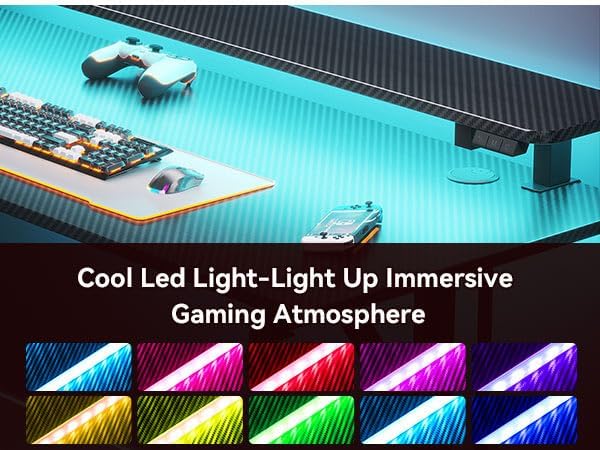
Obrázek 5: Přamples of LED light colors.
Power Outlets & USB Ports
The desk is equipped with integrated power outlets and USB ports for convenient charging and powering your devices.
- AC zásuvky: Use the standard AC outlets to power monitors, laptops, or other electronic devices.
- USB porty: Two USB ports are available for charging smartphones, tablets, or other USB-powered accessories.
- Správa kabelů: Utilize the built-in cable management features to keep your workspace tidy and organized.

Obrázek 6: Integrované zásuvky a USB porty.
Příslušenství
The desk includes a cup holder and a headphone hook for added convenience.
- Držák poháru: Attach the cup holder to either side of the desk for easy access to beverages, preventing spills on your workspace.
- Háček na sluchátka: Use the headphone hook to store your gaming headset or headphones, keeping them within reach and off the desk surface.

Figure 7: Detachable cup holder.

Figure 8: Detachable headphone hook.
Police monitoru
The full-sized monitor shelf provides an ergonomic viewing height and maximizes desk space. It can accommodate up to two 24-inch monitors or a monitor arm.
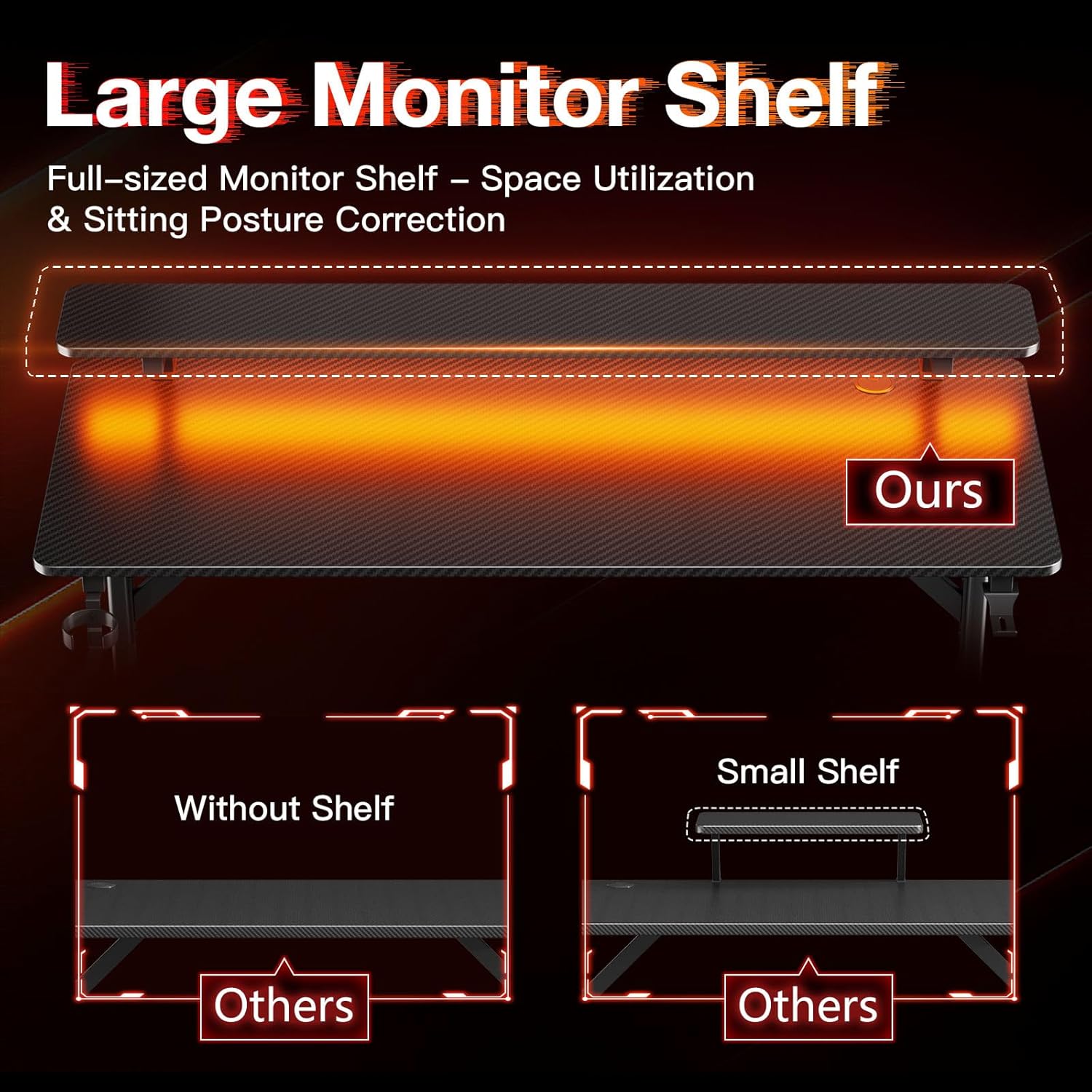
Figure 9: Large monitor shelf for optimal viewing and space.
Údržba
To keep your MOTPK Gaming Desk in optimal condition, follow these maintenance tips:
- Čištění: Otřete povrch stolu měkkým, damp cloth. Avoid harsh chemicals or abrasive cleaners that could damage the carbon fiber texture.
- Utírat prach: Regularly dust the desk and LED light strip to maintain optimal performance and appearance.
- Spojovací materiál: Pravidelně kontrolujte všechny šrouby a vruty, zda jsou pevně utažené. V případě potřeby je dotáhněte.
- Správa kabelů: Ensure cables are neatly organized and not pinched or strained, which could lead to damage.
Odstraňování problémů
If you encounter any issues with your MOTPK Gaming Desk, please refer to the following common solutions:
- Chvění stolu: Check that all leg connections and frame screws are securely tightened. Ensure the desk is on a level surface.
- LED světla nefungují: Verify that the power cable for the LED lights is properly connected to a working power source and the controller. Check if the ON/OFF button has been pressed.
- Nefunkční elektrické zásuvky: Ensure the main power cable for the integrated outlets is securely plugged into a wall socket. Check if the wall socket is active. Avoid overloading the outlets.
- Chybějící díly během montáže: Double-check the packaging. If parts are genuinely missing, contact MOTPK customer support with your purchase details.
If these steps do not resolve your issue, please contact MOTPK customer support for further assistance.
Specifikace
| Funkce | Detail |
|---|---|
| Značka | MOTPK |
| Číslo modelu | MKB04010401003 |
| Rozměry produktu (D x Š x V) | 19.68"H x 47.24"Š x 34.69"V (50 cm H x 120 cm Š x 88 cm V) |
| Velikost | 47 palců |
| Barva | Černý |
| Styl | Hraní |
| Typ horního materiálu | Engineered Wood with Carbon Fiber Texture |
| Základní materiál | Kov (železo) |
| Styl nohou | ve tvaru T |
| Speciální funkce | LED Lights, Built-in Power Outlets (AC & USB), Monitor Shelf, Carbon Fiber Texture |
| Doporučená maximální hmotnost | 150 liber (68 kg) |
| Požadovaná montáž | Ano (doporučeno 2 osoby) |
| Zahrnuté komponenty | Built-in Outlet, LED Lights, Headphone Hook, Cup Holder |
Záruka a podpora
The MOTPK 47-Inch Gaming Desk comes with a Omezená záruka. For specific details regarding warranty coverage and duration, please refer to the warranty information provided in your product packaging or contact MOTPK customer service.
MOTPK is committed to providing high-quality products and excellent pre-sales & after-sales service. If you have any questions, concerns, or require assistance with your product, please do not hesitate to contact our support team. You can find contact information on the official MOTPK webwebu nebo prostřednictvím vaší nákupní platformy.