
1. Konec produktuview
The UNI-T UT372 is a non-contact digital laser tachometer designed for measuring the rotational speed (RPM) and count of objects. It utilizes a laser pointer and reflective tape to provide accurate and stable measurements without physical contact. This device is suitable for various industrial and scientific applications.
Klíčové vlastnosti:
- 5-digit LCD screen with RPM/count and time dual display.
- Measurement modes: MAX (Maximum), MIN (Minimum), AVG (Average), and Normal.
- Nastavitelné sampling rate (0.5-255 seconds).
- Automatic power-off function (cancelable).
- Selectable laser pointer (on/off).
- Clock and time setting capabilities.
- Funkce uchování dat.
- Low power consumption, allowing for approximately 40 hours of continuous operation.
- Equipped with a USB interface for data transfer (UT372 only).
- Certified with CE and UKCA standards.
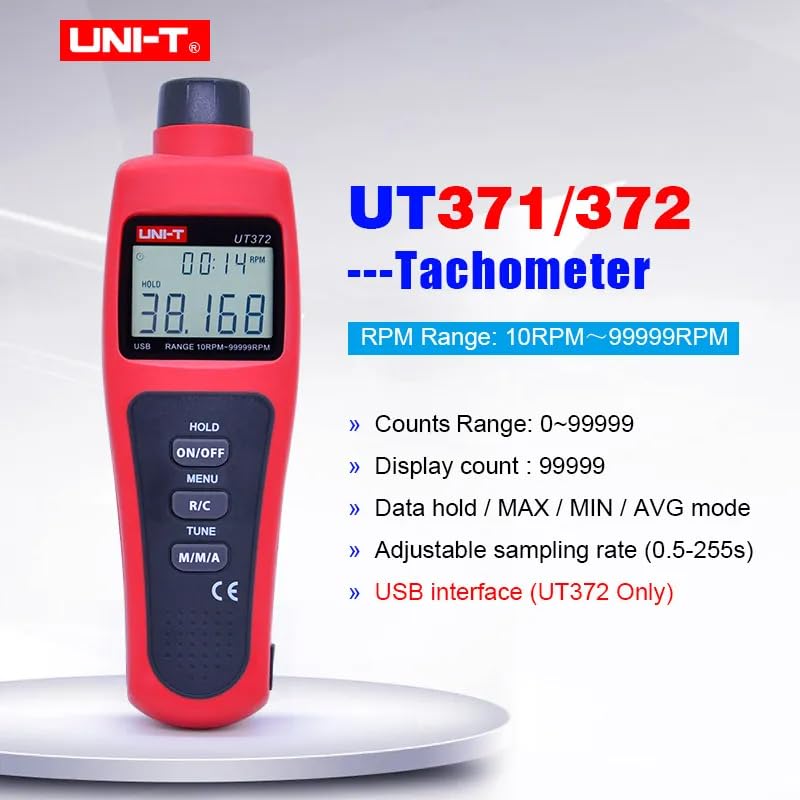
Image 1.1: The UNI-T UT372 tachometer displaying its main features and specifications.
2. Bezpečnostní informace
Před použitím zařízení si prosím přečtěte a pochopte všechny bezpečnostní pokyny. Nedodržení těchto pokynů může vést ke zranění nebo poškození zařízení.
- Do not look directly into the laser beam. The laser is a Class 2 laser product.
- Nepokoušejte se zařízení upravovat ani rozebírat. Opravy by měl provádět pouze kvalifikovaný personál.
- Před použitím se ujistěte, že je přihrádka na baterie bezpečně uzavřena.
- Pokud zařízení nebudete delší dobu používat, vyjměte baterie, abyste zabránili jejich vytečení.
- Keep the device away from water, dust, and extreme temperatures.
3. Obsah balení
Carefully unpack the box and check if all items are present and undamaged. If any item is missing or damaged, contact your supplier.
- UNI-T UT372 Digital Laser Tachometer
- reflexní páska
- USB Interface Cable (for UT372 only)
- PC Software CD (for UT372 only)
- Uživatelská příručka v angličtině
- Batteries (1.5V LR6 x 4)

Image 3.1: The UNI-T UT372 tachometer and its standard accessories as packaged.
4. Product Layout and Panel Introduction
Familiarize yourself with the components and controls of your UT372 tachometer.

Obrázek 4.1: Přední a boční strana view of the UT372 tachometer with labeled components.
- Tachometer Light Source: Vysílá laserový paprsek pro měření.
- LCD displej: Shows measurement readings, modes, and other indicators.
- HOLD / ON/OFF Button: Press to power on/off the device. Short press to activate/deactivate data hold.
- Tlačítko MENU: Accesses the menu for settings adjustments.
- R/C (RPM / Counts) Button: Toggles between RPM and Count measurement modes.
- Tlačítko TUNE: Used for adjusting settings within the menu.
- M/M/A (MAX/MIN/AVG) Button: Cycles through Maximum, Minimum, and Average measurement modes.
- USB Port (UT372 only): Pro připojení k počítači za účelem přenosu dat.
5. Nastavení a instalace baterií
5.1 Instalace baterie
- Vyhledejte kryt přihrádky na baterie na zadní straně zařízení.
- Otevřete kryt jeho posunutím nebo odšroubováním.
- Insert four 1.5V LR6 (AA) batteries, ensuring correct polarity (+/-).
- Bezpečně zavřete kryt bateriového prostoru.
5.2 Aplikace reflexní pásky
For accurate non-contact measurement, apply a piece of reflective tape to the rotating object whose speed or count you wish to measure. Ensure the tape is clean and securely attached.
6. Návod k obsluze
6.1 Zapnutí/vypnutí
Stiskněte tlačítko HOLD / ON/OFF button to turn the tachometer on or off.
6.2 RPM Measurement
- Ensure the device is in RPM measurement mode (indicated on the LCD). If not, press the R/C tlačítko pro přepnutí.
- Point the laser beam at the reflective tape on the rotating object.
- Maintain a measurement distance between 50mm and 200mm (2 to 8 inches) from the target.
- The RPM reading will be displayed on the LCD.
- Poznámka: If no signal is detected within 7 seconds, the LCD will display "0.0000". If the RPM exceeds 99999, the LCD will display "OL" (Overload).

Image 6.1: Illustrates the correct distance and method for RPM measurement.
6.3 Counts Measurement
- Stiskněte tlačítko R/C button to switch to Count measurement mode.
- Namiřte laserový paprsek na reflexní pásku na objektu.
- The device will count the number of times the laser beam reflects off the tape.
6.4 Mode Selection (MAX/MIN/AVG)
Stiskněte tlačítko M/M/A opakovaným stisknutím tlačítka můžete přepínat mezi následujícími režimy zobrazení:
- MAX: Displays the maximum measured value.
- MIN: Displays the minimum measured value.
- AVG: Displays the average measured value.
- Normální: Displays the current real-time measurement.
6.5 Zadržení dat
During measurement, a short press of the HOLD / ON/OFF button will freeze the current reading on the display. Press it again to release the data hold and resume live measurement.
6.6 SampÚprava rychlosti lovu
Sampling rate can be adjusted from 0.5 to 255 seconds. Refer to the detailed user manual for specific steps on how to access and change this setting via the MENU a NALADIT tlačítka.
6.7 USB Interface (UT372 Only)
The UT372 model features a USB port for connecting to a computer. Use the provided USB cable and PC software CD to transfer measurement data for analysis and logging. Follow the instructions provided with the software for installation and operation.
7. Údržba
- Čištění: K čištění zařízení používejte měkký, suchý hadřík. Nepoužívejte abrazivní čisticí prostředky ani rozpouštědla.
- Skladování: Store the tachometer in a cool, dry place away from direct sunlight and extreme temperatures. Remove batteries if storing for extended periods.
- Reflexní páska: Ensure the reflective tape is clean and free from damage for accurate readings. Replace as needed.
8. Řešení problémů
- Zařízení se nezapne: Zkontrolujte instalaci baterií a ujistěte se, že nejsou vybité. V případě potřeby je vyměňte.
- "0.0000" displayed during RPM measurement: Ensure the laser is correctly aimed at the reflective tape and the measurement distance is within 50-200mm. Check if the reflective tape is properly applied and clean.
- Zobrazuje se „OL“: The measured RPM exceeds the device's maximum range (99999 RPM).
- Nepřesné údaje: Verify the reflective tape is securely attached and clean. Ensure the target object is stable during measurement. Check for any obstructions in the laser path.
- Indikátor slabé baterie: Replace batteries promptly when the low battery icon appears on the display.
9. Specifikace
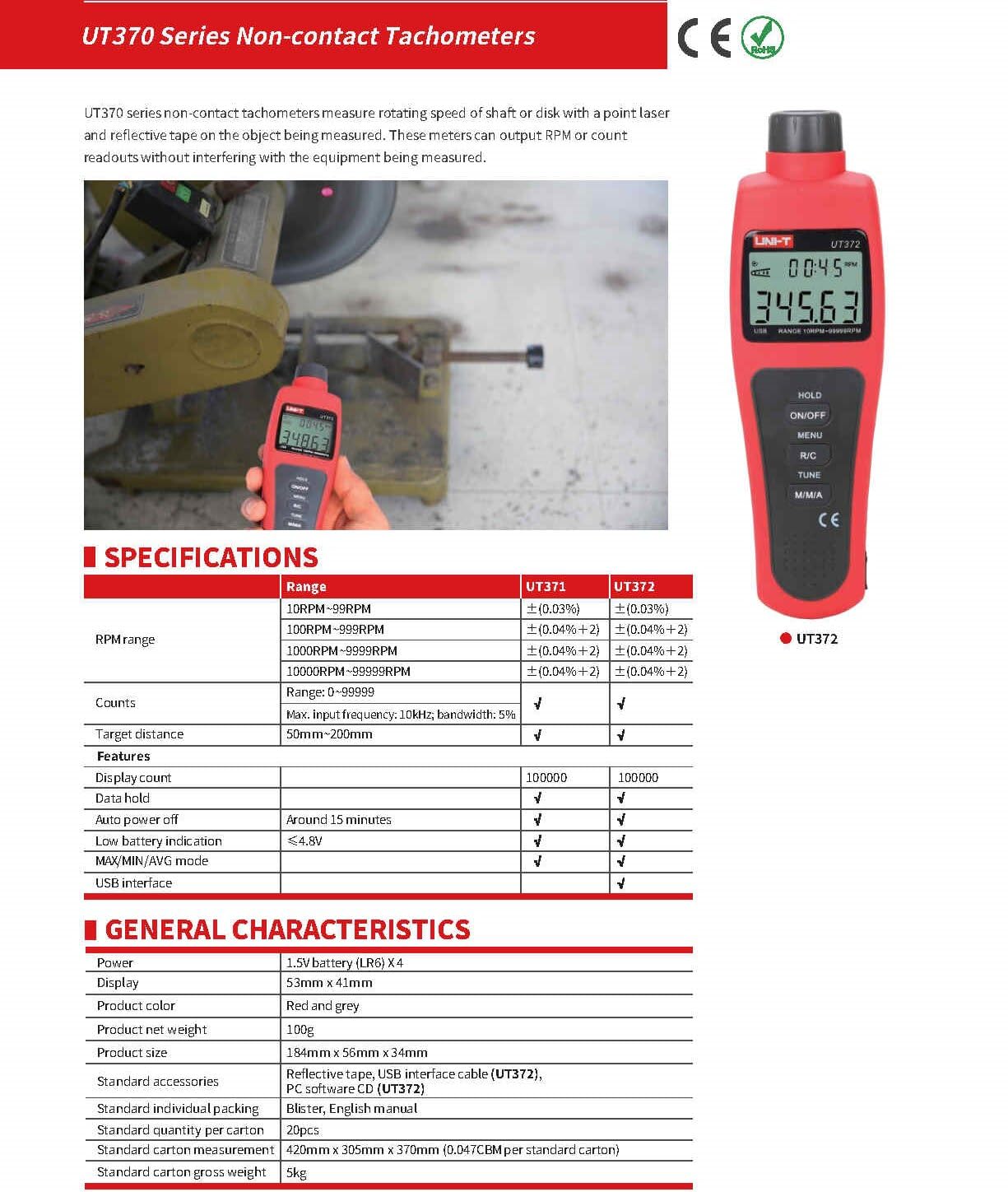
Image 9.1: Detailed specifications for the UT370 series tachometers.
| Parametr | UT372 Specification |
|---|---|
| Rozsah otáček | 10 RPM ~ 99999 RPM (Accuracy: ±(0.04%+2)) |
| Counts Range | 0 ~ 99999 |
| Počet zobrazení | 99999 |
| Cílová vzdálenost | 50 mm ~ 200 mm |
| Maximální vstupní frekvence | 10kHz, bandwidth: 5% |
| Moc | 1.5V Battery (LR6) x 4 |
| Zobrazit | LCD 53 mm x 41 mm |
| Barva produktu | Červená a šedá |
| Čistá hmotnost produktu | 100 g |
| Velikost produktu | 184 mm x 56 mm x 34 mm |
| Automatické vypnutí | Around 15 minutes (cancelable) |
| Indikace slabé baterie | <4.8V |
| Rozhraní USB | Ano |
| Provozní teplota | 0 °C až 50 °C (32 °F až 122 °F) |
| Skladovací teplota | -20 °C až 60 °C (-4 °F až 140 °F) |
| Vlhkost | <80% RH (nekondenzující) |
10. Záruka a podpora
UNI-T products are designed and manufactured to high quality standards. For warranty information, technical support, or service, please refer to the warranty card included with your product or contact your local UNI-T distributor or customer service center. Please have your product model number (UT372) and purchase date available when contacting support.