
GH-99 Galaxy M04
User Manual: Samsung Galaxy M04 Screen Protector (3 Pack)
Model: GH-99 Galaxy M04
Konec produktuview
This user manual provides comprehensive instructions for the installation, use, and maintenance of your Samsung Galaxy M04 Screen Protector. This product is designed to offer superior protection and maintain the clarity and touch sensitivity of your device's screen.

Image: The product package containing three tempered glass screen protectors, ready for installation on the Samsung Galaxy M04.
Vlastnosti
- 9H Hardness and Scratch Resistance: Engineered with industry-leading 9H hardness, this tempered glass provides maximum protection against drops, scratches, and impacts.

Image: Demonstrates the 9H hardness and explosion-proof capabilities, showing resistance to sharp objects.
- High Definition and Clarity: With 99% high-definition transparency, the screen protector ensures optimal viewing experience, restoring the original color and brightness of your screen.

Image: Illustrates the high transmittance of the screen protector, maintaining screen clarity.
- Anti-Fingerprint and Oil-Repellent Coating: Features an oleophobic coating that resists fingerprints and oily smudges, keeping your screen clean and clear.
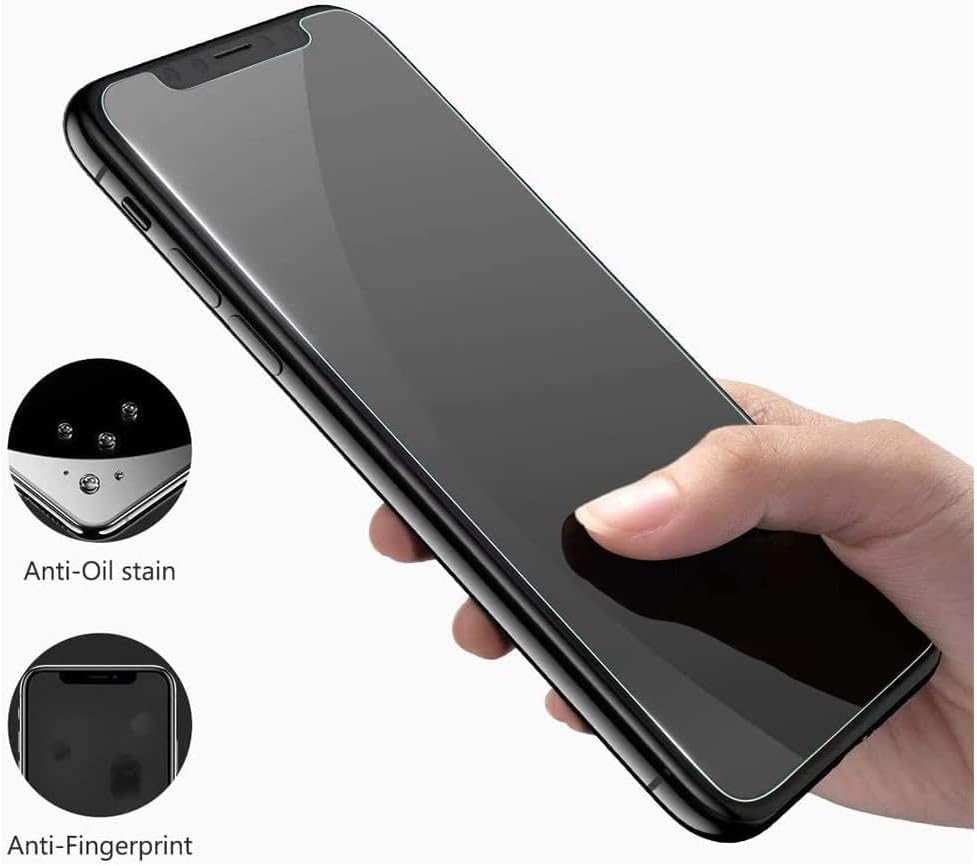
Image: Highlights the anti-oil stain and anti-fingerprint features of the screen protector.
- Design přátelský k pouzdru: The screen protector is designed to be slightly smaller than the actual screen size, ensuring compatibility with most phone cases without lifting or bubbling.

Image: Demonstrates the case-friendly design with a 2.5D curved edge, ensuring compatibility with phone cases.
- Vysoká citlivost dotyku: The ultra-thin 0.3mm design ensures full compatibility with touchscreen sensitivity, including ultrasonic fingerprint recognition.

Image: Illustrates the 3D touch layer, confirming full compatibility with touch screen technology.
Nastavení a instalace
Pro instalaci bez bublin pečlivě dodržujte tyto kroky:
- Vyčistěte obrazovku: Use the provided wipes to thoroughly clean your phone's screen. Ensure there is no dust, smudges, or debris.
- Slupovací ochranná fólie: Carefully peel off the transparent protective membrane from the adhesive side of the screen protector. Avoid touching the adhesive surface.
- Zarovnat a použít: Gently align the screen protector with your phone's screen, ensuring it perfectly fits the cutouts (e.g., camera, speaker). Once aligned, press the middle of the screen protector to initiate adhesion.
- Odstraňte vzduchové bubliny: Use a soft cloth or the provided squeegee card to gently push any air bubbles towards the edges of the screen. Small bubbles should disappear within 24-48 hours.

Image: A visual step-by-step guide demonstrating the installation process of the screen protector.
Údržba
To ensure the longevity and clarity of your screen protector:
- Clean the screen protector regularly with a soft, lint-free cloth.
- Na odolné šmouhy lehceampOtřete hadřík vodou nebo čističem obrazovek speciálně určeným pro elektroniku. Vyhněte se agresivním chemikáliím.
- Do not use abrasive materials or excessive force when cleaning.
Odstraňování problémů
| Problém | Možná příčina | Řešení |
|---|---|---|
| Bubliny po instalaci | Prachové částice nebo nesprávná aplikace. | Gently lift the nearest corner of the protector and reapply, pushing out bubbles with a squeegee. For small bubbles, they may disappear naturally within 24-48 hours. Ensure the screen is completely dust-free before application. |
| Screen protector not adhering properly | Oily residue or dust on the screen; protector not aligned correctly. | Ensure the screen is thoroughly cleaned and dry before application. Realign the protector carefully. |
| Snížená citlivost dotyku | Improper installation or a faulty protector. | Ensure the protector is fully adhered without air gaps. If issues persist, consider replacing the protector. |
Specifikace
- Název produktu: Compatible for Samsung Galaxy M04 Screen Protector Tempered Glass
- Model: GH-99 Galaxy M04
- Tvrdost: Tvrdost povrchu 9H
- Tloušťka: 0.3 mm
- Materiál: Tvrzené sklo
- Vlastnosti: HD High Definition, Anti-Fingerprint, Anti-Oil, Scratch Resistant, Explosion-Proof, Case Friendly, High Touch Sensitivity
- Kompatibilní zařízení: Samsung Galaxy M04 Cellphone
- Počet položek: 3 balení
- Hmotnost položky: 70 g
- Rozměry produktu: 25.4 x 25.4 x 1.27 cm
- Výrobce: Obecný
Záruka a podpora
For any questions, concerns, or support regarding your screen protector, please refer to the seller's contact information or the platform where the purchase was made. Specific warranty details may vary by retailer.
Ask a question about this manual
Ask about setup, troubleshooting, compatibility, parts, safety, or missing instructions. Manuals+ will review the question and use this page’s manual context to help answer it.