
1. Úvod
This manual provides essential instructions for the installation, operation, and maintenance of your PureLink Vuelogic VB200 Huddle Space Videobar. Please read this manual thoroughly before using the product to ensure proper functionality and to prevent damage.
The PureLink Vuelogic VB200 is an all-in-one conferencing solution designed for huddle spaces and small to medium meeting rooms. It integrates a 4K camera, multiple microphones, and stereo speakers to provide a comprehensive audio and video experience.
2. Bezpečnostní informace
Dodržujte následující bezpečnostní opatření, abyste zabránili poškození zařízení a zajistili bezpečnost uživatele:
- Nevystavujte zařízení vodě, vlhkosti ani extrémním teplotám.
- Neumisťujte zařízení do blízkosti zdrojů tepla nebo na přímé sluneční světlo.
- Používejte pouze napájecí adaptér dodaný se zařízením.
- Nepokoušejte se zařízení otevírat ani opravovat sami. Veškerý servis svěřte kvalifikovanému personálu.
- Během provozu zajistěte dostatečné větrání v okolí zařízení.
3. Konec produktuview
The PureLink Vuelogic VB200 combines a high-quality camera, microphone array, and speakers into a single, compact unit for streamlined video conferencing.
3.1. Obsah balení
Ověřte, zda jsou v balení přítomny všechny položky:
- PureLink Vuelogic VB200 Videobar
- Napájecí adaptér
- USB kabel
- Mounting Bracket (if included)
- Rychlý průvodce

Figure 3.1: The retail packaging for the PureLink Vuelogic VB200 Videobar, indicating it is an all-in-one conferencing solution.

Obrázek 3.2: Detailní view of the product packaging, showing the model number VL-VB200 and UPC 4251364736913.
3.2. Součásti zařízení
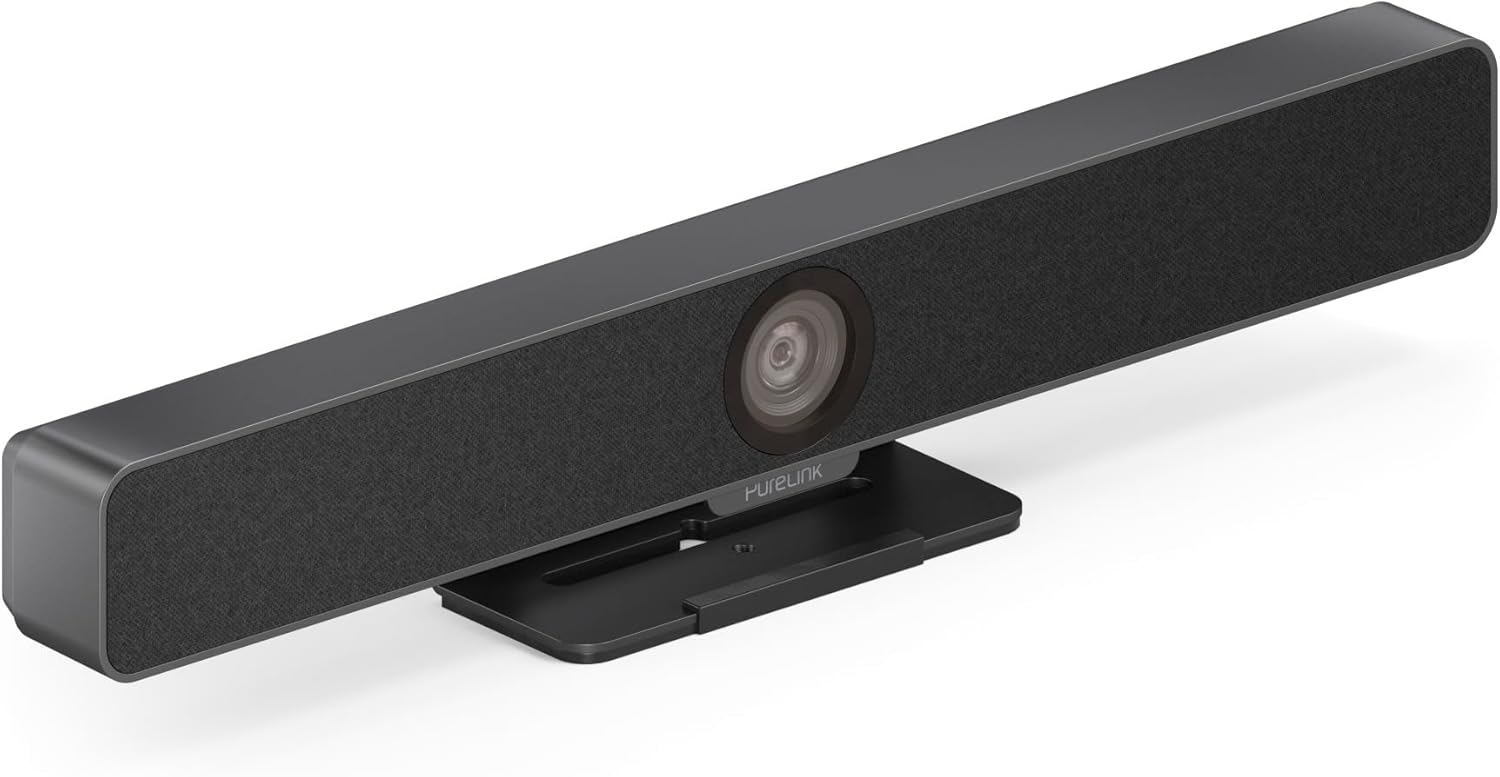
Obrázek 3.3: Přední strana view of the PureLink Vuelogic VB200 Huddle Space Videobar, showcasing the integrated camera and speaker grille.

Obrázek 3.4: Přední a zadní část views of the videobar. The rear view displays the power input, USB-C port, and other connectivity options.
- Přední: Integrated 4K camera, speaker grille, PureLink branding.
- Zadní: Power input, USB-C port for data and power, HDMI output (if applicable), mounting points.
4. Nastavení
Follow these steps to set up your PureLink Vuelogic VB200 Videobar:
- Umístění: Position the videobar on a stable surface, such as a table or monitor, ensuring the camera has a clear view of the meeting participants. The integrated stand allows for flexible placement.
- Připojení napájení: Connect the provided power adapter to the videobar's power input and then to a wall outlet.
- USB připojení: Connect the videobar to your computer using the supplied USB-C cable. The device is plug-and-play and should be recognized automatically by your operating system.
- Volitelné HDMI připojení: If your setup requires video output to a display, connect an HDMI cable from the videobar's HDMI output (if available) to your display.
- Rozpoznávání softwaru: Once connected, your computer's operating system (Windows, macOS, etc.) should detect the device. You may need to select the "PureLink Vuelogic VB200" as your preferred camera, microphone, and speaker in your video conferencing application settings (e.g., Zoom, Microsoft Teams, WebPříklad).

Figure 4.1: The videobar positioned on a surface, demonstrating its flexible mounting options for various work environments.
5. Návod k obsluze
The PureLink Vuelogic VB200 is designed for ease of use with popular video conferencing platforms.
5.1. Starting a Meeting
- Ensure the videobar is connected and powered on.
- Open your preferred video conferencing application (e.g., Zoom, Microsoft Teams, WebEx, Google Meet, Skype, Slack, GoToMeeting).
- In the application's audio and video settings, select "PureLink Vuelogic VB200" as your camera, microphone, and speaker device.
- Start or join your meeting.

Figure 5.1: The videobar is compatible with leading communication platforms such as Zoom, Slack, GoToMeeting, Google Hangouts, Skype, Microsoft Teams, and Google Meet.
5.2. Klíčové vlastnosti
- Kvalita videa 4K: The 120° wide-angle lens captures sharp, high-resolution video, suitable for small to medium rooms.
- Intelligent Auto Framing and Tracking: The camera automatically adjusts its frame to keep all participants visible and can track the active speaker, ensuring optimal framing during dynamic meetings.
- High-Quality Audio Capture: Equipped with 4 MEMS digital microphone arrays, offering a 3-5m range and 180° coverage. Features like Acoustic Echo Cancellation (AEC), Automatic Gain Control (AGC), and Automatic Noise Suppression (ANS) ensure clear communication.
- Hi-Fi Stereo Speakers: Two 3W stereo speakers with bass boost provide clear and powerful audio output for an immersive sound experience.
6. Údržba
To ensure the longevity and optimal performance of your videobar:
- Čištění: Use a soft, dry cloth to clean the exterior of the device. For the camera lens, use a lens cleaning cloth and solution specifically designed for optics. Do not use abrasive cleaners or solvents.
- Skladování: Pokud zařízení delší dobu nepoužíváte, skladujte jej na chladném a suchém místě mimo dosah přímého slunečního záření.
- Aktualizace firmwaru: Periodically check the PureLink webNa webu najdete veškeré dostupné aktualizace firmwaru, abyste zajistili, že vaše zařízení bude mít nejnovější funkce a vylepšení výkonu.
7. Řešení problémů
If you encounter issues with your PureLink Vuelogic VB200, refer to the following common problems and solutions:
| Problém | Možná příčina | Řešení |
|---|---|---|
| Žádný video výstup / Kamera nebyla detekována | Loose USB connection, incorrect software settings, driver issue. |
|
| No audio from speakers / Microphone not working | Incorrect audio settings, muted device. |
|
| Auto-framing not functioning correctly | Poor lighting, obstruction, software glitch. |
|
8. Specifikace
| Funkce | Detail |
|---|---|
| Značka | PureLink |
| Číslo modelu | VL-VB200 |
| Rozměry | 20.47 x 7.87 x 5.12 palce |
| Hmotnost | 2.2 libry |
| Barva | Černý |
| Rozlišení záznamu videa | 4K |
| Optický zoom | 5x |
| Technologie fotosenzoru | CMOS |
| Speciální funkce | Auto Framing and Tracking |
| Typ mikrofonu | 4 MEMS Digital Microphone Arrays |
| Rozsah mikrofonu | 3-5m, 180° coverage |
| Zvukové funkce | AEC, AGC, ANS |
| Reproduktory | Two 3W Stereo Speakers with Bass Boost |
| Technologie připojení | HDMI, USB |
| Podporovaný formát zvuku | AAC, MP3 |
| Podporovaný formát videa | MP4 |
| Kompatibilita | Windows, macOS, Zoom, WebEx, Tencent Meeting, Teams, etc. |
9. Záruka a podpora
PureLink products are designed for reliability and performance. For specific warranty information, please refer to the warranty card included with your product or visit the official PureLink webmísto.
For technical support, troubleshooting assistance, or to inquire about service, please contact PureLink customer support through their official channels. Keep your purchase receipt and product model number (VL-VB200) handy when contacting support.
Official PureLink Webmísto: www.purelink.de