
NOHON NX-YSP04
NOHON Wireless Charger Portable Mag-Safe Battery Pack User Manual
Model: NX-YSP04
Značka: NOHON
Zavedení
The NOHON Wireless Charger Portable Mag-Safe Battery Pack (Model NX-YSP04) is a versatile 10000mAh power bank designed to provide convenient and fast charging for your mobile devices. Featuring magnetic wireless charging and 20W PD fast charging capabilities, it ensures your devices stay powered throughout the day, whether you are at home, traveling, or on the go.
Obsah balení
Zaškrtněte prosím políčko u následujících položek:
- 1 x NOHON 10000mAh Magnetic Wireless Power Bank
- 1 x USB-C kabel
- 1 x Uživatelská příručka
Vlastnosti produktu
- Bezdrátové magnetické nabíjení: Effortlessly attach and charge your devices with innovative magnetic technology for a hassle-free experience. Simply snap and go.
- Vysoká kapacita 20 000 mAh: Poskytuje ample power to keep your devices charged for extended periods, ensuring connectivity throughout the day.
- Rychlé nabíjení 20 W: Supports PD3.0 with 20W Type-C input and output for rapid and efficient power delivery.
- 7.5W Wireless Output: Offers wireless charging compatibility with 5W/7.5W/10W Max output for various devices.
- Současné nabíjení: Charge two devices concurrently using both wireless and wired modes. The power bank can also be charged while wirelessly charging a device.
- Superior Magnetic Force: Ensures a secure and stable connection, preventing accidental disconnections during use.
- Univerzální kompatibilita: Compatible with iPhone 12/13/14/15 series and other devices (requires MagSafe phone case for non-MagSafe compatible phones).
- Kompaktní a přenosné: Lightweight (only 190g) and compact design makes it ideal for travel and daily use. Easily slips into a bag or pocket.
- Kvalita a spolehlivost: Features a non-slip silicone skin design and multi-protect safety technology for durability and performance.
Nastavení
Počáteční nabití powerbanky:
- Connect the provided USB-C cable to the Type-C input port on the NOHON power bank.
- Připojte druhý konec kabelu USB-C ke kompatibilnímu napájecímu adaptéru USB (není součástí balení).
- The LED indicator lights on the power bank will illuminate to show the charging status. A full charge is indicated when all LEDs are solid.
Návod k obsluze
Nabíjení powerbanky
To charge the NOHON power bank, use the included USB-C cable. Connect one end to the power bank's USB-C input port and the other end to a wall adapter or computer USB port. The LED indicators will show the charging progress.

Obrázek: Detail view of the NOHON power bank's side, highlighting the USB-C (20W Type-C Output, 18W Type-C Input) and Lightning (10W Lightning Input) ports, along with LED battery indicators. This image illustrates the various charging inputs and outputs available on the device.
Wireless Charging Your Device (Mag-Safe Compatible)
- Ensure your device is Mag-Safe compatible (iPhone 12/13/14/15 series) or is using a Mag-Safe compatible phone case.
- Align the NOHON power bank with the back of your device. The strong magnets will snap it into place, initiating wireless charging.
- The power bank supports 5W, 7.5W, and 10W wireless output depending on your device's requirements.
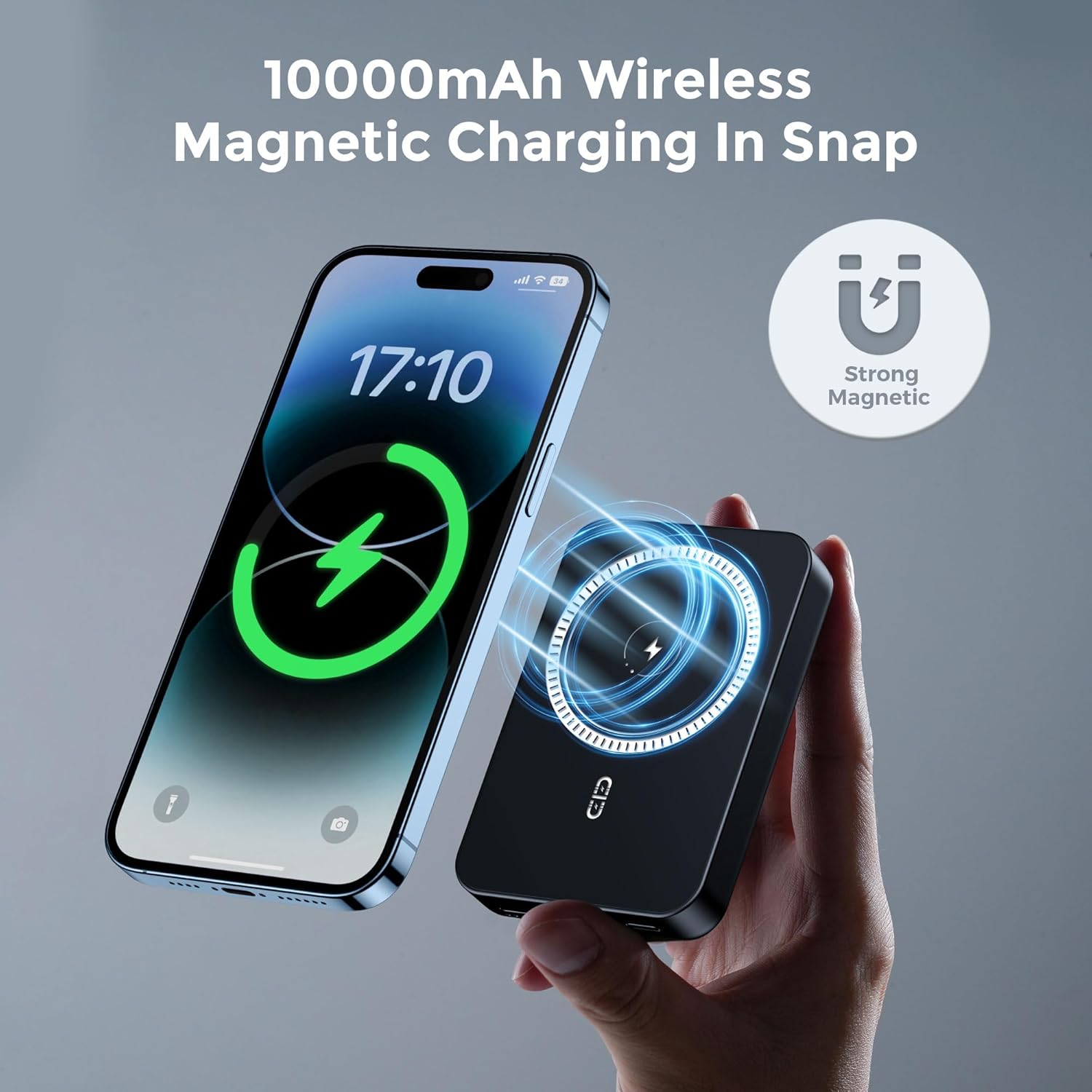
Image: A NOHON power bank is shown magnetically attached to the back of a smartphone, illustrating the "10000mAh Wireless Magnetic Charging In Snap" feature. A "Strong Magnetic" icon emphasizes the secure connection.

Image: A hand holds a smartphone with the NOHON power bank securely attached to its back via strong magnets, demonstrating stability during use. A note indicates that only iPhone 12/13/14 series have native wireless magnetic function, while others require a MagSafe phone case.
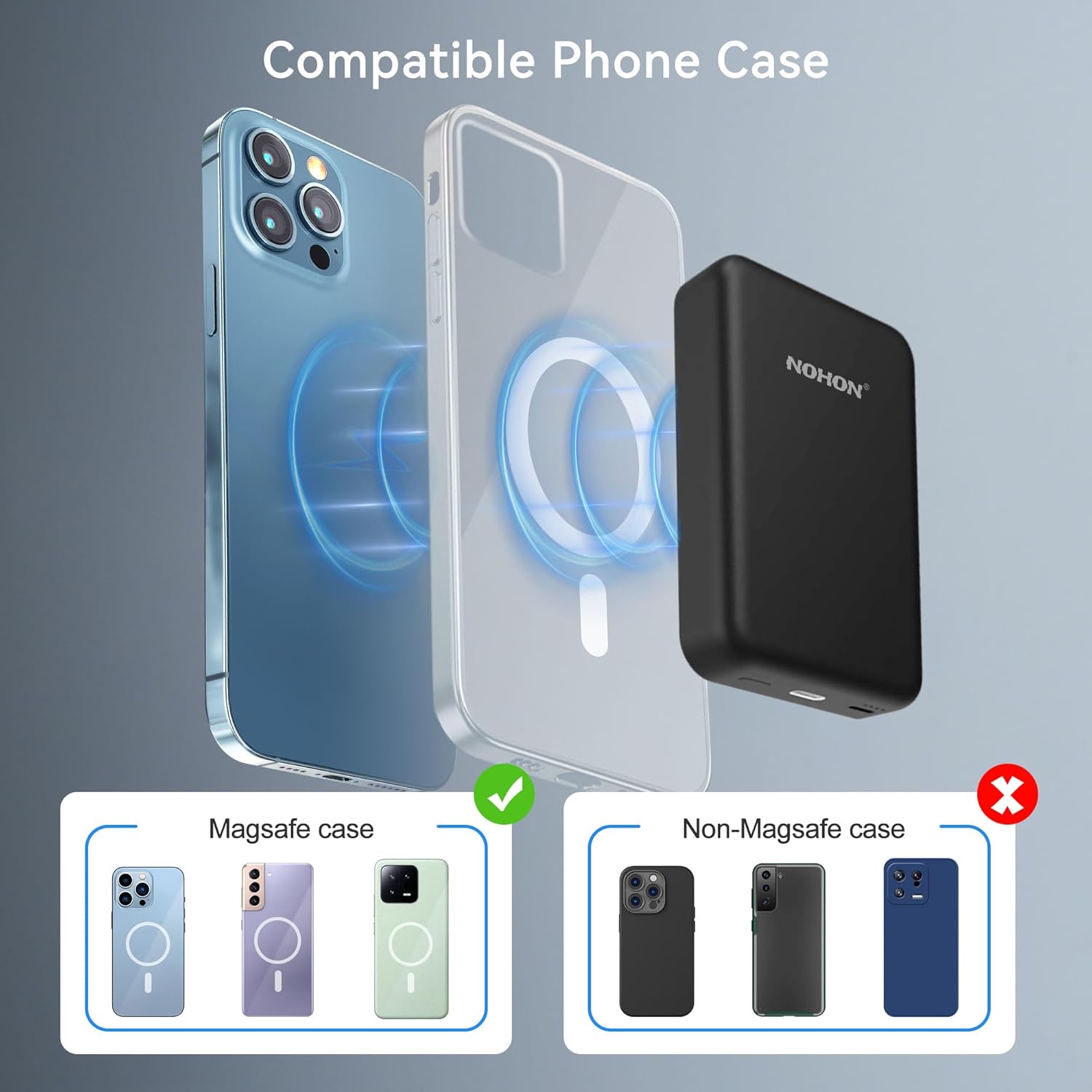
Image: This diagram illustrates the compatibility of the NOHON power bank with different phone cases. It shows that MagSafe cases allow for proper magnetic attachment, while non-MagSafe cases do not, emphasizing the need for a compatible case for optimal magnetic charging.

Image: An illustration demonstrating the wide compatibility of the NOHON power bank. It shows direct compatibility with iPhone 14/13/12 series and indicates that other devices can also be charged wirelessly if they use a MagSafe compatible phone case.
Wired Charging Your Device
Use a USB-C cable to connect your device to the power bank's USB-C output port for wired fast charging (up to 20W PD).
Simultánní nabíjení
The NOHON power bank supports charging itself while simultaneously charging a device wirelessly. You can also charge two devices at once, one wirelessly and one via the USB-C port.

Image: The NOHON power bank is shown simultaneously charging a smartphone wirelessly while the power bank itself is being recharged via a USB-C cable connected to a wall adapter. This demonstrates the "Charge the Device and your Phone Simultaneously" feature.
Údržba
- Chraňte powerbanku před extrémními teplotami, přímým slunečním zářením a tekutinami.
- Povrch čistěte měkkým, suchým hadříkem. Nepoužívejte agresivní chemikálie ani abrazivní materiály.
- Pokud se nepoužívá, skladujte na chladném a suchém místě.
- Vyvarujte se pádu nebo vystavení powerbanky silným nárazům.
Odstraňování problémů
- Powerbanka se nenabíjí:
- Ensure the USB-C cable is securely connected to both the power bank and the power source. Verify the power source is active.
- Zařízení se nenabíjí bezdrátově:
- Check if your device is Mag-Safe compatible or if you are using a Mag-Safe compatible phone case. Ensure proper alignment of the power bank with your device. Remove any thick cases that might interfere with wireless charging.
- Pomalé nabíjení:
- Ensure you are using a compatible fast-charging adapter for the power bank. For wired charging, ensure your cable and device support fast charging protocols.
- Power bank overheating:
- It is normal for the power bank to get slightly warm during charging or discharging. If it becomes excessively hot, disconnect it immediately and allow it to cool down. Ensure proper ventilation and avoid charging in direct sunlight or confined spaces.
Specifikace
| Funkce | Detail |
|---|---|
| Číslo modelu | NX-YSP04 |
| Kapacita baterie | 10000 XNUMX mAh |
| Rozměry produktu | 3.78 x 2.52 x 0.7 palce |
| Hmotnost položky | 6.7 unce (přibližně 190 g) |
| Typ konektoru | USB Type C (Input/Output), Lightning (Input) |
| Kabelový výstup | 20W PD (USB-C) |
| Bezdrátový výstup | 5W/7.5W/10W Max |
| Speciální funkce | Wireless Charging, Magnetic Attachment |
| Barva | Černý |
| Výrobce | NOHON |
Záruka a podpora
NOHON provides a Záruka 12 měsíců pro tento produkt od data zakoupení. Tato záruka se vztahuje na výrobní vady a problémy vzniklé běžným používáním.
For any questions, technical assistance, or warranty claims, please contact NOHON Customer Support:
- Služby zákazníkům: K dispozici 7 dní v týdnu, 24 hodin denně.
- Kontaktní údaje: Please refer to the contact details provided on the product packaging or the official NOHON webmísto.
We are committed to providing exceptional service and will spare no effort to resolve any issues you may encounter.
Ask a question about this manual
Ask about setup, troubleshooting, compatibility, parts, safety, or missing instructions. Manuals+ will review the question and use this page’s manual context to help answer it.