
1. Úvod
This user manual provides detailed instructions for the installation, operation, and maintenance of your Xprinter XP-D200N Thermal Receipt Printer. The XP-D200N is a high-speed thermal printer designed for reliable and efficient receipt printing in various business environments. Please read this manual thoroughly before using the printer to ensure proper functionality and to prevent damage.
2. Bezpečnostní informace
To ensure safe operation and prevent damage to the printer or injury to yourself, please observe the following safety precautions:
- Always use the provided power adapter. Using an incorrect adapter may damage the printer and void the warranty.
- Nevystavujte tiskárnu vodě, vlhkosti ani extrémním teplotám.
- Neumísťujte tiskárnu na přímé sluneční světlo ani do blízkosti zdrojů tepla.
- Nepokoušejte se tiskárnu rozebírat ani opravovat sami. Veškerý servis svěřte kvalifikovanému personálu.
- Ujistěte se, že je tiskárna umístěna na stabilním a rovném povrchu.
- Keep the printer away from dust and debris to maintain optimal performance.
3. Obsah balení
Zkontrolujte prosím obsah balení. Pokud některé položky chybí nebo jsou poškozené, ihned kontaktujte svého prodejce.
- Xprinter XP-D200N Thermal Receipt Printer
- Napájecí adaptér
- Napájecí kabel
- USB kabel
- Termo papírová role (startovací)
- Uživatelská příručka (tento dokument)
4. Konec produktuview
The Xprinter XP-D200N is a compact and efficient thermal receipt printer. Below are images illustrating its key components and design.
Obrázek 4.1: Přední strana view of the Xprinter XP-D200N Thermal Receipt Printer. This image shows the sleek, black casing and the paper output slot.
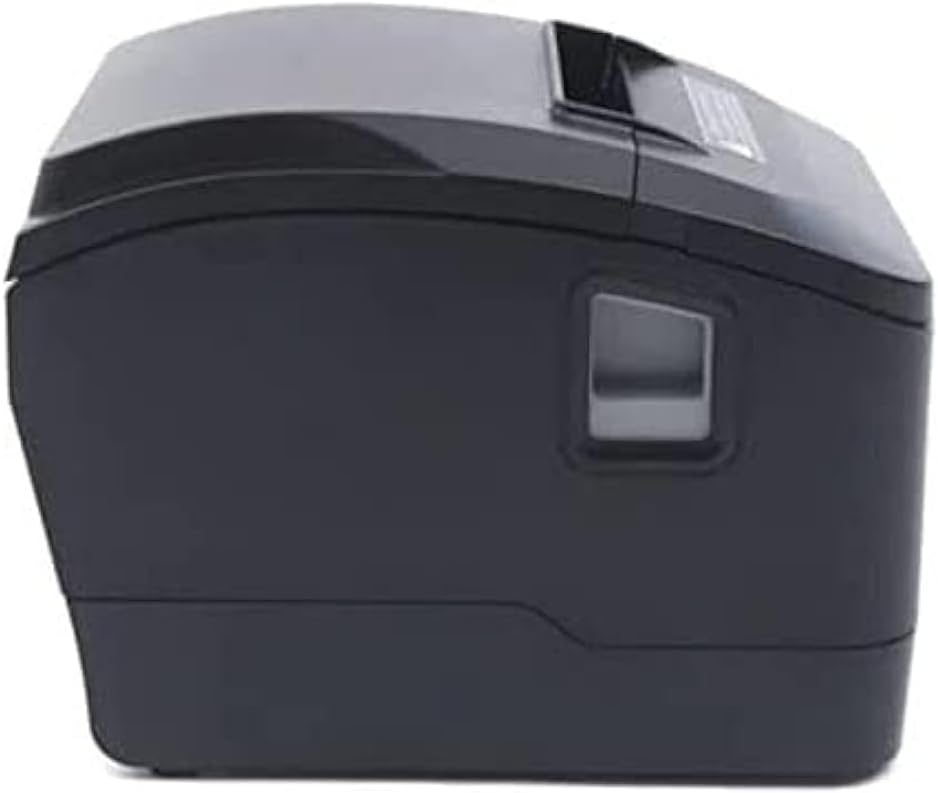
Obrázek 4.2: Strana view of the Xprinter XP-D200N Thermal Receipt Printer. This perspective highlights the compact design and the power switch on the right side.

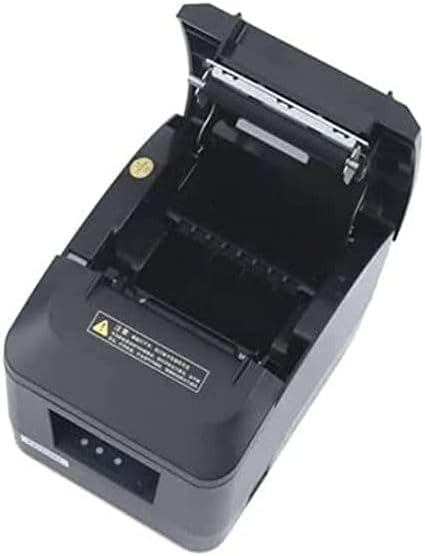
Obrázek 4.3: Nahoru view of the Xprinter XP-D200N Thermal Receipt Printer with the cover open, revealing the thermal paper roll compartment and the print head mechanism. This view is essential for paper loading and maintenance.
5. Nastavení
5.1 Připojení napájení
- Ujistěte se, že je vypínač tiskárny v poloze VYPNUTO.
- Connect the power adapter to the power input port on the back of the printer.
- Plug the power cord into the power adapter, then into a standard electrical outlet.
5.2 Připojení k počítači
The XP-D200N supports both USB and LAN connectivity.
USB připojení:
- Připojte jeden konec kabelu USB k portu USB na tiskárně.
- Připojte druhý konec kabelu USB k volnému portu USB v počítači.
LAN (Ethernet) Connection:
- Connect an Ethernet cable to the LAN port on the printer.
- Připojte druhý konec ethernetového kabelu k síťovému směrovači nebo přepínači.
- Refer to the printer's advanced settings or driver utility for network configuration (e.g., IP address settings).
5.3 Vkládání termopapíru
- Open the printer cover by pressing the release button or lifting the cover latch. (Refer to Figure 4.3).
- Insert the thermal paper roll into the compartment with the paper feeding from the bottom and the leading edge extending towards the front of the printer. Ensure the paper is aligned correctly.
- Vytáhněte malé množství papíru ven z řezačky.
- Pevně zavřete kryt tiskárny, dokud nezacvakne na místo.
5.4 Instalace ovladače
After connecting the printer, you will need to install the appropriate drivers on your computer. Drivers are typically provided on a CD included with the printer or can be downloaded from the official Xprinter webwebu. Během instalace postupujte podle pokynů na obrazovce.
6. Návod k obsluze
6.1 Zapnutí/vypnutí
- To power on: Ensure the power cord is connected, then flip the power switch to the ON position. The indicator light will illuminate.
- To power off: Flip the power switch to the OFF position.
6.2 Základní tisk
Once the printer is connected and drivers are installed, you can print receipts from your point-of-sale (POS) software or other applications. Select the Xprinter XP-D200N as your default printer in your application's print settings.
6.3 Stavové indikátory
The printer features indicator lights (usually on the front panel) that provide information about its status:
- Indikátor napájení: Solid light indicates the printer is powered on.
- Indikátor chyby: Flashing or solid light indicates an error (e.g., paper out, cover open, print head overheat). Refer to the troubleshooting section.
- Paper Out Indicator: Illuminates when the paper roll is empty or nearly empty.
7. Údržba
7.1 Čištění tiskové hlavy
Pravidelné čištění tiskové hlavy zajišťuje optimální kvalitu tisku a prodlužuje životnost tiskárny.
- Vypněte tiskárnu a odpojte napájecí kabel.
- Otevřete kryt tiskárny.
- Použijte vatový tampon lehceampened with isopropyl alcohol (70% or higher) to gently wipe the thermal print head surface. Avoid touching the print head with bare hands.
- Allow the print head to dry completely before closing the cover and reconnecting power (approximately 2-3 minutes).
7.2 Obecné čištění
Otřete vnější povrch tiskárny měkkým,amp tkanina. Nepoužívejte abrazivní čisticí prostředky nebo rozpouštědla.
7.3 Výměna papírové role
When the paper out indicator illuminates or print quality degrades, it's time to replace the paper roll. Follow the steps in Section 5.3 "Loading Thermal Paper".
8. Řešení problémů
| Problém | Možná příčina | Řešení |
|---|---|---|
| Tiskárna se nezapne. | No power, faulty power adapter/cord. | Check power connections. Ensure power switch is ON. Test outlet. |
| Žádný tisk. | Paper out, cover open, incorrect driver, incorrect printer selected, cable disconnected. | Load paper, close cover, check USB/LAN connection, verify driver installation, select correct printer in software. |
| Špatná kvalita tisku (bledé, prázdné řádky). | Dirty print head, low quality thermal paper, print head damage. | Clean print head (Section 7.1). Replace thermal paper. If problem persists, contact support. |
| Zaseknutý papír. | Nesprávné vložení papíru, cizí předmět. | Turn off printer, open cover, carefully remove jammed paper. Reload paper correctly. |
| Error indicator light is on/flashing. | General error, paper out, cover open. | Check for paper out, ensure cover is closed. Power cycle the printer. If error persists, consult manufacturer's support. |
9. Specifikace
| Značka: | Xprinter |
| Model: | XP-D200N |
| Typ tiskárny: | Tiskárna s tepelným příjmem |
| Způsob tisku: | Přímé tepelné |
| Rychlost tisku: | 220 mm/sec (as per product description) |
| Maximální velikost média: | 8 cm (80 mm) |
| Konektivita: | USB, LAN (Ethernet) |
| Příkon: | 24V – 2.5A |
| Tiskový výstup: | Monochromatický |
| Speciální vlastnosti: | Sleek, Compact, Lightweight Design, High Print Quality, Durability, Low Noise, Automatic Paper Cutting |
| Rozměry produktu: | 18.4 x 14 x 13.5 cm |
| Hmotnost položky: | 1.63 kg |
10. Záruka a podpora
The Xprinter XP-D200N Thermal Receipt Printer comes with a standard manufacturer's warranty. For specific warranty terms and conditions, please refer to the warranty card included with your product or visit the official Xprinter website. For technical support, driver downloads, or service inquiries, please contact your local dealer or the Xprinter customer support team through their official channels.
Nejnovější informace a zdroje podpory naleznete na adrese: www.xprinter.net