
symcode USA-6709DA-Green
Symcode Wireless Bluetooth Barcode Scanner User Manual
Model: USA-6709DA-Green
1. Úvod
This user manual provides comprehensive instructions for the Symcode Wireless Bluetooth Barcode Scanner, Model USA-6709DA-Green. This device is designed for accurate and efficient data capture, supporting various 1D and 2D barcode types. It offers versatile connectivity options including Bluetooth, 2.4G wireless, and USB wired connections, making it suitable for a wide range of business applications.

Image 1: Symcode Wireless Bluetooth Barcode Scanner and accessories.
2. Obsah balení
Prosím, ověřte, zda jsou v balení přítomny všechny položky:
- Symcode Barcode Scanner (Model: USA-6706DA-Green)
- USB nabíjecí kabel
- 2.4G USB dongle
- Uživatelská příručka

Image 2: Components included with the Symcode Barcode Scanner.
3. Vlastnosti produktu
- Pokročilá technologie skenování: CMOS optical imaging for quick and precise scanning of 1D and 2D barcodes (QR, DataMatrix, PDF417, Aztec, Hanxin, etc.) even on damaged or poorly printed labels.
- Trojité režimy připojení: Supports Bluetooth, 2.4G wireless, and USB wired connections for maximum flexibility.
- Rozšířený bezdrátový dosah: Up to 200m in open environments and 30m indoors with the 2.4G USB dongle.
- Dlouhá výdrž baterie: 2000mAh battery provides up to 30 hours of continuous scanning, with a full recharge in approximately 2 hours.
- Všestranná konfigurace: Features include hands-free intelligent sensor mode, trigger scan mode, vibration/buzzer settings, data storage/instant upload modes, multiple keyboard languages, and customizable prefix/suffix options.
- Vynikající odolnost: Constructed with strong ABS material, designed to withstand drops of up to 2.4 meters (8 ft) and features an integrated dustproof housing (IP67 rated).
4. Nastavení a připojení
The scanner offers three primary connection methods:
4.1. Bezdrátové připojení 2.4G
- Zapojte 2.4G USB dongle do volného USB portu v počítači.
- Turn on the scanner. It will automatically pair with the dongle.
- A successful connection is indicated by a specific beep sound and LED indicator.
4.2. Připojení Bluetooth
- Ensure your device (smartphone, tablet, computer) has Bluetooth enabled.
- Scan the Bluetooth pairing barcode (usually found in the user manual or on a setup card).
- On your device, search for Bluetooth devices and select "Symcode Scanner" (or similar name).
- Potvrďte párování.
4.3. Kabelové připojení USB
- Připojte skener k počítači pomocí dodaného kabelu USB.
- Skener bude fungovat jako kabelové zařízení a zároveň se bude nabíjet.

Image 3: Connectivity options for the Symcode Barcode Scanner.

Image 4: Operating system compatibility.
5. Návod k obsluze
5.1. Základní operace skenování
To scan a barcode, point the scanner's window at the barcode and press the trigger button. A successful scan will be indicated by a beep and/or vibration, and the data will be transmitted to your connected device.
5.2. Data Upload Modes
Skener podporuje dva režimy nahrávání dat:
- Režim okamžitého nahrávání: Data is transmitted to the connected device immediately after each scan. This is the default mode.
- Režim offline úložiště: Scanned data is stored in the scanner's internal memory (up to 10,000 codes). To upload stored data, scan the specific setup code for 'Upload Data' found in your detailed user manual.

Image 5: Instant Upload Mode vs. Offline Storage Mode.
5.3. Dekódovací schopnosti
The scanner can decode a wide array of barcode types, including:
- 1D čárové kódy: UPC/EAN, Code 39, Code 128, Codabar, Interleaved 2 of 5, Code 93, MSI, Code 11, RSS variants, etc.
- 2D čárové kódy: QR Code, Data Matrix, PDF417, Aztec, Hanxin.
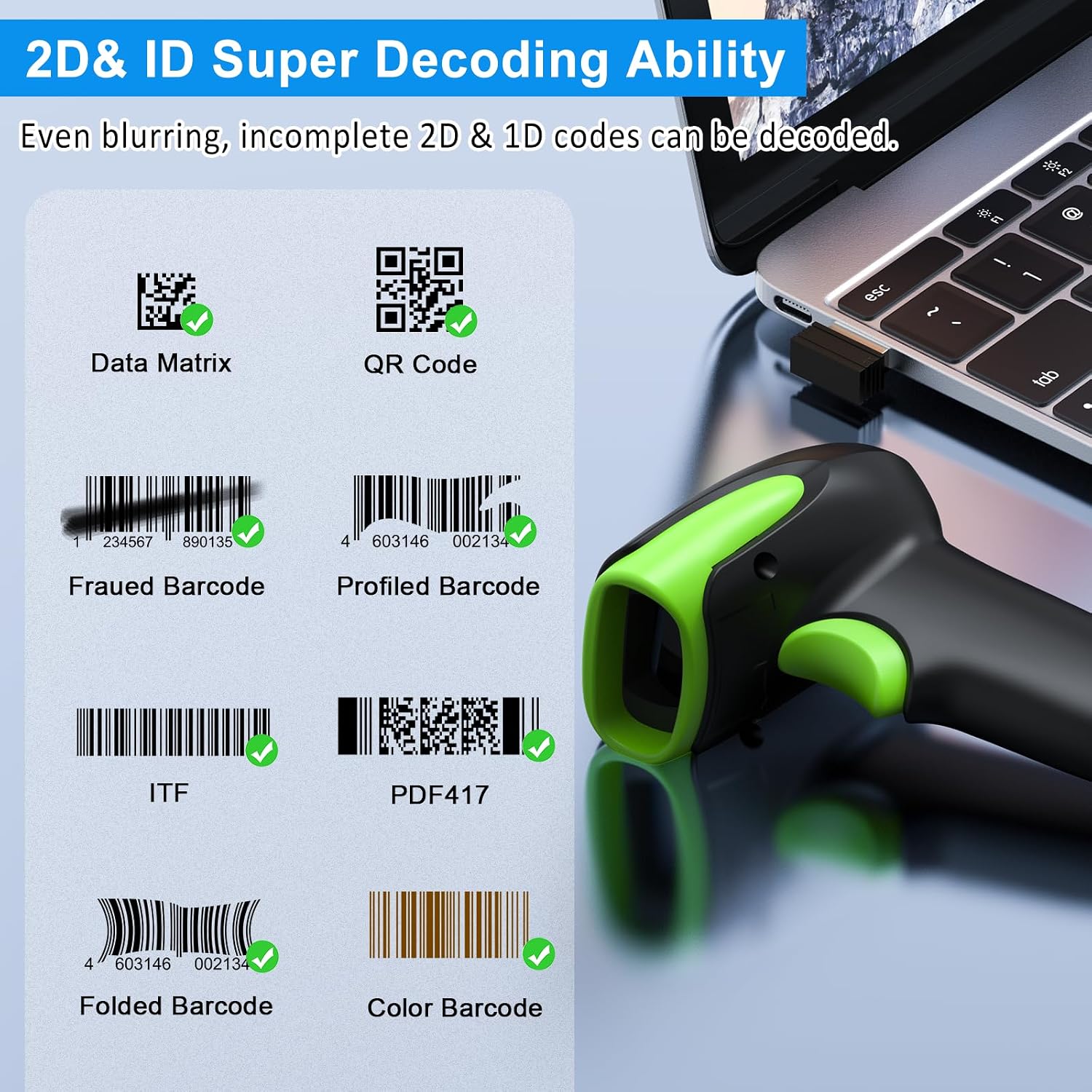
Obrázek 6: Příkladamples of decodable 1D and 2D barcodes.
6. Údržba
To ensure optimal performance and longevity of your scanner:
- Čištění: K čištění vnější strany skeneru použijte měkký, suchý hadřík. Na skenovací okénko použijte hadřík na čištění čoček, abyste zabránili poškrábání. Nepoužívejte abrazivní čisticí prostředky ani rozpouštědla.
- Nabíjení: Recharge the battery using the provided USB cable. Avoid overcharging or completely draining the battery for extended periods.
- Skladování: Skener skladujte na chladném a suchém místě mimo dosah přímého slunečního záření a extrémních teplot.
- Trvanlivost: While rugged, avoid intentional drops or impacts. The scanner is designed to withstand accidental drops up to 2.4 meters.

Image 7: The scanner's rugged design and drop resistance.
7. Řešení problémů
Pokud se se skenerem setkáte s problémy, podívejte se na následující běžné problémy a jejich řešení:
- Skener se nepřipojuje:
- Ujistěte se, že je skener nabitý.
- Verify the correct connection mode (Bluetooth, 2.4G, USB) is selected and properly set up.
- For 2.4G, ensure the dongle is securely plugged in. For Bluetooth, ensure your device's Bluetooth is on and the scanner is paired.
- Zkuste restartovat skener i hostitelské zařízení.
- Skener nečte čárové kódy:
- Ensure the barcode is not excessively damaged, smudged, or poorly printed.
- Zkontrolujte vzdálenost a úhel skeneru k čárovému kódu.
- Ověřte, zda skener podporuje daný typ čárového kódu.
- Pokud je skenovací okénko znečištěné, vyčistěte ho.
- Data not transmitting:
- Ověřte, zda je skener úspěšně připojen k vašemu zařízení.
- Check if the scanner is in 'Offline Storage Mode' and needs to be manually uploaded.
- Ensure the application on your device is ready to receive input.
For further assistance, please refer to the comprehensive troubleshooting section in the full user manual or contact Symcode customer support.
8. Specifikace
| Funkce | Specifikace |
|---|---|
| Číslo modelu | USA-6709DA-Green |
| Vstupní objemtage | DC5V±0.25v |
| Current (Work/Instantaneous) | 25 mA / 95 mA |
| Rychlost dekódování | 100krát / s |
| Bezdrátový dosah (2.4G) | Up to 200m (open air), 30m (indoors) |
| Doba nabíjení | Přibl. 2.5 hodin |
| Životnost baterie | Up to 30 Hours (continuous scanning) |
| Typ baterie | 1 lithium-polymerová baterie (součástí balení) |
| Konektivita | Bluetooth 6.1, Wireless 2.4G, USB Cable |
| Kompatibilní zařízení | Desktop, Laptop, Smartphone, POS systems |
| Operační systémy | Windows 11/10/8/7/XP, Mac OS, iOS, Android, Linux |
| Hmotnost položky | 10.2 unce |
| Rozměry balení | 6.89 x 4.49 x 3.31 palce |

Image 8: Wireless transmission range.
9. Záruka a podpora
This Symcode product is manufactured by USA Scanner. For any product inquiries, technical support, or warranty claims, please contact USA Scanner directly. Refer to the contact information provided in your product packaging or visit the official Symcode brand store on Amazon for support resources.
Navštivte Symcode Store pro více informací.
Ask a question about this manual
Ask about setup, troubleshooting, compatibility, parts, safety, or missing instructions. Manuals+ will review the question and use this page’s manual context to help answer it.