
1. Úvod
Thank you for choosing the Deko TV PRO2 DVB-T2 HEVC Digital Terrestrial Receiver. This device allows you to receive digital terrestrial television broadcasts (DVB-T2) with HEVC (H.265) encoding, providing high-quality video and audio. This manual will guide you through the setup, operation, and maintenance of your new receiver to ensure optimal performance and enjoyment.
2. Obsah krabice
Pečlivě zkontrolujte obsah balení. Pokud některé položky chybí nebo jsou poškozené, obraťte se na prodejce.
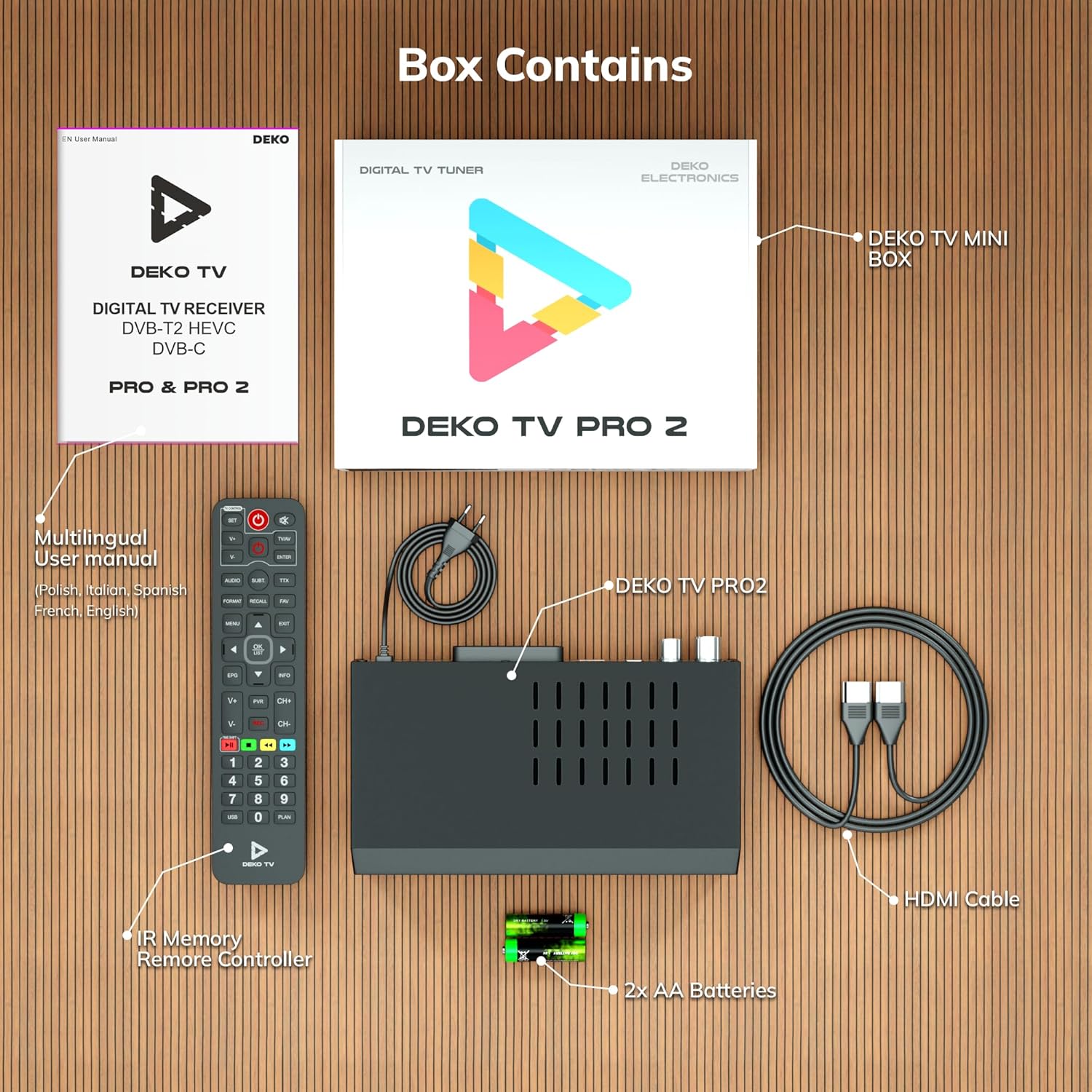
Obrázek 2.1: Deko TV PRO2 Box Contents. The image displays the Deko TV PRO2 receiver, a multilingual user manual, an IR remote control, two AA batteries, a power cable, and an HDMI cable.
- Deko TV PRO2 Digital Terrestrial Receiver
- IR dálkový ovladač
- 2x AAA baterie
- Napájecí kabel
- HDMI kabel
- Vícejazyčná uživatelská příručka
3. Vlastnosti produktu
The Deko TV PRO2 offers a range of features designed to enhance your viewzkušenosti:

Obrázek 3.1: Deko TV PRO2 Key Features. This image illustrates the main functionalities including DVB-T2 Terrestrial reception, Timeshift, HEVC H.265 Codec support, Personal Video Recorder (PVR), universal compatibility, and Crystal Clear Full HD output.
- DVB-T2 Terrestrial: Supports the latest digital terrestrial broadcasting standard.
- HEVC H.265 Codec: Ensures efficient video compression for high-quality picture.
- Univerzální kompatibilita: Works with both modern and older television models.
- Časový posun: Pause live TV and resume watching later.
- Personal Video Recorder (PVR): Record your favorite programs to a connected USB storage device.
- Crystal Clear Full HD: Delivers high-definition video output.
- Duální USB porty: For media playback and PVR functionality.
4. Průvodce nastavením
4.1. Fyzická připojení
Před zapnutím zařízení se ujistěte, že jsou provedena všechna potřebná připojení.

Obrázek 4.1: Rear Panel Connections. This image details the rear panel of the Deko TV PRO2, indicating the RF IN, RF LOOP THROUGH, two USB ports, HDMI output, and SCART connector.
- Připojení antény: Připojte kabel pozemní antény k RF IN port on the back of the receiver. If you have another device (e.g., a TV with an integrated tuner) that also needs an antenna signal, you can connect it to the RF LOOP THROUGH přístav.
- Připojení k televizoru (HDMI): Pro video a zvuk ve vysokém rozlišení připojte kabel HDMI z HDMI portu na receiveru ke vstupu HDMI na vašem televizoru.
- Připojení k televizi (SCART): For older televisions, connect a SCART cable from the SCART portu SCART na přijímači ke vstupu SCART na vašem televizoru. (Note: Do not use both HDMI and SCART simultaneously for video output.)
- Zařízení USB: Insert USB storage devices (for PVR or media playback) into the USB ports. The device has two USB ports.
- Připojení napájení: Connect the power cable to the receiver and then plug it into a wall outlet.
4.2. Instalace baterie dálkového ovládání
Otevřete přihrádku na baterie na zadní straně dálkového ovladače a vložte dvě baterie typu AAA. Dbejte na správnou polaritu (+/-). Přihrádku zavřete.
4.3. Počáteční zapnutí a skenování kanálů
- Ujistěte se, že jsou všechna připojení bezpečná.
- Turn on your television and select the correct HDMI or SCART input source corresponding to where the Deko TV PRO2 is connected.
- Power on the Deko TV PRO2 using the power button on the front panel or the remote control.
- The first time you power on the receiver, an initial setup wizard will appear. Follow the on-screen instructions to select your language, country, and initiate an automatic channel scan. This process will find and store all available digital terrestrial channels.
- Jakmile je skenování dokončeno, měli byste být schopni view kanály.
5. Návod k obsluze
5.1. Základní funkce televizoru
- Výběr kanálu: Použijte CH + / CH- buttons or the numeric keypad on the remote control to change channels.
- Ovládání hlasitosti: Použijte VOL + / VOL- tlačítka na dálkovém ovladači.
- Přístup do menu: Stiskněte tlačítko MENU tlačítko pro přístup do hlavní nabídky s nastaveními a funkcemi.
- Elektronický programový průvodce (EPG): Stiskněte tlačítko EPG tlačítko na view program information and schedules.
- Informační displej: Stiskněte tlačítko INFO tlačítko pro zobrazení aktuálního kanálu a podrobností o programu.
5.2. Přehrávání médií z USB
The Deko TV PRO2 supports media playback from USB storage devices.
- Insert a USB flash drive or external hard drive into one of the USB ports.
- Navigate to the "Media" or "USB" section in the main menu.
- Select the type of media you wish to play (e.g., Video, Music, Photo).
- Procházejte si files and select the desired content to play.
5.3. PVR (Personal Video Recorder) and Timeshift
To use PVR and Timeshift functions, a USB storage device must be connected and formatted by the receiver.
- Záznam: Během sledování programu stiskněte tlačítko REC na dálkovém ovladači spusťte nahrávání. Stiskněte ZASTÁVKA to end the recording. Recorded programs can be accessed via the "PVR" or "Recordings" menu.
- Časový posun: Stiskněte tlačítko PAUZA button during live TV to activate Timeshift. The program will pause, and recording will begin in the background. You can then use HRÁT, RYCHLE VPŘEDa ZPĚT buttons to control playback. Press ZASTÁVKA pro ukončení časového posunu a návrat k živému vysílání.
5.4. Internet and Multimedia Features (Optional Wi-Fi Adapter)
The Deko TV PRO2 supports internet connectivity via a compatible USB Wi-Fi adapter (sold separately). Once connected, you can access certain online multimedia features.

Obrázek 5.1: Internet Connectivity. This image shows the Deko TV PRO2 with an optional USB Wi-Fi adapter, indicating support for Wi-Fi, YouTube, and IPTV functionalities.
- Insert a compatible USB Wi-Fi adapter into one of the USB ports.
- Go to the "Network Settings" in the main menu to configure your Wi-Fi connection.
- Once connected, you may find options for applications like YouTube or IPTV within the receiver's menu, depending on the firmware version.
6. Údržba
- Čištění: K čištění přijímače používejte měkký, suchý hadřík. Nepoužívejte tekuté ani aerosolové čisticí prostředky.
- Větrání: Zajistěte dostatečné větrání přijímače. Nezakrývejte větrací otvory.
- Aktualizace softwaru: Pravidelně kontrolujte informace od výrobce webweb s dostupnými aktualizacemi softwaru. Aktualizace mohou zlepšit výkon a přidat nové funkce. Pečlivě dodržujte pokyny dodané s aktualizací.
7. Řešení problémů
| Problém | Možná příčina | Řešení |
|---|---|---|
| Žádný obraz ani zvuk | Incorrect TV input selected; loose cables; receiver not powered on. | Select the correct HDMI/SCART input on your TV. Check all cable connections. Ensure the receiver is powered on. |
| Zpráva „Žádný signál“ | Antenna not connected; poor antenna signal; no channels scanned. | Check antenna connection. Adjust antenna position. Perform a channel scan (refer to Section 4.3). |
| Dálkové ovládání nefunguje | Batteries are dead or incorrectly inserted; obstruction between remote and receiver. | Replace batteries with new AAA batteries, ensuring correct polarity. Remove any obstructions. Point the remote directly at the receiver. |
| Nelze nahrávat na USB | USB device not connected or formatted; insufficient storage space. | Ensure USB device is properly connected. Format the USB device via the receiver's menu (this will erase all data). Check available storage space. |
8. Specifikace
| Funkce | Detail |
|---|---|
| Značka | Deko |
| Číslo modelu | PRO2 |
| Technologie připojení | USB |
| Spojení | USB, Wi-Fi (via adapter), HDMI, SCART, RF IN, RF LOOP THROUGH |
| Kompatibilní zařízení | Televize |
| Speciální funkce | Connected and multimedia functions, universal remote control |
| Celkový počet portů USB | 2 |
| Celkový počet portů HDMI | 1 |
| Kódování zvuku | DD |
| Režim zvukového výstupu | Stereo, prostorový zvuk |
| Konfigurace kanálů prostorového zvuku | 2.1 |
| Typ dálkového ovládání | Dálkové ovládání |
| Jsou vyžadovány baterie | 2 AAA batteries (Zinc-carbon) |
9. Záruka a podpora
The Deko TV PRO2 receiver comes with a standard manufacturer's warranty. Please refer to the warranty card included in your package or contact your retailer for specific warranty terms and conditions.
For technical support, troubleshooting assistance beyond this manual, or inquiries about spare parts and software updates, please visit the official Deko Electronics webnebo kontaktujte jejich oddělení zákaznických služeb. Kontaktní informace obvykle naleznete na obalu produktu nebo na webových stránkách výrobce. webmísto.