
TRIGKEY Speed S5 5500 16+500
TRIGKEY S5 Pro Max Mini PC User Manual
Model: Speed S5 5500 16+500 | Brand: TRIGKEY
Zavedení
The TRIGKEY S5 Pro Max Mini PC is a compact and powerful desktop computer designed for a wide range of applications, from everyday office tasks to demanding multimedia and light gaming. Featuring an AMD Ryzen 7 5700U processor, 16GB DDR4 RAM, and a 500GB NVMe SSD, this micro computer delivers efficient performance. Its versatile connectivity options, including support for 4K triple display output, WiFi 6, and Bluetooth 5.2, ensure a seamless user experience. This manual provides essential information for setting up, operating, and maintaining your TRIGKEY S5 Pro Max Mini PC.
Průvodce nastavením
Follow these steps to set up your TRIGKEY S5 Pro Max Mini PC for the first time.
1. Vybalení a kontrola součástí
Opatrně vyjměte všechny součásti z obalu. Ujistěte se, že máte následující položky:
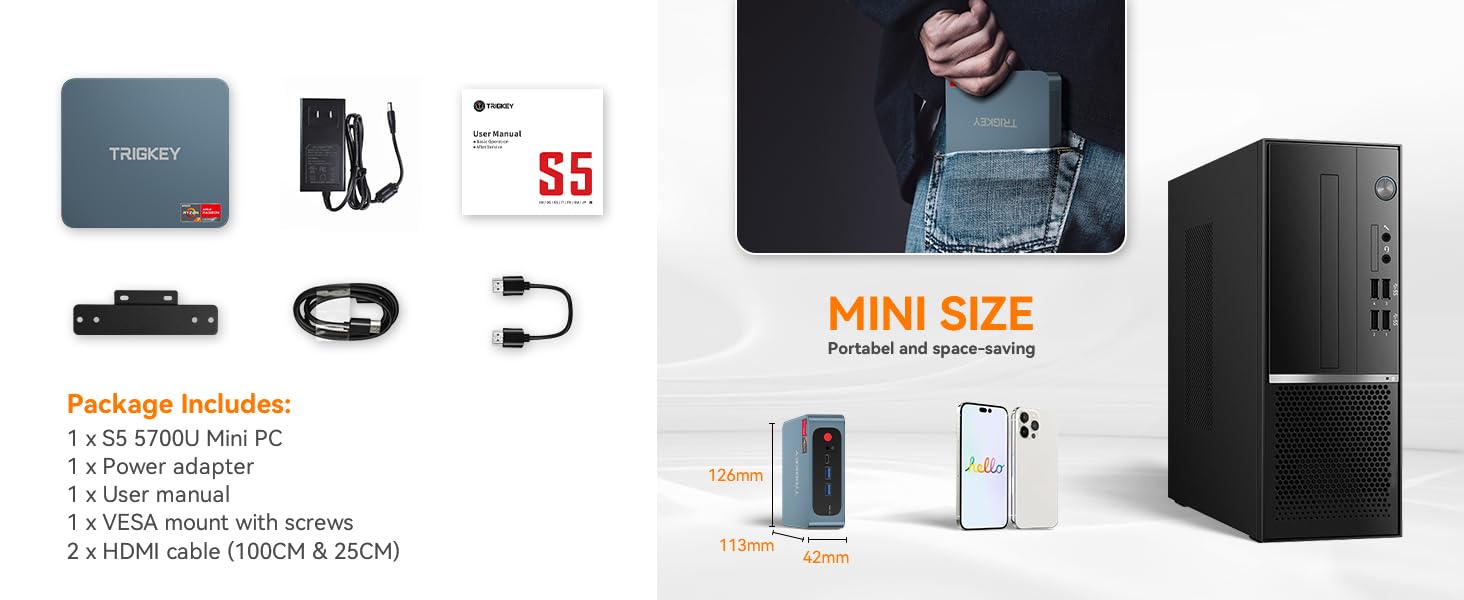
- 1 x TRIGKEY S5 Pro Max Mini PC
- 1 x napájecí adaptér
- 1 x Uživatelská příručka (tento dokument)
- 1 x držák VESA se šrouby
- 2 x HDMI Cables (100CM & 25CM)

Figure 1: TRIGKEY S5 Pro Max Mini PC and its included accessories, including the power adapter, user manual, VESA mount, and two HDMI cables.
2. Připojení periferií
Connect your monitor(s), keyboard, and mouse to the Mini PC. The device supports triple display output via HDMI, DisplayPort (DP), and Type-C ports.
- Monitory: Connect your monitor(s) using the provided HDMI cables or your own DP/Type-C cables. The Mini PC supports up to three displays simultaneously.
- Klávesnice a myš: Connect your USB keyboard and mouse to the available USB 3.2 Gen2 or USB 2.0 ports.
- Síť: For wired internet access, connect an Ethernet cable to the RJ45 1000Mbps LAN port. For wireless, ensure WiFi 6 is enabled.
- Zvuk: Connect speakers or headphones to the audio jack.

Obrázek 2: Přesview of the convenient interfaces on the TRIGKEY S5 Pro Max Mini PC, including USB 3.2 Gen2, Type-C, DP 1.4, HDMI 2.0, USB 2.0, LAN, and Audio Jack.
3. Zapnutí
Connect the power adapter to the DC-in port on the Mini PC, then plug the adapter into a power outlet. Press the power button located on the front of the device. The power indicator light will illuminate, and the system will begin to boot.

Figure 3: The TRIGKEY S5 Pro Max Mini PC, highlighting its compact design and accessible ports for easy setup.
4. Initial Display Setup
Upon first boot, the operating system (Windows 10 Pro) will guide you through the initial setup process. If you are connecting multiple monitors, the system should automatically detect them. You can configure display settings (e.g., extend, duplicate) within the operating system's display settings.
Video 1: This video demonstrates the ease of setting up dual monitors with the TRIGKEY S5 Pro Max Mini PC, showing the connection process and automatic display detection.
Operating Your Mini PC
The TRIGKEY S5 Pro Max Mini PC is pre-installed with Windows 10 Pro, providing a familiar and user-friendly operating environment. Its powerful hardware ensures smooth performance for various tasks.
1. Výkon nadview
Equipped with an AMD Ryzen 7 5700U processor (8 Cores, 16 Threads, up to 4.30GHz) and AMD Radeon Graphics 8 CUs, the Mini PC offers robust performance for multitasking, content creation, and entertainment. The 16GB DDR4 3200MHz RAM (expandable up to 64GB) and 500GB NVMe SSD (configurable up to 2TB) contribute to fast boot times and responsive application loading.

Figure 4: Detailed specifications of the AMD Ryzen 7 5700U processor, highlighting its base and turbo frequencies, core/thread count, graphics card frequency, and processor technology.

Figure 5: Key features of the Mini PC, including its plastic body, dual fan design for cooling, M.2 2280 PCIe3.0X4 slot for SSD, Wi-Fi 6, Bluetooth 5.2, and triple-screen display support.

Figure 6: A bar chart comparing the single-core and multi-core CPU performance of the AMD Ryzen 7 5700U against other processors based on Cinebench R20 scores.
2. Úložiště a paměť
The Mini PC comes with a 500GB M.2 2280 NVMe SSD for high-speed storage. It also supports expansion up to 2TB. The system includes 16GB of DDR4 3200MHz SO-DIMM RAM, with two available slots supporting up to 64GB for enhanced multitasking and gaming performance.

Figure 7: Illustration showing the SO-DIMM DDR4 3200MHz RAM modules and the capability to support up to 64GB, enhancing performance for demanding applications like Adobe Photoshop and Illustrator.

Figure 8: Visual representation of the M.2 2280 NVMe SSD, emphasizing its fast and stable data transfer capabilities and upgrade potential up to 2TB.
3. Scénáře použití
The TRIGKEY S5 Pro Max Mini PC is versatile and suitable for various applications:
- Kancelářské práce: Efektivně zpracovávejte dokumenty, tabulky a prezentace.
- Online Conference: Smooth video conferencing with stable network connectivity.
- Video Editing & Music Making: Process multimedia content with ease thanks to powerful CPU and ample RAM.
- Hraní: Enjoy light to moderate gaming with integrated AMD Radeon Graphics.
- Domácí kino: Connect to your TV for 4K media consumption.
- Stock Trading & School Homework: Reliable performance for analytical and educational tasks.
Obrázek 9: Vizuální examples of the Mini PC's diverse applications, including gaming, online conferences, office work, video editing, school homework, home theater, music making, and stock trading.
Údržba
Správná údržba zajistí dlouhou životnost a optimální výkon vašeho Mini PC.
1. Čištění
Pravidelně čistěte vnější povrch Mini PC měkkým, suchým hadříkem. V případě nahromaděného prachu ve větracích otvorech použijte stlačený vzduch. Před čištěním se ujistěte, že je zařízení vypnuté a odpojené od sítě.
2. Aktualizace softwaru
Keep your operating system and drivers updated to ensure stability, security, and optimal performance. Windows Update can be accessed through the system settings.
3. Aktualizace hardwaru
The TRIGKEY S5 Pro Max Mini PC supports RAM and SSD upgrades. For RAM, it has two SO-DIMM slots, allowing for an upgrade up to 64GB DDR4 3200MHz. The M.2 2280 NVMe SSD can be upgraded to a larger capacity, up to 2TB. Additionally, there is a 2.5-inch SATA HDD slot for further storage expansion. When performing upgrades, ensure the device is powered off and unplugged, and refer to detailed guides or seek professional assistance if unsure.

Obrázek 10: Vnitřní view of the Mini PC, illustrating its efficient heat dissipation technology, M.2 2280 PCIe3.0 X4 SSD slot, and DDR4 dual-channel SODIMM slots for potential upgrades.
Odstraňování problémů
This section addresses common issues you might encounter with your Mini PC.
1. Žádný výstup na displej
- Zkontrolujte kabely: Ensure all display cables (HDMI, DP, Type-C) are securely connected to both the Mini PC and the monitor.
- Cyklus napájení: Turn off the Mini PC, unplug the power adapter, wait 10 seconds, then plug it back in and power on.
- Vstup monitoru: Ověřte, zda je váš monitor nastaven na správný vstupní zdroj (např. HDMI 1, DisplayPort).
- Single Monitor Test: If using multiple monitors, try connecting only one monitor to isolate the issue.
2. System Not Powering On
- Připojení napájení: Ensure the power adapter is firmly connected to the Mini PC and the wall outlet.
- Zásuvka: Test the power outlet with another device to confirm it is working.
- Vypínač: Stiskněte a podržte tlačítko napájení na několik sekund.
3. Pomalý výkon
- Zavření nepoužívaných aplikací: Close any unnecessary programs running in the background.
- Zkontrolujte úložiště: Ujistěte se, že váš SSD disk má dostatek volného místa.
- Aktualizace: Perform Windows updates and driver updates.
- Chlazení: Ensure the Mini PC's vents are not obstructed to allow for proper airflow and prevent overheating.
Specifikace
| Funkce | Specifikace |
|---|---|
| Značka | TRIGKEY |
| Název modelu | Rychlost S5 |
| Číslo modelu položky | Speed S5 5500 16+500 |
| Operační systém | Windows 10 Pro (Pre-installed) |
| Procesor | AMD Ryzen 7 5700U (8 Cores, 16 Threads, 1.80GHz Base, 4.30GHz Max Turbo) |
| Grafický koprocesor | Grafika AMD Radeon Vega 8 |
| BERAN | 16GB DDR4 3200MHz (2 SO-DIMM slots, expandable to 64GB) |
| Pevný disk | 500GB NVMe SSD (M.2 2280 PCIe3.0X4, configurable to 2TB) |
| Další úložiště | 2.5-inch SATA HDD Slot |
| Maximální rozlišení obrazovky | 3840 x 2160 pixelů (4K) |
| Zobrazení výstupu | HDMI (4K@60Hz), DisplayPort (4K@144Hz), Type-C (10Gbps/Max 4K@120Hz) - Triple Display Support |
| Bezdrátové připojení | WiFi 6, Bluetooth 5.2 |
| Kabelové připojení | RJ45 1000Mbps LAN |
| USB porty | 3x USB 3.2 Gen2 (10Gbps), 1x USB 2.0 (480Mbps) |
| Audio Jack | 1x Audio Jack |
| Hmotnost položky | 2.16 libry |
| Rozměry balení | 9.09 x 5.35 x 2.48 palce |
Záruka a podpora
TRIGKEY is committed to providing excellent customer service and support for its products.
- Rychlá odpověď do 24 hodin: Očekávejte odpověď na vaše dotazy do 24 hodin.
- 30-Day No Reason to Return: Enjoy a 30-day return policy for any reason.
- 12měsíční výměna: A replacement is available within 12 months of purchase for eligible issues.
- Lifetime After-Sales Service and Technical Support: Benefit from long-term support for your product.
For further assistance, please refer to the contact information provided on the official TRIGKEY webwebu nebo prostřednictvím vaší nákupní platformy.

Figure 11: Icons representing TRIGKEY's customer support commitments: 24-hour quick reply, 30-day no-reason return, 12-month replacement, and lifetime after-sales service and technical support.
Ask a question about this manual
Ask about setup, troubleshooting, compatibility, parts, safety, or missing instructions. Manuals+ will review the question and use this page’s manual context to help answer it.