
MUBVIEW PK320-F
MUBVIEW Uživatelská příručka k vnitřní bezpečnostní kameře PK320-F
Model: PK320-F | Brand: MUBVIEW
Konec produktuview
MUBVIEW PK320-F Indoor Security Camera is designed to provide comprehensive surveillance for your home, pets, elders, or babies. Featuring stunning 2K resolution, Pan-Tilt-Zoom (PTZ) capabilities, two-way audio, and advanced motion tracking with human/pet detection, this camera ensures you stay connected and informed. It supports both 2.4GHz and 5GHz WiFi for stable connectivity and offers 24/7 recording with clear night vision. Flexible storage options include local storage via an SD card and secure cloud backup.

Image: Four MUBVIEW PK320-F cameras, highlighting the multi-pack offering.

Image: Key features of the MUBVIEW PK320 Smart Camera, including two-way audio, 2K resolution, motion tracking, and dual-band WiFi.
Průvodce nastavením
Follow these steps to set up your MUBVIEW PK320-F camera:
- Stáhněte si MUBVIEW APP: Hledat "MUBVIEW" in your mobile device's app store (iOS or Android) and download the official application.
- Zapnutí a připojení k Wi-Fi: Plug the camera into a power outlet using the provided 2M power cable. Ensure your mobile device is connected to a 2.4GHz or 5GHz WiFi network. The camera supports both frequencies for flexible connectivity.
- Přidat zařízení do aplikace: Otevřete MUBVIEW app, create an account or log in, and follow the on-screen instructions to add your new camera. You will typically scan a QR code on the camera or enter its device ID.
- Kompletní nastavení: Once connected, you can name your camera and configure settings such as motion detection zones, alert preferences, and storage options.

Obrázek: Vizuální průvodce pro rychlý a snadný proces nastavení.
Důležitá poznámka: The camera requires continuous power and must be plugged into an outlet while operating.

Image: Illustration of dual-band WiFi compatibility and power requirement.
Návod k obsluze
Pan-Tilt-Zoom (PTZ) and 2K Resolution
MUBVIEW PK320-F camera offers a wide viewing angle with its Pan-Tilt capabilities, allowing you to remotely adjust the camera's view through the app. It provides 355° horizontal pan and 80° vertical tilt. The 2K (3MP) resolution ensures clear and detailed video footage, capturing essential details for monitoring.

Image: Visual comparison highlighting the clarity of 2K (3MP) resolution over 1080P.

Image: Demonstrates the camera's auto-tracking feature with 355° pan and 80° tilt.
Obousměrný zvuk
Engage in real-time conversations with family members, pets, or visitors through the camera's built-in microphone and speaker. This feature allows for seamless communication directly from your smartphone app.

Image: Illustrates the clear two-way audio function for interacting with pets or people.
Human/Pet Detection & Instant Alerts
The camera is equipped with intelligent human and pet detection capabilities. When motion is detected, the camera can automatically track the movement and send instant message alerts to your connected device, keeping you informed of any significant activity.

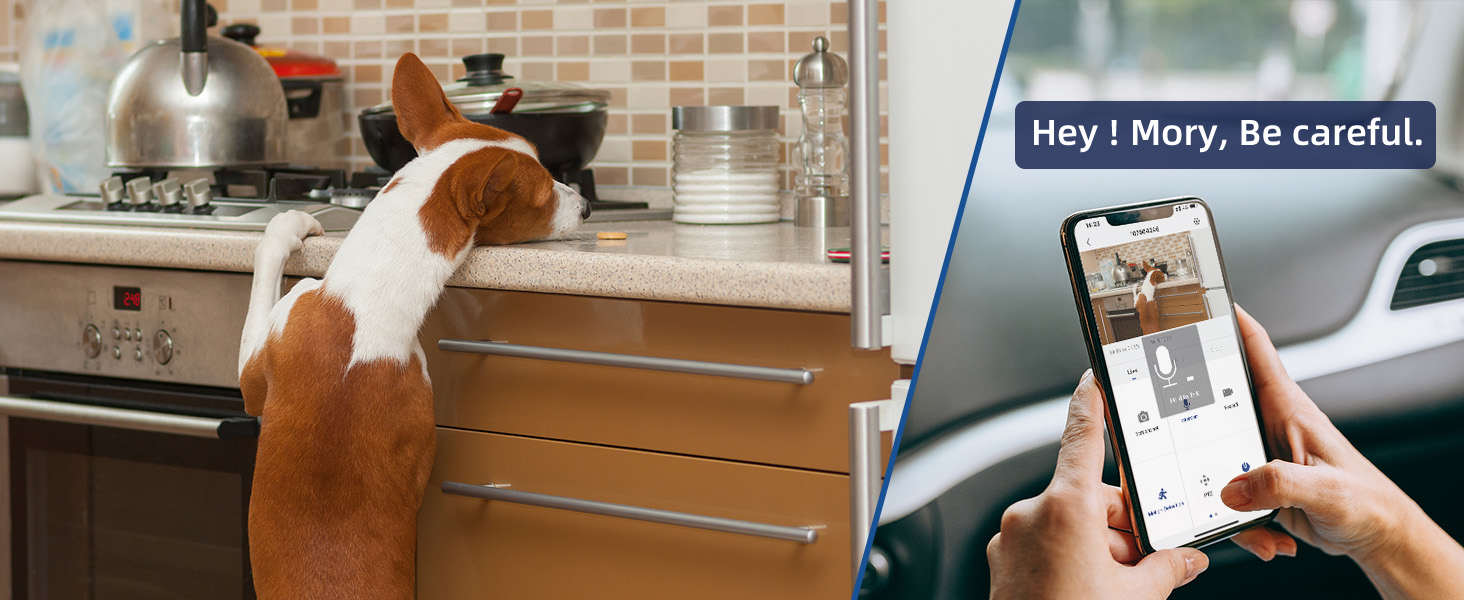
Obrázek: Přample of real-time alerts and interaction with a pet via the camera.
24/7 Recording & Night Vision
Benefit from continuous surveillance with 24/7 recording. The camera's advanced night vision ensures clear visibility even in low-light or completely dark environments, capturing important moments around the clock.
Image: Demonstrates the camera's clear night vision capability.
Multiple Device Viewa sdílení
MUBVIEW aplikace vám to umožňuje view the camera feed from multiple devices simultaneously. You can also securely share access to your camera with trusted family members or friends, enabling collaborative monitoring.
Možnosti úložiště
Kamera nabízí flexibilní řešení pro ukládání vašich nahrávek:
- Místní úložiště: Insert a compatible storage card (MicroSD, not included) into the camera for local recording. Ensure the card is formatted correctly.
- Cloudové úložiště: Securely upload your recordings to the cloud. This option provides off-site backup and can be accessed from anywhere. Subscription may be required for certain cloud services.
Údržba
To ensure optimal performance and longevity of your MUBVIEW PK320-F camera, follow these maintenance guidelines:
- Čištění: Gently wipe the camera lens and body with a soft, dry, lint-free cloth. Avoid using harsh chemicals, solvents, or abrasive cleaners, as these can damage the surface or lens.
- Umístění: Place the camera in a stable location, away from direct sunlight, heat sources, and excessive moisture. Ensure it is positioned where it has a clear line of sight and is within range of your WiFi network.
- Aktualizace softwaru: Regularly check the MUBVIEW app for firmware updates. Keeping your camera's software up-to-date ensures you have the latest features, security enhancements, and bug fixes.
- Napájení: Use only the original power adapter provided with the camera. Do not use damaged cables or adapters.
Odstraňování problémů
Pokud narazíte na problémy s vaším MUBemVIEW PK320-F camera, refer to the following common troubleshooting steps:
| Problém | Možná příčina / řešení |
|---|---|
| Kamera se nepřipojuje k Wi-Fi. |
|
| Poor video quality or blurry image. |
|
| Obousměrný zvuk nefunguje. |
|
| Motion detection alerts are inconsistent or not received. |
|
| SD karta nenahrává nebo není rozpoznána. |
|
Specifikace
| Funkce | Detail |
|---|---|
| Číslo modelu | PK320-F |
| Vnitřní/venkovní použití | Krytý |
| Rozlišení záznamu videa | 3 MP (2K) |
| Protokol připojení | Wi-Fi (2.4 GHz a 5 GHz) |
| Zdroj napájení | Elektrický s kabelem (220 voltů, 5 wattů) |
| Typ ovladače | iOS, Android App |
| Typ montáže | Surface Mount, Wall Mount, Ceiling Mount, Countertop |
| Zahrnuté komponenty | Indoor Camera with 2M Power Cable |
| Form Factor | Kupole |
| Viewúhel | 360 Degrees (Pan: 355°, Tilt: 80°) |
| Rozsah nočního vidění | 33 stop |
| Snímková frekvence | 15-20fps |
| Materiál | Akrylonitrilbutadienstyren (ABS) |
| Rozměry produktu | 6.8 x 5 x 6.8 palce |
| Hmotnost položky | 2.59 libry |
| Typ upozornění | Zvuk a pohyb |
| Technologie fotosenzoru | CMOS |
| Speciální funkce | 2-Way Audio, Color Night Vision, Smart Tracking, Human Detection, Share with Family |
Záruka a podpora
MUBVIEW is committed to providing excellent customer service and support for its products.
- Zákaznická podpora: For technical assistance or inquiries, MUBVIEW offers support via phone and email.
- Call Service: Available 9AM-5PM EST
- Online e-mailová podpora
- Cloudová služba: Enjoy lifetime free cloud service for your recordings, ensuring your footage is securely backed up and accessible.
- Ověření transparentnosti: Each MUBVIEW product includes a unique code that can be verified using the Transparency app to confirm authenticity and prevent counterfeits.
Obrázek: MUBVIEW customer support contact information.

Obrázek: MUBVIEW's commitment to customer-first service, including lifetime free cloud service and 24/7 technical support.

Image: Information on Transparency verification for product authenticity.
Ask a question about this manual
Ask about setup, troubleshooting, compatibility, parts, safety, or missing instructions. Manuals+ will review the question and use this page’s manual context to help answer it.