
1. Úvod
Thank you for choosing the FTes RFKits V70 Wireless Video Intercom System. This system provides enhanced home security and convenience, allowing you to see, hear, and speak to visitors at your door, and even remotely unlock it via a smartphone application. This manual will guide you through the installation, operation, and maintenance of your new intercom system.
Důležitá poznámka k připojení: While the system offers wireless control via the Tuya app (connecting the indoor monitor to your home WiFi network), the connection between the outdoor camera unit and the indoor monitor unit is drátové. This wired connection ensures stable power and video transmission for reliable performance.
2. Konec produktuview
2.1 Klíčové vlastnosti
- 7palcový TFT LCD displej: High-resolution display for clear visitor viewIng.
- 1080P Outdoor Camera: Provides sharp video quality with a 120-degree wide viewúhel.
- Tuya App Remote Control: Manage your intercom system from anywhere using your smartphone (2.4GHz WiFi required).
- Obousměrný interkom: Communicate with visitors at your door.
- Dálkové odemknutí: Grant access to visitors remotely via the indoor monitor or Tuya app.
- Detekce pohybu: Automatically detects movement and can trigger recording.
- Automatic Recording & Snapshot: Captures video or images when a visitor presses the doorbell, stored on a TF card (not included).
- Infračervené noční vidění: Automatic IR LED activation for clear images in low-light conditions.
- Waterproof Outdoor Unit: Designed for outdoor use with a rain cover.
- Režim Nerušit: Silence doorbell notifications when needed.
2.2 Obsah balení
- Indoor Monitor Unit
- Venkovní kamerová jednotka
- Napájecí adaptér pro vnitřní monitor
- Mounting Screws and Brackets
- Kabely
- Uživatelská příručka
3. Bezpečnostní informace
- Před instalací a použitím si pečlivě přečtěte všechny pokyny.
- Ensure the power supply is disconnected before performing any wiring or installation.
- Nevystavujte vnitřní monitor vlhkosti ani extrémním teplotám.
- Používejte pouze dodaný napájecí adaptér.
- Keep the outdoor camera lens clean for optimal image quality.
- Pokud si nejste jisti postupem zapojení, poraďte se s kvalifikovaným elektrikářem.
4. Nastavení a instalace
4.1 Identifikace součásti

This image displays the indoor monitor and outdoor camera units with their respective dimensions. Key features are highlighted with icons, including 7-inch TFT LCD screen, 1080P resolution, intercom function, monitoring, unlock capability, 120-degree view angle, IR LEDs for night vision, day & night mode, waterproof design, and do not disturb mode.

Toto podrobné view of the outdoor camera unit highlights its components: a rain cover for protection, a microphone, the camera lens, white light for full-color night vision, a photoresistance sensor, call buttons, and a customizable nameplate area for room numbers.

This image provides a detailed look at the indoor monitor. The front panel shows touch buttons for unlock, left select, monitor/confirm, right select, and answer/return. The rear panel indicates the TF card slot, speaker, wiring port, DC15V 1.2A power interface, and adjustment controls for color, light brightness, and intercom volume.
4.2 Mounting the Outdoor Camera
- Choose a suitable location near your door, approximately 1.5-1.6 meters (5-5.3 feet) from the ground, ensuring a clear view návštěvníků.
- Mount the rain cover first using screws.
- Insert the outdoor camera unit into the rain cover.
- If applicable, customize the nameplate with your room number or name.
4.3 Montáž vnitřního monitoru
- Select a convenient indoor location, such as a wall in your living room or hallway.
- Upevněte montážní držák na stěnu pomocí šroubů.
- Connect the necessary wires to the indoor monitor (refer to section 4.4).
- Attach the indoor monitor to the mounting bracket.
4.4 Schéma zapojení
The outdoor camera and indoor monitor are connected via a wired connection. Ensure proper wiring for stable operation.
- Connect the video and power cables from the outdoor unit to the corresponding ports on the indoor monitor.
- If connecting to an electronic lock, ensure the lock wires are properly connected to the indoor monitor's unlock output.
- Connect the DC15V 1.2A power adapter to the indoor monitor.
4.5 Tuya App Installation and Pairing

This image illustrates the Tuya mobile application interface. It shows how to install the Tuya app on Android and Apple devices and demonstrates the remote unlock function, allowing users to answer the door and unlock it from their smartphone, even when away from home.
- Download the 'Tuya Smart' app from the App Store (iOS) or Google Play Store (Android).
- Zaregistrujte se nebo se přihlaste ke svému účtu Tuya.
- Ensure your indoor monitor is powered on and connected to your 2.4GHz WiFi network.
- In the Tuya app, tap '+' to add a new device. Follow the on-screen instructions to pair your indoor monitor with the app.
4.6 Instalace TF karty
To enable automatic video recording and snapshots, insert a TF card (not included) into the designated slot on the indoor monitor. Ensure the card is inserted correctly.
5. Návod k obsluze
5.1 Příjem hovorů
- Když návštěvník stiskne tlačítko volání na venkovní jednotce, vnitřní monitor zazvoní a zobrazí obraz návštěvníka.
- Simultaneously, you will receive a notification on your smartphone via the Tuya app.
- To answer from the indoor monitor, press the 'Answer' button.
- To answer from the Tuya app, tap the notification and accept the call.
5.2 Obousměrná komunikace
After answering a call, you can speak with the visitor through the built-in microphone and speaker on both the indoor monitor and the outdoor unit. The Tuya app also supports two-way audio.
5.3 Odemčení dveří
If an electronic lock is connected, you can unlock the door:
- From the indoor monitor: Press the 'Unlock' button.
- From the Tuya app: Tap the 'Unlock' icon during a call or monitoring session.
5.4 Monitoring Live View
Můžete view the live feed from the outdoor camera at any time:
- From the indoor monitor: Press the 'Monitor' button.
- From the Tuya app: Open the app and select your intercom device to view živé vysílání.
5.5 Snapshot and Video Recording
With a TF card installed:
- Automatické nahrávání: When a visitor presses the doorbell, the system automatically records a short video.
- Manual Snapshot/Recording: Během živého vystoupení view or call, you can manually capture snapshots or start video recording via the indoor monitor or Tuya app.
- Zaznamenáno files může být znovuviewed on the indoor monitor or through the Tuya app.
5.6 Úprava nastavení
The indoor monitor allows you to adjust various settings:
- Vyzvánění: Select from available ringtones.
- Objem: Adjust the ringtone and intercom volume.
- Brightness/Color: Adjust the display settings of the screen.
- Nerušit: Activate this mode to silence the indoor monitor's ringtone.
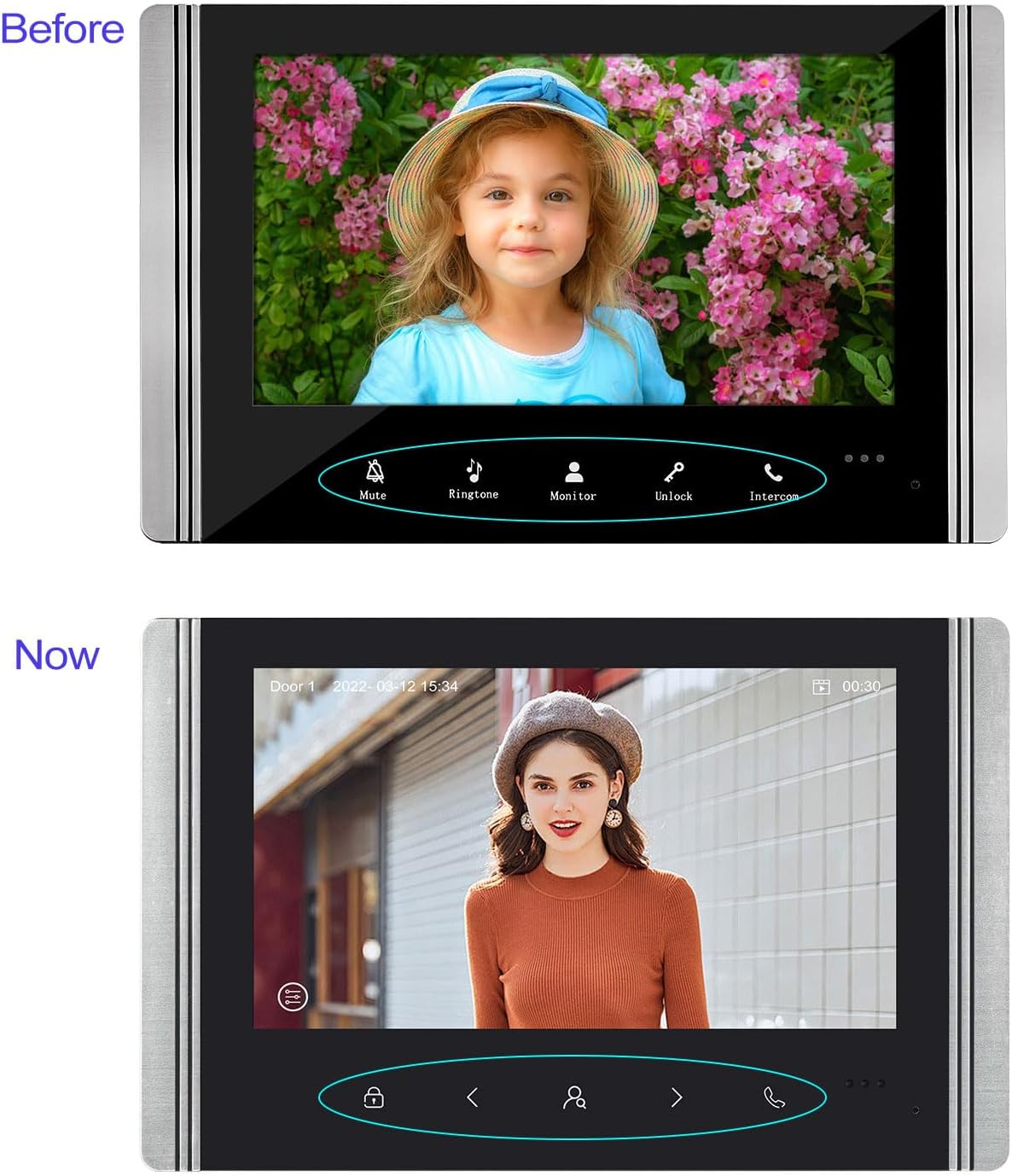
This image compares the 'Before' and 'Now' versions of the indoor monitor's user interface. The 'Before' interface shows buttons for Mute, Ringtone, Monitor, Unlock, and Intercom. The 'Now' interface features a redesigned button layout with icons for unlock, navigation, and call, along with a date and time display.
6. Údržba
- Čištění: Use a soft, dry cloth to clean the indoor monitor and outdoor camera. Avoid abrasive cleaners or solvents.
- Venkovní jednotka: Regularly check the outdoor unit for any obstructions to the camera or microphone. Ensure the rain cover is securely in place.
- Zapojení: Periodically inspect all wired connections for any signs of wear or damage.
- Aktualizace firmwaru: Check the Tuya app or manufacturer's webPro zajištění optimálního výkonu a zabezpečení vyhledejte dostupné aktualizace firmwaru na webu.
7. Řešení problémů
| Problém | Možná příčina | Řešení |
|---|---|---|
| Žádný obraz na vnitřním monitoru | Loose wiring connection; Power issue; Camera malfunction | Check all wired connections between outdoor and indoor units. Ensure power adapter is correctly plugged in. Contact support if issue persists. |
| Žádný zvuk během interkomu | Volume too low; Microphone/speaker obstruction; Wiring issue | Adjust volume settings on the indoor monitor. Check for obstructions on outdoor unit's microphone/speaker. Verify audio wiring. |
| Cannot connect to Tuya app | Incorrect WiFi password; 5GHz WiFi network; Indoor monitor not in pairing mode; App issues | Ensure you are using a 2.4GHz WiFi network. Double-check WiFi password. Restart indoor monitor and try pairing again. Reinstall Tuya app if necessary. |
| Door unlock not working | Electronic lock not connected; Wiring issue; Lock malfunction | Verify the electronic lock is properly connected to the indoor monitor. Check wiring for the unlock function. Test the electronic lock independently. |
| Špatné noční vidění | IR LEDs obstructed; Lens dirty | Clean the outdoor camera lens. Ensure no objects are blocking the IR LEDs. |
8. Specifikace
| Funkce | Detail |
|---|---|
| Značka | FTes RFKits |
| Číslo modelu | V70 |
| Obrazovka vnitřního monitoru | 7-inch TFT LCD (New versions: 1024 x 600 pixels) |
| Outdoor Camera Resolution | 1080P (New versions: 2.0 Megapixels) |
| Fotoaparát Viewúhel | 120 stupňů |
| Noční vidění | Infrared LED with light sensor |
| Connectivity (Monitor to App) | 2.4GHz WiFi |
| Connectivity (Monitor to Camera) | Kabelové |
| Skladování | TF karta (není součástí balení) |
| Kompatibilní zařízení | Smartphone (via Tuya App) |
| Napájení | DC15V 1.2A (for indoor monitor) |
| Hmotnost položky | 1.2 kg |
| Rozměry produktu | 20 x 11 x 37 cm |
| Jsou vyžadovány baterie | Žádný |
Poznámka: As of July 10, 2025, new versions of the indoor unit may feature a redesigned button and a resolution of 1024 x 600 pixels. Outdoor units in new versions may feature 2.0-megapixel cameras. Other functions remain unchanged.
9. Záruka a podpora
For warranty information and technical support, please refer to the product packaging or contact your retailer. You may also visit the official FTes RFKits webstránky pro další pomoc a aktualizované informace.