
1. Úvod
This manual provides detailed instructions for the installation, operation, and maintenance of your FTes RFKits V70 WiFi Wireless Video Door Intercom System. Please read this manual thoroughly before using the product to ensure proper function and safety. This system is designed for multi-family homes, offering enhanced security and communication.
2. Bezpečnostní informace
- Ensure all electrical connections are made by a qualified professional to prevent electric shock or damage to the system.
- Do not expose the outdoor camera to extreme temperatures, direct sunlight for prolonged periods, or corrosive environments.
- Keep the indoor monitor away from water and high humidity.
- Používejte pouze napájecí adaptér dodaný se zařízením.
- Nepokoušejte se zařízení opravovat ani upravovat sami. Požádejte o pomoc zákaznickou podporu.
- Před prováděním jakékoli údržby nebo čištění odpojte napájení.
3. Obsah balení
Ověřte, zda jsou v balení přítomny všechny položky:
- Outdoor Camera Unit (with integrated doorbell buttons)
- 7-inch Indoor Touchscreen Monitor(s)
- Power Adapter(s) for Indoor Monitor(s)
- Montážní šrouby a hmoždinky
- Wiring Cables (for wired connection between units)
- Uživatelská příručka (tento dokument)

Obrázek 3.1: Konecview of the FTes RFKits V70 outdoor camera unit and indoor monitor.
4. Konec produktuview
4.1 Outdoor Camera Unit

Obrázek 4.1: Detailní view of the outdoor camera unit, showing the camera, microphone, white light, photoresistance, rain cover, and call buttons.
- Fotoaparát: 1080P resolution with a 120° wide-angle lens for clear video.
- Mikrofon: Pro obousměrnou audio komunikaci.
- Bílé světlo: Provides illumination for full-color night vision.
- Fotorezistence: Detects ambient light for automatic IR LED switching.
- Kryt proti dešti: Protects the unit from weather elements.
- Volací tlačítka: Multiple buttons for individual apartment calls (e.g., 101, 201, 301).
- User-defined Nameplate: Customizable area for apartment numbers or names.
4.2 Indoor Touchscreen Monitor

Obrázek 4.2: Přední a zadní část view of the indoor monitor, highlighting buttons, ports, and settings.
- 7-inch TFT LCD Touchscreen: Displays video feed and provides touch controls.
- Mikrofon a reproduktor: Pro obousměrnou audio komunikaci.
- Ovládací tlačítka: Unlock key, Left/Right select, Monitor/Confirm, Answer/Return.
- Slot na kartu TF: For local storage of snapshots and video recordings (TF card not included).
- DC15V 1.2A Power Interface: Pro připojení napájecího adaptéru.
- Wiring Port: For connecting to the outdoor camera unit.
- Nastavení: Adjust color, light brightness, intercom volume, ringtone, and format TF card.
5. Nastavení a instalace
5.1 Kabelové připojení
The indoor monitor and outdoor camera are connected via a wired connection to ensure stable power supply and video transmission. Follow the wiring diagram provided in the packaging or consult a professional for installation.
- Mount the outdoor camera unit in a suitable location near your entrance, ensuring it is protected from direct heavy rain and accessible for visitors. The flush mounting design is convenient.
- Mount the indoor monitor(s) at a convenient location inside your home.
- Connect the outdoor unit to the indoor monitor(s) using the provided wiring cables. Ensure correct polarity and secure connections.
- Připojte napájecí adaptér k vnitřnímu monitoru a zapojte jej do elektrické zásuvky.
5.2 Tuya App Setup (WiFi Connection)
The indoor monitor supports wireless connection to your 2.4 GHz WiFi network, enabling remote control via the Tuya app.
- Stáhněte si zdarma Tuya Smart app from your smartphone's app store (available for Android and Apple iOS).
- Zaregistrujte se nebo se přihlaste ke svému účtu Tuya.
- On the indoor monitor, navigate to the WiFi settings and enable WiFi.
- Follow the on-screen instructions on the monitor and in the Tuya app to add your video intercom system. This typically involves scanning a QR code displayed on the monitor or entering a pairing code.
- Ensure your smartphone is connected to a 2.4 GHz WiFi network during the pairing process.

Image 5.1: Steps for installing the Tuya app and demonstrating remote unlocking functionality.
6. Návod k obsluze
6.1 Základní funkce
- Přijetí hovoru: When a visitor presses a call button on the outdoor unit, the indoor monitor will ring and display the visitor's video. Press the 'Answer' button on the monitor or via the Tuya app to establish two-way communication.
- Obousměrný interkom: Speak to your visitor through the monitor or app. The system supports communication between monitors and cameras, as well as between multiple indoor monitors.
- Odemykání dveří: Press the 'Unlock' button on the indoor monitor or in the Tuya app to remotely open an electronic lock (if connected).
- Sledování: Press the 'Monitor' button on the indoor unit to view the live feed from the outdoor camera at any time.
- Detekce pohybu PIR: The system can detect motion near the outdoor unit. When motion is detected, it can trigger a snapshot or video recording.
- Automatic Recording and Snapshot: When a visitor presses the doorbell button, the camera automatically records a video and stores it on the TF card (if inserted). You can review these recordings on your smartphone.
- Noční vidění: The outdoor camera automatically switches to IR LED mode at night, providing clear images in low-light conditions. The white light also assists with full-color night vision.
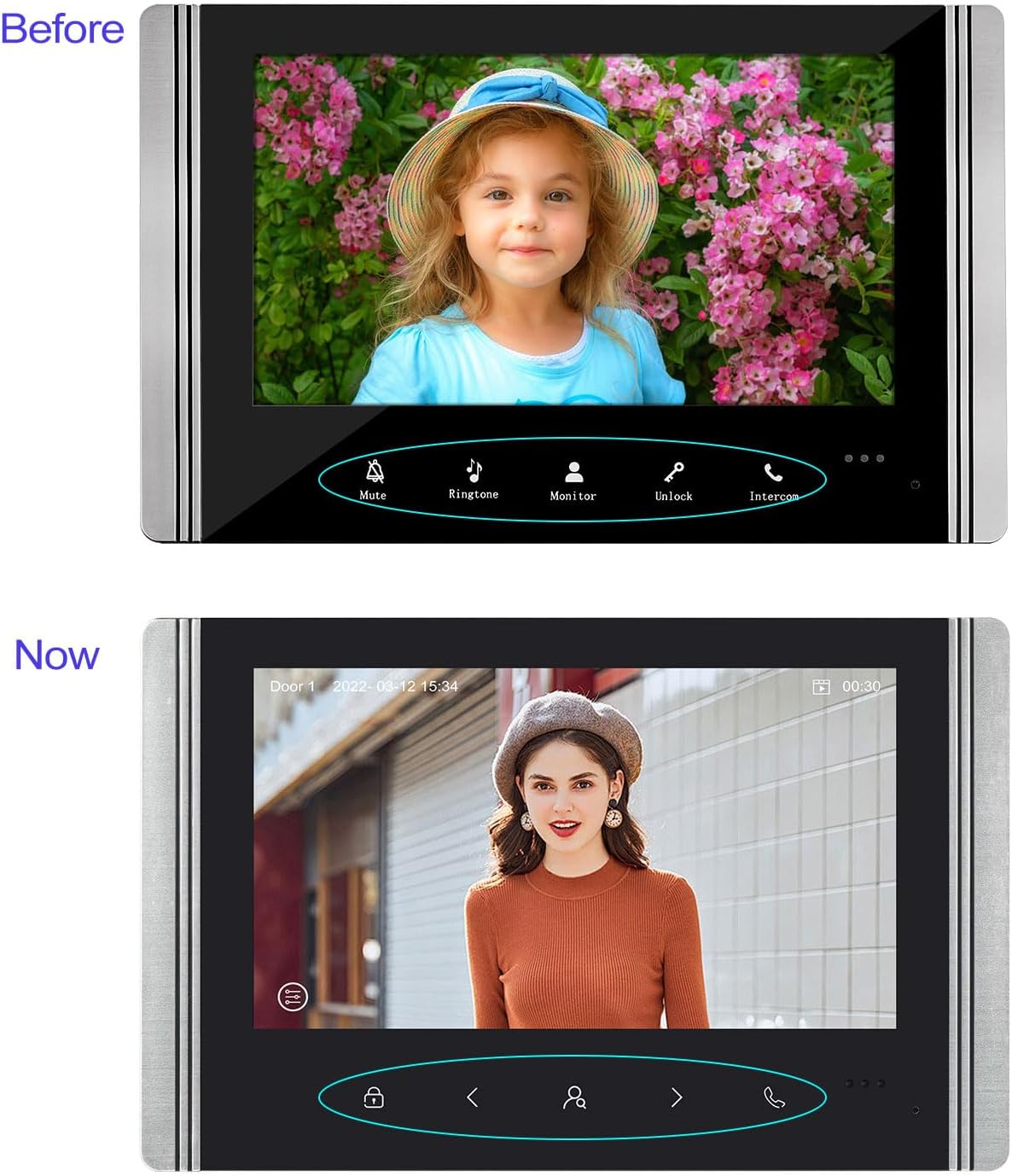
Image 6.1: Evolution of the indoor monitor's user interface, showing clear icons for mute, ringtone, monitor, unlock, and intercom functions.
6.2 Ovládání aplikací Tuya
Once connected to the Tuya app, you can perform the following actions remotely:
- Receive notifications when a visitor presses the doorbell.
- View živý video přenos z venkovní kamery.
- Engage in two-way audio communication with visitors.
- Remotely unlock the door.
- Review recorded videos and snapshots stored on the TF card.
- Upravte nastavení systému.

Image 6.2: Illustration of the multi-family intercom system, showing individual indoor monitors for different apartments (101, 201, 301).
7. Údržba
- Čištění: Use a soft, dry cloth to clean the indoor monitor screen and the outdoor camera lens. Do not use abrasive cleaners or solvents.
- Aktualizace firmwaru: Periodically check for firmware updates through the Tuya app or the manufacturer's webwebu, aby byl zajištěn optimální výkon a zabezpečení.
- Správa TF karet: Regularly back up important recordings and format the TF card to maintain storage capacity and performance.
- Ochrana životního prostředí: Ensure the outdoor unit's rain cover is intact and free from obstructions.
8. Řešení problémů
| Problém | Možná příčina | Řešení |
|---|---|---|
| No video/audio from outdoor unit | Loose wiring connection; Power issue; Damaged unit. | Check all wired connections between the outdoor unit and indoor monitor. Ensure the indoor monitor is powered on. If issues persist, contact support. |
| Indoor monitor not connecting to WiFi | Incorrect WiFi password; Router too far; 5GHz WiFi network; Firewall settings. | Ensure correct 2.4 GHz WiFi password. Move monitor closer to router. Verify router is broadcasting 2.4 GHz. Check router settings for any restrictions. |
| Tuya App not receiving notifications/connecting | App permissions; Network issues; Monitor not connected to WiFi. | Check app permissions on your smartphone (notifications, background data). Ensure your phone has internet access. Verify the indoor monitor is connected to WiFi. |
| Špatná kvalita nočního vidění | Obstruction of IR sensor/LEDs; Dirty lens. | Clean the outdoor camera lens. Ensure no objects are blocking the IR LEDs or photoresistance sensor. |
| Funkce odemykání dveří nefunguje | Electronic lock not connected; Wiring issue; Lock malfunction. | Verify the electronic lock is correctly wired to the outdoor unit. Check the lock's power supply and functionality independently. |
9. Specifikace
- Model: V70
- Značka: FTes RFKits
- Outdoor Camera Resolution: 1080P
- Outdoor Camera Angle: 120° široký úhel
- Vnitřní monitor: 7-inch TFT LCD Touchscreen
- Konektivita: Wired (between units), WiFi 2.4 GHz (for app control)
- Noční vidění: IR LED, White Light for Full Color Night Vision
- Skladování: Supports TF Card (not included) for recording
- Zdroj napájení: Wired, DC15V 1.2A (for indoor monitor)
- Materiál: Kov
- Rozměry produktu (venkovní jednotka): Approximately 173mm (H) x 85mm (W) x 41mm (D)
- Product Dimensions (Indoor Monitor): Approximately 135mm (H) x 210mm (W)
- Hmotnost položky: 2.15 kilogramů (celkový systém)
- Speciální vlastnosti: PIR Motion Detection, Two-Way Intercom, Remote Unlock, Snapshot, Video Recording, Tuya App Control

Image 9.1: Visual representation of product dimensions and a summary of key features.
10. Záruka a podpora
For warranty information and technical support, please refer to the documentation included with your purchase or visit the official FTes RFKits webPokud narazíte na jakékoli problémy, které nejsou uvedeny v této příručce, obraťte se na zákaznický servis.
Identifikátor produktu: X001TZ1BER