
TEYES CC3 2K
TEYES CC3 2K Car Radio Multimedia Navigation System User Manual
Model: CC3 2K | Brand: TEYES
Zavedení
This manual provides comprehensive instructions for the installation, operation, and maintenance of your TEYES CC3 2K Car Radio Multimedia Navigation System. Designed for Toyota Sienna 3 XL30 models from 2014-2020, this Android 10 head unit offers advanced multimedia, navigation, and connectivity features. Please read this manual thoroughly before using the device to ensure proper function and safety.
Obsah balení
Ověřte, zda jsou všechny níže uvedené položky součástí balení. Pokud některé položky chybí nebo jsou poškozené, kontaktujte zákaznickou podporu.

Head Unit CC3 2K: The main display and processing unit.
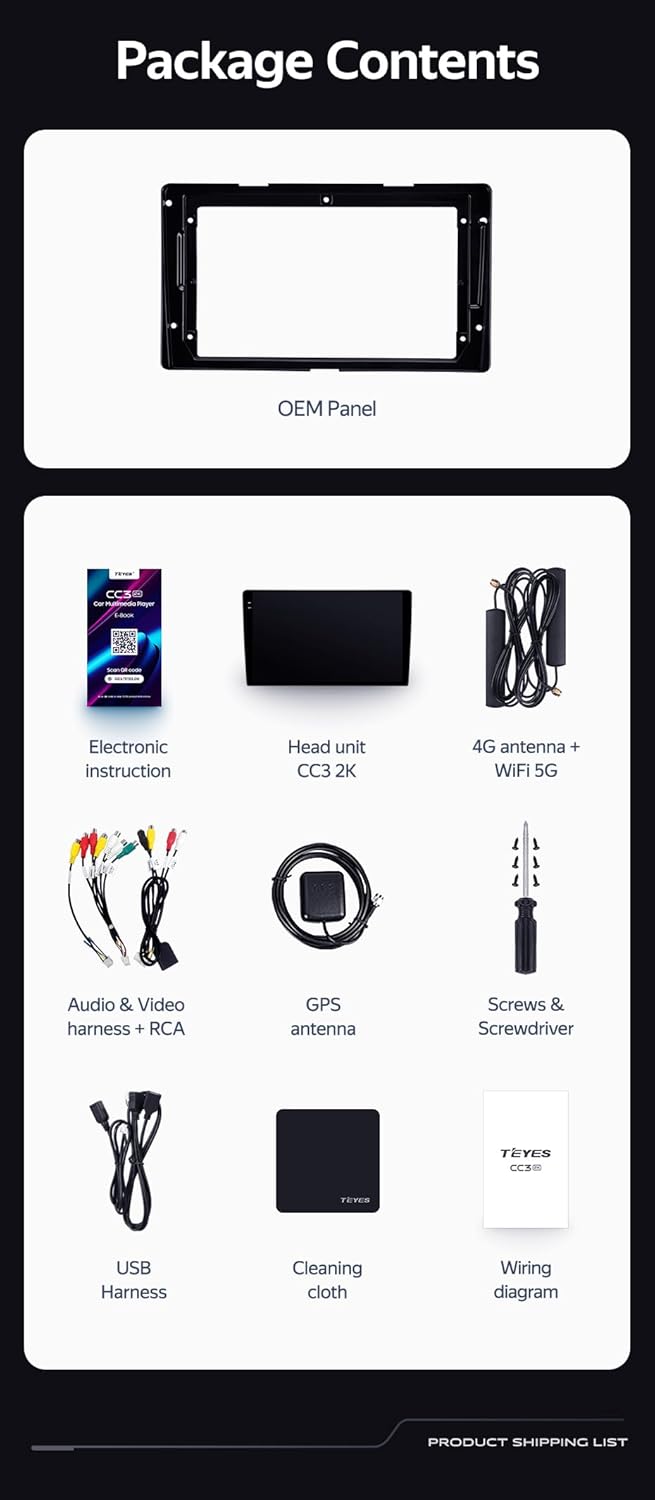
OEM Panel (Frame): Custom-fit panel for seamless integration into your vehicle's dashboard.

USB kabel: For data transfer and connecting external devices.

GPS anténa: Pro přesné navigační a lokalizační služby.

AUX kabel: For auxiliary audio input.

4G WiFi Antenna: Pro síťové připojení.

AHD 1080p Rear Camera: For enhanced reverse visibility.

Napájecí kabel: For connecting the head unit to the vehicle's power supply.
Schéma zapojení: Essential for correct electrical connections.

Electronic Instruction: Digital manual for detailed guidance.

Čisticí hadřík: For maintaining the display's clarity.
Nastavení a instalace
Installation of the TEYES CC3 2K head unit requires technical knowledge and familiarity with car audio systems. It is recommended to seek professional installation to avoid damage to your vehicle or the device. Always disconnect the vehicle's battery before beginning installation.
Instalace ukončenaview
- Příprava: Ensure the vehicle's power is off. Remove the original car radio and dashboard trim.
- Mounting the OEM Panel: Secure the provided OEM panel to the head unit.
- Připojení kabeláže: Connect the power cable, USB cables, GPS antenna, 4G WiFi antenna, AUX cable, and rear camera according to the wiring diagram. Ensure all connections are secure.
- Integrace ovládání na volantu: The unit supports original car steering wheel buttons. Connect the appropriate wires as per the wiring diagram. Configuration may be required in the unit's settings.
- Testování: Before fully reassembling the dashboard, connect the battery and power on the unit to test basic functions.
- Konečná montáž: Carefully reassemble the dashboard trim and secure the head unit in place.

Popis obrázku: This image displays a side-by-side comparison of a Toyota Sienna dashboard before and after the installation of the TEYES CC3 2K head unit. The 'before' image shows the original car radio, while the 'after' image shows the integrated TEYES CC3 2K unit, demonstrating a seamless fit and updated aesthetic.

Popis obrázku: Detailní záběr view of a car's steering wheel with integrated control buttons. The text indicates that the TEYES CC3 2K supports these original car steering wheel buttons, allowing for convenient control of the multimedia system.
Návod k obsluze
The TEYES CC3 2K operates on an Android 10 system, providing a user-friendly interface. The 2K in-cell touch screen offers responsive interaction.
Základní operace
- Zapnutí/vypnutí: Press and hold the power button (if physical) or use the vehicle's ignition.
- Navigace na dotykové obrazovce: Swipe, tap, and pinch to navigate through menus and applications.
- Domovská obrazovka: Access frequently used apps and widgets. Customize the layout as desired.
- Ovládání hlasitosti: Hlasitost upravte pomocí ovládacích prvků na obrazovce nebo tlačítek na volantu.
Multimediální funkce
- Rádio: Access the built-in radio tuner. Supports RDS for enhanced information display.
- Bluetooth: Pair your smartphone for hands-free calling and audio streaming via the upgraded QCC3031QFN Qualcomm Bluetooth module.
- USB přehrávání: Connect USB drives to play audio and video files.
- Videopřehrávač: Play various video formats on the 2K display.
- Zvukový výstup: Utilize the 2*DSP ADAU1701 + ROHM32107 for high-quality audio, including optical and coaxial digital audio output.
Navigace a konektivita
- GPS navigace: Use pre-installed navigation apps or download others from the app store. Supports North America maps.
- 4G Internet & WiFi: Connect to the internet via 4G or WiFi hotspot for online services, app downloads, and real-time traffic updates.
- Zadní kamera: The included AHD 1080p rear camera provides real-time viewing when reversing and supports video recording.
Popis videa: This video demonstrates the TEYES CC3 2K head unit's user interface and features, including its responsive touch screen, multimedia playback, and integration into a car dashboard. It highlights the visual quality and various functionalities of the system.
Popis obrázku: Detailní view of the TEYES CC3 2K head unit's display, showcasing its modern user interface with various application icons for video, radio, folders, and Teyes Yahu. It also displays a music player widget and a car speed indicator, illustrating the system's multimedia and informational capabilities.
Údržba
Proper maintenance ensures the longevity and optimal performance of your TEYES CC3 2K head unit.
- Čištění obrazovky: Use the provided cleaning cloth or a soft, lint-free cloth with a screen-safe cleaner. Avoid abrasive materials or harsh chemicals.
- Aktualizace softwaru: Regularly check for and install software updates to ensure the system has the latest features and security patches.
- Podmínky prostředí: Nevystavujte jednotku extrémním teplotám, delšímu přímému slunečnímu záření nebo nadměrné vlhkosti.
- Připojení kabelů: Pravidelně kontrolujte všechna kabelová připojení, abyste se ujistili, že jsou bezpečná a nepoškozená.
Odstraňování problémů
If you encounter issues with your TEYES CC3 2K, refer to the following common troubleshooting steps. For persistent problems, contact customer support.
- Jednotka se nezapíná:
- Check vehicle's battery connection.
- Verify power cable connections to the head unit.
- Ujistěte se, že je zapnuté zapalování vozidla.
- Žádný zvuk:
- Check volume levels on the unit and vehicle.
- Zkontrolujte připojení kabelů reproduktoru.
- Ensure correct audio source is selected.
- GPS nefunguje:
- Ujistěte se, že je anténa GPS správně připojena a má jasný signál. view z nebe.
- Zkontrolujte nastavení GPS v nabídce jednotky.
- Dotyková obrazovka nereaguje:
- Restart the head unit.
- Ujistěte se, že je obrazovka čistá a bez nečistot.
- Problémy s připojením Bluetooth:
- Ujistěte se, že je Bluetooth povoleno jak na hlavní jednotce, tak na vašem zařízení.
- Delete previous pairings and re-pair the device.
- Move devices closer to the head unit.
Specifikace
| Funkce | Detail |
|---|---|
| Číslo modelu | CC3 2K |
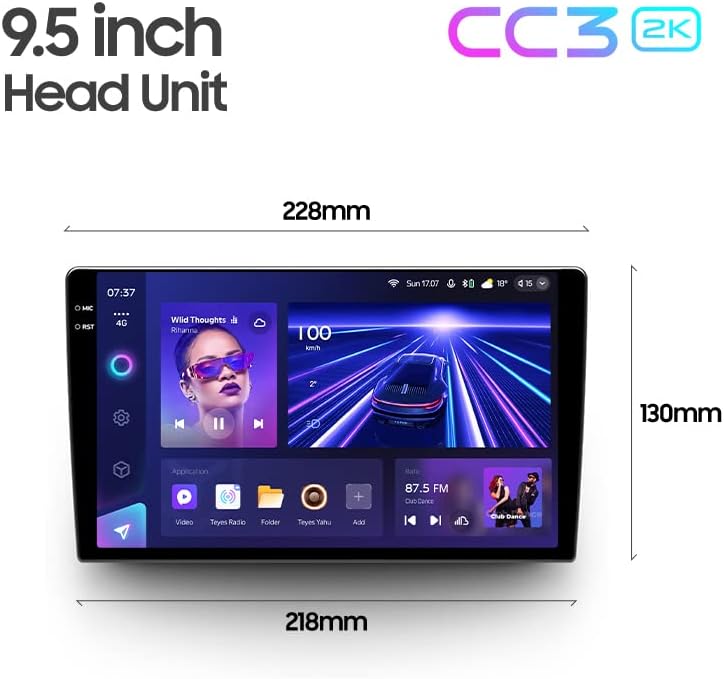
| Velikost displeje | 9.5 palce |
| Operační systém | Android 10 |
| BERAN | 6 GB |
| ROM | 128 GB |
| Procesor | 8 jádra 2.0 GHz |
| Technologie displeje | 2K In-cell Display, Gamut Coverage 157% |
| Modul Bluetooth | QCC3031QFN Qualcomm |
| Audio procesory | 2*DSP ADAU1701 + ROHM32107 |
| Zvukový výstup | Optical and Coaxial Digital Audio Output, Stereo |
| Konektivita | Bluetooth, USB, WiFi, Hotspot, 4G Internet |
| Typ mapy | Severní Amerika |
| Speciální funkce | Touchscreen, RDS Support, Real-time Rear View, Video Recording Support, 3D Software (TEYES Vision & TEYES Yahu) |
| Typ služby vozidla | Car (Toyota Sienna 3 XL30 2014-2020) |

Popis obrázku: This image provides a dimensional diagram of the TEYES CC3 2K 9.5-inch head unit, showing its width (228mm at the top, 218mm at the bottom) and height (130mm). The display also shows the user interface with music playback and car speed information.
Informace o záruce
The TEYES CC3 2K Car Radio Multimedia Navigation System comes with a 1-letá záruka from the date of purchase. This warranty covers manufacturing defects and malfunctions under normal use. It does not cover damage caused by improper installation, accidents, misuse, unauthorized repairs, or normal wear and tear. Please retain your proof of purchase for warranty claims.
Zákaznická podpora
For technical assistance, troubleshooting, or warranty inquiries, please contact TEYES customer support. Refer to the contact information provided with your product packaging or visit the official TEYES webmísto pro zdroje podpory.
Výrobce: Shenzhen TEYES High tech Co., Ltd.
Ask a question about this manual
Ask about setup, troubleshooting, compatibility, parts, safety, or missing instructions. Manuals+ will review the question and use this page’s manual context to help answer it.